QGraphicsItem 類是基類為所有圖形項在 QGraphicsScene . 更多...
| 頭: | #include <QGraphicsItem> |
| qmake: | QT += widgets |
| Since: | Qt 4.2 |
| 繼承者: |
QAbstractGraphicsShapeItem , QGraphicsItemGroup , QGraphicsLineItem , QGraphicsObject ,和 QGraphicsPixmapItem |
該類在 Qt 4.2 引入。
| enum | CacheMode { NoCache, ItemCoordinateCache, DeviceCoordinateCache } |
| enum | GraphicsItemChange { ItemEnabledChange, ItemEnabledHasChanged, ItemMatrixChange, ItemPositionChange, ItemPositionHasChanged, …, ItemScenePositionHasChanged } |
| enum | GraphicsItemFlag { ItemIsMovable, ItemIsSelectable, ItemIsFocusable, ItemClipsToShape, ItemClipsChildrenToShape, …, ItemContainsChildrenInShape } |
| flags | GraphicsItemFlags |
| enum | PanelModality { NonModal, PanelModal, SceneModal } |
| enum | anonymous { Type, UserType } |
| QGraphicsItem (QGraphicsItem * parent = nullptr) | |
| virtual | ~QGraphicsItem () |
| bool | acceptDrops () const |
| bool | acceptHoverEvents () const |
| bool | acceptTouchEvents () const |
| Qt::MouseButtons | acceptedMouseButtons () const |
| virtual void | advance (int phase ) |
| virtual QRectF | boundingRect () const = 0 |
| QRegion | boundingRegion (const QTransform & itemToDeviceTransform ) const |
| qreal | boundingRegionGranularity () const |
| QGraphicsItem::CacheMode | cacheMode () const |
| QList<QGraphicsItem *> | childItems () const |
| QRectF | childrenBoundingRect () const |
| void | clearFocus () |
| QPainterPath | clipPath () const |
| virtual bool | collidesWithItem (const QGraphicsItem * other , Qt::ItemSelectionMode mode = Qt::IntersectsItemShape) const |
| virtual bool | collidesWithPath (const QPainterPath & path , Qt::ItemSelectionMode mode = Qt::IntersectsItemShape) const |
| QList<QGraphicsItem *> | collidingItems (Qt::ItemSelectionMode mode = Qt::IntersectsItemShape) const |
| QGraphicsItem * | commonAncestorItem (const QGraphicsItem * other ) const |
| virtual bool | contains (const QPointF & point ) const |
| QCursor | cursor () const |
| QVariant | data (int key ) const |
| QTransform | deviceTransform (const QTransform & viewportTransform ) const |
| qreal | effectiveOpacity () const |
| void | ensureVisible (const QRectF & rect = QRectF(), int xmargin = 50, int ymargin = 50) |
| void | ensureVisible (qreal x , qreal y , qreal w , qreal h , int xmargin = 50, int ymargin = 50) |
| bool | filtersChildEvents () const |
| QGraphicsItem::GraphicsItemFlags | flags () const |
| QGraphicsItem * | focusItem () const |
| QGraphicsItem * | focusProxy () const |
| void | grabKeyboard () |
| void | grabMouse () |
| QGraphicsEffect * | graphicsEffect () const |
| QGraphicsItemGroup * | group () const |
| bool | hasCursor () const |
| bool | hasFocus () const |
| void | hide () |
| Qt::InputMethodHints | inputMethodHints () const |
| void | installSceneEventFilter (QGraphicsItem * filterItem ) |
| bool | isActive () const |
| bool | isAncestorOf (const QGraphicsItem * child ) const |
| bool | isBlockedByModalPanel (QGraphicsItem ** blockingPanel = nullptr) const |
| bool | isClipped () const |
| bool | isEnabled () const |
| bool | isObscured (const QRectF & rect = QRectF()) const |
| bool | isObscured (qreal x , qreal y , qreal w , qreal h ) const |
| virtual bool | isObscuredBy (const QGraphicsItem * item ) const |
| bool | isPanel () const |
| bool | isSelected () const |
| bool | isUnderMouse () const |
| bool | isVisible () const |
| bool | isVisibleTo (const QGraphicsItem * parent ) const |
| bool | isWidget () const |
| bool | isWindow () const |
| QTransform | itemTransform (const QGraphicsItem * other , bool * ok = nullptr) const |
| QPointF | mapFromItem (const QGraphicsItem * item , const QPointF & point ) const |
| QPolygonF | mapFromItem (const QGraphicsItem * item , const QRectF & rect ) const |
| QPolygonF | mapFromItem (const QGraphicsItem * item , const QPolygonF & polygon ) const |
| QPainterPath | mapFromItem (const QGraphicsItem * item , const QPainterPath & path ) const |
| QPointF | mapFromItem (const QGraphicsItem * item , qreal x , qreal y ) const |
| QPolygonF | mapFromItem (const QGraphicsItem * item , qreal x , qreal y , qreal w , qreal h ) const |
| QPointF | mapFromParent (const QPointF & point ) const |
| QPolygonF | mapFromParent (const QRectF & rect ) const |
| QPolygonF | mapFromParent (const QPolygonF & polygon ) const |
| QPainterPath | mapFromParent (const QPainterPath & path ) const |
| QPointF | mapFromParent (qreal x , qreal y ) const |
| QPolygonF | mapFromParent (qreal x , qreal y , qreal w , qreal h ) const |
| QPointF | mapFromScene (const QPointF & point ) const |
| QPolygonF | mapFromScene (const QRectF & rect ) const |
| QPolygonF | mapFromScene (const QPolygonF & polygon ) const |
| QPainterPath | mapFromScene (const QPainterPath & path ) const |
| QPointF | mapFromScene (qreal x , qreal y ) const |
| QPolygonF | mapFromScene (qreal x , qreal y , qreal w , qreal h ) const |
| QRectF | mapRectFromItem (const QGraphicsItem * item , const QRectF & rect ) const |
| QRectF | mapRectFromItem (const QGraphicsItem * item , qreal x , qreal y , qreal w , qreal h ) const |
| QRectF | mapRectFromParent (const QRectF & rect ) const |
| QRectF | mapRectFromParent (qreal x , qreal y , qreal w , qreal h ) const |
| QRectF | mapRectFromScene (const QRectF & rect ) const |
| QRectF | mapRectFromScene (qreal x , qreal y , qreal w , qreal h ) const |
| QRectF | mapRectToItem (const QGraphicsItem * item , const QRectF & rect ) const |
| QRectF | mapRectToItem (const QGraphicsItem * item , qreal x , qreal y , qreal w , qreal h ) const |
| QRectF | mapRectToParent (const QRectF & rect ) const |
| QRectF | mapRectToParent (qreal x , qreal y , qreal w , qreal h ) const |
| QRectF | mapRectToScene (const QRectF & rect ) const |
| QRectF | mapRectToScene (qreal x , qreal y , qreal w , qreal h ) const |
| QPointF | mapToItem (const QGraphicsItem * item , const QPointF & point ) const |
| QPolygonF | mapToItem (const QGraphicsItem * item , const QRectF & rect ) const |
| QPolygonF | mapToItem (const QGraphicsItem * item , const QPolygonF & polygon ) const |
| QPainterPath | mapToItem (const QGraphicsItem * item , const QPainterPath & path ) const |
| QPointF | mapToItem (const QGraphicsItem * item , qreal x , qreal y ) const |
| QPolygonF | mapToItem (const QGraphicsItem * item , qreal x , qreal y , qreal w , qreal h ) const |
| QPointF | mapToParent (const QPointF & point ) const |
| QPolygonF | mapToParent (const QRectF & rect ) const |
| QPolygonF | mapToParent (const QPolygonF & polygon ) const |
| QPainterPath | mapToParent (const QPainterPath & path ) const |
| QPointF | mapToParent (qreal x , qreal y ) const |
| QPolygonF | mapToParent (qreal x , qreal y , qreal w , qreal h ) const |
| QPointF | mapToScene (const QPointF & point ) const |
| QPolygonF | mapToScene (const QRectF & rect ) const |
| QPolygonF | mapToScene (const QPolygonF & polygon ) const |
| QPainterPath | mapToScene (const QPainterPath & path ) const |
| QPointF | mapToScene (qreal x , qreal y ) const |
| QPolygonF | mapToScene (qreal x , qreal y , qreal w , qreal h ) const |
| void | moveBy (qreal dx , qreal dy ) |
| qreal | opacity () const |
| virtual QPainterPath | opaqueArea () const |
| virtual void | paint (QPainter * painter , const QStyleOptionGraphicsItem * option , QWidget * widget = 0) = 0 |
| QGraphicsItem * | panel () const |
| QGraphicsItem::PanelModality | panelModality () const |
| QGraphicsItem * | parentItem () const |
| QGraphicsObject * | parentObject () const |
| QGraphicsWidget * | parentWidget () const |
| QPointF | pos () const |
| void | removeSceneEventFilter (QGraphicsItem * filterItem ) |
| void | resetTransform () |
| qreal | rotation () const |
| qreal | scale () const |
| QGraphicsScene * | scene () const |
| QRectF | sceneBoundingRect () const |
| QPointF | scenePos () const |
| QTransform | sceneTransform () const |
| void | scroll (qreal dx , qreal dy , const QRectF & rect = QRectF()) |
| void | setAcceptDrops (bool on ) |
| void | setAcceptHoverEvents (bool enabled ) |
| void | setAcceptTouchEvents (bool enabled ) |
| void | setAcceptedMouseButtons (Qt::MouseButtons buttons ) |
| void | setActive (bool active ) |
| void | setBoundingRegionGranularity (qreal granularity ) |
| void | setCacheMode (QGraphicsItem::CacheMode mode , const QSize & logicalCacheSize = QSize()) |
| void | setCursor (const QCursor & cursor ) |
| void | setData (int key , const QVariant & value ) |
| void | setEnabled (bool enabled ) |
| void | setFiltersChildEvents (bool enabled ) |
| void | setFlag (QGraphicsItem::GraphicsItemFlag flag , bool enabled = true) |
| void | setFlags (QGraphicsItem::GraphicsItemFlags flags ) |
| void | setFocus (Qt::FocusReason focusReason = Qt::OtherFocusReason) |
| void | setFocusProxy (QGraphicsItem * item ) |
| void | setGraphicsEffect (QGraphicsEffect * effect ) |
| void | setGroup (QGraphicsItemGroup * group ) |
| void | setInputMethodHints (Qt::InputMethodHints hints ) |
| void | setOpacity (qreal opacity ) |
| void | setPanelModality (QGraphicsItem::PanelModality panelModality ) |
| void | setParentItem (QGraphicsItem * newParent ) |
| void | setPos (const QPointF & pos ) |
| void | setPos (qreal x , qreal y ) |
| void | setRotation (qreal angle ) |
| void | setScale (qreal factor ) |
| void | setSelected (bool selected ) |
| void | setToolTip (const QString & toolTip ) |
| void | setTransform (const QTransform & matrix , bool combine = false) |
| void | setTransformOriginPoint (const QPointF & origin ) |
| void | setTransformOriginPoint (qreal x , qreal y ) |
| void | setTransformations (const QList<QGraphicsTransform *> & transformations ) |
| void | setVisible (bool visible ) |
| void | setX (qreal x ) |
| void | setY (qreal y ) |
| void | setZValue (qreal z ) |
| virtual QPainterPath | shape () const |
| void | show () |
| void | stackBefore (const QGraphicsItem * sibling ) |
| QGraphicsObject * | toGraphicsObject () |
| const QGraphicsObject * | toGraphicsObject () const |
| QString | toolTip () const |
| QGraphicsItem * | topLevelItem () const |
| QGraphicsWidget * | topLevelWidget () const |
| QTransform | transform () const |
| QPointF | transformOriginPoint () const |
| QList<QGraphicsTransform *> | transformations () const |
| virtual int | type () const |
| void | ungrabKeyboard () |
| void | ungrabMouse () |
| void | unsetCursor () |
| void | update (const QRectF & rect = QRectF()) |
| void | update (qreal x , qreal y , qreal width , qreal height ) |
| QGraphicsWidget * | window () const |
| qreal | x () const |
| qreal | y () const |
| qreal | zValue () const |
| virtual void | contextMenuEvent (QGraphicsSceneContextMenuEvent * event ) |
| virtual void | dragEnterEvent (QGraphicsSceneDragDropEvent * event ) |
| virtual void | dragLeaveEvent (QGraphicsSceneDragDropEvent * event ) |
| virtual void | dragMoveEvent (QGraphicsSceneDragDropEvent * event ) |
| virtual void | dropEvent (QGraphicsSceneDragDropEvent * event ) |
| virtual void | focusInEvent (QFocusEvent * event ) |
| virtual void | focusOutEvent (QFocusEvent * event ) |
| virtual void | hoverEnterEvent (QGraphicsSceneHoverEvent * event ) |
| virtual void | hoverLeaveEvent (QGraphicsSceneHoverEvent * event ) |
| virtual void | hoverMoveEvent (QGraphicsSceneHoverEvent * event ) |
| virtual void | inputMethodEvent (QInputMethodEvent * event ) |
| virtual QVariant | inputMethodQuery (Qt::InputMethodQuery query ) const |
| virtual QVariant | itemChange (QGraphicsItem::GraphicsItemChange change , const QVariant & value ) |
| virtual void | keyPressEvent (QKeyEvent * event ) |
| virtual void | keyReleaseEvent (QKeyEvent * event ) |
| virtual void | mouseDoubleClickEvent (QGraphicsSceneMouseEvent * event ) |
| virtual void | mouseMoveEvent (QGraphicsSceneMouseEvent * event ) |
| virtual void | mousePressEvent (QGraphicsSceneMouseEvent * event ) |
| virtual void | mouseReleaseEvent (QGraphicsSceneMouseEvent * event ) |
| void | prepareGeometryChange () |
| virtual bool | sceneEvent (QEvent * event ) |
| virtual bool | sceneEventFilter (QGraphicsItem * watched , QEvent * event ) |
| void | updateMicroFocus () |
| virtual void | wheelEvent (QGraphicsSceneWheelEvent * event ) |
| T | qgraphicsitem_cast (QGraphicsItem * item ) |
它為編寫自己的自定義項提供輕量級基礎。這包括定義項幾何體、碰撞檢測、繪製實現和項交互 (透過事件處理程序)。QGraphicsItem 屬於 圖形視圖框架

為方便起見,Qt 為最常見形狀提供瞭一組標準圖形項。它們是:
項的所有幾何信息都基於其本地坐標係。項的位置 pos (),是唯一未運轉於本地坐標的函數,因為它按父級坐標返迴位置。 圖形視圖坐標係 詳細描述瞭坐標係。
可以設置項是否應該可見 (即:繪製和接受事件),通過調用 setVisible (). Hiding an item will also hide its children. Similarly, you can enable or disable an item by calling setEnabled (). If you disable an item, all its children will also be disabled. By default, items are both visible and enabled. To toggle whether an item is selected or not, first enable selection by setting the ItemIsSelectable flag, and then call setSelected (). Normally, selection is toggled by the scene, as a result of user interaction.
To write your own graphics item, you first create a subclass of QGraphicsItem, and then start by implementing its two pure virtual public functions: boundingRect (), which returns an estimate of the area painted by the item, and paint (), which implements the actual painting. For example:
class SimpleItem : public QGraphicsItem
{
public:
    QRectF boundingRect() const override
    {
        qreal penWidth = 1;
        return QRectF(-10 - penWidth / 2, -10 - penWidth / 2,
                      20 + penWidth, 20 + penWidth);
    }
    void paint(QPainter *painter, const QStyleOptionGraphicsItem *option,
               QWidget *widget) override
    {
        painter->drawRoundedRect(-10, -10, 20, 20, 5, 5);
    }
};
The boundingRect () 函數有許多不同用途。 QGraphicsScene bases its item index on boundingRect (),和 QGraphicsView uses it both for culling invisible items, and for determining the area that needs to be recomposed when drawing overlapping items. In addition, QGraphicsItem's collision detection mechanisms use boundingRect () to provide an efficient cut-off. The fine grained collision algorithm in collidesWithItem () is based on calling shape (), which returns an accurate outline of the item's shape as a QPainterPath .
QGraphicsScene 期望所有項 boundingRect () 和 shape () to remain unchanged unless it is notified. If you want to change an item's geometry in any way, you must first call prepareGeometryChange () to allow QGraphicsScene to update its bookkeeping.
碰撞檢測可以按 2 種方式完成:
The contains () 函數可以被調用以確定項是否 包含 a point or not. This function can also be reimplemented by the item. The default behavior of contains () is based on calling shape ().
Items can contain other items, and also be contained by other items. All items can have a parent item and a list of children. Unless the item has no parent, its position is in parent coordinates (i.e., the parent's local coordinates). Parent items propagate both their position and their transformation to all children.
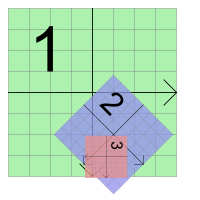
QGraphicsItem supports projective transformations in addition to its base position, pos (). There are several ways to change an item's transformation. For simple transformations, you can call either of the convenience functions setRotation () 或 setScale (), or you can pass any transformation matrix to setTransform (). For advanced transformation control you also have the option of setting several combined transformations by calling setTransformations ().
Item transformations accumulate from parent to child, so if both a parent and child item are rotated 90 degrees, the child's total transformation will be 180 degrees. Similarly, if the item's parent is scaled to 2x its original size, its children will also be twice as large. An item's transformation does not affect its own local geometry; all geometry functions (e.g., contains (), update (), and all the mapping functions) still operate in local coordinates. For convenience, QGraphicsItem provides the functions sceneTransform (), which returns the item's total transformation matrix (including its position and all parents' positions and transformations), and scenePos (), which returns its position in scene coordinates. To reset an item's matrix, call resetTransform ().
Certain transformation operations produce a different outcome depending on the order in which they are applied. For example, if you scale an transform, and then rotate it, you may get a different result than if the transform was rotated first. However, the order you set the transformation properties on QGraphicsItem does not affect the resulting transformation; QGraphicsItem always applies the properties in a fixed, defined order:
The paint () 函數被調用通過 QGraphicsView 以描繪項內容。項沒有背景 (或默認填充自身);項後的任何內容會照射此功能未明確描繪的所有區域。可以調用 update () 以調度重新描繪,可選地傳遞需要重新描繪的矩形。根據項在視圖中是否可見,項可能或可能不會被重新描繪;不存在等價對於 QWidget::repaint () 在 QGraphicsItem。
項由視圖描繪,從父級項開始,然後繪製子級,按升序堆疊次序。可以設置項的堆疊次序通過調用 setZValue (),和測試它通過調用 zValue (),其中具有低 Z 值的項在具有高 Z 值的項之前被描繪。堆疊次序適用於同級項;父級始終在其子級之前繪製。
所有項都是按照定義的、穩定次序繪製的,相同的次序決定哪些項將首先接受鼠標輸入當點擊場景時。通常不必擔心排序,因為項遵循自然次序,遵循場景的邏輯結構。
項的子級堆疊在父級頂部,和同級項按插入次序 (即:按照將它們添加到場景或添加到同一父級的相同次序) 堆疊。若添加項 A,然後 B,那麼 B 位於 A 頂部。若接著添加 C,則項的堆疊次序將是 A,然後是 B,接著是 C。

此範例展示機器人所有肢體的堆疊順序,來自 拖放 Robot 範例。軀乾是 root 項 (所有其它項都是軀乾的子級或後代),因此首先繪製它。接著,繪製頭部,因為它是軀乾子級列錶中的第 1 項。然後,繪製左上臂。因為下臂是上臂的子級,繪製下臂,之後是上臂的下一同級 (右上臂),依此類推。
對於高級用戶,有一些方法能更改項如何排序:
2 同級項的堆疊次序還計數每項的子級和後代項。因此,若一項在另一項之上,那麼它的所有子級也在其它項的所有子級之上。
QGraphicsItem 接收事件從 QGraphicsScene 透過虛函數 sceneEvent ()。此函數將最常見事件,分發給一組方便事件處理程序:
可以過濾用於任何其它項的事件,通過安裝事件過濾器。此功能獨立於 Qt 常規事件過濾器 (見 QObject::installEventFilter ()),僅工作於子類化 QObject 。在將項安裝作為另一項的事件過濾器後,通過調用 installSceneEventFilter (),將收到被過濾事件,通過虛函數 sceneEventFilter ()。可以移除項事件過濾器通過調用 removeSceneEventFilter ().
Sometimes it's useful to register custom data with an item, be it a custom item, or a standard item. You can call setData () on any item to store data in it using a key-value pair (the key being an integer, and the value is a QVariant ). To get custom data from an item, call data (). This functionality is completely untouched by Qt itself; it is provided for the user's convenience.
另請參閱 QGraphicsScene , QGraphicsView ,和 圖形視圖框架 .
此枚舉描述 QGraphicsItem 's cache modes. Caching is used to speed up rendering by allocating and rendering to an off-screen pixel buffer, which can be reused when the item requires redrawing. For some paint devices, the cache is stored directly in graphics memory, which makes rendering very quick.
| 常量 | 值 | 描述 |
|---|---|---|
QGraphicsItem::NoCache
|
0
|
The default; all item caching is disabled. QGraphicsItem::paint () is called every time the item needs redrawing. |
QGraphicsItem::ItemCoordinateCache
|
1
|
Caching is enabled for the item's logical (local) coordinate system. QGraphicsItem creates an off-screen pixel buffer with a configurable size / resolution that you can pass to QGraphicsItem::setCacheMode (). Rendering quality will typically degrade, depending on the resolution of the cache and the item transformation. The first time the item is redrawn, it will render itself into the cache, and the cache is then reused for every subsequent expose. The cache is also reused as the item is transformed. To adjust the resolution of the cache, you can call setCacheMode () 再次。 |
QGraphicsItem::DeviceCoordinateCache
|
2
|
Caching is enabled at the paint device level, in device coordinates. This mode is for items that can move, but are not rotated, scaled or sheared. If the item is transformed directly or indirectly, the cache will be regenerated automatically. Unlike ItemCoordinateCacheMode, DeviceCoordinateCache always renders at maximum quality. |
該枚舉在 Qt 4.4 引入或被修改。
另請參閱 QGraphicsItem::setCacheMode ().
This enum describes the state changes that are notified by QGraphicsItem::itemChange (). The notifications are sent as the state changes, and in some cases, adjustments can be made (see the documentation for each change for details).
Note: Be careful with calling functions on the QGraphicsItem itself inside itemChange (), as certain function calls can lead to unwanted recursion. For example, you cannot call setPos () 在 itemChange () on an ItemPositionChange notification, as the setPos () function will again call itemChange (ItemPositionChange). Instead, you can return the new, adjusted position from itemChange ().
| 常量 | 值 | 描述 |
|---|---|---|
QGraphicsItem::ItemEnabledChange
|
3
|
The item's enabled state changes. If the item is presently enabled, it will become disabled, and vice verca. The value argument is the new enabled state (i.e., true or false). Do not call setEnabled () 在 itemChange () as this notification is delivered. Instead, you can return the new state from itemChange (). |
QGraphicsItem::ItemEnabledHasChanged
|
13
|
The item's enabled state has changed. The value argument is the new enabled state (i.e., true or false). Do not call setEnabled () 在 itemChange () as this notification is delivered. The return value is ignored. |
QGraphicsItem::ItemMatrixChange
|
1
|
The item's affine transformation matrix is changing. This value is obsolete; you can use ItemTransformChange instead. |
QGraphicsItem::ItemPositionChange
|
0
|
The item's position changes. This notification is sent if the ItemSendsGeometryChanges flag is enabled, and when the item's local position changes, relative to its parent (i.e., as a result of calling setPos () 或 moveBy ()). The value argument is the new position (i.e., a QPointF ). You can call pos () to get the original position. Do not call setPos () 或 moveBy () 在 itemChange () as this notification is delivered; instead, you can return the new, adjusted position from itemChange (). After this notification, QGraphicsItem immediately sends the ItemPositionHasChanged notification if the position changed. |
QGraphicsItem::ItemPositionHasChanged
|
9
|
The item's position has changed. This notification is sent if the ItemSendsGeometryChanges flag is enabled, and after the item's local position, relative to its parent, has changed. The value argument is the new position (the same as pos ()), and QGraphicsItem ignores the return value for this notification (i.e., a read-only notification). |
QGraphicsItem::ItemTransformChange
|
8
|
The item's transformation matrix changes. This notification is sent if the ItemSendsGeometryChanges flag is enabled, and when the item's local transformation matrix changes (i.e., as a result of calling setTransform (). The value argument is the new matrix (i.e., a QTransform ); to get the old matrix, call transform ()。不要調用 setTransform () or set any of the transformation properties in itemChange () as this notification is delivered; instead, you can return the new matrix from itemChange (). This notification is not sent if you change the transformation properties. |
QGraphicsItem::ItemTransformHasChanged
|
10
|
The item's transformation matrix has changed either because setTransform is called, or one of the transformation properties is changed. This notification is sent if the ItemSendsGeometryChanges flag is enabled, and after the item's local transformation matrix has changed. The value argument is the new matrix (same as transform ()), and QGraphicsItem ignores the return value for this notification (i.e., a read-only notification). |
QGraphicsItem::ItemRotationChange
|
28
|
The item's rotation property changes. This notification is sent if the ItemSendsGeometryChanges flag is enabled, and when the item's rotation property changes (i.e., as a result of calling setRotation ()). The value argument is the new rotation (i.e., a double); to get the old rotation, call rotation ()。不要調用 setRotation () 在 itemChange () as this notification is delivered; instead, you can return the new rotation from itemChange (). |
QGraphicsItem::ItemRotationHasChanged
|
29
|
The item's rotation property has changed. This notification is sent if the ItemSendsGeometryChanges flag is enabled, and after the item's rotation property has changed. The value argument is the new rotation (i.e., a double), and QGraphicsItem ignores the return value for this notification (i.e., a read-only notification). Do not call setRotation () 在 itemChange () as this notification is delivered. |
QGraphicsItem::ItemScaleChange
|
30
|
The item's scale property changes. This notification is sent if the ItemSendsGeometryChanges flag is enabled, and when the item's scale property changes (i.e., as a result of calling setScale ()). The value argument is the new scale (i.e., a double); to get the old scale, call scale ()。不要調用 setScale () 在 itemChange () as this notification is delivered; instead, you can return the new scale from itemChange (). |
QGraphicsItem::ItemScaleHasChanged
|
31
|
The item's scale property has changed. This notification is sent if the ItemSendsGeometryChanges flag is enabled, and after the item's scale property has changed. The value argument is the new scale (i.e., a double), and QGraphicsItem ignores the return value for this notification (i.e., a read-only notification). Do not call setScale () 在 itemChange () as this notification is delivered. |
QGraphicsItem::ItemTransformOriginPointChange
|
32
|
The item's transform origin point property changes. This notification is sent if the ItemSendsGeometryChanges flag is enabled, and when the item's transform origin point property changes (i.e., as a result of calling setTransformOriginPoint ()). The value argument is the new origin point (i.e., a QPointF ); to get the old origin point, call transformOriginPoint ()。不要調用 setTransformOriginPoint () 在 itemChange () as this notification is delivered; instead, you can return the new transform origin point from itemChange (). |
QGraphicsItem::ItemTransformOriginPointHasChanged
|
33
|
The item's transform origin point property has changed. This notification is sent if the ItemSendsGeometryChanges flag is enabled, and after the item's transform origin point property has changed. The value argument is the new origin point (i.e., a QPointF ),和 QGraphicsItem ignores the return value for this notification (i.e., a read-only notification). Do not call setTransformOriginPoint () 在 itemChange () as this notification is delivered. |
QGraphicsItem::ItemSelectedChange
|
4
|
The item's selected state changes. If the item is presently selected, it will become unselected, and vice verca. The value argument is the new selected state (i.e., true or false). Do not call setSelected () 在 itemChange () as this notification is delivered; instead, you can return the new selected state from itemChange (). |
QGraphicsItem::ItemSelectedHasChanged
|
14
|
The item's selected state has changed. The value argument is the new selected state (i.e., true or false). Do not call setSelected () 在 itemChange () as this notification is delivered. The return value is ignored. |
QGraphicsItem::ItemVisibleChange
|
2
|
The item's visible state changes. If the item is presently visible, it will become invisible, and vice verca. The value argument is the new visible state (i.e., true or false). Do not call setVisible () 在 itemChange () as this notification is delivered; instead, you can return the new visible state from itemChange (). |
QGraphicsItem::ItemVisibleHasChanged
|
12
|
The item's visible state has changed. The value argument is the new visible state (i.e., true or false). Do not call setVisible () 在 itemChange () as this notification is delivered. The return value is ignored. |
QGraphicsItem::ItemParentChange
|
5
|
The item's parent changes. The value argument is the new parent item (i.e., a QGraphicsItem pointer). Do not call setParentItem () 在 itemChange () as this notification is delivered; instead, you can return the new parent from itemChange (). |
QGraphicsItem::ItemParentHasChanged
|
15
|
The item's parent has changed. The value argument is the new parent (i.e., a pointer to a QGraphicsItem ). Do not call setParentItem () 在 itemChange () as this notification is delivered. The return value is ignored. |
QGraphicsItem::ItemChildAddedChange
|
6
|
A child is added to this item. The value argument is the new child item (i.e., a QGraphicsItem pointer). Do not pass this item to any item's setParentItem () function as this notification is delivered. The return value is unused; you cannot adjust anything in this notification. Note that the new child might not be fully constructed when this notification is sent; calling pure virtual functions on the child can lead to a crash. |
QGraphicsItem::ItemChildRemovedChange
|
7
|
A child is removed from this item. The value argument is the child item that is about to be removed (i.e., a QGraphicsItem pointer). The return value is unused; you cannot adjust anything in this notification. |
QGraphicsItem::ItemSceneChange
|
11
|
The item is moved to a new scene. This notification is also sent when the item is added to its initial scene, and when it is removed. The item's
scene
() is the old scene, or
nullptr
if the item has not been added to a scene yet. The value argument is the new scene (i.e., a
QGraphicsScene
pointer), or
nullptr
if the item is removed from a scene. Do not override this change by passing this item to
QGraphicsScene::addItem
() as this notification is delivered; instead, you can return the new scene from
itemChange
(). Use this feature with caution; objecting to a scene change can quickly lead to unwanted recursion.
|
QGraphicsItem::ItemSceneHasChanged
|
16
|
The item's scene has changed. The item's scene () is the new scene. This notification is also sent when the item is added to its initial scene, and when it is removed.The value argument is the new scene (i.e., a pointer to a QGraphicsScene ). Do not call setScene() in itemChange () as this notification is delivered. The return value is ignored. |
QGraphicsItem::ItemCursorChange
|
17
|
The item's cursor changes. The value argument is the new cursor (i.e., a QCursor ). Do not call setCursor () 在 itemChange () as this notification is delivered. Instead, you can return a new cursor from itemChange (). |
QGraphicsItem::ItemCursorHasChanged
|
18
|
The item's cursor has changed. The value argument is the new cursor (i.e., a QCursor ). Do not call setCursor () as this notification is delivered. The return value is ignored. |
QGraphicsItem::ItemToolTipChange
|
19
|
The item's tooltip changes. The value argument is the new tooltip (i.e., a QToolTip ). Do not call setToolTip () 在 itemChange () as this notification is delivered. Instead, you can return a new tooltip from itemChange (). |
QGraphicsItem::ItemToolTipHasChanged
|
20
|
The item's tooltip has changed. The value argument is the new tooltip (i.e., a QToolTip ). Do not call setToolTip () as this notification is delivered. The return value is ignored. |
QGraphicsItem::ItemFlagsChange
|
21
|
The item's flags change. The value argument is the new flags (i.e., a quint32). Do not call setFlags () 在 itemChange () as this notification is delivered. Instead, you can return the new flags from itemChange (). |
QGraphicsItem::ItemFlagsHaveChanged
|
22
|
The item's flags have changed. The value argument is the new flags (i.e., a quint32). Do not call setFlags () 在 itemChange () as this notification is delivered. The return value is ignored. |
QGraphicsItem::ItemZValueChange
|
23
|
The item's Z-value changes. The value argument is the new Z-value (i.e., a double). Do not call setZValue () 在 itemChange () as this notification is delivered. Instead, you can return a new Z-value from itemChange (). |
QGraphicsItem::ItemZValueHasChanged
|
24
|
The item's Z-value has changed. The value argument is the new Z-value (i.e., a double). Do not call setZValue () as this notification is delivered. The return value is ignored. |
QGraphicsItem::ItemOpacityChange
|
25
|
The item's opacity changes. The value argument is the new opacity (i.e., a double). Do not call setOpacity () 在 itemChange () as this notification is delivered. Instead, you can return a new opacity from itemChange (). |
QGraphicsItem::ItemOpacityHasChanged
|
26
|
The item's opacity has changed. The value argument is the new opacity (i.e., a double). Do not call setOpacity () as this notification is delivered. The return value is ignored. |
QGraphicsItem::ItemScenePositionHasChanged
|
27
|
The item's scene position has changed. This notification is sent if the ItemSendsScenePositionChanges flag is enabled, and after the item's scene position has changed (i.e., the position or transformation of the item itself or the position or transformation of any ancestor has changed). The value argument is the new scene position (the same as scenePos ()), and QGraphicsItem ignores the return value for this notification (i.e., a read-only notification). |
此枚舉描述可以在項中設置的不同標誌,以觸發項行為的不同特徵。
所有標誌被禁用,默認情況下。
| 常量 | 值 | 描述 |
|---|---|---|
QGraphicsItem::ItemIsMovable
|
0x1
|
項支持使用鼠標交互式移動。通過點擊項然後拖拽,項將與鼠標光標一起移動。若項有子級,所有子級也被移動。若項是選定的一部分,所有選定項也被移動。此特徵是為瞭方便而提供,透過基實現的 QGraphicsItem 鼠標事件處理程序。 |
QGraphicsItem::ItemIsSelectable
|
0x2
|
項支持選定。啓用此特徵將啓用 setSelected () 以觸發項的選定。它還讓項被自動選中,作為結果對於調用 QGraphicsScene::setSelectionArea (),通過點擊項,或通過使用橡皮筋選定在 QGraphicsView . |
QGraphicsItem::ItemIsFocusable
|
0x4
|
項支持鍵盤輸入聚焦 (即:它是輸入項)。啓用此標誌將允許項接受聚焦,再次允許將鍵事件交付給 QGraphicsItem::keyPressEvent () 和 QGraphicsItem::keyReleaseEvent (). |
QGraphicsItem::ItemClipsToShape
|
0x8
|
項裁剪到它自己的形狀。項無法在其形狀外繪製或接收鼠標、數位闆、拖放或懸停事件。默認禁用。此行為由 QGraphicsView::drawItems() 或 QGraphicsScene::drawItems() 實施。該標誌在 Qt 4.3 引入。 |
QGraphicsItem::ItemClipsChildrenToShape
|
0x10
|
項將其所有後代的描繪裁剪成它自己的形狀。作為此項的直接 (或間接) 子級的項無法在此項的形狀之外繪製。默認情況下,此標誌是禁用的;子級可以繪製在任何地方。此行為由 QGraphicsView::drawItems() 或 QGraphicsScene::drawItems() 實施。該標誌在 Qt 4.3 引入。 |
注意: This flag is similar to ItemContainsChildrenInShape but in addition enforces the containment by clipping the children.
| 常量 | 值 | 描述 |
|---|---|---|
QGraphicsItem::ItemIgnoresTransformations
|
0x20
|
The item ignores inherited transformations (i.e., its position is still anchored to its parent, but the parent or view rotation, zoom or shear transformations are ignored). This flag is useful for keeping text label items horizontal and unscaled, so they will still be readable if the view is transformed. When set, the item's view geometry and scene geometry will be maintained separately. You must call deviceTransform () to map coordinates and detect collisions in the view. By default, this flag is disabled. This flag was introduced in Qt 4.3. |
注意: With this flag set you can still scale the item itself, and that scale transformation will influence the item's children.
| 常量 | 值 | 描述 |
|---|---|---|
QGraphicsItem::ItemIgnoresParentOpacity
|
0x40
|
The item ignores its parent's opacity. The item's effective opacity is the same as its own; it does not combine with the parent's opacity. This flags allows your item to keep its absolute opacity even if the parent is semitransparent. This flag was introduced in Qt 4.5. |
QGraphicsItem::ItemDoesntPropagateOpacityToChildren
|
0x80
|
The item doesn't propagate its opacity to its children. This flag allows you to create a semitransparent item that does not affect the opacity of its children. This flag was introduced in Qt 4.5. |
QGraphicsItem::ItemStacksBehindParent
|
0x100
|
The item is stacked behind its parent. By default, child items are stacked on top of the parent item. But setting this flag, the child will be stacked behind it. This flag is useful for drop shadow effects and for decoration objects that follow the parent item's geometry without drawing on top of it. This flag was introduced in Qt 4.5. |
QGraphicsItem::ItemUsesExtendedStyleOption
|
0x200
|
The item makes use of either exposedRect or matrix in QStyleOptionGraphicsItem . By default, the exposedRect is initialized to the item's boundingRect () 和 matrix is untransformed. You can enable this flag for the style options to be set up with more fine-grained values. Note that QStyleOptionGraphicsItem::levelOfDetail is unaffected by this flag and always initialized to 1. Use QStyleOptionGraphicsItem::levelOfDetailFromTransform () if you need a higher value. This flag was introduced in Qt 4.6. |
QGraphicsItem::ItemHasNoContents
|
0x400
|
The item does not paint anything (i.e., calling paint () on the item has no effect). You should set this flag on items that do not need to be painted to ensure that Graphics View avoids unnecessary painting preparations. This flag was introduced in Qt 4.6. |
QGraphicsItem::ItemSendsGeometryChanges
|
0x800
|
項啓用 itemChange () 通知為 ItemPositionChange , ItemPositionHasChanged , ItemTransformChange , ItemTransformHasChanged , ItemRotationChange , ItemRotationHasChanged , ItemScaleChange , ItemScaleHasChanged , ItemTransformOriginPointChange ,和 ItemTransformOriginPointHasChanged . For performance reasons, these notifications are disabled by default. You must enable this flag to receive notifications for position and transform changes. This flag was introduced in Qt 4.6. |
QGraphicsItem::ItemAcceptsInputMethod
|
0x1000
|
The item supports input methods typically used for Asian languages. This flag was introduced in Qt 4.6. |
QGraphicsItem::ItemNegativeZStacksBehindParent
|
0x2000
|
The item automatically stacks behind it's parent if it's z-value is negative. This flag enables setZValue () to toggle ItemStacksBehindParent. This flag was introduced in Qt 4.6. |
QGraphicsItem::ItemIsPanel
|
0x4000
|
The item is a panel. A panel provides activation and contained focus handling. Only one panel can be active at a time (see
QGraphicsItem::isActive
()). When no panel is active,
QGraphicsScene
activates all non-panel items. Window items (i.e.,
QGraphicsItem::isWindow
() 返迴
true
) are panels. This flag was introduced in Qt 4.6.
|
QGraphicsItem::ItemSendsScenePositionChanges
|
0x10000
|
項啓用 itemChange () 通知為 ItemScenePositionHasChanged . For performance reasons, these notifications are disabled by default. You must enable this flag to receive notifications for scene position changes. This flag was introduced in Qt 4.6. |
QGraphicsItem::ItemContainsChildrenInShape
|
0x80000
|
This flag indicates that all of the item's direct or indirect children only draw within the item's shape. Unlike ItemClipsChildrenToShape, this restriction is not enforced. Set ItemContainsChildrenInShape when you manually assure that drawing is bound to the item's shape and want to avoid the cost associated with enforcing the clip. Setting this flag enables more efficient drawing and collision detection. The flag is disabled by default. |
注意: 若有設置此標誌和 ItemClipsChildrenToShape 兩者,將實施裁剪。這相當於僅僅設置 ItemClipsChildrenToShape。
該標誌在 Qt 5.4 引入。
GraphicsItemFlags 類型是 typedef 對於 QFlags <GraphicsItemFlag>。它存儲 GraphicsItemFlag 值的 OR 組閤。
This enum specifies the behavior of a modal panel. A modal panel is one that blocks input to other panels. Note that items that are children of a modal panel are not blocked.
值是:
| 常量 | 值 | 描述 |
|---|---|---|
QGraphicsItem::NonModal
|
0
|
The panel is not modal and does not block input to other panels. This is the default value for panels. |
QGraphicsItem::PanelModal
|
1
|
The panel is modal to a single item hierarchy and blocks input to its parent pane, all grandparent panels, and all siblings of its parent and grandparent panels. |
QGraphicsItem::SceneModal
|
2
|
The window is modal to the entire scene and blocks input to all panels. |
該枚舉在 Qt 4.6 引入或被修改。
另請參閱 QGraphicsItem::setPanelModality (), QGraphicsItem::panelModality (),和 QGraphicsItem::ItemIsPanel .
值的返迴是通過虛擬 type () function in standard graphics item classes in Qt. All such standard graphics item classes in Qt are associated with a unique value for Type, e.g. the value returned by QGraphicsPathItem::type () is 2.
| 常量 | 值 | 描述 |
|---|---|---|
QGraphicsItem::Type
|
1
|
class QGraphicsPathItem : public QAbstractGraphicsShapeItem { public : enum { Type = 2 }; int type() const override { return Type; } . . . }; |
QGraphicsItem::UserType
|
65536
|
The lowest value returned by the virtual
type
() function for custom subclasses of
QGraphicsItem
.
class CustomItem : public QGraphicsItem { public : enum { Type = UserType + 1 }; int type() const override { // Enable the use of qgraphicsitem_cast with this item. return Type; } . . . }; |
構造 QGraphicsItem 采用給定 parent 項。它不修改的父級對象返迴通過 QObject::parent ().
若
parent
is
nullptr
,可以將項添加到場景通過調用
QGraphicsScene::addItem
()。然後,項將變為頂層項。
另請參閱 QGraphicsScene::addItem () 和 setParentItem ().
[虛擬]
QGraphicsItem::
~QGraphicsItem
()
銷毀 QGraphicsItem and all its children. If this item is currently associated with a scene, the item will be removed from the scene before it is deleted.
注意: 它更高效為移除項從 QGraphicsScene 在銷毀項之前。
返迴
true
if this item can accept drag and drop events; otherwise, returns
false
. By default, items do not accept drag and drop events; items are transparent to drag and drop.
另請參閱 setAcceptDrops ().
返迴
true
若項接受懸停事件 (
QGraphicsSceneHoverEvent
);否則,返迴
false
。默認情況下,項不接受懸停事件。
該函數在 Qt 4.4 引入。
另請參閱 setAcceptHoverEvents () 和 setAcceptedMouseButtons ().
返迴
true
若項接受
觸摸事件
;否則,返迴
false
。默認情況下,項不接受觸摸事件。
該函數在 Qt 4.6 引入。
另請參閱 setAcceptTouchEvents ().
返迴此項接受鼠標事件的鼠標按鈕。默認情況下,接受所有鼠標按鈕。
If an item accepts a mouse button, it will become the mouse grabber item when a mouse press event is delivered for that mouse button. However, if the item does not accept the button, QGraphicsScene will forward the mouse events to the first item beneath it that does.
另請參閱 setAcceptedMouseButtons () 和 mousePressEvent ().
[虛擬]
void
QGraphicsItem::
advance
(
int
phase
)
所有項調用此虛函數 2 次通過 QGraphicsScene::advance () 槽。第 1 階段,所有項被調用采用 phase == 0,指示場景中的項即將推進,然後所有項被調用采用 phase == 1。重實現此函數以更新項,若需要簡單場景控製動畫。
默認實現什麼都不做。
This function is intended for animations. An alternative is to multiple-inherit from QObject and QGraphicsItem 和使用 動畫框架 .
另請參閱 QGraphicsScene::advance () 和 QTimeLine .
[pure virtual]
QRectF
QGraphicsItem::
boundingRect
() const
此純虛函數以矩形形式定義項外部邊界;所有描繪都必須限定到項邊界矩形內。 QGraphicsView 使用這來確定項是否要求重新繪製。
盡管項的形狀可以任意,但邊界 rect 始終是矩形,且不受項變換的影響。
若想要改變項的邊界矩形, 必須先調用 prepareGeometryChange ()。這通知場景即將發生變化,以便它可以更新其項的幾何體索引;否則,場景未感知到項的新幾何體,且結果未定義 (通常,渲染僞影仍留在視圖中)。
重實現此函數讓 QGraphicsView 確定 Widget 的哪些部分 (若有的話) 需要重新繪製。
注意:對於輪廓/描邊的形狀描繪而言,在邊界矩形中包括鋼筆寬度的一半很重要。但是,沒有必要補償抗鋸齒。
範例:
QRectF CircleItem::boundingRect() const
{
    qreal penWidth = 1;
    return QRectF(-radius - penWidth / 2, -radius - penWidth / 2,
                  diameter + penWidth, diameter + penWidth);
}
另請參閱 boundingRegion (), shape (), contains (), 圖形視圖坐標係 ,和 prepareGeometryChange ().
返迴此項的邊界區域。返迴區域的坐標空間從屬 itemToDeviceTransform 。若傳遞恒等 QTransform 作為參數,此函數將返迴本地坐標區域。
The bounding region describes a coarse outline of the item's visual contents. Although it's expensive to calculate, it's also more precise than boundingRect (), and it can help to avoid unnecessary repainting when an item is updated. This is particularly efficient for thin items (e.g., lines or simple polygons). You can tune the granularity for the bounding region by calling setBoundingRegionGranularity (). The default granularity is 0; in which the item's bounding region is the same as its bounding rect.
itemToDeviceTransform is the transformation from item coordinates to device coordinates. If you want this function to return a QRegion in scene coordinates, you can pass sceneTransform () as an argument.
該函數在 Qt 4.4 引入。
另請參閱 boundingRegionGranularity ().
Returns the item's bounding region granularity; a value between and including 0 and 1. The default value is 0 (i.e., the lowest granularity, where the bounding region corresponds to the item's bounding rectangle).
該函數在 Qt 4.4 引入。
另請參閱 setBoundingRegionGranularity ().
Returns the cache mode for this item. The default mode is NoCache (i.e., cache is disabled and all painting is immediate).
該函數在 Qt 4.4 引入。
另請參閱 setCacheMode ().
Returns a list of this item's children.
The items are sorted by stacking order. This takes into account both the items' insertion order and their Z-values.
該函數在 Qt 4.4 引入。
另請參閱 setParentItem (), zValue (),和 排序 .
Returns the bounding rect of this item's descendants (i.e., its children, their children, etc.) in local coordinates. The rectangle will contain all descendants after they have been mapped to local coordinates. If the item has no children, this function returns an empty QRectF .
This does not include this item's own bounding rect; it only returns its descendants' accumulated bounding rect. If you need to include this item's bounding rect, you can add boundingRect () to childrenBoundingRect() using QRectF::operator|().
This function is linear in complexity; it determines the size of the returned bounding rect by iterating through all descendants.
另請參閱 boundingRect () 和 sceneBoundingRect ().
從項獲取鍵盤輸入聚焦。
If it has focus, a 聚焦齣事件 is sent to this item to tell it that it is about to lose the focus.
Only items that set the ItemIsFocusable flag, or widgets that set an appropriate focus policy, can accept keyboard focus.
另請參閱 setFocus (), hasFocus (),和 QGraphicsWidget::focusPolicy .
Returns this item's clip path, or an empty QPainterPath if this item is not clipped. The clip path constrains the item's appearance and interaction (i.e., restricts the area the item can draw within and receive events for).
You can enable clipping by setting the ItemClipsToShape or ItemClipsChildrenToShape flags. The item's clip path is calculated by intersecting all clipping ancestors' shapes. If the item sets ItemClipsToShape , the final clip is intersected with the item's own shape.
注意: Clipping introduces a performance penalty for all items involved; you should generally avoid using clipping if you can (e.g., if your items always draw inside boundingRect () 或 shape () boundaries, clipping is not necessary).
該函數在 Qt 4.5 引入。
另請參閱 isClipped (), shape (),和 setFlags ().
[虛擬]
bool
QGraphicsItem::
collidesWithItem
(const
QGraphicsItem
*
other
,
Qt::ItemSelectionMode
mode
= Qt::IntersectsItemShape) const
返迴
true
若此項碰撞同
other
;否則返迴
false
.
The mode 被應用於 other , and the resulting shape or bounding rectangle is then compared to this item's shape. The default value for mode is Qt::IntersectsItemShape ; other collides with this item if it either intersects, contains, or is contained by this item's shape (see Qt::ItemSelectionMode 瞭解細節)。
The default implementation is based on shape intersection, and it calls shape () on both items. Because the complexity of arbitrary shape-shape intersection grows with an order of magnitude when the shapes are complex, this operation can be noticeably time-consuming. You have the option of reimplementing this function in a subclass of QGraphicsItem to provide a custom algorithm. This allows you to make use of natural constraints in the shapes of your own items, in order to improve the performance of the collision detection. For instance, two untransformed perfectly circular items' collision can be determined very efficiently by comparing their positions and radii.
Keep in mind that when reimplementing this function and calling shape () 或 boundingRect () 在 other , the returned coordinates must be mapped to this item's coordinate system before any intersection can take place.
[虛擬]
bool
QGraphicsItem::
collidesWithPath
(const
QPainterPath
&
path
,
Qt::ItemSelectionMode
mode
= Qt::IntersectsItemShape) const
返迴
true
若此項碰撞同
path
.
碰撞的確定是通過 mode 。默認值對於 mode is Qt::IntersectsItemShape ; path collides with this item if it either intersects, contains, or is contained by this item's shape.
Note that this function checks whether the item's shape or bounding rectangle (depending on mode ) is contained within path , and not whether path is contained within the items shape or bounding rectangle.
另請參閱 collidesWithItem (), contains (),和 shape ().
返迴同此項碰撞的所有項的列錶。
The way collisions are detected is determined by applying mode to items that are compared to this item, i.e., each item's shape or bounding rectangle is checked against this item's shape. The default value for mode is Qt::IntersectsItemShape .
另請參閱 collidesWithItem ().
Returns the closest common ancestor item of this item and
other
,或
nullptr
if either
other
is
nullptr
, or there is no common ancestor.
該函數在 Qt 4.4 引入。
另請參閱 isAncestorOf ().
[虛擬]
bool
QGraphicsItem::
contains
(const
QPointF
&
point
) const
返迴
true
if this item contains
point
, which is in local coordinates; otherwise, false is returned. It is most often called from
QGraphicsView
to determine what item is under the cursor, and for that reason, the implementation of this function should be as light-weight as possible.
By default, this function calls shape (), but you can reimplement it in a subclass to provide a (perhaps more efficient) implementation.
另請參閱 shape (), boundingRect (),和 collidesWithPath ().
[virtual protected]
void
QGraphicsItem::
contextMenuEvent
(
QGraphicsSceneContextMenuEvent
*
event
)
This event handler can be reimplemented in a subclass to process context menu events. The event parameter contains details about the event to be handled.
If you ignore the event (i.e., by calling QEvent::ignore ()), event will propagate to any item beneath this item. If no items accept the event, it will be ignored by the scene and propagate to the view.
It's common to open a QMenu in response to receiving a context menu event. Example:
void CustomItem::contextMenuEvent(QGraphicsSceneContextMenuEvent *event)
{
    QMenu menu;
    QAction *removeAction = menu.addAction("Remove");
    QAction *markAction = menu.addAction("Mark");
    QAction *selectedAction = menu.exec(event->screenPos());
    // ...
}
默認實現忽略事件。
另請參閱 sceneEvent ().
Returns the current cursor shape for the item. The mouse cursor will assume this shape when it's over this item. See the 預定義光標對象列錶 瞭解有用形狀範圍。
An editor item might want to use an I-beam cursor:
item->setCursor(Qt::IBeamCursor);
If no cursor has been set, the cursor of the item beneath is used.
另請參閱 setCursor (), hasCursor (), unsetCursor (), QWidget::cursor ,和 QGuiApplication::overrideCursor ().
返迴此項的自定義數據為鍵 key 作為 QVariant .
自定義項數據對於在任何項中存儲任意特性很有用。範例:
static const int ObjectName = 0;
QGraphicsItem *item = scene.itemAt(100, 50);
if (item->data(ObjectName).toString().isEmpty()) {
    if (qgraphicsitem_cast<ButtonItem *>(item))
        item->setData(ObjectName, "Button");
}
Qt does not use this feature for storing data; it is provided solely for the convenience of the user.
另請參閱 setData ().
Returns this item's device transformation matrix, using viewportTransform to map from scene to device coordinates. This matrix can be used to map coordinates and geometrical shapes from this item's local coordinate system to the viewport's (or any device's) coordinate system. To map coordinates from the viewport, you must first invert the returned matrix.
範例:
QGraphicsRectItem rect;
rect.setPos(100, 100);
rect.deviceTransform(view->viewportTransform()).map(QPointF(0, 0));
// returns the item's (0, 0) point in view's viewport coordinates
rect.deviceTransform(view->viewportTransform()).inverted().map(QPointF(100, 100));
// returns view's viewport's (100, 100) coordinate in item coordinates
This function is the same as combining this item's scene transform with the view's viewport transform, but it also understands the ItemIgnoresTransformations flag. The device transform can be used to do accurate coordinate mapping (and collision detection) for untransformable items.
該函數在 Qt 4.3 引入。
另請參閱 transform (), setTransform (), scenePos (), 圖形視圖坐標係 ,和 itemTransform ().
[virtual protected]
void
QGraphicsItem::
dragEnterEvent
(
QGraphicsSceneDragDropEvent
*
event
)
此事件處理程序用於事件 event , can be reimplemented to receive drag enter events for this item. Drag enter events are generated as the cursor enters the item's area.
By accepting the event (i.e., by calling QEvent::accept ()), the item will accept drop events, in addition to receiving drag move and drag leave. Otherwise, the event will be ignored and propagate to the item beneath. If the event is accepted, the item will receive a drag move event before control goes back to the event loop.
A common implementation of dragEnterEvent accepts or ignores event depending on the associated mime data in event 。範例:
CustomItem::CustomItem()
{
    setAcceptDrops(true);
    ...
}
void CustomItem::dragEnterEvent(QGraphicsSceneDragDropEvent *event)
{
    event->setAccepted(event->mimeData()->hasFormat("text/plain"));
}
Items do not receive drag and drop events by default; to enable this feature, call
setAcceptDrops(true)
.
默認實現什麼都不做。
另請參閱 dropEvent (), dragMoveEvent (),和 dragLeaveEvent ().
[virtual protected]
void
QGraphicsItem::
dragLeaveEvent
(
QGraphicsSceneDragDropEvent
*
event
)
此事件處理程序用於事件 event , can be reimplemented to receive drag leave events for this item. Drag leave events are generated as the cursor leaves the item's area. Most often you will not need to reimplement this function, but it can be useful for resetting state in your item (e.g., highlighting).
調用 QEvent::ignore () 或 QEvent::accept () 在 event 不起作用。
Items do not receive drag and drop events by default; to enable this feature, call
setAcceptDrops(true)
.
默認實現什麼都不做。
另請參閱 dragEnterEvent (), dropEvent (),和 dragMoveEvent ().
[virtual protected]
void
QGraphicsItem::
dragMoveEvent
(
QGraphicsSceneDragDropEvent
*
event
)
此事件處理程序用於事件 event , can be reimplemented to receive drag move events for this item. Drag move events are generated as the cursor moves around inside the item's area. Most often you will not need to reimplement this function; it is used to indicate that only parts of the item can accept drops.
調用 QEvent::ignore () 或 QEvent::accept () 在 event toggles whether or not the item will accept drops at the position from the event. By default, event is accepted, indicating that the item allows drops at the specified position.
Items do not receive drag and drop events by default; to enable this feature, call
setAcceptDrops(true)
.
默認實現什麼都不做。
另請參閱 dropEvent (), dragEnterEvent (),和 dragLeaveEvent ().
[virtual protected]
void
QGraphicsItem::
dropEvent
(
QGraphicsSceneDragDropEvent
*
event
)
此事件處理程序用於事件 event , can be reimplemented to receive drop events for this item. Items can only receive drop events if the last drag move event was accepted.
調用 QEvent::ignore () 或 QEvent::accept () 在 event 不起作用。
Items do not receive drag and drop events by default; to enable this feature, call
setAcceptDrops(true)
.
默認實現什麼都不做。
另請參閱 dragEnterEvent (), dragMoveEvent (),和 dragLeaveEvent ().
返迴此項的 effective opacity, which is between 0.0 (transparent) and 1.0 (opaque). This value is a combination of this item's local opacity, and its parent and ancestors' opacities. The effective opacity decides how the item is rendered.
該函數在 Qt 4.5 引入。
另請參閱 opacity (), setOpacity (), paint (), ItemIgnoresParentOpacity ,和 ItemDoesntPropagateOpacityToChildren .
若此項是場景的一部分,查看通過 QGraphicsView ,此方便函數將試圖捲動視圖以確保 rect 在視圖的視口中可見。若 rect 是 null 矩形 (默認), QGraphicsItem 將默認為項的邊界矩形。 xmargin and ymargin 是視圖應該用於邊距的像素數。
若無法到達指定矩形,內容捲動到最近有效位置。
若此項的查看不是通過 QGraphicsView ,此函數什麼都不做。
另請參閱 QGraphicsView::ensureVisible ().
This convenience function is equivalent to calling ensureVisible( QRectF ( x , y , w , h ), xmargin , ymargin ).
返迴
true
if this item filters child events (i.e., all events intended for any of its children are instead sent to this item); otherwise, false is returned.
The default value is false; child events are not filtered.
該函數在 Qt 4.6 引入。
另請參閱 setFiltersChildEvents ().
Returns this item's flags. The flags describe what configurable features of the item are enabled and not. For example, if the flags include ItemIsFocusable , the item can accept input focus.
By default, no flags are enabled.
另請參閱 setFlags () 和 setFlag ().
[virtual protected]
void
QGraphicsItem::
focusInEvent
(
QFocusEvent
*
event
)
此事件處理程序用於事件 event , can be reimplemented to receive focus in events for this item. The default implementation calls ensureVisible ().
另請參閱 focusOutEvent (), sceneEvent (),和 setFocus ().
If this item, a child or descendant of this item currently has input focus, this function will return a pointer to that item. If no descendant has input focus,
nullptr
被返迴。
該函數在 Qt 4.6 引入。
另請參閱 hasFocus (), setFocus (),和 QWidget::focusWidget ().
[virtual protected]
void
QGraphicsItem::
focusOutEvent
(
QFocusEvent
*
event
)
此事件處理程序用於事件 event , can be reimplemented to receive focus out events for this item. The default implementation does nothing.
另請參閱 focusInEvent (), sceneEvent (),和 setFocus ().
Returns this item's focus proxy, or
nullptr
if this item has no focus proxy.
該函數在 Qt 4.6 引入。
另請參閱 setFocusProxy (), setFocus (),和 hasFocus ().
抓取鍵盤輸入。
The item will receive all keyboard input to the scene until one of the following events occur:
When an item gains the keyboard grab, it receives a QEvent::GrabKeyboard event. When it loses the keyboard grab, it receives a QEvent::UngrabKeyboard event. These events can be used to detect when your item gains or loses the keyboard grab through other means than gaining input focus.
It is almost never necessary to explicitly grab the keyboard in Qt, as Qt grabs and releases it sensibly. In particular, Qt grabs the keyboard when your item gains input focus, and releases it when your item loses input focus, or when the item is hidden.
Note that only visible items can grab keyboard input. Calling grabKeyboard() on an invisible item has no effect.
Keyboard events are not affected.
該函數在 Qt 4.4 引入。
另請參閱 ungrabKeyboard (), grabMouse (),和 setFocus ().
抓取鼠標輸入。
This item will receive all mouse events for the scene until any of the following events occurs:
When an item gains the mouse grab, it receives a QEvent::GrabMouse event. When it loses the mouse grab, it receives a QEvent::UngrabMouse event. These events can be used to detect when your item gains or loses the mouse grab through other means than receiving mouse button events.
It is almost never necessary to explicitly grab the mouse in Qt, as Qt grabs and releases it sensibly. In particular, Qt grabs the mouse when you press a mouse button, and keeps the mouse grabbed until you release the last mouse button. Also, Qt::Popup widgets implicitly call grabMouse() when shown, and ungrabMouse () when hidden.
Note that only visible items can grab mouse input. Calling grabMouse() on an invisible item has no effect.
Keyboard events are not affected.
該函數在 Qt 4.4 引入。
另請參閱 QGraphicsScene::mouseGrabberItem (), ungrabMouse (),和 grabKeyboard ().
Returns a pointer to this item's effect if it has one; otherwise
nullptr
.
該函數在 Qt 4.6 引入。
另請參閱 setGraphicsEffect ().
Returns a pointer to this item's item group, or
nullptr
if this item is not member of a group.
另請參閱 setGroup (), QGraphicsItemGroup ,和 QGraphicsScene::createItemGroup ().
返迴
true
if this item has a cursor set; otherwise, false is returned.
By default, items don't have any cursor set. cursor () will return a standard pointing arrow cursor.
另請參閱 unsetCursor ().
返迴
true
若此項活動,且它或其
聚焦代理
擁有鍵盤輸入聚焦;否則,返迴
false
.
另請參閱 focusItem (), setFocus (), QGraphicsScene::setFocusItem (),和 isActive ().
隱藏項 (項默認可見)。
此方便函數相當於調用
setVisible(false)
.
另請參閱 show () 和 setVisible ().
[virtual protected]
void
QGraphicsItem::
hoverEnterEvent
(
QGraphicsSceneHoverEvent
*
event
)
此事件處理程序用於事件 event , can be reimplemented to receive hover enter events for this item. The default implementation calls update (); otherwise it does nothing.
調用 QEvent::ignore () 或 QEvent::accept () 在 event 不起作用。
另請參閱 hoverMoveEvent (), hoverLeaveEvent (), sceneEvent (),和 setAcceptHoverEvents ().
[virtual protected]
void
QGraphicsItem::
hoverLeaveEvent
(
QGraphicsSceneHoverEvent
*
event
)
此事件處理程序用於事件 event , can be reimplemented to receive hover leave events for this item. The default implementation calls update (); otherwise it does nothing.
調用 QEvent::ignore () 或 QEvent::accept () 在 event 不起作用。
另請參閱 hoverEnterEvent (), hoverMoveEvent (), sceneEvent (),和 setAcceptHoverEvents ().
[virtual protected]
void
QGraphicsItem::
hoverMoveEvent
(
QGraphicsSceneHoverEvent
*
event
)
此事件處理程序用於事件 event , can be reimplemented to receive hover move events for this item. The default implementation does nothing.
調用 QEvent::ignore () 或 QEvent::accept () 在 event 不起作用。
另請參閱 hoverEnterEvent (), hoverLeaveEvent (), sceneEvent (),和 setAcceptHoverEvents ().
[virtual protected]
void
QGraphicsItem::
inputMethodEvent
(
QInputMethodEvent
*
event
)
此事件處理程序用於事件 event , can be reimplemented to receive input method events for this item. The default implementation ignores the event.
另請參閱 inputMethodQuery () 和 sceneEvent ().
Returns the current input method hints of this item.
Input method hints are only relevant for input items. The hints are used by the input method to indicate how it should operate. For example, if the Qt::ImhNumbersOnly flag is set, the input method may change its visual components to reflect that only numbers can be entered.
The effect may vary between input method implementations.
該函數在 Qt 4.6 引入。
另請參閱 setInputMethodHints () 和 inputMethodQuery ().
[virtual protected]
QVariant
QGraphicsItem::
inputMethodQuery
(
Qt::InputMethodQuery
query
) const
This method is only relevant for input items. It is used by the input method to query a set of properties of the item to be able to support complex input method operations, such as support for surrounding text and reconversions. query 指定查詢特性。
另請參閱 inputMethodEvent () 和 QInputMethodEvent .
Installs an event filter for this item on filterItem , causing all events for this item to first pass through filterItem 's sceneEventFilter () 函數。
To filter another item's events, install this item as an event filter for the other item. Example:
QGraphicsScene scene;
QGraphicsEllipseItem *ellipse = scene.addEllipse(QRectF(-10, -10, 20, 20));
QGraphicsLineItem *line = scene.addLine(QLineF(-10, -10, 20, 20));
line->installSceneEventFilter(ellipse);
// line's events are filtered by ellipse's sceneEventFilter() function.
ellipse->installSceneEventFilter(line);
// ellipse's events are filtered by line's sceneEventFilter() function.
An item can only filter events for other items in the same scene. Also, an item cannot filter its own events; instead, you can reimplement sceneEvent () 直接。
Items must belong to a scene for scene event filters to be installed and used.
另請參閱 removeSceneEventFilter (), sceneEventFilter (),和 sceneEvent ().
返迴
true
if this item is active; otherwise returns
false
.
An item can only be active if the scene is active. An item is active if it is, or is a descendent of, an active panel. Items in non-active panels are not active.
Items that are not part of a panel follow scene activation when the scene has no active panel.
Only active items can gain input focus.
該函數在 Qt 4.6 引入。
另請參閱 QGraphicsScene::isActive (), QGraphicsScene::activePanel (), panel (),和 isPanel ().
返迴
true
if this item is an ancestor of
child
(i.e., if this item is
child
's parent, or one of
child
's parent's ancestors).
另請參閱 parentItem ().
返迴
true
if this item is blocked by a modal panel, false otherwise. If
blockingPanel
is non-zero,
blockingPanel
will be set to the modal panel that is blocking this item. If this item is not blocked,
blockingPanel
will not be set by this function.
This function always returns
false
for items not in a scene.
該函數在 Qt 4.6 引入。
另請參閱 panelModality (), setPanelModality (),和 PanelModality .
返迴
true
if this item is clipped. An item is clipped if it has either set the
ItemClipsToShape
flag, or if it or any of its ancestors has set the
ItemClipsChildrenToShape
標誌。
Clipping affects the item's appearance (i.e., painting), as well as mouse and hover event delivery.
另請參閱 clipPath (), shape (),和 setFlags ().
返迴
true
if the item is enabled; otherwise, false is returned.
另請參閱 setEnabled ().
這是重載函數。
返迴
true
if
rect
is completely obscured by the opaque shape of any of colliding items above it (i.e., with a higher Z value than this item).
該函數在 Qt 4.3 引入。
另請參閱 opaqueArea ().
這是重載函數。
This convenience function is equivalent to calling isObscured( QRectF ( x , y , w , h )).
該函數在 Qt 4.3 引入。
[虛擬]
bool
QGraphicsItem::
isObscuredBy
(const
QGraphicsItem
*
item
) const
返迴
true
if this item's bounding rect is completely obscured by the opaque shape of
item
.
The base implementation maps item 's opaqueArea () to this item's coordinate system, and then checks if this item's boundingRect () is fully contained within the mapped shape.
You can reimplement this function to provide a custom algorithm for determining whether this item is obscured by item .
另請參閱 opaqueArea () 和 isObscured ().
返迴
true
若項是麵闆;否則返迴
false
.
該函數在 Qt 4.6 引入。
另請參閱 QGraphicsItem::panel () 和 ItemIsPanel .
返迴
true
if this item is selected; otherwise, false is returned.
Items that are in a group inherit the group's selected state.
Items are not selected by default.
另請參閱 setSelected () 和 QGraphicsScene::setSelectionArea ().
返迴
true
if this item is currently under the mouse cursor in one of the views; otherwise, false is returned.
該函數在 Qt 4.4 引入。
另請參閱 QGraphicsScene::views () 和 QCursor::pos ().
返迴
true
if the item is visible; otherwise, false is returned.
Note that the item's general visibility is unrelated to whether or not it is actually being visualized by a QGraphicsView .
另請參閱 setVisible ().
返迴
true
if the item is visible to
parent
; otherwise, false is returned.
parent
可以是
nullptr
, in which case this function will return whether the item is visible to the scene or not.
An item may not be visible to its ancestors even if isVisible () is true. It may also be visible to its ancestors even if isVisible () is false. If any ancestor is hidden, the item itself will be implicitly hidden, in which case this function will return false.
該函數在 Qt 4.4 引入。
另請參閱 isVisible () 和 setVisible ().
返迴
true
if this item is a widget (i.e.,
QGraphicsWidget
);否則,返迴
false
.
該函數在 Qt 4.4 引入。
返迴
true
if the item is a
QGraphicsWidget
window, otherwise returns false.
該函數在 Qt 4.4 引入。
另請參閱 QGraphicsWidget::windowFlags ().
[virtual protected]
QVariant
QGraphicsItem::
itemChange
(
QGraphicsItem::GraphicsItemChange
change
, const
QVariant
&
value
)
此虛函數被調用由 QGraphicsItem to notify custom items that some part of the item's state changes. By reimplementing this function, you can react to a change, and in some cases (depending on change ), adjustments can be made.
change is the parameter of the item that is changing. value is the new value; the type of the value depends on change .
範例:
QVariant Component::itemChange(GraphicsItemChange change, const QVariant &value)
{
    if (change == ItemPositionChange && scene()) {
        // value is the new position.
        QPointF newPos = value.toPointF();
        QRectF rect = scene()->sceneRect();
        if (!rect.contains(newPos)) {
            // Keep the item inside the scene rect.
            newPos.setX(qMin(rect.right(), qMax(newPos.x(), rect.left())));
            newPos.setY(qMin(rect.bottom(), qMax(newPos.y(), rect.top())));
            return newPos;
        }
    }
    return QGraphicsItem::itemChange(change, value);
}
默認實現什麼都不做,並返迴 value .
注意:某些 QGraphicsItem functions cannot be called in a reimplementation of this function; see the GraphicsItemChange 文檔編製瞭解細節。
另請參閱 GraphicsItemChange .
返迴 QTransform that maps coordinates from this item to other 。若 ok is not null, and if there is no such transform, the boolean pointed to by ok will be set to false; otherwise it will be set to true.
This transform provides an alternative to the mapToItem () 或 mapFromItem () functions, by returning the appropriate transform so that you can map shapes and coordinates yourself. It also helps you write more efficient code when repeatedly mapping between the same two items.
注意: In rare circumstances, there is no transform that maps between two items.
該函數在 Qt 4.5 引入。
另請參閱 mapToItem (), mapFromItem (),和 deviceTransform ().
[virtual protected]
void
QGraphicsItem::
keyPressEvent
(
QKeyEvent
*
event
)
此事件處理程序用於事件 event , can be reimplemented to receive key press events for this item. The default implementation ignores the event. If you reimplement this handler, the event will by default be accepted.
Note that key events are only received for items that set the ItemIsFocusable flag, and that have keyboard input focus.
另請參閱 keyReleaseEvent (), setFocus (), QGraphicsScene::setFocusItem (),和 sceneEvent ().
[virtual protected]
void
QGraphicsItem::
keyReleaseEvent
(
QKeyEvent
*
event
)
此事件處理程序用於事件 event , can be reimplemented to receive key release events for this item. The default implementation ignores the event. If you reimplement this handler, the event will by default be accepted.
Note that key events are only received for items that set the ItemIsFocusable flag, and that have keyboard input focus.
另請參閱 keyPressEvent (), setFocus (), QGraphicsScene::setFocusItem (),和 sceneEvent ().
映射點 point , which is in item 's coordinate system, to this item's coordinate system, and returns the mapped coordinate.
若
item
is
nullptr
, this function returns the same as
mapFromScene
().
另請參閱 itemTransform (), mapFromParent (), mapFromScene (), transform (), mapToItem (),和 圖形視圖坐標係 .
映射矩形 rect , which is in item 's coordinate system, to this item's coordinate system, and returns the mapped rectangle as a polygon.
若
item
is
nullptr
, this function returns the same as
mapFromScene
()
另請參閱 itemTransform (), mapToItem (), mapFromParent (), transform (),和 圖形視圖坐標係 .
映射多邊形 polygon , which is in item 's coordinate system, to this item's coordinate system, and returns the mapped polygon.
若
item
is
nullptr
, this function returns the same as
mapFromScene
().
另請參閱 itemTransform (), mapToItem (), mapFromParent (), transform (),和 圖形視圖坐標係 .
映射路徑 path , which is in item 's coordinate system, to this item's coordinate system, and returns the mapped path.
若
item
is
nullptr
, this function returns the same as
mapFromScene
().
另請參閱 itemTransform (), mapFromParent (), mapFromScene (), mapToItem (),和 圖形視圖坐標係 .
這是重載函數。
此方便函數相當於調用 mapFromItem( item , QPointF ( x , y )).
此方便函數相當於調用 mapFromItem(item, QRectF ( x , y , w , h )).
該函數在 Qt 4.3 引入。
映射點 point , which is in this item's parent's coordinate system, to this item's coordinate system, and returns the mapped coordinate.
另請參閱 mapFromItem (), mapFromScene (), transform (), mapToParent (),和 圖形視圖坐標係 .
映射矩形 rect , which is in this item's parent's coordinate system, to this item's coordinate system, and returns the mapped rectangle as a polygon.
另請參閱 mapToParent (), mapFromItem (), transform (),和 圖形視圖坐標係 .
映射多邊形 polygon , which is in this item's parent's coordinate system, to this item's coordinate system, and returns the mapped polygon.
另請參閱 mapToParent (), mapToItem (), transform (),和 圖形視圖坐標係 .
映射路徑 path , which is in this item's parent's coordinate system, to this item's coordinate system, and returns the mapped path.
另請參閱 mapFromScene (), mapFromItem (), mapToParent (),和 圖形視圖坐標係 .
這是重載函數。
This convenience function is equivalent to calling mapFromParent( QPointF ( x , y )).
此方便函數相當於調用 mapFromItem ( QRectF ( x , y , w , h )).
該函數在 Qt 4.3 引入。
映射點 point , which is in this item's scene's coordinate system, to this item's coordinate system, and returns the mapped coordinate.
另請參閱 mapFromItem (), mapFromParent (), transform (), mapToScene (),和 圖形視圖坐標係 .
映射矩形 rect , which is in this item's scene's coordinate system, to this item's coordinate system, and returns the mapped rectangle as a polygon.
另請參閱 mapToScene (), mapFromItem (), transform (),和 圖形視圖坐標係 .
映射多邊形 polygon , which is in this item's scene's coordinate system, to this item's coordinate system, and returns the mapped polygon.
另請參閱 mapToScene (), mapFromParent (), transform (),和 圖形視圖坐標係 .
映射路徑 path , which is in this item's scene's coordinate system, to this item's coordinate system, and returns the mapped path.
另請參閱 mapFromParent (), mapFromItem (), mapToScene (),和 圖形視圖坐標係 .
這是重載函數。
此方便函數相當於調用 mapFromScene( QPointF ( x , y )).
此方便函數相當於調用 mapFromScene( QRectF ( x , y , w , h )).
該函數在 Qt 4.3 引入。
映射矩形 rect , which is in item 's coordinate system, to this item's coordinate system, and returns the mapped rectangle as a new rectangle (i.e., the bounding rectangle of the resulting polygon).
若
item
is
nullptr
, this function returns the same as
mapRectFromScene
().
該函數在 Qt 4.5 引入。
另請參閱 itemTransform (), mapToParent (), mapToScene (), mapFromItem (),和 圖形視圖坐標係 .
This convenience function is equivalent to calling mapRectFromItem(item, QRectF ( x , y , w , h )).
該函數在 Qt 4.5 引入。
映射矩形 rect , which is in this item's parent's coordinate system, to this item's coordinate system, and returns the mapped rectangle as a new rectangle (i.e., the bounding rectangle of the resulting polygon).
該函數在 Qt 4.5 引入。
另請參閱 itemTransform (), mapToParent (), mapToScene (), mapFromItem (),和 圖形視圖坐標係 .
This convenience function is equivalent to calling mapRectFromParent( QRectF ( x , y , w , h )).
該函數在 Qt 4.5 引入。
映射矩形 rect , which is in scene coordinates, to this item's coordinate system, and returns the mapped rectangle as a new rectangle (i.e., the bounding rectangle of the resulting polygon).
該函數在 Qt 4.5 引入。
另請參閱 itemTransform (), mapToParent (), mapToScene (), mapFromItem (),和 圖形視圖坐標係 .
This convenience function is equivalent to calling mapRectFromScene( QRectF ( x , y , w , h )).
該函數在 Qt 4.5 引入。
映射矩形 rect ,從此項的坐標係到 item 's coordinate system, and returns the mapped rectangle as a new rectangle (i.e., the bounding rectangle of the resulting polygon).
若
item
is
nullptr
, this function returns the same as
mapRectToScene
().
該函數在 Qt 4.5 引入。
另請參閱 itemTransform (), mapToParent (), mapToScene (), mapFromItem (),和 圖形視圖坐標係 .
此方便函數相當於調用 mapRectToItem(item, QRectF ( x , y , w , h )).
該函數在 Qt 4.5 引入。
映射矩形 rect , which is in this item's coordinate system, to its parent's coordinate system, and returns the mapped rectangle as a new rectangle (i.e., the bounding rectangle of the resulting polygon).
該函數在 Qt 4.5 引入。
另請參閱 itemTransform (), mapToParent (), mapToScene (), mapFromItem (),和 圖形視圖坐標係 .
此方便函數相當於調用 mapRectToParent( QRectF ( x , y , w , h )).
該函數在 Qt 4.5 引入。
映射矩形 rect ,從此項的坐標係到場景坐標係,並將映射矩形作為新矩形 (即:結果多邊形的邊界矩形) 返迴。
該函數在 Qt 4.5 引入。
另請參閱 itemTransform (), mapToParent (), mapToScene (), mapFromItem (),和 圖形視圖坐標係 .
此方便函數相當於調用 mapRectToScene( QRectF ( x , y , w , h )).
該函數在 Qt 4.5 引入。
映射點 point ,從此項的坐標係到 item 的坐標係,並返迴映射坐標。
若
item
is
nullptr
, this function returns the same as
mapToScene
().
另請參閱 itemTransform (), mapToParent (), mapToScene (), transform (), mapFromItem (),和 圖形視圖坐標係 .
映射矩形 rect ,從此項的坐標係到 item 's coordinate system, and returns the mapped rectangle as a polygon.
若
item
is
nullptr
, this function returns the same as
mapToScene
().
另請參閱 itemTransform (), mapToParent (), mapToScene (), mapFromItem (),和 圖形視圖坐標係 .
映射多邊形 polygon ,從此項的坐標係到 item 's coordinate system, and returns the mapped polygon.
若
item
is
nullptr
, this function returns the same as
mapToScene
().
另請參閱 itemTransform (), mapToParent (), mapToScene (), mapFromItem (),和 圖形視圖坐標係 .
映射路徑 path ,從此項的坐標係到 item 's coordinate system, and returns the mapped path.
若
item
is
nullptr
, this function returns the same as
mapToScene
().
另請參閱 itemTransform (), mapToParent (), mapToScene (), mapFromItem (),和 圖形視圖坐標係 .
這是重載函數。
This convenience function is equivalent to calling mapToItem( item , QPointF ( x , y )).
This convenience function is equivalent to calling mapToItem(item, QRectF ( x , y , w , h )).
該函數在 Qt 4.3 引入。
映射點 point , which is in this item's coordinate system, to its parent's coordinate system, and returns the mapped coordinate. If the item has no parent, point will be mapped to the scene's coordinate system.
另請參閱 mapToItem (), mapToScene (), transform (), mapFromParent (),和 圖形視圖坐標係 .
映射矩形 rect , which is in this item's coordinate system, to its parent's coordinate system, and returns the mapped rectangle as a polygon. If the item has no parent, rect will be mapped to the scene's coordinate system.
另請參閱 mapToScene (), mapToItem (), mapFromParent (),和 圖形視圖坐標係 .
映射多邊形 polygon , which is in this item's coordinate system, to its parent's coordinate system, and returns the mapped polygon. If the item has no parent, polygon will be mapped to the scene's coordinate system.
另請參閱 mapToScene (), mapToItem (), mapFromParent (),和 圖形視圖坐標係 .
映射路徑 path , which is in this item's coordinate system, to its parent's coordinate system, and returns the mapped path. If the item has no parent, path will be mapped to the scene's coordinate system.
另請參閱 mapToScene (), mapToItem (), mapFromParent (),和 圖形視圖坐標係 .
這是重載函數。
This convenience function is equivalent to calling mapToParent( QPointF ( x , y )).
This convenience function is equivalent to calling mapToParent( QRectF ( x , y , w , h )).
該函數在 Qt 4.3 引入。
映射點 point , which is in this item's coordinate system, to the scene's coordinate system, and returns the mapped coordinate.
另請參閱 mapToItem (), mapToParent (), transform (), mapFromScene (),和 圖形視圖坐標係 .
映射矩形 rect , which is in this item's coordinate system, to the scene's coordinate system, and returns the mapped rectangle as a polygon.
另請參閱 mapToParent (), mapToItem (), mapFromScene (),和 圖形視圖坐標係 .
映射多邊形 polygon , which is in this item's coordinate system, to the scene's coordinate system, and returns the mapped polygon.
另請參閱 mapToParent (), mapToItem (), mapFromScene (),和 圖形視圖坐標係 .
映射路徑 path , which is in this item's coordinate system, to the scene's coordinate system, and returns the mapped path.
另請參閱 mapToParent (), mapToItem (), mapFromScene (),和 圖形視圖坐標係 .
這是重載函數。
此方便函數相當於調用 mapToScene( QPointF ( x , y )).
此方便函數相當於調用 mapToScene( QRectF ( x , y , w , h )).
該函數在 Qt 4.3 引入。
[virtual protected]
void
QGraphicsItem::
mouseDoubleClickEvent
(
QGraphicsSceneMouseEvent
*
event
)
此事件處理程序用於事件 event , can be reimplemented to receive mouse double-click events for this item.
When doubleclicking an item, the item will first receive a mouse press event, followed by a release event (i.e., a click), then a double-click event, and finally a release event.
調用 QEvent::ignore () 或 QEvent::accept () 在 event 不起作用。
默認實現調用 mousePressEvent (). If you want to keep the base implementation when reimplementing this function, call QGraphicsItem::mouseDoubleClickEvent() in your reimplementation.
Note that an item will not receive double click events if it is neither selectable nor movable (single mouse clicks are ignored in this case, and that stops the generation of double clicks).
另請參閱 mousePressEvent (), mouseMoveEvent (), mouseReleaseEvent (),和 sceneEvent ().
[virtual protected]
void
QGraphicsItem::
mouseMoveEvent
(
QGraphicsSceneMouseEvent
*
event
)
此事件處理程序用於事件 event , can be reimplemented to receive mouse move events for this item. If you do receive this event, you can be certain that this item also received a mouse press event, and that this item is the current mouse grabber.
調用 QEvent::ignore () 或 QEvent::accept () 在 event 不起作用。
The default implementation handles basic item interaction, such as selection and moving. If you want to keep the base implementation when reimplementing this function, call QGraphicsItem::mouseMoveEvent() in your reimplementation.
請注意 mousePressEvent () decides which graphics item it is that receives mouse events. See the mousePressEvent () description for details.
另請參閱 mousePressEvent (), mouseReleaseEvent (), mouseDoubleClickEvent (),和 sceneEvent ().
[virtual protected]
void
QGraphicsItem::
mousePressEvent
(
QGraphicsSceneMouseEvent
*
event
)
此事件處理程序用於事件 event , can be reimplemented to receive mouse press events for this item. Mouse press events are only delivered to items that accept the mouse button that is pressed. By default, an item accepts all mouse buttons, but you can change this by calling setAcceptedMouseButtons ().
The mouse press event decides which item should become the mouse grabber (see QGraphicsScene::mouseGrabberItem ()). If you do not reimplement this function, the press event will propagate to any topmost item beneath this item, and no other mouse events will be delivered to this item.
If you do reimplement this function, event will by default be accepted (see QEvent::accept ()), and this item is then the mouse grabber. This allows the item to receive future move, release and double-click events. If you call QEvent::ignore () 在 event , this item will lose the mouse grab, and event will propagate to any topmost item beneath. No further mouse events will be delivered to this item unless a new mouse press event is received.
The default implementation handles basic item interaction, such as selection and moving. If you want to keep the base implementation when reimplementing this function, call QGraphicsItem::mousePressEvent() in your reimplementation.
事件 QEvent::ignore ()d for items that are neither movable nor selectable .
另請參閱 mouseMoveEvent (), mouseReleaseEvent (), mouseDoubleClickEvent (),和 sceneEvent ().
[virtual protected]
void
QGraphicsItem::
mouseReleaseEvent
(
QGraphicsSceneMouseEvent
*
event
)
此事件處理程序用於事件 event ,可以重實現以接收此項的鼠標釋放事件。
調用 QEvent::ignore () 或 QEvent::accept () 在 event 不起作用。
The default implementation handles basic item interaction, such as selection and moving. If you want to keep the base implementation when reimplementing this function, call QGraphicsItem::mouseReleaseEvent() in your reimplementation.
請注意 mousePressEvent () decides which graphics item it is that receives mouse events. See the mousePressEvent () description for details.
另請參閱 mousePressEvent (), mouseMoveEvent (), mouseDoubleClickEvent (),和 sceneEvent ().
移動項通過 dx 水平點,和 dy 垂直點。此函數相當於調用 setPos ( pos () + QPointF ( dx , dy )).
Returns this item's local opacity, which is between 0.0 (transparent) and 1.0 (opaque). This value is combined with parent and ancestor values into the effectiveOpacity (). The effective opacity decides how the item is rendered and also affects its visibility when queried by functions such as QGraphicsView::items ().
The opacity property decides the state of the painter passed to the paint () function. If the item is cached, i.e., ItemCoordinateCache or DeviceCoordinateCache , the effective property will be applied to the item's cache as it is rendered.
不透明度默認為 1.0;完全不透明。
該函數在 Qt 4.5 引入。
另請參閱 setOpacity (), paint (), ItemIgnoresParentOpacity ,和 ItemDoesntPropagateOpacityToChildren .
[虛擬]
QPainterPath
QGraphicsItem::
opaqueArea
() const
此虛函數返迴錶示此項不透明區域的形狀。區域是不透明的,若使用不透明筆刷或顔色 (即:不透明) 填充區域。
此函數用於 isObscuredBy (), which is called by underlying items to determine if they are obscured by this item.
The default implementation returns an empty QPainterPath , indicating that this item is completely transparent and does not obscure any other items.
另請參閱 isObscuredBy (), isObscured (),和 shape ().
[pure virtual]
void
QGraphicsItem::
paint
(
QPainter
*
painter
, const
QStyleOptionGraphicsItem
*
option
,
QWidget
*
widget
= 0)
此函數通常被調用通過 QGraphicsView , paints the contents of an item in local coordinates.
Reimplement this function in a QGraphicsItem subclass to provide the item's painting implementation, using painter 。 option parameter provides style options for the item, such as its state, exposed area and its level-of-detail hints. The widget argument is optional. If provided, it points to the widget that is being painted on; otherwise, it is 0. For cached painting, widget is always 0.
void RoundRectItem::paint(QPainter *painter,
                          const QStyleOptionGraphicsItem *option,
                          QWidget *widget)
{
    painter->drawRoundedRect(-10, -10, 20, 20, 5, 5);
}
The painter's pen is 0-width by default, and its pen is initialized to the QPalette::Text brush from the paint device's palette. The brush is initialized to QPalette::Window .
Make sure to constrain all painting inside the boundaries of boundingRect () to avoid rendering artifacts (as QGraphicsView does not clip the painter for you). In particular, when QPainter renders the outline of a shape using an assigned QPen , half of the outline will be drawn outside, and half inside, the shape you're rendering (e.g., with a pen width of 2 units, you must draw outlines 1 unit inside boundingRect ()). QGraphicsItem does not support use of cosmetic pens with a non-zero width.
All painting is done in local coordinates.
注意: It is mandatory that an item will always redraw itself in the exact same way, unless update () was called; otherwise visual artifacts may occur. In other words, two subsequent calls to paint() must always produce the same output, unless update () was called between them.
注意: Enabling caching for an item does not guarantee that paint() will be invoked only once by the Graphics View framework, even without any explicit call to update (). See the documentation of setCacheMode () 瞭解更多細節。
另請參閱 setCacheMode (), QPen::width (), 項坐標 ,和 ItemUsesExtendedStyleOption .
返迴項的麵闆,或
nullptr
if this item does not have a panel. If the item is a panel, it will return itself. Otherwise it will return the closest ancestor that is a panel.
該函數在 Qt 4.6 引入。
另請參閱 isPanel () 和 ItemIsPanel .
返迴此項的模態。
該函數在 Qt 4.6 引入。
另請參閱 setPanelModality ().
Returns a pointer to this item's parent item. If this item does not have a parent,
nullptr
被返迴。
另請參閱 setParentItem () 和 childItems ().
Returns a pointer to the item's parent, cast to a
QGraphicsObject
。返迴
nullptr
if the parent item is not a
QGraphicsObject
.
該函數在 Qt 4.6 引入。
另請參閱 parentItem () 和 childItems ().
Returns a pointer to the item's parent widget. The item's parent widget is the closest parent item that is a widget.
該函數在 Qt 4.4 引入。
另請參閱 parentItem () 和 childItems ().
返迴項在父級坐標中的位置。若項沒有父級,其位置按場景坐標給齣。
項的位置描述它在父級坐標中的原點 (本地坐標 (0, 0));此函數的返迴如同 mapToParent (0, 0).
為方便起見,也可以調用 scenePos () 以確定項在場景坐標中的位置,不管其父級。
另請參閱 x (), y (), setPos (), transform (),和 圖形視圖坐標係 .
[protected]
void
QGraphicsItem::
prepareGeometryChange
()
為幾何體改變準備項。調用此函數在改變項的邊界矩形之前,以保持 QGraphicsScene 的索引更新。
prepareGeometryChange() 將調用 update () 若這是必要的。
範例:
void CircleItem::setRadius(qreal newRadius)
{
    if (radius != newRadius) {
        prepareGeometryChange();
        radius = newRadius;
    }
}
另請參閱 boundingRect ().
移除此項的事件過濾器從 filterItem .
另請參閱 installSceneEventFilter ().
Resets this item's transformation matrix to the identity matrix or all the transformation properties to their default values. This is equivalent to calling
setTransform(QTransform())
.
該函數在 Qt 4.3 引入。
另請參閱 setTransform () 和 transform ().
Returns the clockwise rotation, in degrees, around the Z axis. The default value is 0 (i.e., the item is not rotated).
The rotation is combined with the item's scale (), transform () 和 transformations () to map the item's coordinate system to the parent item.
該函數在 Qt 4.6 引入。
另請參閱 setRotation (), transformOriginPoint (),和 變換 .
Returns the scale factor of the item. The default scale factor is 1.0 (i.e., the item is not scaled).
The scale is combined with the item's rotation (), transform () 和 transformations () to map the item's coordinate system to the parent item.
該函數在 Qt 4.6 引入。
另請參閱 setScale (), rotation (),和 變換 .
返迴項的當前場景,或
nullptr
若項未存儲在場景中。
要將項添加 (或移動) 到場景,調用 QGraphicsScene::addItem ().
Returns the bounding rect of this item in scene coordinates, by combining sceneTransform () 采用 boundingRect ().
另請參閱 boundingRect () 和 圖形視圖坐標係 .
[virtual protected]
bool
QGraphicsItem::
sceneEvent
(
QEvent
*
event
)
This virtual function receives events to this item. Reimplement this function to intercept events before they are dispatched to the specialized event handlers contextMenuEvent (), focusInEvent (), focusOutEvent (), hoverEnterEvent (), hoverMoveEvent (), hoverLeaveEvent (), keyPressEvent (), keyReleaseEvent (), mousePressEvent (), mouseReleaseEvent (), mouseMoveEvent (),和 mouseDoubleClickEvent ().
返迴
true
if the event was recognized and handled; otherwise, (e.g., if the event type was not recognized,) false is returned.
event is the intercepted event.
[virtual protected]
bool
QGraphicsItem::
sceneEventFilter
(
QGraphicsItem
*
watched
,
QEvent
*
event
)
過濾事件為項 watched . event 是被過濾事件。
Reimplementing this function in a subclass makes it possible for the item to be used as an event filter for other items, intercepting all the events sent to those items before they are able to respond.
Reimplementations must return true to prevent further processing of a given event, ensuring that it will not be delivered to the watched item, or return false to indicate that the event should be propagated further by the event system.
另請參閱 installSceneEventFilter ().
返迴項在場景坐標中的位置。這相當於調用
mapToScene(0, 0)
.
另請參閱 pos (), sceneTransform (),和 圖形視圖坐標係 .
返迴此項的場景變換矩陣。此矩陣可以用於將坐標和幾何圖形形狀,從此項的本地坐標係映射到場景坐標係。要從場景映射坐標,必須首先反轉返迴的矩陣。
範例:
QGraphicsRectItem rect;
rect.setPos(100, 100);
rect.sceneTransform().map(QPointF(0, 0));
// returns QPointF(100, 100);
rect.sceneTransform().inverted().map(QPointF(100, 100));
// returns QPointF(0, 0);
不像 transform (),它隻返迴項的本地變換,此函數包括項的 (和任何父級的) 位置,及所有變換特性。
該函數在 Qt 4.3 引入。
另請參閱 transform (), setTransform (), scenePos (), 圖形視圖坐標係 ,和 變換 .
捲動內容為 rect by dx , dy 。若 rect 為 null 矩形 (默認),項的邊界矩形被捲動。
捲動提供簡單重新繪製的快速替代,當垂直 (或水平) 移位項內容 (或項的一部分) 時。從屬當前變換和描繪設備 (即:視口) 的能力,此操作可能由使用 memmove() 將像素從一個位置移到另一位置的簡單移動組成。在大多數情況下,這比重新渲染整個區域更快。
捲動後,項放齣新近暴露區域的更新。若捲動不被支持 (如:正渲染到 OpenGL 視口,就不會從滾動優化中獲益),此函數相當於調用 update( rect ).
注意: 纔支持滾動當 QGraphicsItem::ItemCoordinateCache 被啓用;在所有其它情況下,調用此函數相當於調用 update( rect )。若確信知道項是不透明的且沒有與其它項重疊,可以映射 rect 到視口坐標並捲動視口。
QTransform xform = item->deviceTransform(view->viewportTransform());
QRect deviceRect = xform.mapRect(rect).toAlignedRect();
view->viewport()->scroll(dx, dy, deviceRect);
該函數在 Qt 4.4 引入。
另請參閱 boundingRect ().
若 on 為 true,此項將接受拖放事件;否則,對於拖放事件它是透明的。默認情況下,項不接受拖放事件。
另請參閱 acceptDrops ().
若 enabled is true, this item will accept hover events; otherwise, it will ignore them. By default, items do not accept hover events.
Hover events are delivered when there is no current mouse grabber item. They are sent when the mouse cursor enters an item, when it moves around inside the item, and when the cursor leaves an item. Hover events are commonly used to highlight an item when it's entered, and for tracking the mouse cursor as it hovers over the item (equivalent to QWidget::mouseTracking ).
Parent items receive hover enter events before their children, and leave events after their children. The parent does not receive a hover leave event if the cursor enters a child, though; the parent stays "hovered" until the cursor leaves its area, including its children's areas.
If a parent item handles child events, it will receive hover move, drag move, and drop events as the cursor passes through its children, but it does not receive hover enter and hover leave, nor drag enter and drag leave events on behalf of its children.
A QGraphicsWidget with window decorations will accept hover events regardless of the value of acceptHoverEvents ().
該函數在 Qt 4.4 引入。
另請參閱 acceptHoverEvents (), hoverEnterEvent (), hoverMoveEvent (),和 hoverLeaveEvent ().
若 enabled 為 True,此項將接受 觸摸事件 ;否則,它會忽略它們。默認情況下,項不接受觸摸事件。
該函數在 Qt 4.6 引入。
另請參閱 acceptTouchEvents ().
設置鼠標 buttons 此項接受鼠標事件。
By default, all mouse buttons are accepted. If an item accepts a mouse button, it will become the mouse grabber item when a mouse press event is delivered for that button. However, if the item does not accept the mouse button, QGraphicsScene will forward the mouse events to the first item beneath it that does.
To disable mouse events for an item (i.e., make it transparent for mouse events), call setAcceptedMouseButtons(0).
另請參閱 acceptedMouseButtons () 和 mousePressEvent ().
若 active is true, and the scene is active, this item's panel will be activated. Otherwise, the panel is deactivated.
If the item is not part of an active scene, active will decide what happens to the panel when the scene becomes active or the item is added to the scene. If true, the item's panel will be activated when the item is either added to the scene or the scene is activated. Otherwise, the item will stay inactive independent of the scene's activated state.
該函數在 Qt 4.6 引入。
另請參閱 isPanel (), QGraphicsScene::setActivePanel (),和 QGraphicsScene::isActive ().
將邊界區域粒度設為 granularity ; a value between and including 0 and 1. The default value is 0 (i.e., the lowest granularity, where the bounding region corresponds to the item's bounding rectangle).
The granularity is used by boundingRegion () to calculate how fine the bounding region of the item should be. The highest achievable granularity is 1, where boundingRegion () will return the finest outline possible for the respective device (e.g., for a QGraphicsView viewport, this gives you a pixel-perfect bounding region). The lowest possible granularity is 0. The value of granularity describes the ratio between device resolution and the resolution of the bounding region (e.g., a value of 0.25 will provide a region where each chunk corresponds to 4x4 device units / pixels).
該函數在 Qt 4.4 引入。
另請參閱 boundingRegionGranularity ().
將項的緩存模式設為 mode .
可選 logicalCacheSize 自變量隻用於 ItemCoordinateCache 模式,描述緩存緩衝的分辨率;若 logicalCacheSize 為 (100, 100), QGraphicsItem will fit the item into 100x100 pixels in graphics memory, regardless of the logical size of the item itself. By default QGraphicsItem uses the size of boundingRect (). For all other cache modes than ItemCoordinateCache , logicalCacheSize 被忽略。
Caching can speed up rendering if your item spends a significant time redrawing itself. In some cases the cache can also slow down rendering, in particular when the item spends less time redrawing than QGraphicsItem spends redrawing from the cache.
當緩存被啓用時,項的 paint () function will generally draw into an offscreen pixmap cache; for any subsequent repaint requests, the Graphics View framework will redraw from the cache. This approach works particularly well with QGLWidget, which stores all the cache as OpenGL textures.
要意識到, QPixmapCache 's cache limit may need to be changed to obtain optimal performance.
You can read more about the different cache modes in the CacheMode 文檔編製。
注意: Enabling caching does not imply that the item's paint () function will be called only in response to an explicit update () call. For instance, under memory pressure, Qt may decide to drop some of the cache information; in such cases an item's paint () function will be called even if there was no update () call (that is, exactly as if there were no caching enabled).
該函數在 Qt 4.4 引入。
另請參閱 cacheMode (), CacheMode ,和 QPixmapCache::setCacheLimit ().
Sets the current cursor shape for the item to cursor . The mouse cursor will assume this shape when it's over this item. See the 預定義光標對象列錶 瞭解有用形狀範圍。
An editor item might want to use an I-beam cursor:
item->setCursor(Qt::IBeamCursor);
If no cursor has been set, the cursor of the item beneath is used.
另請參閱 cursor (), hasCursor (), unsetCursor (), QWidget::cursor ,和 QGuiApplication::overrideCursor ().
Sets this item's custom data for the key key to value .
Custom item data is useful for storing arbitrary properties for any item. Qt does not use this feature for storing data; it is provided solely for the convenience of the user.
另請參閱 data ().
若 enabled 為 True,項被啓用;否則,被禁用。
Disabled items are visible, but they do not receive any events, and cannot take focus nor be selected. Mouse events are discarded; they are not propagated unless the item is also invisible, or if it does not accept mouse events (see acceptedMouseButtons ()). A disabled item cannot become the mouse grabber, and as a result of this, an item loses the grab if it becomes disabled when grabbing the mouse, just like it loses focus if it had focus when it was disabled.
Disabled items are traditionally drawn using grayed-out colors (see QPalette::Disabled ).
If you disable a parent item, all its children will also be disabled. If you enable a parent item, all children will be enabled, unless they have been explicitly disabled (i.e., if you call setEnabled(false) on a child, it will not be re-enabled if its parent is disabled, and then enabled again).
Items are enabled by default.
注意: If you install an event filter, you can still intercept events before they are delivered to items; this mechanism disregards the item's enabled state.
另請參閱 isEnabled ().
若 enabled 為 true,此項被設為過濾其所有子級的所有事件 (即:所有意圖用於其任何子級的事件,取而代之都會被發送給此項);否則,若 enabled 為 false,此項僅處理它自己的事件。默認值為 false。
該函數在 Qt 4.6 引入。
另請參閱 filtersChildEvents ().
若 enabled 為 true,項標誌 flag 被啓用;否則,被禁用。
將項標誌設為 flags 。所有標誌在 flags 被啓用;所有標誌不在 flags 被禁用。
If the item had focus and flags does not enable ItemIsFocusable , the item loses focus as a result of calling this function. Similarly, if the item was selected, and flags does not enabled ItemIsSelectable , the item is automatically unselected.
默認情況下,不啓用標誌。( QGraphicsWidget 啓用 ItemSendsGeometryChanges flag by default in order to track position changes.)
Gives keyboard input focus to this item. The focusReason argument will be passed into any focus event generated by this function; it is used to give an explanation of what caused the item to get focus.
Only enabled items that set the ItemIsFocusable flag can accept keyboard focus.
If this item is not visible, not active, or not associated with a scene, it will not gain immediate input focus. However, it will be registered as the preferred focus item for its subtree of items, should it later become visible.
As a result of calling this function, this item will receive a focus in event with focusReason . If another item already has focus, that item will first receive a 聚焦齣事件 indicating that it has lost input focus.
另請參閱 clearFocus (), hasFocus (), focusItem (),和 focusProxy ().
Sets the item's focus proxy to item .
If an item has a focus proxy, the focus proxy will receive input focus when the item gains input focus. The item itself will still have focus (i.e., hasFocus () will return true), but only the focus proxy will receive the keyboard input.
A focus proxy can itself have a focus proxy, and so on. In such case, keyboard input will be handled by the outermost focus proxy.
The focus proxy item must belong to the same scene as this item.
該函數在 Qt 4.6 引入。
另請參閱 focusProxy (), setFocus (),和 hasFocus ().
設置
effect
as the item's effect. If there already is an effect installed on this item,
QGraphicsItem
將刪除現有效果先於安裝新
effect
. You can delete an existing effect by calling setGraphicsEffect(
nullptr
).
若 effect is the installed effect on a different item, setGraphicsEffect() will remove the effect from the item and install it on this item.
QGraphicsItem 擁有所有權對於 effect .
注意: 此函數將效果應用到自身及其所有子級。
該函數在 Qt 4.6 引入。
另請參閱 graphicsEffect ().
將此項添加到項組
group
。若
group
is
nullptr
, this item is removed from any current group and added as a child of the previous group's parent.
另請參閱 group () 和 QGraphicsScene::createItemGroup ().
Sets the current input method hints of this item to hints .
該函數在 Qt 4.6 引入。
另請參閱 inputMethodHints () 和 inputMethodQuery ().
Sets this item's local opacity , between 0.0 (transparent) and 1.0 (opaque). The item's local opacity is combined with parent and ancestor opacities into the effectiveOpacity ().
By default, opacity propagates from parent to child, so if a parent's opacity is 0.5 and the child is also 0.5, the child's effective opacity will be 0.25.
The opacity property decides the state of the painter passed to the paint () function. If the item is cached, i.e., ItemCoordinateCache or DeviceCoordinateCache , the effective property will be applied to the item's cache as it is rendered.
There are two item flags that affect how the item's opacity is combined with the parent: ItemIgnoresParentOpacity and ItemDoesntPropagateOpacityToChildren .
注意: Setting the opacity of an item to 0 will not make the item invisible (according to isVisible ()), but the item will be treated like an invisible one. See the documentation of setVisible () 瞭解更多信息。
該函數在 Qt 4.5 引入。
另請參閱 opacity (), effectiveOpacity (),和 setVisible ().
Sets the modality for this item to panelModality .
Changing the modality of a visible item takes effect immediately.
該函數在 Qt 4.6 引入。
另請參閱 panelModality ().
Sets this item's parent item to newParent . If this item already has a parent, it is first removed from the previous parent. If newParent is 0, this item will become a top-level item.
Note that this implicitly adds this graphics item to the scene of the parent. You should not add the item to the scene yourself.
The behavior when calling this function on an item that is an ancestor of newParent is undefined.
另請參閱 parentItem () 和 childItems ().
將項的位置設為 pos 在父級坐標。對於沒有父級的項, pos 在場景坐標。
項的位置在父級坐標描述它的原點 (本地坐標 (0, 0))。
另請參閱 pos (), scenePos (),和 圖形視圖坐標係 .
這是重載函數。
此方便函數相當於調用 setPos( QPointF ( x , y )).
設置順時針鏇轉 angle , in degrees, around the Z axis. The default value is 0 (i.e., the item is not rotated). Assigning a negative value will rotate the item counter-clockwise. Normally the rotation angle is in the range (-360, 360), but it's also possible to assign values outside of this range (e.g., a rotation of 370 degrees is the same as a rotation of 10 degrees).
The item is rotated around its transform origin point, which by default is (0, 0). You can select a different transformation origin by calling setTransformOriginPoint ().
The rotation is combined with the item's scale (), transform () 和 transformations () to map the item's coordinate system to the parent item.
該函數在 Qt 4.6 引入。
另請參閱 rotation (), setTransformOriginPoint (),和 變換 .
Sets the scale factor of the item. The default scale factor is 1.0 (i.e., the item is not scaled). A scale factor of 0.0 will collapse the item to a single point. If you provide a negative scale factor, the item will be flipped and mirrored (i.e., rotated 180 degrees).
The item is scaled around its transform origin point, which by default is (0, 0). You can select a different transformation origin by calling setTransformOriginPoint ().
The scale is combined with the item's rotation (), transform () 和 transformations () to map the item's coordinate system to the parent item.
該函數在 Qt 4.6 引入。
另請參閱 scale (), setTransformOriginPoint (),和 變換範例 .
若 selected is true and this item is selectable, this item is selected; otherwise, it is unselected.
If the item is in a group, the whole group's selected state is toggled by this function. If the group is selected, all items in the group are also selected, and if the group is not selected, no item in the group is selected.
Only visible, enabled, selectable items can be selected. If selected is true and this item is either invisible or disabled or unselectable, this function does nothing.
By default, items cannot be selected. To enable selection, set the ItemIsSelectable 標誌。
This function is provided for convenience, allowing individual toggling of the selected state of an item. However, a more common way of selecting items is to call QGraphicsScene::setSelectionArea (), which will call this function for all visible, enabled, and selectable items within a specified area on the scene.
另請參閱 isSelected () 和 QGraphicsScene::selectedItems ().
Sets the item's tool tip to toolTip 。若 toolTip is empty, the item's tool tip is cleared.
Sets the item's current transformation matrix to matrix .
若 combine 為 true,則 matrix is combined with the current matrix; otherwise, matrix 替換 the current matrix. combine is false by default.
To simplify interaction with items using a transformed view, QGraphicsItem provides mapTo... and mapFrom... functions that can translate between items' and the scene's coordinates. For example, you can call mapToScene () to map an item coordinate to a scene coordinate, or mapFromScene () to map from scene coordinates to item coordinates.
The transformation matrix is combined with the item's rotation (), scale () 和 transformations () into a combined transformation that maps the item's coordinate system to its parent.
該函數在 Qt 4.3 引入。
另請參閱 transform (), setRotation (), setScale (), setTransformOriginPoint (), 圖形視圖坐標係 ,和 變換 .
設置 origin 點對於項坐標變換。
該函數在 Qt 4.6 引入。
另請參閱 transformOriginPoint () 和 變換 .
這是重載函數。
設置項坐標變換原點。這相當於調用 setTransformOriginPoint( QPointF ( x , y )).
該函數在 Qt 4.6 引入。
另請參閱 setTransformOriginPoint () 和 變換 .
Sets a list of graphics transformations ( QGraphicsTransform ) that currently apply to this item.
If all you want is to rotate or scale an item, you should call setRotation () 或 setScale () instead. If you want to set an arbitrary transformation on an item, you can call setTransform ().
QGraphicsTransform is for applying and controlling a chain of individual transformation operations on an item. It's particularly useful in animations, where each transform operation needs to be interpolated independently, or differently.
The transformations are combined with the item's rotation (), scale () 和 transform () to map the item's coordinate system to the parent item.
該函數在 Qt 4.6 引入。
另請參閱 transformations (), scale (), setTransformOriginPoint (),和 變換 .
若 visible 為 true, 項可見。否則,項不可見。不可見項不繪製,也不接收任何事件。尤其,鼠標事件直接穿過不可見項,並交付給可能在後麵的任何項。不可見項不可選擇,它們無法獲得輸入聚焦,且不會被檢測通過 QGraphicsScene 的項定位函數。
If an item becomes invisible while grabbing the mouse, (i.e., while it is receiving mouse events,) it will automatically lose the mouse grab, and the grab is not regained by making the item visible again; it must receive a new mouse press to regain the mouse grab.
Similarly, an invisible item cannot have focus, so if the item has focus when it becomes invisible, it will lose focus, and the focus is not regained by simply making the item visible again.
If you hide a parent item, all its children will also be hidden. If you show a parent item, all children will be shown, unless they have been explicitly hidden (i.e., if you call setVisible(false) on a child, it will not be reshown even if its parent is hidden, and then shown again).
Items are visible by default; it is unnecessary to call setVisible() on a new item.
注意: An item with opacity set to 0 will still be considered visible, although it will be treated like an invisible item: mouse events will pass through it, it will not be included in the items returned by QGraphicsView::items (), and so on. However, the item will retain the focus.
另請參閱 isVisible (), show (), hide (),和 setOpacity ().
設置 x 坐標為項位置。相當於調用 setPos (x, y ()).
該函數在 Qt 4.6 引入。
設置 y 坐標為項位置。相當於調用 setPos ( x (), y).
該函數在 Qt 4.6 引入。
將項的 Z 值設為 z 。Z 值決定同級 (相鄰) 項的堆疊次序。Z 值高的同級項將始終繪製在 Z 值較低的另一同級項之上。
若還原 Z 值,項的插入次序將決定其堆疊次序。
Z 值不會以任何方式影響項的大小。
默認 Z 值為 0。
另請參閱 zValue (), 排序 , stackBefore (),和 ItemStacksBehindParent .
[虛擬]
QPainterPath
QGraphicsItem::
shape
() const
返迴此項的形狀按 QPainterPath 在本地坐標。形狀用於很多事情,包括碰撞檢測、命中測試和對於 QGraphicsScene::items () 函數。
默認實現調用 boundingRect () to return a simple rectangular shape, but subclasses can reimplement this function to return a more accurate shape for non-rectangular items. For example, a round item may choose to return an elliptic shape for better collision detection. For example:
QPainterPath RoundItem::shape() const
{
    QPainterPath path;
    path.addEllipse(boundingRect());
    return path;
}
The outline of a shape can vary depending on the width and style of the pen used when drawing. If you want to include this outline in the item's shape, you can create a shape from the stroke using QPainterPathStroker .
This function is called by the default implementations of contains () 和 collidesWithPath ().
另請參閱 boundingRect (), contains (), prepareGeometryChange (),和 QPainterPathStroker .
展示項 (項默認可見)。
此方便函數相當於調用
setVisible(true)
.
另請參閱 hide () 和 setVisible ().
Stacks this item before sibling , which must be a sibling item (i.e., the two items must share the same parent item, or must both be toplevel items). The sibling must have the same Z value as this item, otherwise calling this function will have no effect.
By default, all sibling items are stacked by insertion order (i.e., the first item you add is drawn before the next item you add). If two items' Z values are different, then the item with the highest Z value is drawn on top. When the Z values are the same, the insertion order will decide the stacking order.
該函數在 Qt 4.6 引入。
另請參閱 setZValue (), ItemStacksBehindParent ,和 排序 .
Return the graphics item cast to a QGraphicsObject , if the class is actually a graphics object, 0 otherwise.
該函數在 Qt 4.6 引入。
Return the graphics item cast to a QGraphicsObject , if the class is actually a graphics object, 0 otherwise.
該函數在 Qt 4.6 引入。
Returns the item's tool tip, or an empty QString if no tool tip has been set.
另請參閱 setToolTip () 和 QToolTip .
Returns this item's top-level item. The top-level item is the item's topmost ancestor item whose parent is
nullptr
. If an item has no parent, its own pointer is returned (i.e., a top-level item is its own top-level item).
另請參閱 parentItem ().
Returns a pointer to the item's top level widget (i.e., the item's ancestor whose parent is
nullptr
, or whose parent is not a widget), or
nullptr
if this item does not have a top level widget. If the item is its own top level widget, this function returns a pointer to the item itself.
該函數在 Qt 4.4 引入。
返迴此項的變換矩陣。
The transformation matrix is combined with the item's rotation (), scale () 和 transformations () into a combined transformations for the item.
默認變換矩陣為恒等矩陣。
該函數在 Qt 4.3 引入。
另請參閱 setTransform () 和 sceneTransform ().
Returns the origin point for the transformation in item coordinates.
默認為 QPointF (0,0).
該函數在 Qt 4.6 引入。
另請參閱 setTransformOriginPoint () 和 變換 .
Returns a list of graphics transforms that currently apply to this item.
QGraphicsTransform is for applying and controlling a chain of individual transformation operations on an item. It's particularly useful in animations, where each transform operation needs to be interpolated independently, or differently.
The transformations are combined with the item's rotation (), scale () 和 transform () to map the item's coordinate system to the parent item.
該函數在 Qt 4.6 引入。
另請參閱 setTransformations (), scale (), rotation (), transformOriginPoint (),和 變換 .
[虛擬]
int
QGraphicsItem::
type
() const
Returns the type of an item as an int. All standard graphicsitem classes are associated with a unique value; see QGraphicsItem::Type . This type information is used by qgraphicsitem_cast () to distinguish between types.
默認實現 (在 QGraphicsItem ) returns UserType .
To enable use of qgraphicsitem_cast () with a custom item, reimplement this function and declare a Type enum value equal to your custom item's type. Custom items must return a value larger than or equal to UserType (65536).
例如:
class CustomItem : public QGraphicsItem
{
public:
   enum { Type = UserType + 1 };
   int type() const override
   {
       // Enable the use of qgraphicsitem_cast with this item.
       return Type;
   }
   ...
};
另請參閱 UserType .
釋放鍵盤抓取。
該函數在 Qt 4.4 引入。
另請參閱 grabKeyboard () 和 ungrabMouse ().
釋放鼠標抓取。
該函數在 Qt 4.4 引入。
另請參閱 grabMouse () 和 ungrabKeyboard ().
清零來自此項的光標。
另請參閱 hasCursor () 和 setCursor ().
調度重新繪製的區域涵蓋通過 rect 在此項。可以調用此函數,每當項需要重新繪製時 (譬如:若它改變外觀或大小)。
此函數不會導緻立即描繪;相反,它調度的描繪請求處理通過 QGraphicsView 在控製到達事件循環之後。項纔被重新繪製,若它在任何關聯視圖中可見。
作為項被重新描繪的副作用,其它項的重疊區域 rect 也可能被重新描繪。
若項不可見 (即
isVisible
() 返迴
false
),此函數什麼都不做。
另請參閱 paint () 和 boundingRect ().
這是重載函數。
此方便函數相當於調用 update( QRectF ( x , y , width , height )).
[protected]
void
QGraphicsItem::
updateMicroFocus
()
更新項的微聚焦。
該函數在 Qt 4.7 引入。
另請參閱 QInputMethod .
[virtual protected]
void
QGraphicsItem::
wheelEvent
(
QGraphicsSceneWheelEvent
*
event
)
此事件處理程序用於事件 event ,可以重實現以接收此項的滾輪事件。若重實現此函數, event 將默認接受。
若忽略事件,(即:通過調用 QEvent::ignore ()) 它將被傳播給此項下的任何項。若沒有項接受事件,它會被場景忽略,並傳播給視圖 (如:視圖的垂直滾動條)。
默認實現忽略事件。
另請參閱 sceneEvent ().
返迴項的窗口,或
nullptr
若此項沒有窗口。若項是窗口,它將返迴自身。否則,它將返迴是窗口的最近祖先。
該函數在 Qt 4.4 引入。
另請參閱 QGraphicsWidget::isWindow ().
此方便函數相當於調用 pos ().x().
此方便函數相當於調用 pos ().y().
返迴項的 Z 值。Z 值影響同級 (相鄰) 項的堆疊次序。
默認 Z 值為 0。
另請參閱 setZValue (), 排序 , stackBefore (),和 ItemStacksBehindParent .
返迴給定
item
被鑄造成 T 類型若
item
為 T 類型;否則,
nullptr
被返迴。
注意: 要使此函數正確操控自定義項,重實現 type() function for each custom QGraphicsItem 子類。
該函數在 Qt 4.2 引入。
另請參閱 QGraphicsItem::type () 和 QGraphicsItem::UserType .
