QGraphicsEffect 類是用於所有圖形效果的基類。 更多...
| 頭: | #include <QGraphicsEffect> |
| qmake: | QT += widgets |
| Since: | Qt 4.6 |
| 繼承: | QObject |
| 繼承者: |
QGraphicsBlurEffect , QGraphicsColorizeEffect , QGraphicsDropShadowEffect ,和 QGraphicsOpacityEffect |
該類在 Qt 4.6 引入。
| enum | ChangeFlag { SourceAttached, SourceDetached, SourceBoundingRectChanged, SourceInvalidated } |
| flags | ChangeFlags |
| enum | PixmapPadMode { NoPad, PadToTransparentBorder, PadToEffectiveBoundingRect } |
| QGraphicsEffect (QObject * parent = nullptr) | |
| virtual | ~QGraphicsEffect () |
| QRectF | boundingRect () const |
| virtual QRectF | boundingRectFor (const QRectF & rect ) const |
| bool | isEnabled () const |
| void | setEnabled (bool enable ) |
| void | update () |
| void | enabledChanged (bool enabled ) |
| virtual void | draw (QPainter * painter ) = 0 |
| void | drawSource (QPainter * painter ) |
| QRectF | sourceBoundingRect (Qt::CoordinateSystem system = Qt::LogicalCoordinates) const |
| virtual void | sourceChanged (QGraphicsEffect::ChangeFlags flags ) |
| bool | sourceIsPixmap () const |
| QPixmap | sourcePixmap (Qt::CoordinateSystem system = Qt::LogicalCoordinates, QPoint * offset = nullptr, QGraphicsEffect::PixmapPadMode mode = PadToEffectiveBoundingRect) const |
| void | updateBoundingRect () |
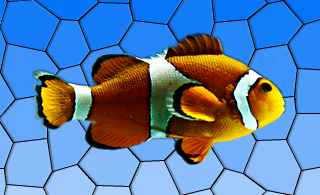
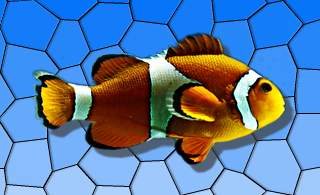
效果更改元素的外觀是通過掛鈎到渲染管道並運轉於源 (如 QGraphicsPixmapItem ) 和目的地設備 (如 QGraphicsView 的視口)。可以禁用效果通過調用 setEnabled (false)。若效果被禁用,則直接渲染源。
要將視覺效果添加到 QGraphicsItem ,例如,可以使用標準效果之一,或另外通過創建 QGraphicsEffect 子類來創建自己的效果。然後可以在項中安裝效果使用 QGraphicsItem::setGraphicsEffect ().
Qt 提供下列標準效果:
|
|

|

|

|
|

For more information on how to use each effect, refer to the specific effect's documentation.
To create your own custom effect, create a subclass of QGraphicsEffect (or any other existing effects) and reimplement the virtual function draw (). This function is called whenever the effect needs to redraw. The draw () function takes the painter with which to draw as an argument. For more information, refer to the documentation for draw (). In the draw () function you can call sourcePixmap () to get a pixmap of the graphics effect source which you can then process.
If your effect changes, use update () to request for a redraw. If your custom effect changes the bounding rectangle of the source, e.g., a radial glow effect may need to apply an extra margin, you can reimplement the virtual boundingRectFor () function, and call updateBoundingRect () to notify the framework whenever this rectangle changes. The virtual sourceChanged () function is called to notify the effects that the source has changed in some way - e.g., if the source is a QGraphicsRectItem and its rectangle parameters have changed.
另請參閱 QGraphicsItem::setGraphicsEffect () 和 QWidget::setGraphicsEffect ().
This enum describes what has changed in QGraphicsEffectSource.
| 常量 | 值 | 描述 |
|---|---|---|
QGraphicsEffect::SourceAttached
|
0x1
|
The effect is installed on a source. |
QGraphicsEffect::SourceDetached
|
0x2
|
The effect is uninstalled on a source. |
QGraphicsEffect::SourceBoundingRectChanged
|
0x4
|
The bounding rect of the source has changed. |
QGraphicsEffect::SourceInvalidated
|
0x8
|
The visual appearance of the source has changed. |
ChangeFlags 類型是 typedef 對於 QFlags <ChangeFlag>。它存儲 ChangeFlag 值的 OR 組閤。
This enum describes how the pixmap returned from sourcePixmap should be padded.
| 常量 | 值 | 描述 |
|---|---|---|
QGraphicsEffect::NoPad
|
0
|
The pixmap should not receive any additional padding. |
QGraphicsEffect::PadToTransparentBorder
|
1
|
The pixmap should be padded to ensure it has a completely transparent border. |
QGraphicsEffect::PadToEffectiveBoundingRect
|
2
|
The pixmap should be padded to match the effective bounding rectangle of the effect. |
This property holds whether the effect is enabled or not.
If an effect is disabled, the source will be rendered with as normal, with no interference from the effect. If the effect is enabled, the source will be rendered with the effect applied.
This property is enabled by default.
Using this property, you can disable certain effects on slow platforms, in order to ensure that the user interface is responsive.
訪問函數:
| bool | isEnabled () const |
| void | setEnabled (bool enable ) |
通知程序信號:
| void | enabledChanged (bool enabled ) |
Constructs a new QGraphicsEffect instance having the specified parent .
[signal]
void
QGraphicsEffect::
enabledChanged
(
bool
enabled
)
This signal is emitted whenever the effect is enabled or disabled. The enabled parameter holds the effects's new enabled state.
注意: 通知程序信號對於特性 enabled .
另請參閱 isEnabled ().
[slot]
void
QGraphicsEffect::
update
()
Schedules a redraw of the effect. Call this function whenever the effect needs to be redrawn. This function does not trigger a redraw of the source.
另請參閱 updateBoundingRect ().
[虛擬]
QGraphicsEffect::
~QGraphicsEffect
()
Removes the effect from the source, and destroys the graphics effect.
Returns the effective bounding rectangle for this effect, i.e., the bounding rectangle of the source in device coordinates, adjusted by any margins applied by the effect itself.
另請參閱 boundingRectFor () 和 updateBoundingRect ().
[虛擬]
QRectF
QGraphicsEffect::
boundingRectFor
(const
QRectF
&
rect
) const
Returns the effective bounding rectangle for this effect, given the provided rect in the device coordinates. When writing you own custom effect, you must call updateBoundingRect () whenever any parameters are changed that may cause this this function to return a different value.
另請參閱 sourceBoundingRect ().
[pure virtual protected]
void
QGraphicsEffect::
draw
(
QPainter
*
painter
)
This pure virtual function draws the effect and is called whenever the source needs to be drawn.
Reimplement this function in a QGraphicsEffect subclass to provide the effect's drawing implementation, using painter .
例如:
MyGraphicsEffect::draw(QPainter *painter)
{
    ...
    QPoint offset;
    if (sourceIsPixmap()) {
        // No point in drawing in device coordinates (pixmap will be scaled anyways).
        const QPixmap pixmap = sourcePixmap(Qt::LogicalCoordinates, &offset);
        ...
        painter->drawPixmap(offset, pixmap);
    } else {
        // Draw pixmap in device coordinates to avoid pixmap scaling;
        const QPixmap pixmap = sourcePixmap(Qt::DeviceCoordinates, &offset);
        painter->setWorldTransform(QTransform());
        ...
        painter->drawPixmap(offset, pixmap);
    }
    ...
}
This function should not be called explicitly by the user, since it is meant for reimplementation purposes only.
[protected]
void
QGraphicsEffect::
drawSource
(
QPainter
*
painter
)
Draws the source directly using the given painter .
This function should only be called from QGraphicsEffect::draw ().
例如:
MyGraphicsOpacityEffect::draw(QPainter *painter)
{
    // Fully opaque; draw directly without going through a pixmap.
    if (qFuzzyCompare(m_opacity, 1)) {
        drawSource(painter);
        return;
    }
    ...
}
另請參閱 QGraphicsEffect::draw ().
[protected]
QRectF
QGraphicsEffect::
sourceBoundingRect
(
Qt::CoordinateSystem
system
= Qt::LogicalCoordinates) const
Returns the bounding rectangle of the source mapped to the given system .
調用此函數采用 Qt::DeviceCoordinates outside of QGraphicsEffect::draw () will give undefined results, as there is no device context available.
另請參閱 draw ().
[virtual protected]
void
QGraphicsEffect::
sourceChanged
(
QGraphicsEffect::ChangeFlags
flags
)
此虛函數被調用由 QGraphicsEffect to notify the effect that the source has changed. If the effect applies any cache, then this cache must be purged in order to reflect the new appearance of the source.
The flags describes what has changed.
[protected]
bool
QGraphicsEffect::
sourceIsPixmap
() const
返迴
true
if the source effectively is a pixmap, e.g., a
QGraphicsPixmapItem
.
This function is useful for optimization purposes. For instance, there's no point in drawing the source in device coordinates to avoid pixmap scaling if this function returns
true
- the source pixmap will be scaled anyways.
[protected]
QPixmap
QGraphicsEffect::
sourcePixmap
(
Qt::CoordinateSystem
system
= Qt::LogicalCoordinates,
QPoint
*
offset
= nullptr,
QGraphicsEffect::PixmapPadMode
mode
= PadToEffectiveBoundingRect) const
Returns a pixmap with the source painted into it.
The system specifies which coordinate system to be used for the source. The optional offset parameter returns the offset where the pixmap should be painted at using the current painter. For control on how the pixmap is padded use the mode 參數。
The returned pixmap is clipped to the current painter's device rectangle when system is Qt::DeviceCoordinates .
調用此函數采用 Qt::DeviceCoordinates outside of QGraphicsEffect::draw () will give undefined results, as there is no device context available.
另請參閱 draw () 和 boundingRect ().
[protected]
void
QGraphicsEffect::
updateBoundingRect
()
This function notifies the effect framework when the effect's bounding rectangle has changed. As a custom effect author, you must call this function whenever you change any parameters that will cause the virtual boundingRectFor () function to return a different value.
This function will call update () 若這是必要的。
另請參閱 boundingRectFor (), boundingRect (),和 sourceBoundingRect ().
