QPainter 類在 Widget 和其它描繪設備中履行低級描繪。 更多...
| 頭: | #include <QPainter> |
| qmake: | QT += gui |
| 繼承者: |
注意: 此類的所有函數 可重入 .
| class | PixmapFragment |
| enum | CompositionMode { CompositionMode_SourceOver, CompositionMode_DestinationOver, CompositionMode_Clear, CompositionMode_Source, CompositionMode_Destination, …, RasterOp_SourceOrNotDestination } |
| enum | PixmapFragmentHint { OpaqueHint } |
| flags | PixmapFragmentHints |
| enum | RenderHint { Antialiasing, TextAntialiasing, SmoothPixmapTransform, HighQualityAntialiasing, NonCosmeticDefaultPen, …, LosslessImageRendering } |
| flags | RenderHints |
| QPainter (QPaintDevice * device ) | |
| QPainter () | |
| ~QPainter () | |
| const QBrush & | background () const |
| Qt::BGMode | backgroundMode () const |
| bool | begin (QPaintDevice * device ) |
| void | beginNativePainting () |
| QRectF | boundingRect (const QRectF & rectangle , int flags , const QString & text ) |
| QRect | boundingRect (const QRect & rectangle , int flags , const QString & text ) |
| QRect | boundingRect (int x , int y , int w , int h , int flags , const QString & text ) |
| QRectF | boundingRect (const QRectF & rectangle , const QString & text , const QTextOption & option = QTextOption()) |
| const QBrush & | brush () const |
| QPoint | brushOrigin () const |
| QRectF | clipBoundingRect () const |
| QPainterPath | clipPath () const |
| QRegion | clipRegion () const |
| QTransform | combinedTransform () const |
| QPainter::CompositionMode | compositionMode () const |
| QPaintDevice * | device () const |
| const QTransform & | deviceTransform () const |
| void | drawArc (const QRectF & rectangle , int startAngle , int spanAngle ) |
| void | drawArc (const QRect & rectangle , int startAngle , int spanAngle ) |
| void | drawArc (int x , int y , int width , int height , int startAngle , int spanAngle ) |
| void | drawChord (const QRectF & rectangle , int startAngle , int spanAngle ) |
| void | drawChord (int x , int y , int width , int height , int startAngle , int spanAngle ) |
| void | drawChord (const QRect & rectangle , int startAngle , int spanAngle ) |
| void | drawConvexPolygon (const QPointF * points , int pointCount ) |
| void | drawConvexPolygon (const QPolygonF & polygon ) |
| void | drawConvexPolygon (const QPoint * points , int pointCount ) |
| void | drawConvexPolygon (const QPolygon & polygon ) |
| void | drawEllipse (const QRectF & rectangle ) |
| void | drawEllipse (const QRect & rectangle ) |
| void | drawEllipse (int x , int y , int width , int height ) |
| void | drawEllipse (const QPointF & center , qreal rx , qreal ry ) |
| void | drawEllipse (const QPoint & center , int rx , int ry ) |
| void | drawGlyphRun (const QPointF & position , const QGlyphRun & glyphs ) |
| void | drawImage (const QRectF & target , const QImage & image , const QRectF & source , Qt::ImageConversionFlags flags = Qt::AutoColor) |
| void | drawImage (const QRect & target , const QImage & image , const QRect & source , Qt::ImageConversionFlags flags = Qt::AutoColor) |
| void | drawImage (const QPointF & point , const QImage & image , const QRectF & source , Qt::ImageConversionFlags flags = Qt::AutoColor) |
| void | drawImage (const QPoint & point , const QImage & image , const QRect & source , Qt::ImageConversionFlags flags = Qt::AutoColor) |
| void | drawImage (const QRectF & rectangle , const QImage & image ) |
| void | drawImage (const QRect & rectangle , const QImage & image ) |
| void | drawImage (const QPointF & point , const QImage & image ) |
| void | drawImage (const QPoint & point , const QImage & image ) |
| void | drawImage (int x , int y , const QImage & image , int sx = 0, int sy = 0, int sw = -1, int sh = -1, Qt::ImageConversionFlags flags = Qt::AutoColor) |
| void | drawLine (const QLineF & line ) |
| void | drawLine (const QLine & line ) |
| void | drawLine (int x1 , int y1 , int x2 , int y2 ) |
| void | drawLine (const QPoint & p1 , const QPoint & p2 ) |
| void | drawLine (const QPointF & p1 , const QPointF & p2 ) |
| void | drawLines (const QLineF * lines , int lineCount ) |
| void | drawLines (const QVector<QLineF> & lines ) |
| void | drawLines (const QPointF * pointPairs , int lineCount ) |
| void | drawLines (const QVector<QPointF> & pointPairs ) |
| void | drawLines (const QLine * lines , int lineCount ) |
| void | drawLines (const QVector<QLine> & lines ) |
| void | drawLines (const QPoint * pointPairs , int lineCount ) |
| void | drawLines (const QVector<QPoint> & pointPairs ) |
| void | drawPath (const QPainterPath & path ) |
| void | drawPicture (const QPointF & point , const QPicture & picture ) |
| void | drawPicture (int x , int y , const QPicture & picture ) |
| void | drawPicture (const QPoint & point , const QPicture & picture ) |
| void | drawPie (const QRectF & rectangle , int startAngle , int spanAngle ) |
| void | drawPie (int x , int y , int width , int height , int startAngle , int spanAngle ) |
| void | drawPie (const QRect & rectangle , int startAngle , int spanAngle ) |
| void | drawPixmap (const QRectF & target , const QPixmap & pixmap , const QRectF & source ) |
| void | drawPixmap (const QRect & target , const QPixmap & pixmap , const QRect & source ) |
| void | drawPixmap (int x , int y , int w , int h , const QPixmap & pixmap , int sx , int sy , int sw , int sh ) |
| void | drawPixmap (int x , int y , const QPixmap & pixmap , int sx , int sy , int sw , int sh ) |
| void | drawPixmap (const QPointF & point , const QPixmap & pixmap , const QRectF & source ) |
| void | drawPixmap (const QPoint & point , const QPixmap & pixmap , const QRect & source ) |
| void | drawPixmap (const QPointF & point , const QPixmap & pixmap ) |
| void | drawPixmap (const QPoint & point , const QPixmap & pixmap ) |
| void | drawPixmap (int x , int y , const QPixmap & pixmap ) |
| void | drawPixmap (const QRect & rectangle , const QPixmap & pixmap ) |
| void | drawPixmap (int x , int y , int width , int height , const QPixmap & pixmap ) |
| void | drawPixmapFragments (const QPainter::PixmapFragment * fragments , int fragmentCount , const QPixmap & pixmap , QPainter::PixmapFragmentHints hints = PixmapFragmentHints()) |
| void | drawPoint (const QPointF & position ) |
| void | drawPoint (const QPoint & position ) |
| void | drawPoint (int x , int y ) |
| void | drawPoints (const QPointF * points , int pointCount ) |
| void | drawPoints (const QPolygonF & points ) |
| void | drawPoints (const QPoint * points , int pointCount ) |
| void | drawPoints (const QPolygon & points ) |
| void | drawPolygon (const QPointF * points , int pointCount , Qt::FillRule fillRule = Qt::OddEvenFill) |
| void | drawPolygon (const QPolygonF & points , Qt::FillRule fillRule = Qt::OddEvenFill) |
| void | drawPolygon (const QPoint * points , int pointCount , Qt::FillRule fillRule = Qt::OddEvenFill) |
| void | drawPolygon (const QPolygon & points , Qt::FillRule fillRule = Qt::OddEvenFill) |
| void | drawPolyline (const QPointF * points , int pointCount ) |
| void | drawPolyline (const QPolygonF & points ) |
| void | drawPolyline (const QPoint * points , int pointCount ) |
| void | drawPolyline (const QPolygon & points ) |
| void | drawRect (const QRectF & rectangle ) |
| void | drawRect (int x , int y , int width , int height ) |
| void | drawRect (const QRect & rectangle ) |
| void | drawRects (const QRectF * rectangles , int rectCount ) |
| void | drawRects (const QVector<QRectF> & rectangles ) |
| void | drawRects (const QRect * rectangles , int rectCount ) |
| void | drawRects (const QVector<QRect> & rectangles ) |
| void | drawRoundedRect (const QRectF & rect , qreal xRadius , qreal yRadius , Qt::SizeMode mode = Qt::AbsoluteSize) |
| void | drawRoundedRect (int x , int y , int w , int h , qreal xRadius , qreal yRadius , Qt::SizeMode mode = Qt::AbsoluteSize) |
| void | drawRoundedRect (const QRect & rect , qreal xRadius , qreal yRadius , Qt::SizeMode mode = Qt::AbsoluteSize) |
| void | drawStaticText (const QPointF & topLeftPosition , const QStaticText & staticText ) |
| void | drawStaticText (const QPoint & topLeftPosition , const QStaticText & staticText ) |
| void | drawStaticText (int left , int top , const QStaticText & staticText ) |
| void | drawText (const QRectF & rectangle , int flags , const QString & text , QRectF * boundingRect = nullptr) |
| void | drawText (const QPointF & position , const QString & text ) |
| void | drawText (const QPoint & position , const QString & text ) |
| void | drawText (int x , int y , const QString & text ) |
| void | drawText (const QRect & rectangle , int flags , const QString & text , QRect * boundingRect = nullptr) |
| void | drawText (int x , int y , int width , int height , int flags , const QString & text , QRect * boundingRect = nullptr) |
| void | drawText (const QRectF & rectangle , const QString & text , const QTextOption & option = QTextOption()) |
| void | drawTiledPixmap (const QRectF & rectangle , const QPixmap & pixmap , const QPointF & position = QPointF()) |
| void | drawTiledPixmap (int x , int y , int width , int height , const QPixmap & pixmap , int sx = 0, int sy = 0) |
| void | drawTiledPixmap (const QRect & rectangle , const QPixmap & pixmap , const QPoint & position = QPoint()) |
| bool | end () |
| void | endNativePainting () |
| void | eraseRect (const QRectF & rectangle ) |
| void | eraseRect (int x , int y , int width , int height ) |
| void | eraseRect (const QRect & rectangle ) |
| void | fillPath (const QPainterPath & path , const QBrush & brush ) |
| void | fillRect (const QRectF & rectangle , const QBrush & brush ) |
| void | fillRect (int x , int y , int width , int height , const QBrush & brush ) |
| void | fillRect (const QRect & rectangle , const QBrush & brush ) |
| void | fillRect (const QRectF & rectangle , const QColor & color ) |
| void | fillRect (int x , int y , int width , int height , const QColor & color ) |
| void | fillRect (const QRect & rectangle , const QColor & color ) |
| void | fillRect (int x , int y , int width , int height , Qt::GlobalColor color ) |
| void | fillRect (const QRect & rectangle , Qt::GlobalColor color ) |
| void | fillRect (const QRectF & rectangle , Qt::GlobalColor color ) |
| void | fillRect (int x , int y , int width , int height , Qt::BrushStyle style ) |
| void | fillRect (const QRect & rectangle , Qt::BrushStyle style ) |
| void | fillRect (const QRectF & rectangle , Qt::BrushStyle style ) |
| void | fillRect (int x , int y , int width , int height , QGradient::Preset preset ) |
| void | fillRect (const QRect & rectangle , QGradient::Preset preset ) |
| void | fillRect (const QRectF & rectangle , QGradient::Preset preset ) |
| const QFont & | font () const |
| QFontInfo | fontInfo () const |
| QFontMetrics | fontMetrics () const |
| bool | hasClipping () const |
| bool | isActive () const |
| Qt::LayoutDirection | layoutDirection () const |
| qreal | opacity () const |
| QPaintEngine * | paintEngine () const |
| const QPen & | pen () const |
| QPainter::RenderHints | renderHints () const |
| void | resetTransform () |
| void | restore () |
| void | rotate (qreal angle ) |
| void | save () |
| void | scale (qreal sx , qreal sy ) |
| void | setBackground (const QBrush & brush ) |
| void | setBackgroundMode (Qt::BGMode mode ) |
| void | setBrush (const QBrush & brush ) |
| void | setBrush (Qt::BrushStyle style ) |
| void | setBrushOrigin (const QPointF & position ) |
| void | setBrushOrigin (int x , int y ) |
| void | setBrushOrigin (const QPoint & position ) |
| void | setClipPath (const QPainterPath & path , Qt::ClipOperation operation = Qt::ReplaceClip) |
| void | setClipRect (const QRectF & rectangle , Qt::ClipOperation operation = Qt::ReplaceClip) |
| void | setClipRect (const QRect & rectangle , Qt::ClipOperation operation = Qt::ReplaceClip) |
| void | setClipRect (int x , int y , int width , int height , Qt::ClipOperation operation = Qt::ReplaceClip) |
| void | setClipRegion (const QRegion & region , Qt::ClipOperation operation = Qt::ReplaceClip) |
| void | setClipping (bool enable ) |
| void | setCompositionMode (QPainter::CompositionMode mode ) |
| void | setFont (const QFont & font ) |
| void | setLayoutDirection (Qt::LayoutDirection direction ) |
| void | setOpacity (qreal opacity ) |
| void | setPen (const QPen & pen ) |
| void | setPen (const QColor & color ) |
| void | setPen (Qt::PenStyle style ) |
| void | setRenderHint (QPainter::RenderHint hint , bool on = true) |
| void | setRenderHints (QPainter::RenderHints hints , bool on = true) |
| void | setTransform (const QTransform & transform , bool combine = false) |
| void | setViewTransformEnabled (bool enable ) |
| void | setViewport (const QRect & rectangle ) |
| void | setViewport (int x , int y , int width , int height ) |
| void | setWindow (const QRect & rectangle ) |
| void | setWindow (int x , int y , int width , int height ) |
| void | setWorldMatrixEnabled (bool enable ) |
| void | setWorldTransform (const QTransform & matrix , bool combine = false) |
| void | shear (qreal sh , qreal sv ) |
| void | strokePath (const QPainterPath & path , const QPen & pen ) |
| bool | testRenderHint (QPainter::RenderHint hint ) const |
| const QTransform & | transform () const |
| void | translate (const QPointF & offset ) |
| void | translate (const QPoint & offset ) |
| void | translate (qreal dx , qreal dy ) |
| bool | viewTransformEnabled () const |
| QRect | viewport () const |
| QRect | window () const |
| bool | worldMatrixEnabled () const |
| const QTransform & | worldTransform () const |
QPainter 提供高度優化的特徵來做大多數的繪製 GUI 程序要求。它可以繪製從簡單直綫到復雜形狀 (像餡餅和弦) 的一切。它還可以繪製對齊文本和像素圖。通常,它在 "自然" 坐標係中繪製,但也可以在視圖和世界坐標係之間變換。QPainter 可以運轉於任何對象有繼承 QPaintDevice 類。
常見用法對於 QPainter 是在 Widget 描繪事件內:構造和定製 (如:設置鋼筆或筆刷) 描繪器。然後繪製。記住銷毀 QPainter 對象在繪製後。例如:
void SimpleExampleWidget::paintEvent(QPaintEvent *)
{
    QPainter painter(this);
    painter.setPen(Qt::blue);
    painter.setFont(QFont("Arial", 30));
    painter.drawText(rect(), Qt::AlignCenter, "Qt");
}
核心功能對於 QPainter 是繪製,但類還提供瞭幾個函數允許定製 QPainter 的設置及其渲染品質,啓用裁剪的其它函數。另外,通過指定描繪器的閤成模式可以控製如何將不同形狀閤並到一起。
The isActive () 函數指示描繪器是否活動。激活描繪器通過 begin () 函數且構造函數接受 QPaintDevice 自變量。 end () 函數,和析構函數將其取消激活。
連同 QPaintDevice and QPaintEngine 類,QPainter 形成用於 Qt 描繪係統的基。QPainter 是用於履行繪製操作的類。 QPaintDevice 錶示可以在其中描繪的設備使用 QPainter。 QPaintEngine 提供用於在不同類型設備中繪製的描繪器接口。若描繪器活動, device () 返迴描繪器在其上描繪的描繪設備,和 paintEngine () 返迴描繪器目前正在操作的描繪引擎。更多信息,見 描繪係統 .
有時,期望讓彆人描繪在不尋常 QPaintDevice 。QPainter 支持靜態函數 setRedirected() 來做這。
警告: 當 paintdevice 是 Widget 時,QPainter 隻可用於 paintEvent() 函數內或由 paintEvent() 調用的函數內。
可以定製幾個設置以進行 QPainter 繪製根據偏好:
注意,這些中一些設置會鏡像某些繪製設備的設置,如 QWidget::font ()。 QPainter::begin () 函數 (或等效 QPainter 構造函數) 會從描繪設備拷貝這些屬性。
可以在任何時候保存 QPainter 的狀態通過調用 save () 函數將所有可用設置保存在內部堆棧。 restore () 函數將它們彈迴來。
QPainter 提供瞭繪製大多數圖元的函數: drawPoint (), drawPoints (), drawLine (), drawRect (), drawRoundedRect (), drawEllipse (), drawArc (), drawPie (), drawChord (), drawPolyline (), drawPolygon (), drawConvexPolygon () 及 drawCubicBezier()。2 方便函數, drawRects () 和 drawLines (),繪製給定數量的矩形或綫條,按給定數組 QRects or QLines 使用當前鋼筆和筆刷。
QPainter 類還提供 fillRect () 函數填充給定 QRect ,采用給定 QBrush ,和 eraseRect () 函數擦除給定矩形內區域。
所有這些函數都有整數和浮點版本。

|
基本繪製範例
The 基本繪製 範例展示如何顯示各種樣式的基本圖形圖元使用 QPainter 類。 |
若需要繪製復雜形狀,尤其是當需要重復這樣做時,考慮創建 QPainterPath 和繪製它使用 drawPath ().
|
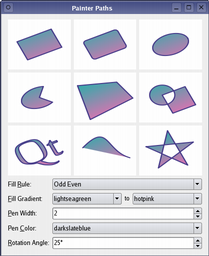
描繪器路徑範例
The QPainterPath 類為描繪操作提供容器,使能夠構造和重用圖形形狀。 The 描繪器路徑 範例展示如何使用描繪器路徑以構建復雜渲染形狀。 |
|
QPainter 還提供 fillPath () 函數填充給定 QPainterPath 采用給定 QBrush ,和 strokePath () 函數繪製給定路徑的輪廓 (即:描邊路徑)。
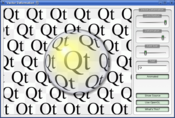
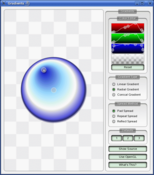
另請參閱 嚮量變形 範例,展示如何使用高級嚮量技術以繪製文本使用 QPainterPath , 漸變 範例展示 Qt 中可用的不同漸變類型,和 路徑描邊 範例展示 Qt 的內置虛綫圖案和展示如何使用自定義圖案以延伸可用圖案的範圍。
| 嚮量變形 | 漸變 | 路徑描邊 |
|---|---|---|
|
|

|
文本繪製的完成是使用 drawText ()。當需要細粒度定位時, boundingRect () 告訴您哪裏給定 drawText () 命令會繪製。
有能繪製像素圖/圖像的函數,也就是 drawPixmap (), drawImage () 和 drawTiledPixmap ()。兩者 drawPixmap () 和 drawImage () 産生相同結果,除瞭 drawPixmap () 在屏幕上更快,而 drawImage () 可能更快在 QPrinter 或其它設備。
有 drawPicture () 函數繪製內容為整個 QPicture 。 drawPicture () 函數是忽視所有描繪器設置的唯一函數,因為 QPicture 擁有自己的設置。
像素圖的高分辨率版本擁有的 設備像素比率 值大於 1 (見 QImageReader , QPixmap::devicePixelRatio ())。若值匹配底層 QPaintDevice ,會將它直接繪製到沒有應用額外變換的設備上。
例如,情況是這樣,當繪製 QPixmap 64x64 像素大小采用設備像素比率 2 到高 DPI (每英寸點數) 屏幕,屏幕設備像素比率也必須為 2。注意,那麼像素圖是有效 32x32 像素在 用戶空間 。Qt 中基於像素圖大小計算布局幾何體的代碼路徑,會使用此大小。這的淨效果是像素圖被顯示成高 DPI 像素圖,而不是大像素圖。
使用 QPainter 要獲得最優渲染結果,應使用平颱無關 QImage 作為描繪設備;即:使用 QImage 將確保結果在任何平颱都有同等像素錶示。
QPainter 類還提供控製渲染品質的手段,透過其 RenderHint 枚舉且支持浮點精度:用於繪製圖元的所有函數均有浮點版本。這些經常用於組閤 QPainter::Antialiasing 渲染提示。

|
同心圓範例
The 同心圓 範例展示使用浮點精度和抗鋸齒可以獲得改進渲染品質,當繪製自定義 Widget 時。 應用程序主窗口顯示的幾個 Widget,是使用精度和抗鋸齒的各種組閤繪製的。 |
The RenderHint 枚舉指定任何給定引擎都可能 (或不可能) 遵守的 QPainter 標誌。 QPainter::Antialiasing 指示引擎應對圖元邊緣抗鋸齒 (若可能的話), QPainter::TextAntialiasing 指示引擎應對文本抗鋸齒 (若可能的話),和 QPainter::SmoothPixmapTransform 指示引擎應使用平滑像素圖的變換算法。
The renderHints () 函數返迴為此描繪器設置的渲染提示指定標誌。使用 setRenderHint () 函數能設置 (或清零) 目前設置的 RenderHints .
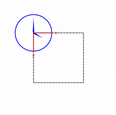
通常,QPainter 操作設備自己的坐標係 (通常是像素),但 QPainter 對坐標變換有很好的支持。
| nop | rotate () | scale () | translate () |
|---|---|---|---|

|

|
|

|
最常用的變換是比例縮放、鏇轉、平移及剪切。使用 scale () 函數用於按給定偏移比例縮放坐標係, rotate () 函數用於鏇轉它和 translate () 用於平移它 (即:將給定偏移添加到點)。還可以繞原點扭麯坐標係使用 shear () 函數。見 仿射變換 範例瞭解可視化剪切坐標係。
另請參閱 變換 範例,展示變換如何影響 QPainter 渲染圖形原語的方式。尤其,展示變換次序如何影響結果。
|
仿射變換範例
The 仿射變換 範例展示 Qt 對描繪操作履行仿射變換的能力。演示還允許用戶對變換操作實驗,並立即查看結果。 |

|
所有變換操作運轉於變換 worldTransform ()。矩陣將平麵點變換為另一點。關於變換矩陣的更多信息,見 坐標係 and QTransform 文檔編製。
The setWorldTransform () 函數可以替換 (或添加到) 目前設置的 worldTransform ()。 resetTransform () 函數重置任何變換的做齣是使用 translate (), scale (), shear (), rotate (), setWorldTransform (), setViewport () 和 setWindow () 函數。 deviceTransform () 返迴從邏輯坐標變換成平颱從屬描繪設備的設備坐標的矩陣。纔需要後一函數,當對平颱從屬句柄使用平颱描繪命令時,且平颱本身不做變換。
當采用 QPainter 繪製時,我們使用邏輯坐標指定點,然後轉換成描繪設備的物理坐標。邏輯坐標到物理坐標的映射的處理是通過 QPainter 的 combinedTransform (),組閤 viewport () 和 window () 和 worldTransform ()。 viewport () 錶示指定任意矩形的物理坐標, window () 按邏輯坐標描述相同矩形,和 worldTransform () 等同於變換矩陣。
另請參閱 坐標係
QPainter 可以將任何繪製操作裁剪到矩形、區域或嚮量路徑。當前裁剪是可用的,使用函數 clipRegion () 和 clipPath ()。首選 (更快) 路徑還是區域從屬底層 paintEngine ()。例如, QImage 描繪引擎首選路徑,而 X11 描繪引擎首選區域。設置裁剪是在描繪器邏輯坐標中完成的。
在 QPainter 的裁剪之後,描繪設備還可以裁剪。例如,大多數 Widget 會裁剪掉用於子級小部件的像素,而大多數打印機會裁剪掉靠近紙張邊緣的區域。不會通過返迴值反映這種額外裁剪對於 clipRegion () 或 hasClipping ().
QPainter 提供 CompositionMode 枚舉,定義用於數字圖像閤成的 Porter-Duff 規則;它描述瞭用於將一圖像的像素 (源) 與另一圖像的像素 (目的地) 組閤的模型。
2 種最常見的閤成形式是 Source and SourceOver . Source 用於將不透明對象繪製到描繪設備上。按此模式,源的每個像素會替換目的地的相應像素。在 SourceOver 閤成模式,源對象是透明的且會繪製在目的地頂部。
注意,閤成變換按像素操作。齣於此原因,使用圖形原語本身及其邊界矩形有差異:邊界矩形包含具有 Alpha == 0 的像素 (即:圍繞原語的像素)。這些像素將覆寫其它圖像的像素,從而有效清零這些像素,而原語僅覆寫其自己的區域。

|
閤成模式範例
The 閤成模式 範例可在 Qt 的範例目錄下找到,允許對各種閤成模式實驗並立即查看結果。 |
若將坐標用於 Qt 基於光柵的描繪引擎,重要注意事項,當坐標大於 +/- 2
15
可以使用,但采用此範圍外坐標履行的任何描繪都不保證顯示;繪製可以被剪裁。這是由於使用瞭
short int
在實現中。
由 Qt 描邊器生成的輪廓隻是近似值,當處理彎麯形狀時。在大多數情況下,使用另一貝塞爾麯綫綫段錶示貝塞爾麯綫綫段的輪廓是不可能的,所以 Qt 通過使用幾段更小麯綫逼近麯綫輪廓。由於性能原因,Qt 有限製這些輪廓可以使用多少麯綫,因此當使用大鋼筆寬度 (或大比例縮放) 時,輪廓誤差會遞增。要生成更小誤差的輪廓,可能使用 QPainterPathStroker 類,它擁有的 setCurveThreshold 成員函數,能讓用戶指定誤差偏差。另一解決方案是先將路徑轉換成多邊形,然後繪製代替多邊形。
QPainter 是允許開發者做各種圖形操作 (譬如:如漸變、閤成模式及矢量圖形) 的豐富框架。且 QPainter 可以跨各種不同硬件和軟件堆棧,做到這點。自然,硬件和軟件的底層組閤對性能有一些影響,且由於排列的數量,確保每個單一操作與閤成模式、筆刷、裁剪、變換等的各種所有組閤都很快,幾乎是不可能完成的任務。作為妥協,我們選擇 QPainter API 和後端的子集,硬件和軟件的給定組閤,可以盡可能好的獲得閤理性能保證。
作為高性能引擎的關注後端:
這些操作包括:
drawPixmap()
組閤簡單變換和不透明度與非平滑變換模式 (
QPainter::SmoothPixmapTransform
不作為渲染提示啓用)。
QPainter::CompositionMode_Source
and
QPainter::CompositionMode_SourceOver
.
此列錶給齣在性能臨界應用程序中能安全使用哪些特徵。對於某些設置,其它操作也可能很快,但在廣泛使用它們之前,推薦在軟件將最終運行的係統中對它們進行基準測試和驗證。還有一些情況,使用昂貴操作是可以的,例如,當將結果緩存在 QPixmap .
另請參閱 QPaintDevice , QPaintEngine , Qt SVG , 基本繪製範例 ,和 繪製實用工具函數 .
定義用於支持數字圖像閤成的模式。閤成模式用於指定如何將一圖像 (源) 中的像素與另一圖像中的像素 (目的地) 閤並。
請注意,采用 RasterOp 前綴錶示的按位光柵操作模式,僅在 X11 和光柵描繪引擎中本機支持。這意味著利用這些模式的唯一方式,在 Mac 是憑藉 QImage 。RasterOp 錶示的融閤模式 not 不支持具有 alpha 分量的鋼筆的筆刷。此外,打開 QPainter::Antialiasing 渲染提示將有效禁用 RasterOp 模式。

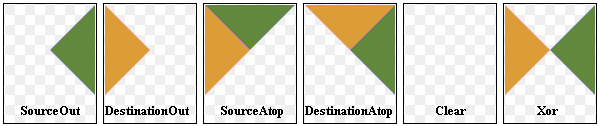
最常見的類型是 SourceOver (經常稱為僅僅 Alpha 融閤),其中源像素以源 Alpha 分量定義半透明像素的方式,融閤在目的地像素的頂部。
有幾種閤成模式要求源圖像 (或目標圖像) 中的 Alpha 通道纔有效果。齣於最優性能,圖像格式 Format_ARGB32_Premultiplied 是首選的。
當閤成模式有設置時,它適用於所有描繪運算符、鋼筆、筆刷、漸變和像素圖/圖像繪製。
| 常量 | 值 | 描述 |
|---|---|---|
QPainter::CompositionMode_SourceOver
|
0
|
這是默認模式。源的 Alpha 用於融閤目的地頂部像素。 |
QPainter::CompositionMode_DestinationOver
|
1
|
目的地 Alpha 用於將它融閤在源像素的頂部。此模式是 CompositionMode_SourceOver 的逆。 |
QPainter::CompositionMode_Clear
|
2
|
目的地的像素被清零 (設為完全透明) 獨立於源。 |
QPainter::CompositionMode_Source
|
3
|
輸齣源像素 (這意味著基本拷貝操作,且等同於 SourceOver 當源像素不透明時)。 |
QPainter::CompositionMode_Destination
|
4
|
輸齣目的地像素。這意味著融閤不起作用。此模式是 CompositionMode_Source 的逆。 |
QPainter::CompositionMode_SourceIn
|
5
|
輸齣源,其 Alpha 減去目的地 Alpha。 |
QPainter::CompositionMode_DestinationIn
|
6
|
輸齣目的地,其 Alpha 減去源 Alpha。此模式是 CompositionMode_SourceIn 的逆。 |
QPainter::CompositionMode_SourceOut
|
7
|
輸齣源,其 Alpha 減去目的地 Alpha 的逆。 |
QPainter::CompositionMode_DestinationOut
|
8
|
輸齣目的地,其 Alpha 減去源 Alpha 的逆。此模式是 CompositionMode_SourceOut 的逆。 |
QPainter::CompositionMode_SourceAtop
|
9
|
源像素融閤在目的地頂部,采用源像素 Alpha 減去目的地像素 Alpha。 |
QPainter::CompositionMode_DestinationAtop
|
10
|
目的地像素融閤在源頂部,采用目的地像素 Alpha 減去源像素 Alpha。此模式是 CompositionMode_SourceAtop 的逆。 |
QPainter::CompositionMode_Xor
|
11
|
源 Alpha 減去目的地 Alpha 的逆,目的地 Alpha 減去源 Alpha 的逆,源閤並目的地。CompositionMode_Xor 與按位 Xor 不一樣。 |
QPainter::CompositionMode_Plus
|
12
|
將源的 Alpha 和顔色兩者與目的地像素相加在一起。 |
QPainter::CompositionMode_Multiply
|
13
|
輸齣是源顔色乘以目的地。顔色乘以白色顔色保持不變,而顔色乘以黑色將産生黑色。 |
QPainter::CompositionMode_Screen
|
14
|
反轉源顔色和目的地顔色,然後相乘。采用白色屏蔽顔色將産生白色,而采用黑色屏蔽顔色顔色保持不變。 |
QPainter::CompositionMode_Overlay
|
15
|
根據目的地顔色乘以 (或屏蔽) 顔色。目的地顔色混閤源顔色,以反映目的地的明度 (或暗度)。 |
QPainter::CompositionMode_Darken
|
16
|
選擇源顔色和目的地顔色中的更暗者。 |
QPainter::CompositionMode_Lighten
|
17
|
選擇源顔色和目的地顔色中的更亮者。 |
QPainter::CompositionMode_ColorDodge
|
18
|
變亮目的地顔色,以反映源顔色。黑色的源顔色使目的地顔色保持不變。 |
QPainter::CompositionMode_ColorBurn
|
19
|
變暗目的地顔色,以反映源顔色。白色的源顔色使目的地顔色保持不變。 |
QPainter::CompositionMode_HardLight
|
20
|
根據源顔色乘以 (或屏蔽) 顔色。亮源顔色將使目的地顔色變亮,而暗源顔色將使目的地顔色變暗。 |
QPainter::CompositionMode_SoftLight
|
21
|
根據源顔色使顔色變暗 (或變亮)。類似於 CompositionMode_HardLight。 |
QPainter::CompositionMode_Difference
|
22
|
從更亮的顔色減更暗的顔色。采用白色描繪將反轉目的地顔色,而采用黑色描繪將使目的地顔色保持不變。 |
QPainter::CompositionMode_Exclusion
|
23
|
類似於 CompositionMode_Difference,但具有更低對比度。采用白色描繪將反轉目的地顔色,而采用黑色描繪將使目的地顔色保持不變。 |
QPainter::RasterOp_SourceOrDestination
|
24
|
對源像素和目的地像素做按位 OR 操作 (src OR dst)。 |
QPainter::RasterOp_SourceAndDestination
|
25
|
對源像素和目的地像素做按位 AND 操作 (src AND dst)。 |
QPainter::RasterOp_SourceXorDestination
|
26
|
對源像素和目的地像素做按位 XOR 操作 (src XOR dst)。 |
QPainter::RasterOp_NotSourceAndNotDestination
|
27
|
對源像素和目的地像素做按位 NOR 操作 ((NOT src) AND (NOT dst))。 |
QPainter::RasterOp_NotSourceOrNotDestination
|
28
|
對源像素和目的地像素做按位 NAND 操作 ((NOT src) OR (NOT dst))。 |
QPainter::RasterOp_NotSourceXorDestination
|
29
|
做按位操作若反轉源像素,然後 XOR 目的地 ((NOT src) XOR dst)。 |
QPainter::RasterOp_NotSource
|
30
|
做按位操作若反轉源像素 (NOT src)。 |
QPainter::RasterOp_NotSourceAndDestination
|
31
|
做按位操作若反轉源,然後 AND 目的地 ((NOT src) AND dst)。 |
QPainter::RasterOp_SourceAndNotDestination
|
32
|
做按位操作若源 AND 反轉目的地像素 (src AND (NOT dst))。 |
QPainter::RasterOp_NotSourceOrDestination
|
33
|
做按位操作若反轉源,然後 OR 目的地 ((NOT src) OR dst)。 |
QPainter::RasterOp_ClearDestination
|
35
|
清零目的地中的像素 (設為 0) 獨立於源。 |
QPainter::RasterOp_SetDestination
|
36
|
設置目的地中的像素 (設為 1) 獨立於源。 |
QPainter::RasterOp_NotDestination
|
37
|
做按位操作若反轉目的地像素 (NOT dst)。 |
QPainter::RasterOp_SourceOrNotDestination
|
34
|
做按位操作若源 OR 反轉目的地像素 (src OR (NOT dst))。 |
另請參閱 compositionMode (), setCompositionMode (), 閤成模式 ,和 圖像閤成範例 .
| 常量 | 值 | 描述 |
|---|---|---|
QPainter::OpaqueHint
|
0x01
|
指示要繪製的像素圖片段是不透明的。不透明片段的繪製速度潛在更快。 |
該枚舉在 Qt 4.7 引入或被修改。
PixmapFragmentHints 類型是 typedef 對於 QFlags <PixmapFragmentHint>。它存儲 PixmapFragmentHint 值的 OR 組閤。
另請參閱 QPainter::drawPixmapFragments () 和 QPainter::PixmapFragment .
Renderhints 用於將標誌指定給 QPainter 可能 (或可能不) 被任何給定引擎所遵守。
| 常量 | 值 | 描述 |
|---|---|---|
QPainter::Antialiasing
|
0x01
|
指示引擎應盡可能消除圖元邊緣鋸齒。 |
QPainter::TextAntialiasing
|
0x02
|
指示引擎應盡可能消除文本鋸齒。要強製禁用文本抗鋸齒,不要使用此提示。相反,設置 QFont::NoAntialias 在字體樣式對策。 |
QPainter::SmoothPixmapTransform
|
0x04
|
指示引擎應使用平滑像素圖變換算法 (譬如:雙綫性) 而不是最近相鄰。 |
QPainter::HighQualityAntialiasing
|
0x08
|
此值已過時且會被忽略,使用 Antialiasing (抗鋸齒) 渲染提示代替。 |
QPainter::NonCosmeticDefaultPen
|
0x10
|
此值已過時,默認為 QPen 現在不化妝。 |
QPainter::Qt4CompatiblePainting
|
0x20
|
兼容性提示告訴引擎要使用如 Qt4 中的基於 X11 的相同填充規則,其中鋸齒渲染的偏移略微小於 0.5 個像素。還將默認構造鋼筆視為化妝。潛在有用當將 Qt 4 應用程序移植到 Qt 5 時。 |
QPainter::LosslessImageRendering
|
0x40
|
使用無損圖像渲染,每當可能時。目前,此提示纔使用當 QPainter 用於輸齣 PDF 文件透過 QPrinter or QPdfWriter ,其中 drawImage ()/ drawPixmap () 調用將使用無損壓縮算法而不是有損 JPEG 壓縮編碼圖像。該值在 Qt 5.13 添加。 |
RenderHints 類型是 typedef 對於 QFlags <RenderHint>。它存儲 RenderHint 值的 OR 組閤。
另請參閱 renderHints (), setRenderHint (), 渲染品質 ,和 同心圓範例 .
構造描繪器開始描繪描繪 device 立即。
此構造函數對短期存活描繪器很方便,如在 QWidget::paintEvent () 且隻應使用一次。構造函數調用 begin () 為您和 QPainter 析構函數自動調用 end ().
void MyWidget::paintEvent(QPaintEvent *)
{
    QPainter p;
    p.begin(this);
    p.drawLine(...);        // drawing code
    p.end();
}
使用此構造函數的相同範例:
void MyWidget::paintEvent(QPaintEvent *)
{
    QPainter p(this);
    p.drawLine(...);        // drawing code
}
由於構造函數無法提供反饋當描繪器初始化失敗時,因此應使用 begin () 和 end () 以在外部設備中描繪,如:打印機。
構造描繪器。
銷毀描繪器。
返迴當前背景筆刷。
另請參閱 setBackground () 和 Settings .
返迴當前背景模式。
另請參閱 setBackgroundMode () 和 Settings .
開始 paint 描繪
device
並返迴
true
若成功;否則返迴
false
.
預告:所有描繪器設置 ( setPen (), setBrush () 等) 被重置為默認值當 begin() 被調用時。
可能齣現的錯誤是嚴重問題,譬如這些:
painter->begin(0); // impossible - paint device cannot be 0
QPixmap image(0, 0);
painter->begin(&image); // impossible - image.isNull() == true;
painter->begin(myWidget);
painter2->begin(myWidget); // impossible - only one painter at a time
注意:大多數時候,可以使用某一構造函數代替 begin(),且 end () 在銷毀時自動完成。
警告: 描繪設備每次隻可以由一個描繪器進行描繪。
警告: 描繪 QImage 采用格式 QImage::Format_Indexed8 不支持。
刷新描繪管道並準備為用戶直接嚮底層圖形上下文發齣命令。之後必須調用 endNativePainting ().
注意,隻會將底層描繪引擎狀態改變,重置為它們各自的默認狀態。重置狀態可能隨發行變化。下列狀態目前是在 OpenGL 2 引擎中重置的:
例如,若用戶改變 OpenGL 多邊形模式在 beginNativePaint()/ endNativePainting () 塊,就不會將它重置為默認狀態通過 endNativePainting ()。這裏是展示描繪器命令和原生 OpenGL 命令的混閤範例:
QPainter painter(this);
painter.fillRect(0, 0, 128, 128, Qt::green);
painter.beginNativePainting();
glEnable(GL_SCISSOR_TEST);
glScissor(0, 0, 64, 64);
glClearColor(1, 0, 0, 1);
glClear(GL_COLOR_BUFFER_BIT);
glDisable(GL_SCISSOR_TEST);
painter.endNativePainting();
該函數在 Qt 4.6 引入。
另請參閱 endNativePainting ().
返迴邊界矩形為 text 如它會齣現當繪製在給定 rectangle 采用指定 flags 使用目前設置的 font ();即:函數告訴您在哪裏 drawText () 函數將繪製,當給定相同自變量時。
若 text 未擬閤在給定 rectangle 使用指定 flags ,函數返迴要求矩形。
The flags 自變量是下列標誌的按位 OR:
若有設置幾個水平對齊標誌 (或幾個垂直對齊標誌),結果對齊未定義。
另請參閱 drawText (), Qt::Alignment ,和 Qt::TextFlag .
這是重載函數。
返迴邊界矩形為 text 如它會齣現當繪製在給定 rectangle 采用指定 flags 使用目前設置的 font ().
這是重載函數。
返迴邊界矩形為給定 text 如它會齣現當繪製在矩形內開始於點 ( x , y ) 采用寬度 w 和高度 h .
這是重載函數。
代之,將標誌指定成按位 OR 的 Qt::AlignmentFlag and Qt::TextFlag ,此重載函數接受 option 自變量。 QTextOption 類提供一般富文本特性的描述。
另請參閱 QTextOption .
返迴描繪器的當前筆刷。
另請參閱 QPainter::setBrush () 和 Settings .
返迴目前設置的筆刷原點。
另請參閱 setBrushOrigin () 和 Settings .
返迴當前裁剪的邊界矩形,若有裁剪;否則返迴空矩形。注意,裁剪區域按邏輯坐標給齣。
不保證邊界矩形是緊密的。
該函數在 Qt 4.8 引入。
另請參閱 setClipRect (), setClipPath (),和 setClipRegion ().
按邏輯坐標返迴當前裁剪路徑。
警告: QPainter 不會明確存儲組閤剪輯,因為這的處理是通過底層 QPaintEngine ,所以路徑會按需重新創建並轉換到當前邏輯坐標係。這是潛在的昂貴操作。
另請參閱 setClipPath (), clipRegion (),和 setClipping ().
返迴目前設置的裁剪區域。注意,裁剪區域按邏輯坐標給齣。
警告: QPainter 不會明確存儲組閤剪輯,因為這的處理是通過底層 QPaintEngine ,所以路徑會按需重新創建並轉換到當前邏輯坐標係。這是潛在的昂貴操作。
另請參閱 setClipRegion (), clipPath (),和 setClipping ().
返迴當前窗口/視口及世界變換的組閤變換矩陣。
另請參閱 setWorldTransform (), setWindow (),和 setViewport ().
返迴當前的閤成模式。
另請參閱 CompositionMode and setCompositionMode ().
返迴此描繪器目前在其中描繪的描繪設備,或
nullptr
若描繪器不活動。
另請參閱 isActive ().
返迴從邏輯坐標變換成平颱從屬描繪設備的設備坐標的矩陣。
此函數是 only 需要當使用平颱描繪命令對平颱從屬句柄 ( Qt::HANDLE ),且平颱本身不做變換。
The QPaintEngine::PaintEngineFeature 枚舉可以查詢,以確定平颱是否履行變換。
另請參閱 worldTransform () 和 QPaintEngine::hasFeature ().
繪製弧形定義通過給定 rectangle , startAngle and spanAngle .
The startAngle and spanAngle 必須以 1/16 度為單位指定,即:完整圓形等於 5760 (16 * 360)。正值角度意味著逆時針方嚮,而負值意味著順時針方嚮。0 度在 3 點鍾位置。

|
QRectF rectangle(10.0, 20.0, 80.0, 60.0); int startAngle = 30 * 16; int spanAngle = 120 * 16; QPainter painter(this); painter.drawArc(rectangle, startAngle, spanAngle); |
另請參閱 drawPie (), drawChord (),和 坐標係 .
這是重載函數。
繪製弧形定義通過給定 rectangle , startAngle and spanAngle .
這是重載函數。
繪製由矩形定義的弧形開始於 ( x , y ) 采用指定 width and height ,和給定 startAngle and spanAngle .
繪製弦定義通過給定 rectangle , startAngle and spanAngle 。弦的填充是采用當前 brush ().
startAngle 和 spanAngle 必須以 1/16 度為單位指定,即:完整圓形等於 5760 (16 * 360)。正值角度意味著逆時針方嚮,而負值意味著順時針方嚮。0 度在 3 點鍾位置。

|
QRectF rectangle(10.0, 20.0, 80.0, 60.0); int startAngle = 30 * 16; int spanAngle = 120 * 16; QPainter painter(this); painter.drawChord(rect, startAngle, spanAngle); |
另請參閱 drawArc (), drawPie (),和 坐標係 .
這是重載函數。
繪製弦定義通過矩形開始於 ( x , y ) 采用指定 width and height ,和給定 startAngle and spanAngle .
這是重載函數。
繪製弦定義通過給定 rectangle , startAngle and spanAngle .
繪製凸多邊形定義通過前 pointCount 點按數組 points 使用當前鋼筆。

|
static const QPointF points[4] = { QPointF(10.0, 80.0), QPointF(20.0, 10.0), QPointF(80.0, 30.0), QPointF(90.0, 70.0) }; QPainter painter(this); painter.drawConvexPolygon(points, 4); |
第一點隱式連接到最後一點,且多邊形的填充是采用當前 brush ()。若提供的多邊形不凸 (即:它至少包含一個大於 180 度的角),結果未定義。
在某些平颱 (如 X11),drawConvexPolygon() 函數可以更快相比 drawPolygon () 函數。
另請參閱 drawPolygon (), drawPolyline (),和 坐標係 .
這是重載函數。
繪製凸多邊形定義通過 polygon 使用當前鋼筆和筆刷。
這是重載函數。
繪製凸多邊形定義通過前 pointCount 點按數組 points 使用當前鋼筆。
這是重載函數。
繪製凸多邊形定義通過 polygon 使用當前鋼筆和筆刷。
繪製橢圓定義通過給定 rectangle .
填充橢圓擁有大小 rectangle . size() 。描邊橢圓擁有大小 rectangle . size() 加鋼筆寬度。

|
QRectF rectangle(10.0, 20.0, 80.0, 60.0); QPainter painter(this); painter.drawEllipse(rectangle); |
這是重載函數。
繪製橢圓定義通過給定 rectangle .
這是重載函數。
繪製由矩形定義的橢圓開始於 ( x , y ) 采用給定 width and height .
這是重載函數。
繪製橢圓位於 center 采用半徑 rx and ry .
該函數在 Qt 4.4 引入。
這是重載函數。
繪製橢圓位於 center 采用半徑 rx and ry .
該函數在 Qt 4.4 引入。
繪製字形錶示通過 glyphs at position 。 position 給齣字形字符串的基綫邊緣。將檢索字形從選中字體按 glyphs 和在由位置給齣的偏移處按 glyphs .
該函數在 Qt 4.8 引入。
另請參閱 QGlyphRun::setRawFont (), QGlyphRun::setPositions (),和 QGlyphRun::setGlyphIndexes ().
繪製矩形部分 source 為給定 image 到 target 矩形在描繪設備中。
注意: 會比例縮放圖像以擬閤矩形,若圖像和矩形兩者的大小不一緻。
注意: 見 繪製高分辨率版本的像素圖和圖像 關於如何影響這通過 QImage::devicePixelRatio ().
若需要修改圖像以擬閤更低分辨率結果 (如:從 32 位轉換成 8 位),使用 flags 指定將如何首選發生這。
QRectF target(10.0, 20.0, 80.0, 60.0); QRectF source(0.0, 0.0, 70.0, 40.0); QImage image(":/images/myImage.png"); QPainter painter(this); painter.drawImage(target, image, source); |
另請參閱 drawPixmap () 和 QImage::devicePixelRatio ().
這是重載函數。
繪製矩形部分 source 為給定 image 到 target 矩形在描繪設備中。
注意: 會比例縮放圖像以擬閤矩形,若圖像和矩形兩者的大小不一緻。
這是重載函數。
繪製矩形部分 source 為給定 image 采用其原點在給定 point .
這是重載函數。
繪製矩形部分 source 為給定 image 采用其原點在給定 point .
這是重載函數。
繪製給定 image 進給定 rectangle .
注意: 會比例縮放圖像以擬閤矩形,若圖像和矩形兩者的大小不一緻。
這是重載函數。
繪製給定 image 進給定 rectangle .
注意: 會比例縮放圖像以擬閤矩形,若圖像和矩形兩者的大小不一緻。
這是重載函數。
繪製給定 image 在給定 point .
這是重載函數。
繪製給定 image 在給定 point .
這是重載函數。
繪製圖像在 ( x , y ) 通過拷貝部分 image 到描繪設備。
( x , y ) 指定要繪製在繪製設備中的左上點。( sx , sy ) 指定左上點在 image 這是要繪製的。默認為 (0, 0)。
( sw , sh ) 指定要繪製的圖像大小。默認值 (0, 0) (和負值) 意味著一直到圖像右下角。
繪製直綫定義通過 line .

|
QLineF line(10.0, 80.0, 90.0, 20.0); QPainter(this); painter.drawLine(line); |
另請參閱 drawLines (), drawPolyline (),和 坐標係 .
這是重載函數。
繪製直綫定義通過 line .
這是重載函數。
繪製直綫從 ( x1 , y1 ) to ( x2 , y2 ).
這是重載函數。
繪製直綫從 p1 to p2 .
這是重載函數。
繪製直綫從 p1 to p2 .
繪製第一 lineCount 綫條按數組 lines 使用當前鋼筆。
另請參閱 drawLine () 和 drawPolyline ().
這是重載函數。
繪製定義綫條集按列錶 lines 使用當前鋼筆和筆刷。
這是重載函數。
繪製第一 lineCount 綫條按數組 pointPairs 使用當前鋼筆。綫條的指定是按成對點形式,所以條目數對於 pointPairs 必須至少 lineCount * 2.
這是重載函數。
繪製綫條為每對點按嚮量 pointPairs 使用當前鋼筆。若數組中有奇數個點,將忽略最後一點。
這是重載函數。
繪製第一 lineCount 綫條按數組 lines 使用當前鋼筆。
這是重載函數。
繪製定義綫條集按列錶 lines 使用當前鋼筆和筆刷。
這是重載函數。
繪製第一 lineCount 綫條按數組 pointPairs 使用當前鋼筆。
這是重載函數。
繪製綫條為每對點按嚮量 pointPairs 使用當前鋼筆。
繪製給定描繪器 path 使用當前鋼筆為輪廓和使用當前筆刷為填充。

|
QPainterPath path; path.moveTo(20, 80); path.lineTo(20, 30); path.cubicTo(80, 0, 50, 50, 80, 80); QPainter painter(this); painter.drawPath(path); |
重演給定 picture 在給定 point .
The QPicture 類是描繪設備,它記錄並重演 QPainter 命令。圖片以獨立於平颱格式將描繪器命令序列化到 IO 設備。可以描繪於 Widget (或像素圖) 的一切,也可以存儲在圖片中。
此函數做的準確如同 QPicture::play () 當調用采用 point = QPoint (0, 0).
QPicture picture; QPointF point(10.0, 20.0) picture.load("drawing.pic"); QPainter painter(this); painter.drawPicture(0, 0, picture); |
另請參閱 QPicture::play ().
這是重載函數。
繪製給定 picture 在點 ( x , y ).
這是重載函數。
重演給定 picture 在給定 point .
繪製餅圖定義通過給定 rectangle , startAngle and spanAngle .
餅圖的填充是采用當前 brush ().
startAngle 和 spanAngle 必須以 1/16 度為單位指定,即:完整圓形等於 5760 (16 * 360)。正值角度意味著逆時針方嚮,而負值意味著順時針方嚮。0 度在 3 點鍾位置。

|
QRectF rectangle(10.0, 20.0, 80.0, 60.0); int startAngle = 30 * 16; int spanAngle = 120 * 16; QPainter painter(this); painter.drawPie(rectangle, startAngle, spanAngle); |
另請參閱 drawEllipse (), drawChord (),和 坐標係 .
這是重載函數。
繪製餅圖定義通過矩形開始於 ( x , y ) 采用指定 width and height ,和給定 startAngle and spanAngle .
這是重載函數。
繪製餅圖定義通過給定 rectangle , startAngle 和 spanAngle .
繪製矩形部分 source 為給定 pixmap 進給定 target 在描繪設備中。
注意: 會比例縮放像素圖以擬閤矩形,若像素圖和矩形兩者的大小不一緻。
注意: 見 繪製高分辨率版本的像素圖和圖像 關於如何影響這通過 QPixmap::devicePixelRatio ().
QRectF target(10.0, 20.0, 80.0, 60.0); QRectF source(0.0, 0.0, 70.0, 40.0); QPixmap pixmap(":myPixmap.png"); QPainter(this); painter.drawPixmap(target, pixmap, source); |
若 pixmap 是 QBitmap 它是使用鋼筆顔色繪製 "設置" 位。若 backgroundMode is Qt::OpaqueMode ,使用背景筆刷的顔色繪製 "未設置" 位;若 backgroundMode is Qt::TransparentMode ,"未設置" 位透明。不支持采用使用漸變 (或紋理色) 繪製位圖。
另請參閱 drawImage () 和 QPixmap::devicePixelRatio ().
這是重載函數。
繪製矩形部分 source 為給定 pixmap 進給定 target 在描繪設備中。
注意: 會比例縮放像素圖以擬閤矩形,若像素圖和矩形兩者的大小不一緻。
這是重載函數。
繪製矩形部分按原點 ( sx , sy ),寬度 sw 和高度 sh ,為給定 pixmap ,在點 ( x , y ),采用寬度 w 和高度 h 。若 sw 或 sh 等於 0,使用像素圖的寬度/高度並通過偏移 sx/sy 進行調節;
這是重載函數。
繪製像素圖在 ( x , y ) 通過拷貝一部分的給定 pixmap 到描繪設備。
( x , y ) 指定要繪製在繪製設備中的左上點。( sx , sy ) 指定左上點在 pixmap 這是要繪製的。默認為 (0, 0)。
( sw , sh ) 指定要繪製的像素圖大小。默認 (0,0) (和負值) 意味著一直到像素圖右下。
這是重載函數。
繪製矩形部分 source 為給定 pixmap 采用其原點在給定 point .
這是重載函數。
繪製矩形部分 source 為給定 pixmap 采用其原點在給定 point .
這是重載函數。
繪製給定 pixmap 采用其原點在給定 point .
這是重載函數。
繪製給定 pixmap 采用其原點在給定 point .
這是重載函數。
繪製給定 pixmap 在位置 ( x , y ).
這是重載函數。
繪製給定 pixmap 進給定 rectangle .
注意: 會比例縮放像素圖以擬閤矩形,若像素圖和矩形兩者的大小不一緻。
這是重載函數。
繪製 pixmap 到矩形在位置 ( x , y ) 采用給定 width and height .
此函數用於繪製 pixmap ,或子矩形 pixmap ,在具有不同比例縮放、鏇轉和不透明度的多個位置。 fragments 是數組化的 fragmentCount 元素,指定用於繪製每個像素圖片段的參數。 hints 參數可以用於傳入繪製提示。
此函數潛在更快相比多次調用 drawPixmap (),因為後端可以優化狀態變化。
該函數在 Qt 4.7 引入。
另請參閱 QPainter::PixmapFragment and QPainter::PixmapFragmentHint .
繪製單點按給定 position 使用當前鋼筆顔色。
另請參閱 坐標係 .
這是重載函數。
繪製單點按給定 position 使用當前鋼筆顔色。
這是重載函數。
繪製單點按位置 ( x , y ).
繪製第一 pointCount 點按數組 points 使用當前鋼筆顔色。
另請參閱 坐標係 .
這是重載函數。
繪製點按嚮量 points .
這是重載函數。
繪製第一 pointCount 點按數組 points 使用當前鋼筆顔色。
這是重載函數。
繪製點按嚮量 points .
繪製多邊形定義通過前 pointCount 點按數組 points 使用當前鋼筆和筆刷。
|
|
static const QPointF points[4] = { QPointF(10.0, 80.0), QPointF(20.0, 10.0), QPointF(80.0, 30.0), QPointF(90.0, 70.0) }; QPainter painter(this); painter.drawPolygon(points, 4); |
第一點隱式連接到最後一點,且多邊形的填充是采用當前 brush ().
若 fillRule is Qt::WindingFill ,多邊形的填充是使用捲繞填充算法。若 fillRule is Qt::OddEvenFill ,多邊形的填充是使用奇偶填充算法。見 Qt::FillRule 瞭解這些填充規則的更詳細描述。
另請參閱 drawConvexPolygon (), drawPolyline (),和 坐標係 .
這是重載函數。
繪製多邊形定義通過給定 points 使用填充規則 fillRule .
這是重載函數。
繪製多邊形定義通過前 pointCount 點按數組 points .
這是重載函數。
繪製多邊形定義通過給定 points 使用填充規則 fillRule .
繪製多段綫定義通過前 pointCount 點按 points 使用當前鋼筆。
注意,不像 drawPolygon () 函數,最後一點是 not 連接到第一點的,也不填充多段綫。
static const QPointF points[3] = { QPointF(10.0, 80.0), QPointF(20.0, 10.0), QPointF(80.0, 30.0), }; QPainter painter(this); painter.drawPolyline(points, 3); |
另請參閱 drawLines (), drawPolygon (),和 坐標係 .
這是重載函數。
繪製多段綫定義通過給定 points 使用當前鋼筆。
這是重載函數。
繪製多段綫定義通過前 pointCount 點按 points 使用當前鋼筆。
這是重載函數。
繪製多段綫定義通過給定 points 使用當前鋼筆。
繪製當前 rectangle 采用當前鋼筆和筆刷。
填充矩形擁有大小 rectangle .size()。描邊矩形擁有大小 rectangle .size() 加鋼筆寬度。

|
QRectF rectangle(10.0, 20.0, 80.0, 60.0); QPainter painter(this); painter.drawRect(rectangle); |
另請參閱 drawRects (), drawPolygon (),和 坐標係 .
這是重載函數。
繪製矩形采用左上角在 ( x , y ) 和采用給定 width and height .
這是重載函數。
繪製當前 rectangle 采用當前鋼筆和筆刷。
繪製第一 rectCount 為給定 rectangles 使用當前鋼筆和筆刷。
另請參閱 drawRect ().
這是重載函數。
繪製給定 rectangles 使用當前鋼筆和筆刷。
這是重載函數。
繪製第一 rectCount 為給定 rectangles 使用當前鋼筆和筆刷。
這是重載函數。
繪製給定 rectangles 使用當前鋼筆和筆刷。
繪製給定矩形 rect 帶圓角。
The xRadius and yRadius 自變量指定定義圓角矩形的橢圓半徑。當 mode is Qt::RelativeSize , xRadius and yRadius 分彆按矩形寬度和高度的一半的百分比指定,且應該在 0.0 到 100.0 範圍內。
填充矩形擁有大小 rect.size()。描邊矩形擁有大小 rect.size() 加鋼筆寬度。

|
QRectF rectangle(10.0, 20.0, 80.0, 60.0); QPainter painter(this); painter.drawRoundedRect(rectangle, 20.0, 15.0); |
該函數在 Qt 4.4 引入。
這是重載函數。
繪製給定矩形 x , y , w , h 帶圓角。
該函數在 Qt 4.4 引入。
這是重載函數。
繪製給定矩形 rect 帶圓角。
該函數在 Qt 4.4 引入。
繪製給定 staticText 在給定 topLeftPosition .
將使用描繪器設置的字體和變換,繪製文本。若描繪器設置的字體和/或變換,異於初始化使用的為布局 QStaticText ,則必須重新計算布局。使用 QStaticText::prepare () 以初始化 staticText 按稍後繪製時采用的字體和變換。
若 topLeftPosition 不一樣當 staticText 被初始化 (或當最後繪製時),在將文本平移到其新位置時會稍微有點開銷。
注意: 若描繪器變換不是仿射變換,那麼 staticText 將被繪製使用常規調用 drawText (),丟失任何潛在性能改進。
注意: Y 位置用作字體的頂部。
該函數在 Qt 4.7 引入。
另請參閱 QStaticText .
這是重載函數。
繪製 staticText 在 topLeftPosition .
注意: Y 位置用作字體的頂部。
該函數在 Qt 4.7 引入。
這是重載函數。
繪製 staticText 按坐標 left and top .
注意: Y 位置用作字體的頂部。
該函數在 Qt 4.7 引入。
這是重載函數。
繪製給定 text 在提供的 rectangle 。 rectangle 沿著對齊 flags 定義錨點為 text .

|
QPainter painter(this); painter.drawText(rect, Qt::AlignCenter, tr("Qt\nProject")); |
The boundingRect (若非 null) 用於設置邊界矩形應該是什麼,為包圍整個文本。例如,下圖中的點綫錶示 boundingRect 如計算通過函數,且虛綫錶示 rectangle :

|
QPainter painter(this); QFont font = painter.font(); font.setPixelSize(48); painter.setFont(font); const QRect rectangle = QRect(0, 0, 100, 50); QRect boundingRect; painter.drawText(rectangle, 0, tr("Hello"), &boundingRect); QPen pen = painter.pen(); pen.setStyle(Qt::DotLine); painter.setPen(pen); painter.drawRect(boundingRect.adjusted(0, 0, -pen.width(), -pen.width())); pen.setStyle(Qt::DashLine); painter.setPen(pen); painter.drawRect(rectangle.adjusted(0, 0, -pen.width(), -pen.width())); |
The flags 自變量是下列標誌的按位 OR:
默認情況下, QPainter 繪製抗鋸齒文本。
注意: Y 坐標對於 rectangle 被用作字體的頂部。
另請參閱 Qt::AlignmentFlag , Qt::TextFlag , boundingRect (),和 layoutDirection ().
繪製給定 text 采用目前定義的文本方嚮,開始於給定 position .
此函數不處理 \n 換行符,因為無法將文本分成多行,也無法顯示換行符。使用接受矩形的 QPainter::drawText() 代替,若想要采用換行符繪製多行文本,或者若想要換行文本。
默認情況下, QPainter 繪製抗鋸齒文本。
注意: Y 位置用作字體的基綫。
這是重載函數。
繪製給定 text 采用目前定義的文本方嚮,開始於給定 position .
默認情況下, QPainter 繪製抗鋸齒文本。
注意: Y 位置用作字體的基綫。
這是重載函數。
繪製給定 text 在位置 ( x , y ),使用描繪器目前定義的文本方嚮。
默認情況下, QPainter 繪製抗鋸齒文本。
注意: Y 位置用作字體的基綫。
這是重載函數。
繪製給定 text 在提供的 rectangle 根據指定 flags .
The boundingRect (若非 null) 用於設置邊界矩形應該是什麼,為包圍整個文本。例如,下圖中的點綫錶示 boundingRect 如計算通過函數,且虛綫錶示 rectangle :
|
|
QPainter painter(this); QFont font = painter.font(); font.setPixelSize(48); painter.setFont(font); const QRect rectangle = QRect(0, 0, 100, 50); QRect boundingRect; painter.drawText(rectangle, 0, tr("Hello"), &boundingRect); QPen pen = painter.pen(); pen.setStyle(Qt::DotLine); painter.setPen(pen); painter.drawRect(boundingRect.adjusted(0, 0, -pen.width(), -pen.width())); pen.setStyle(Qt::DashLine); painter.setPen(pen); painter.drawRect(rectangle.adjusted(0, 0, -pen.width(), -pen.width())); |
默認情況下, QPainter 繪製抗鋸齒文本。
注意: Y 坐標對於 rectangle 被用作字體的頂部。
這是重載函數。
繪製給定 text 在矩形內按原點 ( x , y ), width and height .
The boundingRect (若非 null) 用於設置邊界矩形應該是什麼,為包圍整個文本。例如,下圖中的點綫錶示 boundingRect 如計算通過函數,且虛綫錶示的矩形定義通過 x , y , width and height :
|
|
QPainter painter(this); QFont font = painter.font(); font.setPixelSize(48); painter.setFont(font); const QRect rectangle = QRect(0, 0, 100, 50); QRect boundingRect; painter.drawText(rectangle, 0, tr("Hello"), &boundingRect); QPen pen = painter.pen(); pen.setStyle(Qt::DotLine); painter.setPen(pen); painter.drawRect(boundingRect.adjusted(0, 0, -pen.width(), -pen.width())); pen.setStyle(Qt::DashLine); painter.setPen(pen); painter.drawRect(rectangle.adjusted(0, 0, -pen.width(), -pen.width())); |
The flags 自變量是下列標誌的按位 OR:
默認情況下, QPainter 繪製抗鋸齒文本。
注意: Y 位置用作字體的頂部。
另請參閱 Qt::AlignmentFlag , Qt::TextFlag , setFont (),和 setPen ().
這是重載函數。
繪製給定 text 在 rectangle 指定,使用 option 以控件其位置、方嚮及取嚮。給定選項在 option 覆寫這些設置在 QPainter 對象自身。
默認情況下, QPainter 繪製抗鋸齒文本。
注意: Y 坐標對於 rectangle 被用作字體的頂部。
繪製平鋪 pixmap ,在給定 rectangle 采用其原點在給定 position .
調用 drawTiledPixmap() 類似調用 drawPixmap () 數次采用像素圖填充 (平鋪) 區域,但潛在效率要高得多,從屬底層窗口係統。
drawTiledPixmap() 在高 DPI (采用 devicePixelRatio > 1) 顯示中將産生相同視覺平鋪圖案,相比正常 DPI 顯示。設置 devicePixelRatio 為 pixmap 以控製平鋪大小。例如:將它設為平鋪寬度和高度的二分之一 (在 1x 和 2x 顯示中),並在 2x 顯示中産生高分辨率輸齣。
The position 偏移始終按描繪坐標係,獨立於顯示 devicePixelRatio。
另請參閱 drawPixmap ().
這是重載函數。
繪製平鋪 pixmap 在指定矩形中。
( x , y ) 指定要繪製到描繪設備中的左上點;采用給定 width and height . ( sx , sy ) 指定左上點在 pixmap 這是要繪製的;默認為 (0, 0)。
這是重載函數。
繪製平鋪 pixmap ,在給定 rectangle 采用其原點在給定 position .
結束描繪。繪製時所用的任何資源都被釋放。通常不需要調用這,因為它是由析構函數調用的。
返迴
true
若描繪器不再活動;否則返迴
false
.
還原描繪器,在手動發齣本機描繪命令後。讓描繪器還原它依賴的任何本機狀態,在調用任何其它描繪器命令前。
該函數在 Qt 4.6 引入。
另請參閱 beginNativePainting ().
擦除區域按給定 rectangle 。相當於調用
fillRect(rectangle, background()).
另請參閱 fillRect ().
這是重載函數。
擦除矩形內區域開始於 ( x , y ) 采用給定 width and height .
這是重載函數。
擦除區域按給定 rectangle .
填充給定 path 使用給定 brush 。輪廓不繪製。
另外,可以指定 QColor 而不是 QBrush ; QBrush 構造函數 (接受 QColor 自變量) 將自動創建純色圖案筆刷。
另請參閱 drawPath ().
填充給定 rectangle 采用 brush 指定。
另外,可以指定 QColor 而不是 QBrush ; QBrush 構造函數 (接受 QColor 自變量) 將自動創建純色圖案筆刷。
另請參閱 drawRect ().
這是重載函數。
填充矩形開始於 ( x , y ) 采用給定 width and height ,使用給定 brush .
這是重載函數。
填充給定 rectangle 采用指定 brush .
這是重載函數。
填充給定 rectangle 采用 color 指定。
該函數在 Qt 4.5 引入。
這是重載函數。
填充矩形開始於 ( x , y ) 采用給定 width and height ,使用給定 color .
該函數在 Qt 4.5 引入。
這是重載函數。
填充給定 rectangle 采用 color 指定。
該函數在 Qt 4.5 引入。
這是重載函數。
填充矩形開始於 ( x , y ) 采用給定 width and height ,使用給定 color .
該函數在 Qt 4.5 引入。
這是重載函數。
填充給定 rectangle 采用指定 color .
該函數在 Qt 4.5 引入。
這是重載函數。
填充給定 rectangle 采用指定 color .
該函數在 Qt 4.5 引入。
這是重載函數。
填充矩形開始於 ( x , y ) 采用給定 width and height ,使用筆刷 style 指定。
該函數在 Qt 4.5 引入。
這是重載函數。
填充給定 rectangle 采用筆刷 style 指定。
該函數在 Qt 4.5 引入。
這是重載函數。
填充給定 rectangle 采用筆刷 style 指定。
該函數在 Qt 4.5 引入。
這是重載函數。
填充矩形開始於 ( x , y ) 采用給定 width and height ,使用給定漸變 preset .
該函數在 Qt 5.12 引入。
這是重載函數。
填充給定 rectangle 采用指定漸變 preset .
該函數在 Qt 5.12 引入。
這是重載函數。
填充給定 rectangle 采用指定漸變 preset .
該函數在 Qt 5.12 引入。
返迴目前設置的,用於繪製文本的字體。
另請參閱 setFont (), drawText (),和 Settings .
返迴用於描繪器的字體信息,若描繪器是活動的。否則,返迴值未定義。
另請參閱 font (), isActive (),和 Settings .
返迴用於描繪器的字體規格,若描繪器是活動的。否則,返迴值未定義。
另請參閱 font (), isActive (),和 Settings .
返迴
true
若有設置裁剪;否則返迴
false
.
另請參閱 setClipping () 和 裁剪 .
返迴
true
if
begin
() 有被調用。且
end
() 尚未被調用;否則返迴
false
.
另請參閱 begin () 和 QPaintDevice::paintingActive ().
返迴描繪器使用的布局方嚮,當繪製文本時。
另請參閱 QTextOption::textDirection (), setLayoutDirection (), drawText (),和 Settings .
返迴描繪器的不透明度。默認值為 1。
該函數在 Qt 4.2 引入。
另請參閱 setOpacity ().
返迴描繪器目前運轉於的描繪引擎,若描繪器是活動的;否則 0。
另請參閱 isActive ().
返迴描繪器的當前鋼筆。
返迴此描繪器指定設置渲染提示的標誌。
另請參閱 setRenderHints (), testRenderHint (),和 渲染品質 .
重置任何變換的做齣是使用 translate (), scale (), shear (), rotate (), setWorldTransform (), setViewport () 和 setWindow ().
另請參閱 坐標變換 .
還原當前描繪器狀態 (從堆棧彈齣保存狀態)。
另請參閱 save ().
順時針鏇轉坐標係。給定的 angle 參數是以度為單位。
另請參閱 setWorldTransform () 和 坐標變換 .
保存當前描繪器狀態 (把狀態壓入堆棧)。save() 之後必須緊跟相應 restore (); end () 函數解繞堆棧。
另請參閱 restore ().
比例縮放坐標係按 ( sx , sy ).
另請參閱 setWorldTransform () 和 坐標變換 .
將描繪器背景筆刷設為給定 brush .
背景筆刷是繪製不透明文本、點畫綫及位圖時的填充筆刷。背景筆刷在透明背景模式下 (默認) 沒有效果。
另請參閱 background (), setBackgroundMode (),和 Settings .
將描繪器背景模式設為給定 mode
Qt::TransparentMode (默認) 繪製點畫綫和文本無需設置背景像素。 Qt::OpaqueMode 填充這些空間采用當前背景色。
注意:為繪製透明位圖或像素圖,必須使用 QPixmap::setMask ().
另請參閱 backgroundMode (), setBackground (),和 Settings .
把描繪器的筆刷設為給定 brush .
描繪器的筆刷定義形狀如何被填充。
這是重載函數。
把描繪器的筆刷設為黑色,並指定 style .
將筆刷原點設為 position .
筆刷原點指定描繪器筆刷的 (0, 0) 坐標。
注意,當 brushOrigin () 有必要采納 Qt 3 小部件的父級背景,不再是這種情況,由於 Qt 4 描繪器不描繪背景,除非明確告訴它要這樣做通過設置小部件的 autoFillBackground 特性為 true。
另請參閱 brushOrigin () 和 Settings .
這是重載函數。
將筆刷的原點設為點 ( x , y ).
這是重載函數。
將筆刷的原點設為給定 position .
啓用裁剪,並將描繪器的裁剪路徑設為給定 path ,采用裁剪 operation .
注意,裁剪路徑是按邏輯 (描繪器) 坐標指定的。
另請參閱 clipPath (), clipRegion (),和 裁剪 .
啓用裁剪,並將裁剪區域設為給定 rectangle 使用給定裁剪 operation 。默認操作為替換當前裁剪矩形。
注意,裁剪矩形是按邏輯 (描繪器) 坐標指定的。
另請參閱 clipRegion (), setClipping (),和 裁剪 .
這是重載函數。
啓用裁剪,並將裁剪區域設為給定 rectangle 使用給定裁剪 operation .
啓用裁剪,並將裁剪區域設為矩形開始於 ( x , y ) 采用給定 width and height .
將裁剪區域設為給定 region 使用指定裁剪 operation 。默認裁剪操作是替換當前裁剪區域。
注意,剪輯區域按邏輯坐標給齣。
另請參閱 clipRegion (), setClipRect (),和 裁剪 .
啓用裁剪若 enable 為 true,或禁用裁剪若 enable 為 false。
另請參閱 hasClipping () 和 裁剪 .
將閤成模式設為給定 mode .
警告: 僅 QPainter 運轉於 QImage 完全支持所有閤成模式。作為由 X11 支持 RasterOp 模式的描述在 compositionMode ().
另請參閱 compositionMode ().
將描繪器的字體設為給定 font .
此字體用於後續 drawText () 函數。文本顔色如同鋼筆顔色。
若設置字體不可用,Qt 會查找接近匹配的字體。 font () 將返迴使用 setFont() 所設置的和 fontInfo () 返迴實際使用字體 (可能相同)。
另請參閱 font (), drawText (),和 Settings .
將描繪器繪製文本時使用的布局方嚮,設為指定 direction .
默認為 Qt::LayoutDirectionAuto ,將從文本繪製方嚮隱式確定。
另請參閱 QTextOption::setTextDirection (), layoutDirection (), drawText (),和 Settings .
把描繪器的不透明度設為 opacity 。值應該在範圍 0.0 到 1.0 之間,其中 0.0 為完全透明,1.0 為完全不透明。
對描繪器設置不透明度將單獨應用到所有繪製操作。
該函數在 Qt 4.2 引入。
另請參閱 opacity ().
把描繪器的鋼筆,設為給定 pen .
The pen 定義如何繪製綫條和輪廓,且它還定義文本顔色。
這是重載函數。
將描繪器鋼筆設為擁有樣式 Qt::SolidLine ,寬度 1 並指定 color .
這是重載函數。
將描繪器鋼筆設為擁有給定 style ,寬度 1 和黑色。
設置給定渲染 hint 在描繪器若 on 為 true;否則清零渲染提示。
另請參閱 setRenderHints (), renderHints (),和 渲染品質 .
設置給定渲染 hints 在描繪器若 on 為 true;否則清零渲染提示。
該函數在 Qt 4.2 引入。
另請參閱 setRenderHint (), renderHints (),和 渲染品質 .
設置世界變換矩陣。若 combine 為 true,指定 transform 組閤當前矩陣;否則,替換當前矩陣。
該函數在 Qt 4.3 引入。
另請參閱 transform () 和 setWorldTransform ().
啓用視圖變換若 enable 為 true,或禁用視圖變換若 enable 為 false。
另請參閱 viewTransformEnabled () 和 窗口/視口轉換 .
將描繪器視口矩形設為給定 rectangle ,並啓用視圖變換。
視口矩形是視圖變換的一部分。視口指定設備坐標係。它的姐妹 window () 指定邏輯坐標係。
默認視口矩形如同設備矩形。
另請參閱 viewport (), viewTransformEnabled (),和 窗口/視口轉換 .
這是重載函數。
將描繪器視口矩形設為的矩形開始於 ( x , y ) 采用給定 width and height .
將描繪器窗口設為給定 rectangle ,並啓用視圖變換。
窗口矩形是視圖變換的一部分。窗口指定邏輯坐標係。它的姐妹 viewport () 指定設備坐標係。
默認窗口矩形如同設備矩形。
另請參閱 window (), viewTransformEnabled (),和 窗口/視口轉換 .
這是重載函數。
將描繪器窗口設為的矩形開始於 ( x , y ) 和給定 width and height .
啓用變換若 enable 為 true,或禁用變換若 enable 為 false。世界變換矩陣不改變。
該函數在 Qt 4.2 引入。
另請參閱 worldMatrixEnabled (), worldTransform (),和 坐標變換 .
設置世界變換矩陣。若 combine 為 true,指定 matrix 組閤當前矩陣;否則,替換當前矩陣。
另請參閱 worldTransform (), transform (),和 setTransform ().
剪切坐標係按 ( sh , sv ).
另請參閱 setWorldTransform () 和 坐標變換 .
繪製輪廓 (描邊) 路徑 path 采用的鋼筆指定通過 pen
返迴
true
if
hint
已設置;否則返迴
false
.
該函數在 Qt 4.3 引入。
另請參閱 renderHints () 和 setRenderHint ().
彆名化的 worldTransform ()。返迴世界變換矩陣。
另請參閱 setTransform () 和 worldTransform ().
平移坐標係通過給定 offset ;即:給定 offset 被添加到點。
另請參閱 setWorldTransform () 和 坐標變換 .
這是重載函數。
平移坐標係通過給定 offset .
這是重載函數。
平移坐標係通過嚮量 ( dx , dy ).
返迴
true
若視圖變換被啓用;否則返迴 false。
另請參閱 setViewTransformEnabled () 和 worldTransform ().
返迴視口矩形。
另請參閱 setViewport () 和 setViewTransformEnabled ().
返迴窗口矩形。
另請參閱 setWindow () 和 setViewTransformEnabled ().
返迴
true
若世界變換被啓用;否則返迴 false。
該函數在 Qt 4.2 引入。
另請參閱 setWorldMatrixEnabled (), worldTransform (),和 坐標係 .
返迴世界變換矩陣。
另請參閱 setWorldTransform ().
