QTransform 類指定坐標係的 2D 變換。 更多...
| 頭: | #include <QTransform> |
| qmake: | QT += gui |
| Since: | Qt 4.3 |
該類在 Qt 4.3 引入。
| enum | TransformationType { TxNone, TxTranslate, TxScale, TxRotate, TxShear, TxProject } |
| QTransform (qreal m11 , qreal m12 , qreal m21 , qreal m22 , qreal dx , qreal dy ) | |
| QTransform (qreal m11 , qreal m12 , qreal m13 , qreal m21 , qreal m22 , qreal m23 , qreal m31 , qreal m32 , qreal m33 = 1.0) | |
| QTransform () | |
| QTransform & | operator= (const QTransform & matrix ) |
| qreal | m11 () const |
| qreal | m12 () const |
| qreal | m13 () const |
| qreal | m21 () const |
| qreal | m22 () const |
| qreal | m23 () const |
| qreal | m31 () const |
| qreal | m32 () const |
| qreal | m33 () const |
| QTransform | adjoint () const |
| qreal | determinant () const |
| qreal | dx () const |
| qreal | dy () const |
| QTransform | inverted (bool * invertible = nullptr) const |
| bool | isAffine () const |
| bool | isIdentity () const |
| bool | isInvertible () const |
| bool | isRotating () const |
| bool | isScaling () const |
| bool | isTranslating () const |
| void | map (qreal x , qreal y , qreal * tx , qreal * ty ) const |
| QPoint | map (const QPoint & point ) const |
| QPointF | map (const QPointF & p ) const |
| QLine | map (const QLine & l ) const |
| QLineF | map (const QLineF & line ) const |
| QPolygonF | map (const QPolygonF & polygon ) const |
| QPolygon | map (const QPolygon & polygon ) const |
| QRegion | map (const QRegion & region ) const |
| QPainterPath | map (const QPainterPath & path ) const |
| void | map (int x , int y , int * tx , int * ty ) const |
| QRectF | mapRect (const QRectF & rectangle ) const |
| QRect | mapRect (const QRect & rectangle ) const |
| QPolygon | mapToPolygon (const QRect & rectangle ) const |
| void | reset () |
| QTransform & | rotate (qreal angle , Qt::Axis axis = Qt::ZAxis) |
| QTransform & | rotateRadians (qreal angle , Qt::Axis axis = Qt::ZAxis) |
| QTransform & | scale (qreal sx , qreal sy ) |
| void | setMatrix (qreal m11 , qreal m12 , qreal m13 , qreal m21 , qreal m22 , qreal m23 , qreal m31 , qreal m32 , qreal m33 ) |
| QTransform & | shear (qreal sh , qreal sv ) |
| QTransform & | translate (qreal dx , qreal dy ) |
| QTransform | transposed () const |
| QTransform::TransformationType | type () const |
| QVariant | operator QVariant () const |
| bool | operator!= (const QTransform & matrix ) const |
| QTransform | operator* (const QTransform & matrix ) const |
| QTransform & | operator*= (const QTransform & matrix ) |
| QTransform & | operator*= (qreal scalar ) |
| QTransform & | operator+= (qreal scalar ) |
| QTransform & | operator-= (qreal scalar ) |
| QTransform & | operator/= (qreal scalar ) |
| bool | operator== (const QTransform & matrix ) const |
| QTransform | fromScale (qreal sx , qreal sy ) |
| QTransform | fromTranslate (qreal dx , qreal dy ) |
| bool | quadToQuad (const QPolygonF & one , const QPolygonF & two , QTransform & trans ) |
| bool | quadToSquare (const QPolygonF & quad , QTransform & trans ) |
| bool | squareToQuad (const QPolygonF & quad , QTransform & trans ) |
| bool | qFuzzyCompare (const QTransform & t1 , const QTransform & t2 ) |
| uint | qHash (const QTransform & key , uint seed = 0) |
| QPainterPath | operator* (const QPainterPath & path , const QTransform & matrix ) |
| QPoint | operator* (const QPoint & point , const QTransform & matrix ) |
| QPointF | operator* (const QPointF & point , const QTransform & matrix ) |
| QLineF | operator* (const QLineF & line , const QTransform & matrix ) |
| QLine | operator* (const QLine & line , const QTransform & matrix ) |
| QPolygon | operator* (const QPolygon & polygon , const QTransform & matrix ) |
| QPolygonF | operator* (const QPolygonF & polygon , const QTransform & matrix ) |
| QRegion | operator* (const QRegion & region , const QTransform & matrix ) |
| QDataStream & | operator<< (QDataStream & stream , const QTransform & matrix ) |
| QDataStream & | operator>> (QDataStream & stream , QTransform & matrix ) |
變換指定如何平移、比例縮放、剪切、鏇轉或投影坐標係,且通常在渲染圖形時使用。
不同於 QMatrix, QTransform 是允許透視變換的真正 3 x 3 矩陣。QTransform 的 toAffine() 方法允許將 QTransform 鑄造成 QMatrix。若矩陣有指定透視圖變換,則轉換會導緻數據丟失。
QTransform 是 Qt 推薦的變換類。
可以構建 QTransform 對象使用 setMatrix (), scale (), rotate (), translate () 和 shear () 函數。另外,可以構建它通過應用 基本矩陣運算 。矩陣也可以在構造時定義,且可以把它重置為恒等矩陣 (默認) 使用 reset () 函數。
QTransform 類支持圖形原語的映射:可以將給定點、綫、多邊形、區域或描繪器路徑,映射到坐標係定義通過 this 矩陣使用 map () 函數。若是矩形,變換其坐標可以使用 mapRect () 函數。還可以將矩形變換成 polygon (映射到坐標係定義通過 this 矩陣),使用 mapToPolygon () 函數。
QTransform 提供
isIdentity
() 函數其返迴
true
若矩陣是恒等矩陣,和
isInvertible
() 函數其返迴
true
if the matrix is non-singular (i.e. AB = BA = I). The
inverted
() function returns an inverted copy of
this
matrix if it is invertible (otherwise it returns the identity matrix), and
adjoint
() returns the matrix's classical adjoint. In addition, QTransform provides the
determinant
() function which returns the matrix's determinant.
Finally, the QTransform class supports matrix multiplication, addition and subtraction, and objects of the class can be streamed as well as compared.
When rendering graphics, the matrix defines the transformations but the actual transformation is performed by the drawing routines in QPainter .
默認情況下, QPainter operates on the associated device's own coordinate system. The standard coordinate system of a QPaintDevice has its origin located at the top-left position. The x values increase to the right; y values increase downward. For a complete description, see the 坐標係 文檔編製。
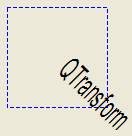
QPainter has functions to translate, scale, shear and rotate the coordinate system without using a QTransform. For example:

|
void SimpleTransformation::paintEvent(QPaintEvent *) { QPainter painter(this); painter.setPen(QPen(Qt::blue, 1, Qt::DashLine)); painter.drawRect(0, 0, 100, 100); painter.rotate(45); painter.setFont(QFont("Helvetica", 24)); painter.setPen(QPen(Qt::black, 1)); painter.drawText(20, 10, "QTransform"); } |
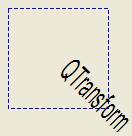
Although these functions are very convenient, it can be more efficient to build a QTransform and call QPainter::setTransform () if you want to perform more than a single transform operation. For example:
|
void CombinedTransformation::paintEvent(QPaintEvent *) { QPainter painter(this); painter.setPen(QPen(Qt::blue, 1, Qt::DashLine)); painter.drawRect(0, 0, 100, 100); QTransform transform; transform.translate(50, 50); transform.rotate(45); transform.scale(0.5, 1.0); painter.setTransform(transform); painter.setFont(QFont("Helvetica", 24)); painter.setPen(QPen(Qt::black, 1)); painter.drawText(20, 10, "QTransform"); } |
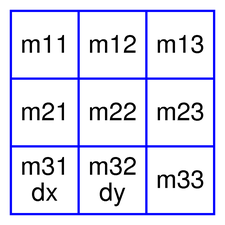
QTransform 對象包含 3 x 3 矩陣。
m31
(
dx
) 和
m32
(
dy
) 元素指定水平和垂直平移。
m11
and
m22
元素指定水平和垂直比例縮放。
m21
and
m12
elements specify horizontal and vertical
shearing
. And finally, the
m13
and
m23
elements specify horizontal and vertical projection, with
m33
as an additional projection factor.
QTransform transforms a point in the plane to another point using the following formulas:
x' = m11*x + m21*y + dx
y' = m22*y + m12*x + dy
if (!isAffine()) {
    w' = m13*x + m23*y + m33
    x' /= w'
    y' /= w'
}
點 (x, y) 是原點,和 (x', y') is the transformed point. (x', y') can be transformed back to (x, y) by performing the same operation on the inverted () matrix.
The various matrix elements can be set when constructing the matrix, or by using the setMatrix () function later on. They can also be manipulated using the translate (), rotate (), scale () 和 shear () convenience functions. The currently set values can be retrieved using the m11 (), m12 (), m13 (), m21 (), m22 (), m23 (), m31 (), m32 (), m33 (), dx () 和 dy () 函數。
Translation is the simplest transformation. Setting
dx
and
dy
will move the coordinate system
dx
units along the X axis and
dy
units along the Y axis. Scaling can be done by setting
m11
and
m22
. For example, setting
m11
to 2 and
m22
to 1.5 will double the height and increase the width by 50%. The identity matrix has
m11
,
m22
,和
m33
set to 1 (all others are set to 0) mapping a point to itself. Shearing is controlled by
m12
and
m21
. Setting these elements to values different from zero will twist the coordinate system. Rotation is achieved by setting both the shearing factors and the scaling factors. Perspective transformation is achieved by setting both the projection factors and the scaling factors.
Here's the combined transformations example using basic matrix operations:
|
void BasicOperations::paintEvent(QPaintEvent *) { const double a = qDegreesToRadians(45.0); double sina = sin(a); double cosa = cos(a); QTransform scale(0.5, 0, 0, 1.0, 0, 0); QTransform rotate(cosa, sina, -sina, cosa, 0, 0); QTransform translate(1, 0, 0, 1, 50.0, 50.0); QTransform transform = scale * rotate * translate; QPainter painter(this); painter.setPen(QPen(Qt::blue, 1, Qt::DashLine)); painter.drawRect(0, 0, 100, 100); painter.setTransform(transform); painter.setFont(QFont("Helvetica", 24)); painter.setPen(QPen(Qt::black, 1)); painter.drawText(20, 10, "QTransform"); } |
The combined transform first scales each operand, then rotates it, and finally translates it, just as in the order in which the product of its factors is written. This means the point to which the transforms are applied is implicitly multiplied on the left with the transform to its right.
The matrix notation in QTransform is the transpose of a commonly-taught convention which represents transforms and points as matrices and vectors. That convention multiplies its matrix on the left and column vector to the right. In other words, when several transforms are applied to a point, the right-most matrix acts directly on the vector first. Then the next matrix to the left acts on the result of the first operation - and so on. As a result, that convention multiplies the matrices that make up a composite transform in the reverse of the order in QTransform, as you can see in 組閤變換 . Transposing the matrices, and combining them to the right of a row vector that represents the point, lets the matrices of transforms appear, in their product, in the order in which we think of the transforms being applied to the point.
另請參閱 QPainter , 坐標係 , 仿射變換範例 ,和 變換範例 .
| 常量 | 值 |
|---|---|
QTransform::TxNone
|
0x00
|
QTransform::TxTranslate
|
0x01
|
QTransform::TxScale
|
0x02
|
QTransform::TxRotate
|
0x04
|
QTransform::TxShear
|
0x08
|
QTransform::TxProject
|
0x10
|
構造矩陣采用元素 m11 , m12 , m21 , m22 , dx and dy .
另請參閱 setMatrix ().
構造矩陣采用元素 m11 , m12 , m13 , m21 , m22 , m23 , m31 , m32 , m33 .
另請參閱 setMatrix ().
構造恒等矩陣。
所有元素被設為 0 除瞭
m11
and
m22
(指定比例) 和
m33
被設為 1。
另請參閱 reset ().
賦值給定 matrix 的值到此矩陣。
返迴水平比例縮放因子。
返迴垂直剪切因子。
返迴水平投影因子。
返迴水平剪切因子。
Returns the vertical scaling factor.
Returns the vertical projection factor.
Returns the horizontal translation factor.
另請參閱 dx (), translate (),和 基本矩陣運算 .
返迴垂直翻譯因子。
另請參閱 dy (), translate (),和 基本矩陣運算 .
Returns the division factor.
Returns the adjoint of this matrix.
返迴矩陣的行列式。
Returns the horizontal translation factor.
另請參閱 m31 (), translate (),和 基本矩陣運算 .
返迴垂直翻譯因子。
[static]
QTransform
QTransform::
fromScale
(
qreal
sx
,
qreal
sy
)
Creates a matrix which corresponds to a scaling of sx 水平和 sy vertically. This is the same as QTransform ().scale(sx, sy) but slightly faster.
該函數在 Qt 4.5 引入。
[static]
QTransform
QTransform::
fromTranslate
(
qreal
dx
,
qreal
dy
)
Creates a matrix which corresponds to a translation of dx 沿 X 軸和 dy along the y axis. This is the same as QTransform ().translate(dx, dy) but slightly faster.
該函數在 Qt 4.5 引入。
Returns an inverted copy of this matrix.
If the matrix is singular (not invertible), the returned matrix is the identity matrix. If invertible is valid (i.e. not 0), its value is set to true if the matrix is invertible, otherwise it is set to false.
另請參閱 isInvertible ().
返迴
true
if the matrix represent an affine transformation, otherwise returns
false
.
返迴
true
if the matrix is the identity matrix, otherwise returns
false
.
另請參閱 reset ().
返迴
true
若矩陣可逆,否則返迴
false
.
另請參閱 inverted ().
返迴
true
若矩陣錶示某種鏇轉變換,否則返迴
false
.
注意: A rotation transformation of 180 degrees and/or 360 degrees is treated as a scaling transformation.
另請參閱 reset ().
返迴
true
若矩陣錶示比例縮放變換,否則返迴
false
.
另請參閱 reset ().
返迴
true
若矩陣錶示平移變換,否則返迴
false
.
另請參閱 reset ().
Maps the given coordinates x and y into the coordinate system defined by this matrix. The resulting values are put in * tx 和 * ty ,分彆。
The coordinates are transformed using the following formulas:
x' = m11*x + m21*y + dx
y' = m22*y + m12*x + dy
if (!isAffine()) {
    w' = m13*x + m23*y + m33
    x' /= w'
    y' /= w'
}
The point (x, y) is the original point, and (x', y') is the transformed point.
另請參閱 基本矩陣運算 .
這是重載函數。
創建並返迴 QPoint 副本對象為給定 point , mapped into the coordinate system defined by this matrix. Note that the transformed coordinates are rounded to the nearest integer.
這是重載函數。
創建並返迴 QPointF object that is a copy of the given point, p , mapped into the coordinate system defined by this matrix.
這是重載函數。
創建並返迴 QLineF object that is a copy of the given line, l , mapped into the coordinate system defined by this matrix.
這是重載函數。
創建並返迴 QLine 副本對象為給定 line , mapped into the coordinate system defined by this matrix. Note that the transformed coordinates are rounded to the nearest integer.
這是重載函數。
創建並返迴 QPolygonF 副本對象為給定 polygon , mapped into the coordinate system defined by this matrix.
這是重載函數。
創建並返迴 QPolygon 副本對象為給定 polygon , mapped into the coordinate system defined by this matrix. Note that the transformed coordinates are rounded to the nearest integer.
這是重載函數。
創建並返迴 QRegion 副本對象為給定 region , mapped into the coordinate system defined by this matrix.
Calling this method can be rather expensive if rotations or shearing are used.
這是重載函數。
創建並返迴 QPainterPath 副本對象為給定 path , mapped into the coordinate system defined by this matrix.
這是重載函數。
Maps the given coordinates x and y into the coordinate system defined by this matrix. The resulting values are put in * tx 和 * ty , respectively. Note that the transformed coordinates are rounded to the nearest integer.
創建並返迴 QRectF 副本對象為給定 rectangle , mapped into the coordinate system defined by this matrix.
The rectangle's coordinates are transformed using the following formulas:
x' = m11*x + m21*y + dx
y' = m22*y + m12*x + dy
if (!isAffine()) {
    w' = m13*x + m23*y + m33
    x' /= w'
    y' /= w'
}
If rotation or shearing has been specified, this function returns the bounding rectangle. To retrieve the exact region the given rectangle maps to, use the mapToPolygon () 函數代替。
另請參閱 mapToPolygon () 和 基本矩陣運算 .
這是重載函數。
創建並返迴 QRect 副本對象為給定 rectangle , mapped into the coordinate system defined by this matrix. Note that the transformed coordinates are rounded to the nearest integer.
創建並返迴 QPolygon 錶示的給定 rectangle , mapped into the coordinate system defined by this matrix.
The rectangle's coordinates are transformed using the following formulas:
x' = m11*x + m21*y + dx
y' = m22*y + m12*x + dy
if (!isAffine()) {
    w' = m13*x + m23*y + m33
    x' /= w'
    y' /= w'
}
Polygons and rectangles behave slightly differently when transformed (due to integer rounding), so
matrix.map(QPolygon(rectangle))
is not always the same as
matrix.mapToPolygon(rectangle)
.
[static]
bool
QTransform::
quadToQuad
(const
QPolygonF
&
one
, const
QPolygonF
&
two
,
QTransform
&
trans
)
創建變換矩陣
trans
,映射 4 邊多邊形
one
,到另一 4 邊多邊形
two
。返迴
true
若變換是可能的;否則返迴 false。
這是方便方法組閤 quadToSquare () 和 squareToQuad () methods. It allows the input quad to be transformed into any other quad.
另請參閱 squareToQuad () 和 quadToSquare ().
[static]
bool
QTransform::
quadToSquare
(const
QPolygonF
&
quad
,
QTransform
&
trans
)
創建變換矩陣
trans
,映射 4 邊多邊形
quad
,到單位正方形。返迴
true
if the transformation is constructed or false if such a transformation does not exist.
另請參閱 squareToQuad () 和 quadToQuad ().
將矩陣重置為恒等矩陣,即,所有元素被設為 0,除瞭
m11
and
m22
(指定比例) 和
m33
被設為 1。
另請參閱 QTransform (), isIdentity (),和 基本矩陣運算 .
逆時針鏇轉坐標係按給定 angle 關於指定 axis 並返迴矩陣引用。
注意,若應用 QTransform 到由 Widget 坐標定義的點,鏇轉方嚮將是順時針,因為 Y 軸指嚮嚮下。
角度的指定是以度為單位。
另請參閱 setMatrix ().
逆時針鏇轉坐標係按給定 angle 關於指定 axis 並返迴矩陣引用。
注意,若應用 QTransform 到由 Widget 坐標定義的點,鏇轉方嚮將是順時針,因為 Y 軸指嚮嚮下。
角度的指定是以弧度為單位。
另請參閱 setMatrix ().
比例縮放坐標係按 sx 水平和 sy 垂直,並返迴矩陣引用。
另請參閱 setMatrix ().
將矩陣元素設為指定值, m11 , m12 , m13 m21 , m22 , m23 m31 , m32 and m33 。注意,此函數替換先前值。 QTransform 提供 translate (), rotate (), scale () 和 shear () convenience functions to manipulate the various matrix elements based on the currently defined coordinate system.
另請參閱 QTransform ().
剪切坐標係按 sh 水平和 sv 垂直,並返迴矩陣引用。
另請參閱 setMatrix ().
[static]
bool
QTransform::
squareToQuad
(const
QPolygonF
&
quad
,
QTransform
&
trans
)
創建變換矩陣
trans
, that maps a unit square to a four-sided polygon,
quad
。返迴
true
if the transformation is constructed or false if such a transformation does not exist.
另請參閱 quadToSquare () 和 quadToQuad ().
移動坐標係 dx 沿 X 軸和 dy 沿 Y 軸,並返迴矩陣引用。
另請參閱 setMatrix ().
返迴此矩陣的轉置。
返迴此矩陣的變換類型。
The transformation type is the highest enumeration value capturing all of the matrix's transformations. For example, if the matrix both scales and shears, the type would be
TxShear
,因為
TxShear
has a higher enumeration value than
TxScale
.
Knowing the transformation type of a matrix is useful for optimization: you can often handle specific types more optimally than handling the generic case.
返迴變換如 QVariant .
返迴
true
if this matrix is not equal to the given
matrix
,否則返迴
false
.
Returns the result of multiplying this matrix by the given matrix .
Note that matrix multiplication is not commutative, i.e. a*b != b*a.
這是重載函數。
Returns the result of multiplying this matrix by the given matrix .
這是重載函數。
Returns the result of performing an element-wise multiplication of this matrix with the given scalar .
這是重載函數。
Returns the matrix obtained by adding the given scalar to each element of this matrix.
這是重載函數。
Returns the matrix obtained by subtracting the given scalar from each element of this matrix.
這是重載函數。
Returns the result of performing an element-wise division of this matrix by the given scalar .
返迴
true
若此矩陣等於給定
matrix
,否則返迴
false
.
返迴
true
if
t1
and
t2
are equal, allowing for a small fuzziness factor for floating-point comparisons; false otherwise.
該函數在 Qt 4.6 引入。
返迴哈希值為 key ,使用 seed 做計算種子。
該函數在 Qt 5.6 引入。
這如同 matrix .map( path ).
該函數在 Qt 4.3 引入。
另請參閱 QTransform::map ().
這如同 matrix .map( point ).
另請參閱 QTransform::map ().
如同 matrix .map( point ).
另請參閱 QTransform::map ().
這如同 matrix .map( line ).
另請參閱 QTransform::map ().
這如同 matrix .map( line ).
另請參閱 QTransform::map ().
這如同 matrix .map( polygon ).
另請參閱 QTransform::map ().
這如同 matrix .map( polygon ).
該函數在 Qt 4.3 引入。
另請參閱 QTransform::map ().
這如同 matrix .map( region ).
另請參閱 QTransform::map ().
寫入給定 matrix 到給定 stream 並返迴流引用。
該函數在 Qt 4.3 引入。
另請參閱 序列化 Qt 數據類型 .
讀取給定 matrix 從給定 stream 並返迴流引用。
該函數在 Qt 4.3 引入。
另請參閱 序列化 Qt 數據類型 .
