擺動範例展示如何動畫 Widget 使用 QBasicTimer and timerEvent() 。此外,範例演示如何使用 QFontMetrics 確定屏幕中的文本大小。
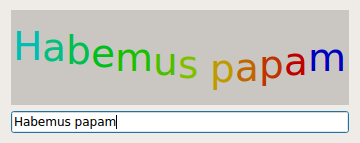
擺動範例的屏幕截圖
QBasicTimer 是針對計時器的低級類。不像 QTimer , QBasicTimer 並未繼承自 QObject ;不是發射 timeout() 信號,當經過某些數量的時間後,它會發送 QTimerEvent 到 QObject 到我們的選擇。這使 QBasicTimer 更輕量替代 QTimer 。Qt 的內置 Widget 會在內部使用它,且 Qt API 提供它是為高度優化的應用程序 (譬如:嵌入式應用程序)。
範例由 2 個類組成:
WigglyWidget
是以波浪綫顯示文本的自定義 Widget。
Dialog
是允許用戶鍵入文本的對話框 Widget。它組閤
WigglyWidget
和
QLineEdit
.
我們將首先快速查看
Dialog
類,然後審查
WigglyWidget
類。
class Dialog : public QDialog
{
    Q_OBJECT
public:
    explicit Dialog(QWidget *parent = 0);
};
The
Dialog
類提供允許用戶鍵入文本的對話框 widget。然後文本的渲染是通過
WigglyWidget
.
Dialog::Dialog(QWidget *parent)
    : QDialog(parent)
{
    WigglyWidget *wigglyWidget = new WigglyWidget;
    QLineEdit *lineEdit = new QLineEdit;
    QVBoxLayout *layout = new QVBoxLayout(this);
    layout->addWidget(wigglyWidget);
    layout->addWidget(lineEdit);
    connect(lineEdit, &QLineEdit::textChanged, wigglyWidget, &WigglyWidget::setText);
    lineEdit->setText(tr("Hello world!"));
    setWindowTitle(tr("Wiggly"));
    resize(360, 145);
}
在構造函數中,創建擺動 Widget 除瞭
行編輯
, and we put the two widgets in a vertical layout. We connect the line edit's
textChanged()
signal to the wiggly widget's
setText()
slot to obtain the real time interaction with the wiggly widget. The widget's default text is "Hello world!".
class WigglyWidget : public QWidget
{
    Q_OBJECT
public:
    WigglyWidget(QWidget *parent = 0);
public slots:
    void setText(const QString &newText) { text = newText; }
protected:
    void paintEvent(QPaintEvent *event) override;
    void timerEvent(QTimerEvent *event) override;
private:
    QBasicTimer timer;
    QString text;
    int step;
};
The
WigglyWidget
class provides the wiggly line displaying the text. We subclass
QWidget
and reimplement the standard
paintEvent()
and
timerEvent()
functions to draw and update the widget. In addition we implement a public
setText()
slot that sets the widget's text.
The
timer
變量,類型
QBasicTimer
, is used to update the widget at regular intervals, making the widget move. The
text
variable is used to store the currently displayed text, and
step
to calculate position and color for each character on the wiggly line.
WigglyWidget::WigglyWidget(QWidget *parent)
    : QWidget(parent)
{
    setBackgroundRole(QPalette::Midlight);
    setAutoFillBackground(true);
    QFont newFont = font();
    newFont.setPointSize(newFont.pointSize() + 20);
    setFont(newFont);
    step = 0;
    timer.start(60, this);
}
In the constructor, we make the widget's background slightly lighter than the usual background using the QPalette::Midlight color role. The background role defines the brush from the widget's palette that Qt uses to paint the background. Then we enlarge the widget's font with 20 points.
Finally we start the timer; the call to QBasicTimer::start () makes sure that this particular wiggly widget will receive the timer events generated when the timer times out (every 60 milliseconds).
void WigglyWidget::paintEvent(QPaintEvent * /* event */)
{
    static const int sineTable[16] = {
        0, 38, 71, 92, 100, 92, 71, 38, 0, -38, -71, -92, -100, -92, -71, -38
    };
    QFontMetrics metrics(font());
    int x = (width() - metrics.horizontalAdvance(text)) / 2;
    int y = (height() + metrics.ascent() - metrics.descent()) / 2;
    QColor color;
The
paintEvent()
function is called whenever a
QPaintEvent
is sent to the widget. Paint events are sent to widgets that need to update themselves, for instance when part of a widget is exposed because a covering widget was moved. For the wiggly widget, a paint event will also be generated every 60 milliseconds from the
timerEvent()
槽。
The
sineTable
represents y-values of the sine curve, multiplied by 100. It is used to make the wiggly widget move along the sine curve.
The
QFontMetrics
object provides information about the widget's font. The
x
variable is the horizontal position where we start drawing the text. The
y
variable is the vertical position of the text's base line. Both variables are computed so that the text is horizontally and vertically centered. To compute the base line, we take into account the font's ascent (the height of the font above the base line) and font's descent (the height of the font below the base line). If the descent equals the ascent, they cancel out each other and the base line is at
height()
/ 2.
    QPainter painter(this);
    for (int i = 0; i < text.size(); ++i) {
        int index = (step + i) % 16;
        color.setHsv((15 - index) * 16, 255, 191);
        painter.setPen(color);
        painter.drawText(x, y - ((sineTable[index] * metrics.height()) / 400),
                         QString(text[i]));
        x += metrics.horizontalAdvance(text[i]);
    }
}
Each time the
paintEvent()
function is called, we create a
QPainter
對象
painter
to draw the contents of the widget. For each character in
text
, we determine the color and the position on the wiggly line based on
step
. In addition,
x
is incremented by the character's width.
For simplicity, we assume that
QFontMetrics::horizontalAdvance
(
text
) returns the sum of the individual character advances (
QFontMetrics::horizontalAdvance
(
text[i]
)). In practice, this is not always the case because
QFontMetrics::horizontalAdvance
(
text
) also takes into account the kerning between certain letters (e.g., 'A' and 'V'). The result is that the text isn't perfectly centered. You can verify this by typing "AVAVAVAVAVAV" in the line edit.
void WigglyWidget::timerEvent(QTimerEvent *event)
{
    if (event->timerId() == timer.timerId()) {
        ++step;
        update();
    } else {
        QWidget::timerEvent(event);
    }
The
timerEvent()
function receives all the timer events that are generated for this widget. If a timer event is sent from the widget's
QBasicTimer
,遞增
step
以使文本移動,和調用
QWidget::update
() to refresh the display. Any other timer event is passed on to the base class's implementation of the
timerEvent()
函數。
The
QWidget::update
() slot does not cause an immediate repaint; instead the slot schedules a paint event for processing when Qt returns to the main event loop. The paint events are then handled by
WigglyWidget
's
paintEvent()
函數。
文件:
