The QFontMetrics 類提供字體規格信息。 更多...
| 頭: | #include <QFontMetrics> |
| qmake: | QT += gui |
注意: 此類的所有函數 可重入 .
| QFontMetrics (const QFont & font ) | |
| QFontMetrics (const QFont & font , QPaintDevice * paintdevice ) | |
| QFontMetrics (const QFontMetrics & fm ) | |
| ~QFontMetrics () | |
| int | ascent () const |
| int | averageCharWidth () const |
| QRect | boundingRect (QChar ch ) const |
| QRect | boundingRect (const QString & text ) const |
| QRect | boundingRect (const QRect & rect , int flags , const QString & text , int tabStops = 0, int * tabArray = nullptr) const |
| QRect | boundingRect (int x , int y , int width , int height , int flags , const QString & text , int tabStops = 0, int * tabArray = nullptr) const |
| int | capHeight () const |
| int | descent () const |
| QString | elidedText (const QString & text , Qt::TextElideMode mode , int width , int flags = 0) const |
| int | height () const |
| int | horizontalAdvance (const QString & text , int len = -1) const |
| int | horizontalAdvance (QChar ch ) const |
| bool | inFont (QChar ch ) const |
| bool | inFontUcs4 (uint ucs4 ) const |
| int | leading () const |
| int | leftBearing (QChar ch ) const |
| int | lineSpacing () const |
| int | lineWidth () const |
| int | maxWidth () const |
| int | minLeftBearing () const |
| int | minRightBearing () const |
| int | overlinePos () const |
| int | rightBearing (QChar ch ) const |
| QSize | size (int flags , const QString & text , int tabStops = 0, int * tabArray = nullptr) const |
| int | strikeOutPos () const |
| void | swap (QFontMetrics & other ) |
| QRect | tightBoundingRect (const QString & text ) const |
| int | underlinePos () const |
| int | xHeight () const |
| bool | operator!= (const QFontMetrics & other ) const |
| QFontMetrics & | operator= (const QFontMetrics & fm ) |
| QFontMetrics & | operator= (QFontMetrics && other ) |
| bool | operator== (const QFontMetrics & other ) const |
The QFontMetrics 類提供字體規格信息。
QFontMetrics 函數計算給定字體的字符和字符串的大小。有 3 種方式可以創建 QFontMetrics 對象:
(注意:若使用打印機字體,返迴值可能不精確。打印機字體並非始終可訪問,所以使用最接近的屏幕字體,若有提供打印機字體)
一旦創建,對象就能提供對字體及其字符各種指標的訪問函數,和按字體渲染字符串的函數。
有運轉於字體的幾個函數: ascent (), descent (), height (), leading () 和 lineSpacing () 返迴字體的基本大小特性。 underlinePos (), overlinePos (), strikeOutPos () 和 lineWidth () 函數,返迴下劃綫、上劃綫或刪除綫字符的行屬性。這些函數都很快。
還有運轉於字體字形集的一些函數: minLeftBearing (), minRightBearing () 和 maxWidth ()。這些必然很慢,且推薦避免使用它們,若可能的話。
For each character, you can get its width(), leftBearing () 和 rightBearing () 和找齣它是否在字體中是使用 inFont ()。也可以將字符視為字符串,並對它使用字符串函數。
The string functions include width(), to return the width of a string in pixels (or points, for a printer), boundingRect () 返迴包含渲染字符串的足夠大矩形,和 size () 返迴該矩形的大小。
範例:
QFont font("times", 24);
QFontMetrics fm(font);
int pixelsWide = fm.horizontalAdvance("What's the width of this text?");
int pixelsHigh = fm.height();
另請參閱 QFont , QFontInfo , QFontDatabase ,和 字符映射範例 .
構造字體規格對象為 font .
字體規格將兼容的描繪設備用於創建 font .
The font metrics object holds the information for the font that is passed in the constructor at the time it is created, and is not updated if the font's attributes are changed later.
使用 QFontMetrics (const QFont &, QPaintDevice *) to get the font metrics that are compatible with a certain paint device.
構造字體規格對象為 font and paintdevice .
字體規格將兼容傳遞 paintdevice。若 paintdevice is 0, the metrics will be screen-compatible, ie. the metrics you get if you use the font for drawing text on a widgets or pixmaps ,不在 QPicture or QPrinter.
The font metrics object holds the information for the font that is passed in the constructor at the time it is created, and is not updated if the font's attributes are changed later.
構造副本為 fm .
銷毀字體規格對象並釋放所有分配資源。
返迴字體的上升。
字體的上升是從基綫到字符最高位置的延伸距離。實踐中,一些字體設計者打破瞭此規則,如:當在字符頂部放置多個重音時 (或為容納外來語言中的不尋常字符),所以此值很小是可能的 (盡管罕見)。
另請參閱 descent ().
返迴字體字形的平均寬度。
該函數在 Qt 4.2 引入。
返迴由墨跡覆蓋的矩形,若字符 ch 被繪製在坐標係原點處。
Note that the bounding rectangle may extend to the left of (0, 0) (e.g., for italicized fonts), and that the text output may cover all pixels in the bounding rectangle. For a space character the rectangle will usually be empty.
注意,矩形通常在基綫的上方和下方都有延伸。
警告: The width of the returned rectangle is not the advance width of the character. Use boundingRect(const QString &) 或 horizontalAdvance () 代替。
另請參閱 width ().
返迴字符串中字符的邊界矩形指定通過 text 。邊界矩形始終至少覆蓋文本將覆蓋的像素集,若在 (0,0) 處繪製。
Note that the bounding rectangle may extend to the left of (0, 0), e.g. for italicized fonts, and that the width of the returned rectangle might be different than what the width() method returns.
若想要知道字符串的推進寬度 (以將一組字符串彼此相鄰布置),使用 horizontalAdvance () 代替。
換行符被處理成正常字符, not 作為換行。
邊界矩形的高度至少一樣大如值返迴通過 height ().
另請參閱 width (), height (), QPainter::boundingRect (),和 tightBoundingRect ().
這是重載函數。
返迴字符串中字符的邊界矩形指定通過 text , which is the set of pixels the text would cover if drawn at (0, 0). The drawing, and hence the bounding rectangle, is constrained to the rectangle rect .
The flags 自變量是下列標誌的按位 OR:
Qt::AlignHCenter | Qt::AlignVCenter
)
Qt::Horizontal 對齊默認為 Qt::AlignLeft 和垂直對齊默認為 Qt::AlignTop .
若有設置幾個水平對齊標誌 (或幾個垂直對齊標誌),結果對齊未定義。
若 Qt::TextExpandTabs 有設置在 flags ,那麼:若 tabArray is non-null, it specifies a 0-terminated sequence of pixel-positions for tabs; otherwise if tabStops is non-zero, it is used as the tab spacing (in pixels).
Note that the bounding rectangle may extend to the left of (0, 0), e.g. for italicized fonts, and that the text output may cover all pixels in the bounding rectangle.
換行符會被處理成換行。
盡管實際高度不同,但是 Yes 和 Yes 的邊界矩形高度是相同的。
The bounding rectangle returned by this function is somewhat larger than that calculated by the simpler boundingRect () function. This function uses the maximum left and right font bearings as is necessary for multi-line text to align correctly. Also, fontHeight() and lineSpacing () are used to calculate the height, rather than individual character heights.
另請參閱 width (), QPainter::boundingRect (),和 Qt::Alignment .
這是重載函數。
返迴邊界矩形為給定 text within the rectangle specified by the x and y 坐標, width ,和 height .
若 Qt::TextExpandTabs 有設置在 flags and tabArray is non-null, it specifies a 0-terminated sequence of pixel-positions for tabs; otherwise, if tabStops is non-zero, it is used as the tab spacing (in pixels).
返迴字體的大寫高度。
The cap height of a font is the height of a capital letter above the baseline. It specifically is the height of capital letters that are flat - such as H or I - as opposed to round letters such as O, or pointed letters like A, both of which may display overshoot.
該函數在 Qt 5.8 引入。
另請參閱 ascent ().
返迴字體的下降。
下降是從基綫到字符最低點的延伸距離。實踐中,一些字體設計者打破瞭此規則,如:為容納外來語言中的不尋常字符,所以此值很小是可能的 (盡管罕見)。
另請參閱 ascent ().
若字符串 text 寬於 width ,返迴省略版本的字符串 (即:字符串在其中帶有 ...)。否則,返迴原始字符串。
The mode parameter specifies whether the text is elided on the left (e.g., "...tech"), in the middle (e.g., "Tr...ch"), or on the right (e.g., "Trol...").
The width 以像素為單位指定,而不是字符。
The flags 自變量是可選的,且目前隻支持 Qt::TextShowMnemonic 作為值。
省略標記遵循
layoutdirection
。例如,它在文本右側對於從右到左布局若
mode
is
Qt::ElideLeft
,和在文本左側若
mode
is
Qt::ElideRight
.
該函數在 Qt 4.2 引入。
返迴字體的高度。
另請參閱 leading () 和 lineSpacing ().
返迴橫嚮推進 (以像素為單位) 為首 len 字符的 text 。若 len 為負 (默認),使用整個字符串。
這是適閤繪製後續字符的距離後於 text .
該函數在 Qt 5.11 引入。
另請參閱 boundingRect ().
這是重載函數。
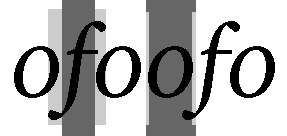
返迴橫嚮推進為字符 ch 以像素為單位。這是適閤繪製後續字符的距離後於 ch .
Some of the metrics are described in the image. The central dark rectangles cover the logical horizontalAdvance () of each character. The outer pale rectangles cover the leftBearing () 和 rightBearing () of each character. Notice that the bearings of "f" in this particular font are both negative, while the bearings of "o" are both positive.
警告: This function will produce incorrect results for Arabic characters or non-spacing marks in the middle of a string, as the glyph shaping and positioning of marks that happens when processing strings cannot be taken into account. When implementing an interactive text control, use QTextLayout 代替。
該函數在 Qt 5.11 引入。
另請參閱 boundingRect ().
返迴
true
若字符
ch
是字體中的有效字符;否則返迴
false
.
返迴
true
若字符
ucs4
以 UCS-4/UTF-32 編碼的是字體中的有效字符;否則返迴
false
.
返迴字體的行間距。
這是自然行間的間距。
另請參閱 height () 和 lineSpacing ().
返迴左傾角為字符 ch 按字體。
The left bearing is the right-ward distance of the left-most pixel of the character from the logical origin of the character. This value is negative if the pixels of the character extend to the left of the logical origin.
See width() for a graphical description of this metric.
另請參閱 rightBearing (), minLeftBearing (),和 width ().
返迴從一基綫到下一基綫的距離。
返迴下劃綫和刪除綫的寬度,調節字體的點大小。
另請參閱 underlinePos (), overlinePos (),和 strikeOutPos ().
返迴字體中最寬字符的寬度。
返迴字體的最小左傾角。
這是最小 leftBearing (字符) 對於字體中的所有字符。
注意:此函數會非常慢,若字體很大。
另請參閱 minRightBearing () 和 leftBearing ().
返迴字體的最小右傾角。
這是最小 rightBearing (字符) 對於字體中的所有字符。
注意:此函數會非常慢,若字體很大。
另請參閱 minLeftBearing () 和 rightBearing ().
返迴基綫到應繪製上劃綫的距離。
另請參閱 underlinePos (), strikeOutPos (),和 lineWidth ().
返迴右傾角為字符 ch 按字體。
The right bearing is the left-ward distance of the right-most pixel of the character from the logical origin of a subsequent character. This value is negative if the pixels of the character extend to the right of the width() of the character.
See width() for a graphical description of this metric.
另請參閱 leftBearing (), minRightBearing (),和 width ().
返迴像素大小為 text .
The flags 自變量是下列標誌的按位 OR:
若 Qt::TextExpandTabs 有設置在 flags ,那麼:若 tabArray is non-null, it specifies a 0-terminated sequence of pixel-positions for tabs; otherwise if tabStops is non-zero, it is used as the tab spacing (in pixels).
換行符會被處理成換行。
盡管實際高度不同,但是 Yes 和 Yes 的邊界矩形高度是相同的。
另請參閱 boundingRect ().
返迴基綫到應繪製刪除綫的距離。
另請參閱 underlinePos (), overlinePos (),和 lineWidth ().
交換此字體規格實例同 other 。此函數非常快且從不失敗。
該函數在 Qt 5.0 引入。
返迴圍繞字符串中字符的緊密邊界矩形指定通過 text 。邊界矩形始終至少覆蓋文本將覆蓋的像素集,若在 (0,0) 處繪製。
Note that the bounding rectangle may extend to the left of (0, 0), e.g. for italicized fonts, and that the width of the returned rectangle might be different than what the width() method returns.
若想要知道字符串的推進寬度 (以將一組字符串彼此相鄰布置),使用 horizontalAdvance () 代替。
換行符被處理成正常字符, not 作為換行。
警告: 在 Windows 調用此方法很慢。
該函數在 Qt 4.3 引入。
另請參閱 width (), height (),和 boundingRect ().
返迴基綫到應繪製下劃綫的距離。
另請參閱 overlinePos (), strikeOutPos (),和 lineWidth ().
返迴字體的 x 高度。這經常但並不總是與字符 x 的高度相同。
返迴
true
if
other
不等於此對象;否則返迴
false
.
認為 2 種字體規格相等,若它們構造自同一 QFont 且認為構造它們的描繪設備是兼容的。
另請參閱 operator== ().
賦值字體規格 fm .
移動賦值 other 到此 QFontMetrics 實例。
該函數在 Qt 5.2 引入。
返迴
true
if
other
等於此對象;否則返迴
false
.
認為 2 種字體規格相等,若它們構造自同一 QFont 且認為構造它們的描繪設備是兼容的。
另請參閱 operator!= ().
