The QPalette 類包含各 Widget 狀態的顔色組。 更多...
| 頭: | #include <QPalette> |
| qmake: | QT += gui |
| enum | ColorGroup { Disabled, Active, Inactive, Normal } |
| enum | ColorRole { Window, Background, WindowText, Foreground, ..., NoRole } |
| QPalette () | |
| QPalette (const QColor & button ) | |
| QPalette (Qt::GlobalColor button ) | |
| QPalette (const QColor & button , const QColor & window ) | |
| QPalette (const QBrush & windowText , const QBrush & button , const QBrush & light , const QBrush & dark , const QBrush & mid , const QBrush & text , const QBrush & bright_text , const QBrush & base , const QBrush & window ) | |
| QPalette (const QPalette & p ) | |
| QPalette (QPalette && other ) | |
| ~QPalette () | |
| const QBrush & | alternateBase () const |
| const QBrush & | base () const |
| const QBrush & | brightText () const |
| const QBrush & | brush (QPalette::ColorGroup group , QPalette::ColorRole role ) const |
| const QBrush & | brush (QPalette::ColorRole role ) const |
| const QBrush & | button () const |
| const QBrush & | buttonText () const |
| qint64 | cacheKey () const |
| const QColor & | color (QPalette::ColorGroup group , QPalette::ColorRole role ) const |
| const QColor & | color (QPalette::ColorRole role ) const |
| QPalette::ColorGroup | currentColorGroup () const |
| const QBrush & | dark () const |
| const QBrush & | highlight () const |
| const QBrush & | highlightedText () const |
| bool | isBrushSet (QPalette::ColorGroup cg , QPalette::ColorRole cr ) const |
| bool | isCopyOf (const QPalette & p ) const |
| bool | isEqual (QPalette::ColorGroup cg1 , QPalette::ColorGroup cg2 ) const |
| const QBrush & | light () const |
| const QBrush & | link () const |
| const QBrush & | linkVisited () const |
| const QBrush & | mid () const |
| const QBrush & | midlight () const |
| const QBrush & | placeholderText () const |
| QPalette | resolve (const QPalette & other ) const |
| void | setBrush (QPalette::ColorRole role , const QBrush & brush ) |
| void | setBrush (QPalette::ColorGroup group , QPalette::ColorRole role , const QBrush & brush ) |
| void | setColor (QPalette::ColorGroup group , QPalette::ColorRole role , const QColor & color ) |
| void | setColor (QPalette::ColorRole role , const QColor & color ) |
| void | setColorGroup (QPalette::ColorGroup cg , const QBrush & windowText , const QBrush & button , const QBrush & light , const QBrush & dark , const QBrush & mid , const QBrush & text , const QBrush & bright_text , const QBrush & base , const QBrush & window ) |
| void | setCurrentColorGroup (QPalette::ColorGroup cg ) |
| const QBrush & | shadow () const |
| void | swap (QPalette & other ) |
| const QBrush & | text () const |
| const QBrush & | toolTipBase () const |
| const QBrush & | toolTipText () const |
| const QBrush & | window () const |
| const QBrush & | windowText () const |
| QVariant | operator QVariant () const |
| bool | operator!= (const QPalette & p ) const |
| QPalette & | operator= (const QPalette & p ) |
| QPalette & | operator= (QPalette && other ) |
| bool | operator== (const QPalette & p ) const |
| const QMetaObject | staticMetaObject |
| QDataStream & | operator<< (QDataStream & s , const QPalette & p ) |
| QDataStream & | operator>> (QDataStream & s , QPalette & p ) |
The QPalette 類包含各 Widget 狀態的顔色組。
調色闆由 3 個顔色組組成: Active , Disabled ,和 Inactive 。Qt 中的所有 Widget 都包含調色闆,並使用它們的調色闆來繪製自己。這使 UI (用戶界麵) 變得易於配置,且更容易保持一緻性。
若創建新的 Widget,強烈推薦使用調色闆中的顔色,而不是硬編碼特定顔色。
顔色組:
活動和不活動窗口兩者,可以包含禁用 Widget (被禁用 Widget 經常被稱為 不可訪問 or 變灰 )。
大多數風格,Active 和 Inactive 看起來一樣。
可以為調色闆的任何顔色組中的特定角色,設置顔色和筆刷采用 setColor () 和 setBrush ()。顔色組包含用於繪製 Widget 自身的一組顔色。推薦 Widget 使用來自調色闆的顔色組角色 (譬如:foreground 和 base),而不是像 "紅色" 或 "綠鬆石色" 的文字顔色。顔色角色的枚舉和定義在 ColorRole 文檔編製。
強烈推薦使用當前風格的默認調色闆 (返迴通過 QGuiApplication::palette ()) 並按需求修改。這由 Qt 小部件完成的,當繪製它們時。
要修改顔色組,調用函數 setColor () 和 setBrush (),從屬想要純色,或像素圖模式。
還有相應的 color () 和 brush () getter,和常用方便函數以獲取 ColorRole 對於當前 ColorGroup : window (), windowText (), base (),等。
可以使用拷貝構造函數拷貝調色闆,並測試看 2 調色闆是否 identical 使用 isCopyOf ().
QPalette is optimized by the use of 隱式共享 , so it is very efficient to pass QPalette objects as arguments.
警告: Some styles do not use the palette for all drawing, for instance, if they make use of native theme engines. This is the case for both the Windows Vista and the macOS styles.
另請參閱 QApplication::setPalette (), QWidget::setPalette (),和 QColor .
| 常量 | 值 | 描述 |
|---|---|---|
QPalette::Disabled
|
1
|
|
QPalette::Active
|
0
|
|
QPalette::Inactive
|
2
|
|
QPalette::Normal
|
Active
|
Active 的同義詞 |
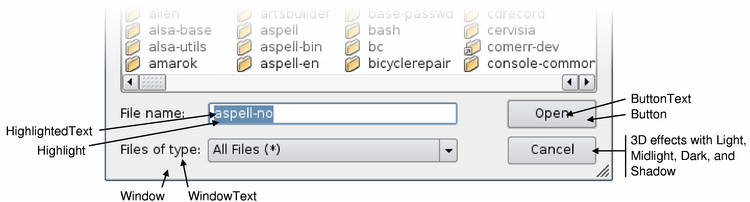
ColorRole 枚舉定義當前 GUI 中使用的不同符號顔色角色。
中心角色包括:
| 常量 | 值 | 描述 |
|---|---|---|
QPalette::Window
|
10
|
一般背景色。 |
QPalette::Background
|
Window
|
This value is obsolete. Use Window instead. |
QPalette::WindowText
|
0
|
一般前景色。 |
QPalette::Foreground
|
WindowText
|
This value is obsolete. Use WindowText instead. |
QPalette::Base
|
9
|
主要用作文本錄入 Widget 的背景色,但也可用於其它描繪 (譬如:組閤框下拉列錶和工具欄手柄的背景)。它通常為白色,或另一淺色。 |
QPalette::AlternateBase
|
16
|
在交替行顔色的視圖中用作替代背景色 (見 QAbstractItemView::setAlternatingRowColors ()). |
QPalette::ToolTipBase
|
18
|
用作背景色對於 QToolTip and QWhatsThis 。工具提示使用 Inactive (不活動) 顔色組對於 QPalette ,因為工具提示不是活動窗口。 |
QPalette::ToolTipText
|
19
|
用作前景顔色對於 QToolTip and QWhatsThis 。工具提示使用 Inactive (不活動) 顔色組對於 QPalette ,因為工具提示不是活動窗口。 |
QPalette::PlaceholderText
|
20
|
用作各種文本輸入 Widget 的占位符顔色。該枚舉值在 Qt 5.12 引入 |
QPalette::Text
|
6
|
前景顔色使用
基
。這通常如同
WindowText
,在這種情況下,它必須提供很好的對比與
Window
and
基
.
|
QPalette::Button
|
1
|
一般按鈕的背景色。此背景可以不同於
Window
因為有些樣式要求不同背景色對於按鈕。
|
QPalette::ButtonText
|
8
|
前景顔色使用
Button
顔色。
|
QPalette::BrightText
|
7
|
文本顔色很不同於
WindowText
,且有鮮明對比與
Dark
。通常用於需要繪製的文本,其中
文本
or
WindowText
會給齣較差的對比 (譬如:按下按鈕)。注意,文本顔色可以用於除僅單詞外的東西;文本顔色
usually
用於文本,但綫條、圖標、等使用文本顔色角色也非常常見。
|
有一些顔色角色主要用於 3D 斜角和陰影效果。所有這些通常派生自
Window
,並以依賴這種關係的方式被使用。例如,按鈕依賴它以使斜角看起來很有吸引力,和 Motif 滾動條依賴於
Mid
稍微不同於
Window
.
| 常量 | 值 | 描述 |
|---|---|---|
QPalette::Light
|
2
|
更亮比
Button
顔色。
|
QPalette::Midlight
|
3
|
介於
Button
and
Light
.
|
QPalette::Dark
|
4
|
更暗比
Button
.
|
QPalette::Mid
|
5
|
介於
Button
and
Dark
.
|
QPalette::Shadow
|
11
|
非常深的顔色。默認情況下,陰影顔色為 Qt::black . |
被選中 (標記) 的項有 2 種角色:
| 常量 | 值 | 描述 |
|---|---|---|
QPalette::Highlight
|
12
|
指示選定項 (或當前項) 的顔色。默認情況下,高亮顔色為 Qt::darkBlue . |
QPalette::HighlightedText
|
13
|
文本顔色形成對比與
Highlight
。默認情況下,高亮文本顔色為
Qt::white
.
|
有 2 超鏈接相關顔色角色:
| 常量 | 值 | 描述 |
|---|---|---|
QPalette::Link
|
14
|
用於未拜訪超鏈接的文本顔色。默認情況下,鏈接顔色為 Qt::blue . |
QPalette::LinkVisited
|
15
|
用於已拜訪超鏈接的文本顔色。默認情況下,鏈接拜訪顔色為 Qt::magenta . |
注意,不要使用
Link
and
LinkVisited
角色,當在 Qt 中渲染富文本時,推薦使用 CSS 和
QTextDocument::setDefaultStyleSheet
() 函數來更改鏈接的外觀。例如:
    QTextBrowser browser;
    QColor linkColor(Qt::red);
    QString sheet = QString::fromLatin1("a { text-decoration: underline; color: %1 }").arg(linkColor.name());
    browser.document()->setDefaultStyleSheet(sheet);
| 常量 | 值 | 描述 |
|---|---|---|
QPalette::NoRole
|
17
|
沒有角色;此特殊角色經常用於指示,沒有賦值角色。 |
Constructs a palette object that uses the application's default palette.
另請參閱 QApplication::setPalette () 和 QApplication::palette ().
構造調色闆從
button
顔色。其它顔色是自動計算的,基於此顔色。
Window
也會是按鈕顔色。
構造調色闆從
button
顔色。其它顔色是自動計算的,基於此顔色。
Window
也會是按鈕顔色。
構造調色闆從 button 顔色和 window 。其它顔色是基於這些顔色自動計算的。
構造調色闆。可以傳遞畫筆、像素圖、或純色為 windowText , button , light , dark , mid , text , bright_text , base and window .
另請參閱 QBrush .
構造副本為 p .
此構造函數很快感謝 隱式共享 .
移動構造 QPalette 實例,使之指嚮同一對象如 other 所指嚮的。
在被移動後,隻可以賦值給或銷毀 other 。任何其它操作都將導緻未定義行為。
該函數在 Qt 5.4 引入。
銷毀調色闆。
返迴當前顔色組的替代基筆刷。
返迴當前顔色組的基畫筆。
返迴當前顔色組的亮文本前景筆刷。
返迴筆刷按指定顔色 group ,用於給定顔色 role .
另請參閱 color (), setBrush (),和 ColorRole .
這是重載函數。
返迴已設置的筆刷為給定顔色 role 在當前 ColorGroup .
另請參閱 color (), setBrush (),和 ColorRole .
返迴當前顔色組的按鈕筆刷。
返迴當前顔色組的按鈕文本前景筆刷。
返迴內容標識數對於此 QPalette 對象。截然不同的 QPalette 對象可以擁有相同鍵,若它們引用相同內容。
cacheKey() 會改變,當變更調色闆時。
返迴顔色按指定顔色 group ,用於給定顔色 role .
另請參閱 brush (), setColor (),和 ColorRole .
這是重載函數。
返迴已設置的顔色為給定顔色 role 在當前 ColorGroup .
返迴調色闆的當前顔色組。
另請參閱 setCurrentColorGroup ().
返迴當前顔色組的深色筆刷。
返迴當前顔色組的高亮筆刷。
返迴當前顔色組的高亮文本筆刷。
返迴
true
若
ColorGroup
cg
and
ColorRole
cr
先前在此調色闆中有設置;否則返迴
false
.
該函數在 Qt 4.2 引入。
另請參閱 setBrush ().
返迴
true
若此調色闆和
p
是彼此的副本 (即:它們中的一個是作為其它的副本創建的,且隨後未修改);否則返迴
false
。這比相等嚴格得多。
另請參閱 operator= () 和 operator== ().
返迴
true
(通常很快) 若顔色組
cg1
等於
cg2
;否則返迴
false
.
返迴當前顔色組的淺色筆刷。
返迴當前顔色組未拜訪的鏈接文本筆刷。
返迴當前顔色組拜訪的鏈接文本筆刷。
返迴當前顔色組的中間筆刷。
返迴當前顔色組的中光筆刷。
返迴當前顔色組的占位符文本筆刷。
注意: Before Qt 5.12, the placeholder text color was hard-coded in the code as QPalette::text (). color () where an alpha of 128 was applied. We continue to support this behavior by default, unless you set your own brush. One can get back the original placeholder color setting the special QBrush default constructor as placeholder brush.
該函數在 Qt 5.12 引入。
返迴新的 QPalette that has attributes copied from other .
設置筆刷為給定顔色 role 到指定 brush 為調色闆中的所有組。
另請參閱 brush (), setColor (),和 ColorRole .
這是重載函數。
設置筆刷按指定顔色 group ,用於給定顔色 role ,到 brush .
另請參閱 brush (), setColor (),和 ColorRole .
設置顔色按指定顔色 group ,用於給定顔色 role ,到指定純 color .
另請參閱 setBrush (), color (),和 ColorRole .
這是重載函數。
設置的顔色用於給定顔色 role ,在所有顔色組,到指定純 color .
另請參閱 brush (), setColor (),和 ColorRole .
設置組按 cg 。可以傳遞畫筆、像素圖、或純色為 windowText , button , light , dark , mid , text , bright_text , base and window .
另請參閱 QBrush .
把調色闆的當前顔色組設為 cg .
另請參閱 currentColorGroup ().
返迴當前顔色組的陰影筆刷。
交換此調色闆實例與 other 。此函數非常快且從不失敗。
該函數在 Qt 5.0 引入。
返迴當前顔色組的文本前景筆刷。
返迴當前顔色組的工具提示基筆刷。此筆刷用於 QToolTip and QWhatsThis .
注意: 工具提示使用 Inactive (不活動) 顔色組對於 QPalette ,因為工具提示不是活動窗口。
該函數在 Qt 4.4 引入。
返迴當前顔色組的工具提示文本筆刷。此筆刷用於 QToolTip and QWhatsThis .
注意: 工具提示使用 Inactive (不活動) 顔色組對於 QPalette ,因為工具提示不是活動窗口。
該函數在 Qt 4.4 引入。
返迴當前顔色組的窗口 (一般背景) 筆刷。
返迴當前顔色組的窗口文本 (一般前景) 筆刷。
返迴調色闆作為 QVariant
返迴
true
(很慢) 若此調色闆不同於
p
;否則返迴
false
(通常很快)。
注意: 當前 ColorGroup 不考慮,當比較調色闆時
另請參閱 operator== ().
賦值 p 到此調色闆,並返迴此調色闆的引用。
此操作很快,感謝 隱式共享 .
移動賦值 other 到此 QPalette 實例。
該函數在 Qt 5.2 引入。
返迴
true
(通常很快) 若此調色闆等於
p
;否則返迴
false
(很慢)。
注意: 當前 ColorGroup 不考慮,當比較調色闆時
另請參閱 operator!= ().
寫入調色闆 p 到流 s 並返迴流引用。
另請參閱 QDataStream 運算符格式 .
讀取調色闆從流 s 到調色闆 p ,並返迴流引用。
另請參閱 QDataStream 運算符格式 .
