The QColor 類提供基於 RGB、HSV 或 CMYK 值的顔色。 更多...
| 頭: | #include <QColor> |
| qmake: | QT += gui |
| enum | NameFormat { HexRgb, HexArgb } |
| enum | Spec { Rgb, Hsv, Cmyk, Hsl, Invalid } |
| QColor () | |
| QColor (Qt::GlobalColor color ) | |
| QColor (int r , int g , int b , int a = ...) | |
| QColor (QRgb color ) | |
| QColor (QRgba64 rgba64 ) | |
| QColor (const QString & name ) | |
| QColor (QStringView name ) | |
| QColor (const char * name ) | |
| QColor (QLatin1String name ) | |
| QColor (const QColor & color ) | |
| QColor (QColor && other ) | |
| int | alpha () const |
| qreal | alphaF () const |
| int | black () const |
| qreal | blackF () const |
| int | blue () const |
| qreal | blueF () const |
| QColor | convertTo (QColor::Spec colorSpec ) const |
| int | cyan () const |
| qreal | cyanF () const |
| QColor | darker (int factor = 200) const |
| void | getCmyk (int * c , int * m , int * y , int * k , int * a = nullptr) |
| void | getCmykF (qreal * c , qreal * m , qreal * y , qreal * k , qreal * a = nullptr) |
| void | getHsl (int * h , int * s , int * l , int * a = nullptr) const |
| void | getHslF (qreal * h , qreal * s , qreal * l , qreal * a = nullptr) const |
| void | getHsv (int * h , int * s , int * v , int * a = nullptr) const |
| void | getHsvF (qreal * h , qreal * s , qreal * v , qreal * a = nullptr) const |
| void | getRgb (int * r , int * g , int * b , int * a = nullptr) const |
| void | getRgbF (qreal * r , qreal * g , qreal * b , qreal * a = nullptr) const |
| int | green () const |
| qreal | greenF () const |
| int | hslHue () const |
| qreal | hslHueF () const |
| int | hslSaturation () const |
| qreal | hslSaturationF () const |
| int | hsvHue () const |
| qreal | hsvHueF () const |
| int | hsvSaturation () const |
| qreal | hsvSaturationF () const |
| int | hue () const |
| qreal | hueF () const |
| bool | isValid () const |
| QColor | lighter (int factor = 150) const |
| int | lightness () const |
| qreal | lightnessF () const |
| int | magenta () const |
| qreal | magentaF () const |
| QString | name () const |
| QString | name (QColor::NameFormat format ) const |
| int | red () const |
| qreal | redF () const |
| QRgb | rgb () const |
| QRgba64 | rgba64 () const |
| QRgb | rgba () const |
| int | saturation () const |
| qreal | saturationF () const |
| void | setAlpha (int alpha ) |
| void | setAlphaF (qreal alpha ) |
| void | setBlue (int blue ) |
| void | setBlueF (qreal blue ) |
| void | setCmyk (int c , int m , int y , int k , int a = 255) |
| void | setCmykF (qreal c , qreal m , qreal y , qreal k , qreal a = 1.0) |
| void | setGreen (int green ) |
| void | setGreenF (qreal green ) |
| void | setHsl (int h , int s , int l , int a = 255) |
| void | setHslF (qreal h , qreal s , qreal l , qreal a = 1.0) |
| void | setHsv (int h , int s , int v , int a = 255) |
| void | setHsvF (qreal h , qreal s , qreal v , qreal a = 1.0) |
| void | setNamedColor (const QString & name ) |
| void | setNamedColor (QStringView name ) |
| void | setNamedColor (QLatin1String name ) |
| void | setRed (int red ) |
| void | setRedF (qreal red ) |
| void | setRgb (int r , int g , int b , int a = 255) |
| void | setRgb (QRgb rgb ) |
| void | setRgba64 (QRgba64 rgba ) |
| void | setRgbF (qreal r , qreal g , qreal b , qreal a = 1.0) |
| void | setRgba (QRgb rgba ) |
| QColor::Spec | spec () const |
| QColor | toCmyk () const |
| QColor | toHsl () const |
| QColor | toHsv () const |
| QColor | toRgb () const |
| int | value () const |
| qreal | valueF () const |
| int | yellow () const |
| qreal | yellowF () const |
| QVariant | operator QVariant () const |
| bool | operator!= (const QColor & color ) const |
| QColor & | operator= (QColor && other ) |
| QColor & | operator= (const QColor & color ) |
| QColor & | operator= (Qt::GlobalColor color ) |
| bool | operator== (const QColor & color ) const |
| QStringList | colorNames () |
| QColor | fromCmyk (int c , int m , int y , int k , int a = 255) |
| QColor | fromCmykF (qreal c , qreal m , qreal y , qreal k , qreal a = 1.0) |
| QColor | fromHsl (int h , int s , int l , int a = 255) |
| QColor | fromHslF (qreal h , qreal s , qreal l , qreal a = 1.0) |
| QColor | fromHsv (int h , int s , int v , int a = 255) |
| QColor | fromHsvF (qreal h , qreal s , qreal v , qreal a = 1.0) |
| QColor | fromRgb (QRgb rgb ) |
| QColor | fromRgb (int r , int g , int b , int a = 255) |
| QColor | fromRgba64 (ushort r , ushort g , ushort b , ushort a = USHRT_MAX) |
| QColor | fromRgba64 (QRgba64 rgba64 ) |
| QColor | fromRgbF (qreal r , qreal g , qreal b , qreal a = 1.0) |
| QColor | fromRgba (QRgb rgba ) |
| bool | isValidColor (const QString & name ) |
| bool | isValidColor (QStringView name ) |
| bool | isValidColor (QLatin1String name ) |
| typedef | QRgb |
| int | qAlpha (QRgb rgba ) |
| uint | qAlpha (QRgba64 rgba64 ) |
| int | qBlue (QRgb rgb ) |
| uint | qBlue (QRgba64 rgba64 ) |
| int | qGray (int r , int g , int b ) |
| int | qGray (QRgb rgb ) |
| int | qGreen (QRgb rgb ) |
| uint | qGreen (QRgba64 rgba64 ) |
| QRgb | qPremultiply (QRgb rgb ) |
| QRgba64 | qPremultiply (QRgba64 rgba64 ) |
| int | qRed (QRgb rgb ) |
| uint | qRed (QRgba64 rgba64 ) |
| QRgb | qRgb (int r , int g , int b ) |
| QRgba64 | qRgba64 (quint16 r , quint16 g , quint16 b , quint16 a ) |
| QRgba64 | qRgba64 (quint64 c ) |
| QRgb | qRgba (int r , int g , int b , int a ) |
| QRgb | qUnpremultiply (QRgb rgb ) |
| QRgba64 | qUnpremultiply (QRgba64 rgba64 ) |
| QDataStream & | operator<< (QDataStream & stream , const QColor & color ) |
| QDataStream & | operator>> (QDataStream & stream , QColor & color ) |
The QColor 類提供基於 RGB、HSV 或 CMYK 值的顔色。
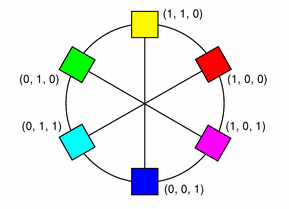
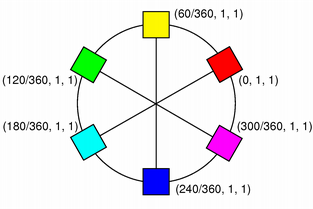
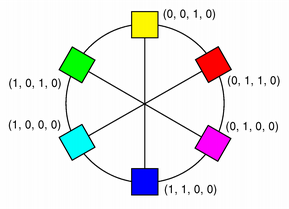
顔色通常根據 RGB (紅色、綠色和藍色) 分量指定,根據 HSV (色調、飽和度和值) 和 CMYK (青色、洋紅色、黃色和黑色) 分量指定也是可能。此外,可以使用顔色名稱指定顔色。顔色名稱可以是任何 SVG 1.0 顔色名稱。
| RGB | HSV | CMYK |
|---|---|---|
|
|
|
The QColor 構造函數基於 RGB 值創建顔色。要創建 QColor 基於 HSV 或 CMYK 值,使用 toHsv () 和 toCmyk () 函數分彆。這些函數使用期望格式返迴顔色副本。此外,靜態 fromRgb (), fromHsv () 和 fromCmyk () 函數可以從指定值創建顔色。另外,可以將顔色轉換成 3 種格式之一使用 convertTo () 函數 (返迴期望格式的顔色副本),或任一 setRgb (), setHsv () 和 setCmyk () 函數更改 this 顔色的格式。 spec () 函數告訴如何指定顔色。
A color can be set by passing an RGB string (such as "#112233"), or an ARGB string (such as "#ff112233") or a color name (such as "blue"), to the setNamedColor () function. The color names are taken from the SVG 1.0 color names. The name () function returns the name of the color in the format "#RRGGBB". Colors can also be set using setRgb (), setHsv () 和 setCmyk (). To get a lighter or darker color use the lighter () 和 darker () 函數分彆。
The isValid () function indicates whether a QColor is legal at all. For example, a RGB color with RGB values out of range is illegal. For performance reasons, QColor mostly disregards illegal colors, and for that reason, the result of using an invalid color is undefined.
The color components can be retrieved individually, e.g with red (), hue () 和 cyan (). The values of the color components can also be retrieved in one go using the getRgb (), getHsv () 和 getCmyk () functions. Using the RGB color model, the color components can in addition be accessed with rgb ().
There are several related non-members: QRgb is a typdef for an unsigned int representing the RGB value triplet (r, g, b). Note that it also can hold a value for the alpha-channel (for more information, see the 融閤 Alpha 的繪製 section). The qRed (), qBlue () 和 qGreen () functions return the respective component of the given QRgb value, while the qRgb () 和 qRgba () functions create and return the QRgb triplet based on the given component values. Finally, the qAlpha () function returns the alpha component of the provided QRgb ,和 qGray () function calculates and return a gray value based on the given value.
QColor is platform and device independent. The QColormap 類把顔色映射到硬件。
一般而言,有關描繪的更多信息,見 描繪係統 文檔編製。
QColor supports floating point precision and provides floating point versions of all the color components functions, e.g. getRgbF (), hueF () 和 fromCmykF (). Note that since the components are stored using 16-bit integers, there might be minor deviations between the values set using, for example, setRgbF () and the values returned by the getRgbF () function due to rounding.
While the integer based functions take values in the range 0-255 (except hue () which must have values within the range 0-359), the floating point functions accept values in the range 0.0 - 1.0.
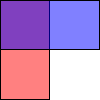
QColor also support alpha-blended outlining and filling. The alpha channel of a color specifies the transparency effect, 0 represents a fully transparent color, while 255 represents a fully opaque color. For example:
// Specify semi-transparent red
painter.setBrush(QColor(255, 0, 0, 127));
painter.drawRect(0, 0, width()/2, height());
// Specify semi-transparent blue
painter.setBrush(QColor(0, 0, 255, 127));
painter.drawRect(0, 0, width(), height()/2);
以上代碼産生以下輸齣:
The alpha channel of a color can be retrieved and set using the alpha () 和 setAlpha () functions if its value is an integer, and alphaF () 和 setAlphaF () if its value is qreal (double). By default, the alpha-channel is set to 255 (opaque). To retrieve and set all the RGB color components (including the alpha-channel) in one go, use the rgba () 和 setRgba () 函數。
There are 20 predefined QColors described by the Qt::GlobalColor enum, including black, white, primary and secondary colors, darker versions of these colors and three shades of gray. QColor also recognizes a variety of color names; the static colorNames () 函數返迴 QStringList color names that QColor knows about.
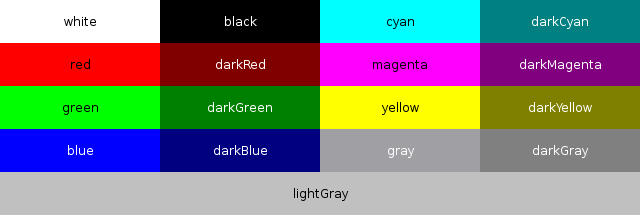
此外, Qt::color0 , Qt::color1 and Qt::transparent colors are used for special purposes.
Qt::color0 (zero pixel value) and Qt::color1 (non-zero pixel value) are special colors for drawing in QBitmaps. Painting with Qt::color0 sets the bitmap bits to 0 (transparent; i.e., background), and painting with Qt::color1 sets the bits to 1 (opaque; i.e., foreground).
Qt::transparent is used to indicate a transparent pixel. When painting with this value, a pixel value will be used that is appropriate for the underlying pixel format in use.
The RGB model is hardware-oriented. Its representation is close to what most monitors show. In contrast, HSV represents color in a way more suited to the human perception of color. For example, the relationships "stronger than", "darker than", and "the opposite of" are easily expressed in HSV but are much harder to express in RGB.
HSV, like RGB, has three components:
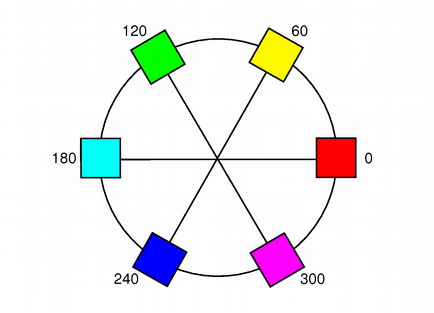


Here are some examples: pure red is H=0, S=255, V=255; a dark red, moving slightly towards the magenta, could be H=350 (equivalent to -10), S=255, V=180; a grayish light red could have H about 0 (say 350-359 or 0-10), S about 50-100, and S=255.
Qt returns a hue value of -1 for achromatic colors. If you pass a hue value that is too large, Qt forces it into range. Hue 360 or 720 is treated as 0; hue 540 is treated as 180.
In addition to the standard HSV model, Qt provides an alpha-channel to feature alpha-blended drawing .
HSL is similar to HSV, however instead of the Value parameter, HSL specifies a Lightness parameter which maps somewhat differently to the brightness of the color.
Similarly, the HSL saturation value is not in general the same as the HSV saturation value for the same color. hslSaturation () provides the color's HSL saturation value, while saturation () 和 hsvSaturation () provides the HSV saturation value.
The hue value is defined to be the same in HSL and HSV.
While the RGB and HSV color models are used for display on computer monitors, the CMYK model is used in the four-color printing process of printing presses and some hard-copy devices.
CMYK has four components, all in the range 0-255: cyan (C), magenta (M), yellow (Y) and black (K). Cyan, magenta and yellow are called subtractive colors; the CMYK color model creates color by starting with a white surface and then subtracting color by applying the appropriate components. While combining cyan, magenta and yellow gives the color black, subtracting one or more will yield any other color. When combined in various percentages, these three colors can create the entire spectrum of colors.
Mixing 100 percent of cyan, magenta and yellow does produce black, but the result is unsatisfactory since it wastes ink, increases drying time, and gives a muddy colour when printing. For that reason, black is added in professional printing to provide a solid black tone; hence the term 'four color process'.
In addition to the standard CMYK model, Qt provides an alpha-channel to feature alpha-blended drawing .
如何格式化輸齣為 name () 函數
| 常量 | 值 | 描述 |
|---|---|---|
QColor::HexRgb
|
0
|
#RRGGBB 中的 "#" 字符之後緊跟 3 個 2 位十六進製數字 (即
#RRGGBB
).
|
QColor::HexArgb
|
1
|
#AARRGGBB 中的 "#" 字符之後緊跟 4 個 2 位十六進製數字 (即
#AARRGGBB
).
|
另請參閱 name ().
指定 RGB、HSV、CMYK 或 HSL 顔色類型。
| 常量 | 值 |
|---|---|
QColor::Rgb
|
1
|
QColor::Hsv
|
2
|
QColor::Cmyk
|
3
|
QColor::Hsl
|
4
|
QColor::Invalid
|
0
|
構造具有 RGB 值 (0, 0, 0) 的無效顔色。無效顔色是底層窗口係統沒有正確設置的顔色。
無效顔色的 Alpha 值未指定。
另請參閱 isValid ().
這是重載函數。
構造新顔色采用顔色值 color .
Constructs a color with the RGB value r , g , b , and the alpha-channel (transparency) value of a .
The color is left invalid if any of the arguments are invalid.
構造顔色采用值 color 。忽略 Alpha 分量並設為純色。
構造顔色采用值 rgba64 .
該函數在 Qt 5.6 引入。
另請參閱 fromRgba64 ().
構造命名顔色以相同方式如 setNamedColor () 使用給定 name .
顔色無效若 name 無法剖析。
另請參閱 setNamedColor (), name (),和 isValid ().
Default constructs an instance of QColor.
構造命名顔色以相同方式如 setNamedColor () 使用給定 name .
這是重載函數。
另請參閱 setNamedColor (), name (),和 isValid ().
構造命名顔色以相同方式如 setNamedColor () 使用給定 name .
這是重載函數。
該函數在 Qt 5.8 引入。
另請參閱 setNamedColor (), name (),和 isValid ().
構造的顔色是副本為 color .
另請參閱 isValid ().
移動拷貝構造函數。
返迴此顔色的 Alpha 顔色分量。
另請參閱 setAlpha (), alphaF (),和 融閤 Alpha 的繪製 .
返迴此顔色的 Alpha 顔色分量。
另請參閱 setAlphaF (), alpha (),和 融閤 Alpha 的繪製 .
返迴此顔色的黑色分量。
另請參閱 blackF (), getCmyk (),和 CMYK 顔色模型 .
返迴此顔色的黑色分量。
另請參閱 black (), getCmykF (),和 CMYK 顔色模型 .
返迴此顔色的藍色顔色分量。
另請參閱 setBlue (), blueF (),和 getRgb ().
返迴此顔色的藍色顔色分量。
另請參閱 setBlueF (), blue (),和 getRgbF ().
[static]
QStringList
QColor::
colorNames
()
返迴 QStringList 包含 Qt 知道的有關顔色名稱。
另請參閱 預定義的顔色 .
創建副本為 this 顔色按格式指定通過 colorSpec .
另請參閱 spec (), toCmyk (), toHsv (), toRgb (),和 isValid ().
返迴此顔色的青色顔色分量。
另請參閱 cyanF (), getCmyk (),和 CMYK 顔色模型 .
返迴此顔色的青色顔色分量。
另請參閱 cyan (), getCmykF (),和 CMYK 顔色模型 .
返迴更暗 (或更亮) 的顔色,但不改變此對象。
若 factor 大於 100,此函數返迴更暗顔色。設置 factor 到 300 返迴擁有 1/3 亮度的顔色。若 factor 小於 100,返迴顔色更亮,但推薦使用 lighter () 函數為此目的。若 factor 為 0 或負值,返迴值未指定。
函數將當前 RGB 顔色轉換成 HSV,將值 V 分量除以 factor 並將顔色轉換迴 RGB。
該函數在 Qt 4.3 引入。
[static]
QColor
QColor::
fromCmyk
(
int
c
,
int
m
,
int
y
,
int
k
,
int
a
= 255)
靜態方便函數返迴 QColor 構造自給定 CMYK 顔色值: c (青色), m (洋紅色), y (黃色), k (黑色),和 a (Alpha 通道,即:透明度)。
所有值必須在範圍 0-255。
另請參閱 toCmyk (), fromCmykF (), isValid (),和 CMYK 顔色模型 .
[static]
QColor
QColor::
fromCmykF
(
qreal
c
,
qreal
m
,
qreal
y
,
qreal
k
,
qreal
a
= 1.0)
這是重載函數。
靜態方便函數返迴 QColor 構造自給定 CMYK 顔色值: c (青色), m (洋紅色), y (黃色), k (黑色),和 a (Alpha 通道,即:透明度)。
所有值必須在範圍 0.0-1.0。
另請參閱 toCmyk (), fromCmyk (), isValid (),和 CMYK 顔色模型 .
[static]
QColor
QColor::
fromHsl
(
int
h
,
int
s
,
int
l
,
int
a
= 255)
靜態方便函數返迴 QColor 構造自 HSV 顔色值 h (色相), s (飽和度), l (明度),和 a (Alpha 通道,即:透明度)。
值 s , l ,和 a 必須全部在範圍 0-255;值 h 必須在範圍 0-359。
該函數在 Qt 4.6 引入。
另請參閱 toHsl (), fromHslF (), isValid (),和 HSL 顔色模型 .
[static]
QColor
QColor::
fromHslF
(
qreal
h
,
qreal
s
,
qreal
l
,
qreal
a
= 1.0)
這是重載函數。
靜態方便函數返迴 QColor 構造自 HSV 顔色值 h (色相), s (飽和度), l (明度),和 a (Alpha 通道,即:透明度)。
所有值必須在範圍 0.0-1.0。
該函數在 Qt 4.6 引入。
另請參閱 toHsl (), fromHsl (), isValid (),和 HSL 顔色模型 .
[static]
QColor
QColor::
fromHsv
(
int
h
,
int
s
,
int
v
,
int
a
= 255)
靜態方便函數返迴 QColor 構造自 HSV 顔色值 h (色相), s (飽和度), v (值),和 a (Alpha 通道,即:透明度)。
值 s , v ,和 a 必須全部在範圍 0-255;值 h 必須在範圍 0-359。
另請參閱 toHsv (), fromHsvF (), isValid (),和 HSV 顔色模型 .
[static]
QColor
QColor::
fromHsvF
(
qreal
h
,
qreal
s
,
qreal
v
,
qreal
a
= 1.0)
這是重載函數。
靜態方便函數返迴 QColor 構造自 HSV 顔色值 h (色相), s (飽和度), v (值),和 a (Alpha 通道,即:透明度)。
所有值必須在範圍 0.0-1.0。
另請參閱 toHsv (), fromHsv (), isValid (),和 HSV 顔色模型 .
[static]
QColor
QColor::
fromRgb
(
QRgb
rgb
)
靜態方便函數返迴 QColor 構造自給定 QRgb 值 rgb .
Alpha 分量對於 rgb 被忽略 (即:它被自動設為 255),使用 fromRgba () 函數以包括 Alpha 通道指定通過給定 QRgb 值。
另請參閱 fromRgba (), fromRgbF (), toRgb (),和 isValid ().
[static]
QColor
QColor::
fromRgb
(
int
r
,
int
g
,
int
b
,
int
a
= 255)
靜態方便函數返迴 QColor 構造自 RGB 顔色值 r (紅色), g (綠色), b (藍色),和 a (Alpha 通道,即:透明度)。
所有值必須在範圍 0-255。
另請參閱 toRgb (), fromRgba64 (), fromRgbF (),和 isValid ().
[static]
QColor
QColor::
fromRgba64
(
ushort
r
,
ushort
g
,
ushort
b
,
ushort
a
= USHRT_MAX)
靜態方便函數返迴 QColor 構造自 RGBA64 顔色值 r (紅色), g (綠色), b (藍色),和 a (Alpha 通道,即:透明度)。
該函數在 Qt 5.6 引入。
另請參閱 fromRgb (), fromRgbF (), toRgb (),和 isValid ().
[static]
QColor
QColor::
fromRgba64
(
QRgba64
rgba64
)
靜態方便函數返迴 QColor 構造自給定 QRgba64 值 rgba64 .
該函數在 Qt 5.6 引入。
另請參閱 fromRgb (), fromRgbF (), toRgb (),和 isValid ().
[static]
QColor
QColor::
fromRgbF
(
qreal
r
,
qreal
g
,
qreal
b
,
qreal
a
= 1.0)
靜態方便函數返迴 QColor 構造自 RGB 顔色值 r (紅色), g (綠色), b (藍色),和 a (Alpha 通道,即:透明度)。
所有值必須在範圍 0.0-1.0。
另請參閱 fromRgb (), fromRgba64 (), toRgb (),和 isValid ().
[static]
QColor
QColor::
fromRgba
(
QRgb
rgba
)
靜態方便函數返迴 QColor 構造自給定 QRgb 值 rgba .
不像 fromRgb () 函數,Alpha 通道指定通過給定 QRgb 包括值。
另請參閱 fromRgb (), fromRgba64 (),和 isValid ().
設置指嚮內容按 c , m , y , k ,和 a , to the cyan, magenta, yellow, black, and alpha-channel (transparency) components of the color's CMYK value.
可以單獨檢索這些分量使用 cyan (), magenta (), yellow (), black () 和 alpha () 函數。
設置指嚮內容按 c , m , y , k ,和 a , to the cyan, magenta, yellow, black, and alpha-channel (transparency) components of the color's CMYK value.
可以單獨檢索這些分量使用 cyanF (), magentaF (), yellowF (), blackF () 和 alphaF () 函數。
另請參閱 setCmykF () 和 CMYK 顔色模型 .
設置指嚮內容按 h , s , l ,和 a , to the hue, saturation, lightness, and alpha-channel (transparency) components of the color's HSL value.
可以單獨檢索這些分量使用 hslHue (), hslSaturation (), lightness () 和 alpha () 函數。
該函數在 Qt 4.6 引入。
另請參閱 getHslF (), setHsl (),和 HSL 顔色模型 .
設置指嚮內容按 h , s , l ,和 a , to the hue, saturation, lightness, and alpha-channel (transparency) components of the color's HSL value.
可以單獨檢索這些分量使用 hslHueF (), hslSaturationF (), lightnessF () 和 alphaF () 函數。
該函數在 Qt 4.6 引入。
另請參閱 getHsl (), setHslF (),和 HSL 顔色模型 .
設置指嚮內容按 h , s , v ,和 a , to the hue, saturation, value, and alpha-channel (transparency) components of the color's HSV value.
可以單獨檢索這些分量使用 hue (), saturation (), value () 和 alpha () 函數。
設置指嚮內容按 h , s , v ,和 a , to the hue, saturation, value, and alpha-channel (transparency) components of the color's HSV value.
可以單獨檢索這些分量使用 hueF (), saturationF (), valueF () 和 alphaF () 函數。
設置指嚮內容按 r , g , b ,和 a , to the red, green, blue, and alpha-channel (transparency) components of the color's RGB value.
可以單獨檢索這些分量使用 red (), green (), blue () 和 alpha () 函數。
設置指嚮內容按 r , g , b ,和 a , to the red, green, blue, and alpha-channel (transparency) components of the color's RGB value.
可以單獨檢索這些分量使用 redF (), greenF (), blueF () 和 alphaF () 函數。
返迴此顔色的綠色分量。
另請參閱 setGreen (), greenF (),和 getRgb ().
返迴此顔色的綠色分量。
另請參閱 setGreenF (), green (),和 getRgbF ().
Returns the HSL hue color component of this color.
該函數在 Qt 4.6 引入。
另請參閱 hslHueF (), hsvHue (), getHsl (),和 HSL 顔色模型 .
Returns the HSL hue color component of this color.
該函數在 Qt 4.6 引入。
另請參閱 hslHue (), hsvHueF (),和 getHslF ().
Returns the HSL saturation color component of this color.
該函數在 Qt 4.6 引入。
另請參閱 hslSaturationF (), hsvSaturation (), getHsl (),和 HSL 顔色模型 .
Returns the HSL saturation color component of this color.
該函數在 Qt 4.6 引入。
另請參閱 hslSaturation (), hsvSaturationF (), getHslF (),和 HSL 顔色模型 .
Returns the HSV hue color component of this color.
另請參閱 hueF (), hslHue (), getHsv (),和 HSV 顔色模型 .
返迴此顔色的色相顔色分量。
另請參閱 hue (), hslHueF (), getHsvF (),和 HSV 顔色模型 .
Returns the HSV saturation color component of this color.
另請參閱 saturationF (), hslSaturation (), getHsv (),和 HSV 顔色模型 .
Returns the HSV saturation color component of this color.
另請參閱 saturation (), hslSaturationF (), getHsvF (),和 HSV 顔色模型 .
Returns the HSV hue color component of this color.
顔色被隱式轉換成 HSV (色相/飽和度/值)。
另請參閱 hsvHue (), hslHue (), hueF (), getHsv (),和 HSV 顔色模型 .
Returns the HSV hue color component of this color.
顔色被隱式轉換成 HSV (色相/飽和度/值)。
另請參閱 hsvHueF (), hslHueF (), hue (), getHsvF (),和 HSV 顔色模型 .
返迴
true
若顔色有效;否則返迴
false
.
[static]
bool
QColor::
isValidColor
(const
QString
&
name
)
返迴
true
若
name
is a valid color name and can be used to construct a valid
QColor
對象,否則返迴 false。
It uses the same algorithm used in setNamedColor ().
該函數在 Qt 4.7 引入。
另請參閱 setNamedColor ().
[static]
bool
QColor::
isValidColor
(
QStringView
name
)
這是重載函數。
該函數在 Qt 5.10 引入。
[static]
bool
QColor::
isValidColor
(
QLatin1String
name
)
這是重載函數。
該函數在 Qt 5.8 引入。
返迴更亮 (或更暗) 顔色,但不改變此對象。
若 factor is greater than 100, this functions returns a lighter color. Setting factor to 150 returns a color that is 50% brighter. If the factor is less than 100, the return color is darker, but we recommend using the darker () 函數為此目的。若 factor 為 0 或負值,返迴值未指定。
The function converts the current RGB color to HSV, multiplies the value (V) component by factor 並將顔色轉換迴 RGB。
該函數在 Qt 4.3 引入。
返迴此顔色的明度顔色分量。
該函數在 Qt 4.6 引入。
另請參閱 lightnessF () 和 getHsl ().
返迴此顔色的明度顔色分量。
該函數在 Qt 4.6 引入。
返迴此顔色的洋紅色顔色分量。
另請參閱 magentaF (), getCmyk (),和 CMYK 顔色模型 .
返迴此顔色的洋紅色顔色分量。
另請參閱 magenta (), getCmykF (),和 CMYK 顔色模型 .
按 #RRGGBB 格式返迴顔色的名稱;即 # 字符之後緊跟 3 個 2 位十六進製數字。
另請參閱 setNamedColor ().
返迴顔色的名稱按指定 format .
該函數在 Qt 5.2 引入。
另請參閱 setNamedColor () 和 NameFormat .
返迴此顔色的紅色分量。
另請參閱 setRed (), redF (),和 getRgb ().
返迴此顔色的紅色分量。
另請參閱 setRedF (), red (),和 getRgbF ().
返迴顔色的 RGB 值。Alpha 值不透明。
另請參閱 setRgb (), getRgb (),和 rgba ().
返迴顔色的 RGB64 值,包括其 Alpha。
對於無效顔色,返迴顔色的 Alpha 值未指定。
該函數在 Qt 5.6 引入。
另請參閱 setRgba64 (), rgba (),和 rgb ().
返迴顔色的 RGB 值,包括其 Alpha。
對於無效顔色,返迴顔色的 Alpha 值未指定。
另請參閱 setRgba (), rgb (),和 rgba64 ().
Returns the HSV saturation color component of this color.
顔色被隱式轉換成 HSV (色相/飽和度/值)。
另請參閱 hsvSaturation (), hslSaturation (), saturationF (), getHsv (),和 HSV 顔色模型 .
Returns the HSV saturation color component of this color.
顔色被隱式轉換成 HSV (色相/飽和度/值)。
另請參閱 hsvSaturationF (), hslSaturationF (), saturation (), getHsvF (),和 HSV 顔色模型 .
將此顔色的 Alpha 設為 alpha 。整數 Alpha 的指定範圍為 0-255。
另請參閱 alpha (), alphaF (),和 融閤 Alpha 的繪製 .
將此顔色的 Alpha 設為 alpha 。qreal Alpha 的指定範圍為 0.0-1.0。
另請參閱 alphaF (), alpha (),和 融閤 Alpha 的繪製 .
將此顔色的藍色顔色分量設為 blue 。整數分量的指定在範圍 0-255。
另請參閱 blue (), blueF (),和 setRgb ().
將此顔色的藍色顔色分量設為 blue 。浮點分量的指定在範圍 0.0-1.0。
另請參閱 blueF (), blue (),和 setRgbF ().
將顔色設為 CMYK 值, c (青色), m (洋紅色), y (黃色), k (黑色),和 a (Alpha 通道,即:透明度)。
所有值必須在範圍 0-255。
另請參閱 getCmyk (), setCmykF (),和 CMYK 顔色模型 .
這是重載函數。
將顔色設為 CMYK 值, c (青色), m (洋紅色), y (黃色), k (黑色),和 a (Alpha 通道,即:透明度)。
所有值必須在範圍 0.0-1.0。
另請參閱 getCmykF (), setCmyk (),和 CMYK 顔色模型 .
將此顔色的綠色顔色分量設為 green 。整數分量的指定在範圍 0-255。
另請參閱 green (), greenF (),和 setRgb ().
將此顔色的綠色顔色分量設為 green 。浮點分量的指定在範圍 0.0-1.0。
另請參閱 greenF (), green (),和 setRgbF ().
設置 HSL (色相/飽和度/明度) 顔色值; h 是色相, s 是飽和度, l 是明度和 a 是 HSL 顔色的 Alpha 分量。
飽和度、值和 Alpha 通道值必須在範圍 0-255,而色相值必須大於 -1。
該函數在 Qt 4.6 引入。
設置 HSL (色相/飽和度/明度) 顔色明度; h 是色相, s 是飽和度, l 是明度和 a 是 HSL 顔色的 Alpha 分量。
所有值必須在範圍 0.0-1.0。
該函數在 Qt 4.6 引入。
設置 HSV (色相/飽和度/值) 顔色值; h 是色相, s 是飽和度, v 是值和 a 是 HSV (色相/飽和度/值) 顔色的 Alpha 分量。
飽和度、值和 Alpha 通道值必須在範圍 0-255,而色相值必須大於 -1。
另請參閱 getHsv (), setHsvF (),和 HSV 顔色模型 .
設置 HSV (色相/飽和度/值) 顔色值; h 是色相, s 是飽和度, v 是值和 a 是 HSV (色相/飽和度/值) 顔色的 Alpha 分量。
所有值必須在範圍 0.0-1.0。
另請參閱 getHsvF (), setHsv (),和 HSV 顔色模型 .
設置 RGB 值為此 QColor to name ,可能是這些格式之一:
transparent
- 錶示缺乏顔色。
顔色無效若 name 無法剖析。
另請參閱 QColor (), name (),和 isValid ().
這是重載函數。
該函數在 Qt 5.10 引入。
這是重載函數。
該函數在 Qt 5.8 引入。
將此顔色的紅色顔色分量設為 red 。整數分量的指定在範圍 0-255。
另請參閱 red (), redF (),和 setRgb ().
將此顔色的紅色顔色分量設為 red 。浮點分量的指定在範圍 0.0-1.0。
另請參閱 redF (), red (),和 setRgbF ().
將 RGB 值設為 r , g , b 和 Alpha 值為 a .
所有值必須在範圍 0-255。
另請參閱 rgb (), getRgb (),和 setRgbF ().
這是重載函數。
將 RGB 值設為 rgb 。alpha 值被設為不透明。
將 RGB64 值設為 rgba ,包括其 Alpha。
該函數在 Qt 5.6 引入。
將此顔色的顔色通道設為 r (紅色), g (綠色), b (藍色) 和 a (Alpha,透明度)。
所有值必須在範圍 0.0-1.0。
另請參閱 rgb (), getRgbF (),和 setRgb ().
將 RGB 值設為 rgba ,包括其 Alpha。
另請參閱 rgba (), rgb (),和 setRgba64 ().
返迴如何指定顔色。
創建並返迴 CMYK (青色/洋紅色/黃色/黑色) QColor 基於此顔色。
另請參閱 fromCmyk (), convertTo (), isValid (),和 CMYK 顔色模型 .
創建並返迴 HSL (色相/飽和度/明度) QColor 基於此顔色。
另請參閱 fromHsl (), convertTo (), isValid (),和 HSL 顔色模型 .
創建並返迴 HSV (色相/飽和度/值) QColor 基於此顔色。
另請參閱 fromHsv (), convertTo (), isValid (),和 HSV 顔色模型 .
創建並返迴 RGB (紅色/綠色/藍色) QColor 基於此顔色。
另請參閱 fromRgb (), convertTo (),和 isValid ().
返迴此顔色的值顔色分量。
另請參閱 valueF (), getHsv (),和 HSV 顔色模型 .
返迴此顔色的值顔色分量。
另請參閱 value (), getHsvF (),和 HSV 顔色模型 .
返迴此顔色的黃色顔色分量。
另請參閱 yellowF (), getCmyk (),和 CMYK 顔色模型 .
返迴此顔色的黃色顔色分量。
另請參閱 yellow (), getCmykF (),和 CMYK 顔色模型 .
將顔色返迴成 QVariant
返迴
true
若此顔色擁有的 RGB 和 alpha 值異於
color
;否則返迴
false
.
移動賦值運算符。
賦值副本為 color 到此顔色,並返迴其引用。
這是重載函數。
賦值副本為 color 並返迴此顔色的引用。
返迴
true
若此顔色擁有的 RGB 和 Alpha 值如同
color
;否則返迴
false
.
格式為 #AARRGGBB 的 ARGB 四元組,相當於無符號整數。
The type also holds a value for the alpha-channel. The default alpha channel is
ff
, i.e opaque. For more information, see the
融閤 Alpha 的繪製
章節。
另請參閱 QColor::rgb () 和 QColor::rgba ().
Returns the alpha component of the ARGB quadruplet rgba .
另請參閱 qRgb () 和 QColor::alpha ().
Returns the alpha component of rgba64 as an 8-bit value.
該函數在 Qt 5.6 引入。
另請參閱 QRgba64::alpha8 () 和 QColor::alpha ().
Returns the blue component of the ARGB quadruplet rgb .
另請參閱 qRgb () 和 QColor::blue ().
Returns the blue component of rgba64 as an 8-bit value.
該函數在 Qt 5.6 引入。
另請參閱 QRgba64::blue8 () 和 QColor::blue ().
Returns a gray value (0 to 255) from the ( r , g , b ) triplet.
The gray value is calculated using the formula ( r * 11 + g * 16 + b * 5)/32.
這是重載函數。
Returns a gray value (0 to 255) from the given ARGB quadruplet rgb .
The gray value is calculated using the formula (R * 11 + G * 16 + B * 5)/32; the alpha-channel is ignored.
Returns the green component of the ARGB quadruplet rgb .
另請參閱 qRgb () 和 QColor::green ().
Returns the green component of rgba64 as an 8-bit value.
該函數在 Qt 5.6 引入。
另請參閱 QRgba64::green8 () 和 QColor::green ().
Converts an unpremultiplied ARGB quadruplet rgb into a premultiplied ARGB quadruplet.
該函數在 Qt 5.3 引入。
另請參閱 qUnpremultiply ().
轉換未預乘 QRgba64 四元組 rgba64 成預乘 QRgba64 四元組。
該函數在 Qt 5.6 引入。
另請參閱 QRgba64::premultiplied () 和 qUnpremultiply ().
Returns the red component of the ARGB quadruplet rgb .
另請參閱 qRgb () 和 QColor::red ().
Returns the red component of rgba64 as an 8-bit value.
該函數在 Qt 5.6 引入。
另請參閱 QRgba64::red8 () 和 QColor::red ().
返迴 ARGB 四元組 (255, r , g , b ).
另請參閱 qRgba (), qRed (), qGreen (), qBlue (),和 qAlpha ().
返迴 QRgba64 四元組 ( r , g , b , a ).
該函數在 Qt 5.6 引入。
另請參閱 qRgba ().
返迴 c 作為 QRgba64 struct.
該函數在 Qt 5.6 引入。
另請參閱 qRgba ().
返迴 ARGB 四元組 ( a , r , g , b ).
另請參閱 qRgb (), qRed (), qGreen (), qBlue (),和 qAlpha ().
轉換預乘 ARGB 四元組 rgb 成未預乘 ARGB 四元組。
該函數在 Qt 5.3 引入。
另請參閱 qPremultiply ().
轉換預乘 QRgba64 四元組 rgba64 成未預乘 QRgba64 四元組。
該函數在 Qt 5.6 引入。
另請參閱 QRgba64::unpremultiplied () 和 qPremultiply ().
寫入 color 到 stream .
另請參閱 序列化 Qt 數據類型 .
讀取 color 從 stream .
另請參閱 序列化 Qt 數據類型 .
