The QFormLayout class manages forms of input widgets and their associated labels. 更多...
| 頭: | #include <QFormLayout> |
| qmake: | QT += widgets |
| Since: | Qt 4.4 |
| 繼承: | QLayout |
| class | TakeRowResult |
| enum | FieldGrowthPolicy { FieldsStayAtSizeHint, ExpandingFieldsGrow, AllNonFixedFieldsGrow } |
| enum | ItemRole { LabelRole, FieldRole, SpanningRole } |
| enum | RowWrapPolicy { DontWrapRows, WrapLongRows, WrapAllRows } |
|
|
| QFormLayout (QWidget * parent = nullptr) | |
| virtual | ~QFormLayout () |
| void | addRow (QWidget * label , QWidget * field ) |
| void | addRow (QWidget * label , QLayout * field ) |
| void | addRow (const QString & labelText , QWidget * field ) |
| void | addRow (const QString & labelText , QLayout * field ) |
| void | addRow (QWidget * widget ) |
| void | addRow (QLayout * layout ) |
| QFormLayout::FieldGrowthPolicy | fieldGrowthPolicy () const |
| Qt::Alignment | formAlignment () const |
| void | getItemPosition (int index , int * rowPtr , QFormLayout::ItemRole * rolePtr ) const |
| void | getLayoutPosition (QLayout * layout , int * rowPtr , QFormLayout::ItemRole * rolePtr ) const |
| void | getWidgetPosition (QWidget * widget , int * rowPtr , QFormLayout::ItemRole * rolePtr ) const |
| int | horizontalSpacing () const |
| void | insertRow (int row , QWidget * label , QWidget * field ) |
| void | insertRow (int row , QWidget * label , QLayout * field ) |
| void | insertRow (int row , const QString & labelText , QWidget * field ) |
| void | insertRow (int row , const QString & labelText , QLayout * field ) |
| void | insertRow (int row , QWidget * widget ) |
| void | insertRow (int row , QLayout * layout ) |
| QLayoutItem * | itemAt (int row , QFormLayout::ItemRole role ) const |
| Qt::Alignment | labelAlignment () const |
| QWidget * | labelForField (QWidget * field ) const |
| QWidget * | labelForField (QLayout * field ) const |
| void | removeRow (int row ) |
| void | removeRow (QWidget * widget ) |
| void | removeRow (QLayout * layout ) |
| int | rowCount () const |
| QFormLayout::RowWrapPolicy | rowWrapPolicy () const |
| void | setFieldGrowthPolicy (QFormLayout::FieldGrowthPolicy policy ) |
| void | setFormAlignment (Qt::Alignment alignment ) |
| void | setHorizontalSpacing (int spacing ) |
| void | setItem (int row , QFormLayout::ItemRole role , QLayoutItem * item ) |
| void | setLabelAlignment (Qt::Alignment alignment ) |
| void | setLayout (int row , QFormLayout::ItemRole role , QLayout * layout ) |
| void | setRowWrapPolicy (QFormLayout::RowWrapPolicy policy ) |
| void | setSpacing (int spacing ) |
| void | setVerticalSpacing (int spacing ) |
| void | setWidget (int row , QFormLayout::ItemRole role , QWidget * widget ) |
| int | spacing () const |
| QFormLayout::TakeRowResult | takeRow (int row ) |
| QFormLayout::TakeRowResult | takeRow (QWidget * widget ) |
| QFormLayout::TakeRowResult | takeRow (QLayout * layout ) |
| int | verticalSpacing () const |
| virtual void | addItem (QLayoutItem * item ) override |
| virtual int | count () const override |
| virtual Qt::Orientations | expandingDirections () const override |
| virtual bool | hasHeightForWidth () const override |
| virtual int | heightForWidth (int width ) const override |
| virtual void | invalidate () override |
| virtual QLayoutItem * | itemAt (int index ) const override |
| virtual QSize | minimumSize () const override |
| virtual void | setGeometry (const QRect & rect ) override |
| virtual QSize | sizeHint () const override |
| virtual QLayoutItem * | takeAt (int index ) override |
| const QMetaObject | staticMetaObject |
The QFormLayout class manages forms of input widgets and their associated labels.
QFormLayout is a convenience layout class that lays out its children in a two-column form. The left column consists of labels and the right column consists of "field" widgets (line editors, spin boxes, etc.).
Traditionally, such two-column form layouts were achieved using QGridLayout . QFormLayout is a higher-level alternative that provides the following advantages:
例如, macOS Aqua and KDE guidelines specify that the labels should be right-aligned, whereas Windows and GNOME applications normally use left-alignment.
For devices with small displays, QFormLayout can be set to wrap long rows , or even to wrap all rows .
The addRow () 重載接受 QString 和 QWidget * creates a QLabel behind the scenes and automatically set up its buddy. We can then write code like this:
QFormLayout *formLayout = new QFormLayout;
formLayout->addRow(tr("&Name:"), nameLineEdit);
formLayout->addRow(tr("&Email:"), emailLineEdit);
formLayout->addRow(tr("&Age:"), ageSpinBox);
setLayout(formLayout);
Compare this with the following code, written using QGridLayout :
nameLabel = new QLabel(tr("&Name:"));
nameLabel->setBuddy(nameLineEdit);
emailLabel = new QLabel(tr("&Name:"));
emailLabel->setBuddy(emailLineEdit);
ageLabel = new QLabel(tr("&Name:"));
ageLabel->setBuddy(ageSpinBox);
QGridLayout *gridLayout = new QGridLayout;
gridLayout->addWidget(nameLabel, 0, 0);
gridLayout->addWidget(nameLineEdit, 0, 1);
gridLayout->addWidget(emailLabel, 1, 0);
gridLayout->addWidget(emailLineEdit, 1, 1);
gridLayout->addWidget(ageLabel, 2, 0);
gridLayout->addWidget(ageSpinBox, 2, 1);
setLayout(gridLayout);
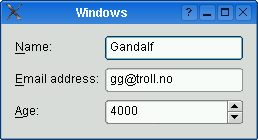
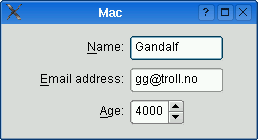
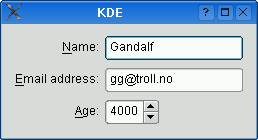
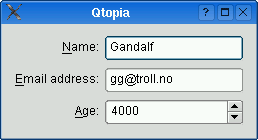
The table below shows the default appearance in different styles.
| QCommonStyle derived styles (except QPlastiqueStyle) | QMacStyle | QPlastiqueStyle | Qt Extended styles |
|---|---|---|---|
|
|
|
|
| Traditional style used for Windows, GNOME, and earlier versions of KDE. Labels are left aligned, and expanding fields grow to fill the available space. (This normally corresponds to what we would get using a two-column QGridLayout )。 | Style based on the macOS Aqua guidelines. Labels are right-aligned, the fields don't grow beyond their size hint, and the form is horizontally centered. | Recommended style for KDE applications . Similar to MacStyle, except that the form is left-aligned and all fields grow to fill the available space. | Default style for Qt Extended styles. Labels are right-aligned, expanding fields grow to fill the available space, and row wrapping is enabled for long lines. |
The form styles can be also be overridden individually by calling setLabelAlignment (), setFormAlignment (), setFieldGrowthPolicy (),和 setRowWrapPolicy (). For example, to simulate the form layout appearance of QMacStyle on all platforms, but with left-aligned labels, you could write:
formLayout->setRowWrapPolicy(QFormLayout::DontWrapRows);
formLayout->setFieldGrowthPolicy(QFormLayout::FieldsStayAtSizeHint);
formLayout->setFormAlignment(Qt::AlignHCenter | Qt::AlignTop);
formLayout->setLabelAlignment(Qt::AlignLeft);
另請參閱 QGridLayout , QBoxLayout ,和 QStackedLayout .
This enum specifies the different policies that can be used to control the way in which the form's fields grow.
| 常量 | 值 | 描述 |
|---|---|---|
QFormLayout::FieldsStayAtSizeHint
|
0
|
The fields never grow beyond their effective size hint . This is the default for QMacStyle. |
QFormLayout::ExpandingFieldsGrow
|
1
|
Fields with an horizontal size policy of Expanding or MinimumExpanding will grow to fill the available space. The other fields will not grow beyond their effective size hint. This is the default policy for Plastique. |
QFormLayout::AllNonFixedFieldsGrow
|
2
|
All fields with a size policy that allows them to grow will grow to fill the available space. This is the default policy for most styles. |
另請參閱 fieldGrowthPolicy .
This enum specifies the types of widgets (or other layout items) that may appear in a row.
| 常量 | 值 | 描述 |
|---|---|---|
QFormLayout::LabelRole
|
0
|
A label widget. |
QFormLayout::FieldRole
|
1
|
A field widget. |
QFormLayout::SpanningRole
|
2
|
A widget that spans label and field columns. |
另請參閱 itemAt () 和 getItemPosition ().
This enum specifies the different policies that can be used to control the way in which the form's rows wrap.
| 常量 | 值 | 描述 |
|---|---|---|
QFormLayout::DontWrapRows
|
0
|
Fields are always laid out next to their label. This is the default policy for all styles except Qt Extended styles. |
QFormLayout::WrapLongRows
|
1
|
Labels are given enough horizontal space to fit the widest label, and the rest of the space is given to the fields. If the minimum size of a field pair is wider than the available space, the field is wrapped to the next line. This is the default policy for Qt Extended styles. |
QFormLayout::WrapAllRows
|
2
|
Fields are always laid out below their label. |
另請參閱 rowWrapPolicy .
This property holds the way in which the form's fields grow
The default value depends on the widget or application style. For QMacStyle, the default is FieldsStayAtSizeHint ; for QCommonStyle derived styles (like Plastique and Windows), the default is ExpandingFieldsGrow ; for Qt Extended styles, the default is AllNonFixedFieldsGrow .
If none of the fields can grow and the form is resized, extra space is distributed according to the current form alignment .
訪問函數:
| QFormLayout::FieldGrowthPolicy | fieldGrowthPolicy () const |
| void | setFieldGrowthPolicy (QFormLayout::FieldGrowthPolicy policy ) |
另請參閱 formAlignment and rowWrapPolicy .
This property holds the alignment of the form layout's contents within the layout's geometry
The default value depends on the widget or application style. For QMacStyle, the default is Qt::AlignHCenter | Qt::AlignTop ; for the other styles, the default is Qt::AlignLeft | Qt::AlignTop .
訪問函數:
| Qt::Alignment | formAlignment () const |
| void | setFormAlignment (Qt::Alignment alignment ) |
另請參閱 labelAlignment and rowWrapPolicy .
This property holds the spacing between widgets that are laid out side by side
By default, if no value is explicitly set, the layout's horizontal spacing is inherited from the parent layout, or from the style settings for the parent widget.
訪問函數:
| int | horizontalSpacing () const |
| void | setHorizontalSpacing (int spacing ) |
另請參閱 verticalSpacing , QStyle::pixelMetric (),和 PM_LayoutHorizontalSpacing .
This property holds the horizontal alignment of the labels
The default value depends on the widget or application style. For QCommonStyle derived styles, except for QPlastiqueStyle, the default is Qt::AlignLeft ; for the other styles, the default is Qt::AlignRight .
訪問函數:
| Qt::Alignment | labelAlignment () const |
| void | setLabelAlignment (Qt::Alignment alignment ) |
另請參閱 formAlignment .
This property holds the way in which the form's rows wrap
The default value depends on the widget or application style. For Qt Extended styles, the default is WrapLongRows ; for the other styles, the default is DontWrapRows .
If you want to display each label above its associated field (instead of next to it), set this property to WrapAllRows .
訪問函數:
| QFormLayout::RowWrapPolicy | rowWrapPolicy () const |
| void | setRowWrapPolicy (QFormLayout::RowWrapPolicy policy ) |
另請參閱 fieldGrowthPolicy .
This property holds the spacing between widgets that are laid out vertically
By default, if no value is explicitly set, the layout's vertical spacing is inherited from the parent layout, or from the style settings for the parent widget.
訪問函數:
| int | verticalSpacing () const |
| void | setVerticalSpacing (int spacing ) |
另請參閱 horizontalSpacing , QStyle::pixelMetric (),和 PM_LayoutHorizontalSpacing .
Constructs a new form layout with the given parent 小部件。
將直接把布局設為頂層布局對於 parent 。Widget 隻可以有一個頂層布局。返迴它通過 QWidget::layout ().
另請參閱 QWidget::setLayout ().
[虛擬]
QFormLayout::
~QFormLayout
()
Destroys the form layout.
[override virtual]
void
QFormLayout::
addItem
(
QLayoutItem
*
item
)
重實現自 QLayout::addItem ().
Adds a new row to the bottom of this form layout, with the given label and field .
另請參閱 insertRow ().
這是重載函數。
這是重載函數。
This overload automatically creates a QLabel behind the scenes with labelText as its text. The field is set as the new QLabel 's buddy .
這是重載函數。
This overload automatically creates a QLabel behind the scenes with labelText as its text.
這是重載函數。
Adds the specified widget at the end of this form layout. The widget spans both columns.
這是重載函數。
Adds the specified layout at the end of this form layout. The layout spans both columns.
[override virtual]
int
QFormLayout::
count
() const
重實現自 QLayout::count ().
[override virtual]
Qt::Orientations
QFormLayout::
expandingDirections
() const
重實現自 QLayout::expandingDirections ().
Retrieves the row and role (column) of the item at the specified index 。若 index is out of bounds, * rowPtr is set to -1; otherwise the row is stored in * rowPtr and the role is stored in * rolePtr .
另請參閱 itemAt (), count (), getLayoutPosition (),和 getWidgetPosition ().
Retrieves the row and role (column) of the specified child layout 。若 layout is not in the form layout, * rowPtr is set to -1; otherwise the row is stored in * rowPtr and the role is stored in * rolePtr .
Retrieves the row and role (column) of the specified widget in the layout. If widget is not in the layout, * rowPtr is set to -1; otherwise the row is stored in * rowPtr and the role is stored in * rolePtr .
另請參閱 getItemPosition () 和 itemAt ().
[override virtual]
bool
QFormLayout::
hasHeightForWidth
() const
重實現自 QLayoutItem::hasHeightForWidth ().
[override virtual]
int
QFormLayout::
heightForWidth
(
int
width
) const
重實現自 QLayoutItem::heightForWidth ().
Inserts a new row at position row in this form layout, with the given label and field 。若 row is out of bounds, the new row is added at the end.
另請參閱 addRow ().
這是重載函數。
這是重載函數。
This overload automatically creates a QLabel behind the scenes with labelText as its text. The field is set as the new QLabel 's buddy .
這是重載函數。
This overload automatically creates a QLabel behind the scenes with labelText as its text.
這是重載函數。
Inserts the specified widget 在位置 row in this form layout. The widget spans both columns. If row is out of bounds, the widget is added at the end.
這是重載函數。
Inserts the specified layout 在位置 row in this form layout. The layout spans both columns. If row is out of bounds, the widget is added at the end.
[override virtual]
void
QFormLayout::
invalidate
()
重實現自 QLayout::invalidate ().
Returns the layout item in the given
row
采用指定
role
(column). Returns
nullptr
if there is no such item.
另請參閱 QLayout::itemAt () 和 setItem ().
[override virtual]
QLayoutItem
*QFormLayout::
itemAt
(
int
index
) const
重實現自 QLayout::itemAt ().
Returns the label associated with the given field .
另請參閱 itemAt ().
這是重載函數。
[override virtual]
QSize
QFormLayout::
minimumSize
() const
重實現自 QLayout::minimumSize ().
Deletes row row from this form layout.
row must be non-negative and less than rowCount ().
After this call, rowCount () is decremented by one. All widgets and nested layouts that occupied this row are deleted. That includes both the field widget(s) and the label, if any. All following rows are shifted up one row and the freed vertical space is redistributed amongst the remaining rows.
You can use this function to undo a previous addRow () 或 insertRow ():
QFormLayout *flay = ...;
QPointer<QLineEdit> le = new QLineEdit;
flay->insertRow(2, "User:", le);
// later:
flay->removeRow(2); // le == nullptr at this point
If you want to remove the row from the layout without deleting the widgets, use takeRow () 代替。
該函數在 Qt 5.8 引入。
另請參閱 takeRow ().
這是重載函數。
Deletes the row corresponding to widget from this form layout.
After this call, rowCount () is decremented by one. All widgets and nested layouts that occupied this row are deleted. That includes both the field widget(s) and the label, if any. All following rows are shifted up one row and the freed vertical space is redistributed amongst the remaining rows.
You can use this function to undo a previous addRow () 或 insertRow ():
QFormLayout *flay = ...;
QPointer<QLineEdit> le = new QLineEdit;
flay->insertRow(2, "User:", le);
// later:
flay->removeRow(le); // le == nullptr at this point
If you want to remove the row from the layout without deleting the widgets, use takeRow () 代替。
該函數在 Qt 5.8 引入。
另請參閱 takeRow ().
這是重載函數。
Deletes the row corresponding to layout from this form layout.
After this call, rowCount () is decremented by one. All widgets and nested layouts that occupied this row are deleted. That includes both the field widget(s) and the label, if any. All following rows are shifted up one row and the freed vertical space is redistributed amongst the remaining rows.
You can use this function to undo a previous addRow () 或 insertRow ():
QFormLayout *flay = ...;
QPointer<QVBoxLayout> vbl = new QVBoxLayout;
flay->insertRow(2, "User:", vbl);
// later:
flay->removeRow(layout); // vbl == nullptr at this point
If you want to remove the row from the form layout without deleting the inserted layout, use takeRow () 代替。
該函數在 Qt 5.8 引入。
另請參閱 takeRow ().
Returns the number of rows in the form.
另請參閱 QLayout::count ().
[override virtual]
void
QFormLayout::
setGeometry
(const
QRect
&
rect
)
重實現自 QLayout::setGeometry ().
設置項在給定 row 為給定 role to item , extending the layout with empty rows if necessary.
If the cell is already occupied, the item is not inserted and an error message is sent to the console. The item spans both columns.
警告: 不要使用此函數添加子級布局 (或子級 Widget 項)。使用 setLayout () 或 setWidget () 代替。
另請參閱 setLayout ().
Sets the sub-layout in the given row 為給定 role to layout , extending the form layout with empty rows if necessary.
If the cell is already occupied, the layout is not inserted and an error message is sent to the console.
注意: For most applications, addRow () 或 insertRow () should be used instead of setLayout().
另請參閱 setWidget ().
This function sets both the vertical and horizontal spacing to spacing .
另請參閱 spacing (), setVerticalSpacing (),和 setHorizontalSpacing ().
Sets the widget in the given row 為給定 role to widget , extending the layout with empty rows if necessary.
If the cell is already occupied, the widget is not inserted and an error message is sent to the console.
注意: For most applications, addRow () 或 insertRow () should be used instead of setWidget().
另請參閱 setLayout ().
[override virtual]
QSize
QFormLayout::
sizeHint
() const
重實現自 QLayoutItem::sizeHint ().
If the vertical spacing is equal to the horizontal spacing, this function returns that value; otherwise it returns -1.
另請參閱 setSpacing (), verticalSpacing (),和 horizontalSpacing ().
[override virtual]
QLayoutItem
*QFormLayout::
takeAt
(
int
index
)
重實現自 QLayout::takeAt ().
移除指定 row from this form layout.
row must be non-negative and less than rowCount ().
注意: This function doesn't delete anything.
After this call, rowCount () is decremented by one. All following rows are shifted up one row and the freed vertical space is redistributed amongst the remaining rows.
You can use this function to undo a previous addRow () 或 insertRow ():
QFormLayout *flay = ...;
QPointer<QLineEdit> le = new QLineEdit;
flay->insertRow(2, "User:", le);
// later:
QFormLayout::TakeRowResult result = flay->takeRow(2);
If you want to remove the row from the layout and delete the widgets, use removeRow () 代替。
Returns A structure containing both the widget and corresponding label layout items
該函數在 Qt 5.8 引入。
另請參閱 removeRow ().
這是重載函數。
移除指定 widget from this form layout.
注意: This function doesn't delete anything.
After this call, rowCount () is decremented by one. All following rows are shifted up one row and the freed vertical space is redistributed amongst the remaining rows.
QFormLayout *flay = ...;
QPointer<QLineEdit> le = new QLineEdit;
flay->insertRow(2, "User:", le);
// later:
QFormLayout::TakeRowResult result = flay->takeRow(widget);
If you want to remove the row from the layout and delete the widgets, use removeRow () 代替。
Returns A structure containing both the widget and corresponding label layout items
該函數在 Qt 5.8 引入。
另請參閱 removeRow ().
這是重載函數。
移除指定 layout from this form layout.
注意: This function doesn't delete anything.
After this call, rowCount () is decremented by one. All following rows are shifted up one row and the freed vertical space is redistributed amongst the remaining rows.
QFormLayout *flay = ...;
QPointer<QVBoxLayout> vbl = new QVBoxLayout;
flay->insertRow(2, "User:", vbl);
// later:
QFormLayout::TakeRowResult result = flay->takeRow(widget);
If you want to remove the row from the form layout and delete the inserted layout, use removeRow () 代替。
Returns A structure containing both the widget and corresponding label layout items
該函數在 Qt 5.8 引入。
另請參閱 removeRow ().
