The QBoxLayout 類水平或垂直排列子級 Widget。 更多...
| 頭: | #include <QBoxLayout> |
| qmake: | QT += widgets |
| 繼承: | QLayout |
| 繼承者: | QHBoxLayout and QVBoxLayout |
| enum | Direction { LeftToRight, RightToLeft, TopToBottom, BottomToTop } |
| QBoxLayout (QBoxLayout::Direction dir , QWidget * parent = nullptr) | |
| virtual | ~QBoxLayout () |
| void | addLayout (QLayout * layout , int stretch = 0) |
| void | addSpacerItem (QSpacerItem * spacerItem ) |
| void | addSpacing (int size ) |
| void | addStretch (int stretch = 0) |
| void | addStrut (int size ) |
| void | addWidget (QWidget * widget , int stretch = 0, Qt::Alignment alignment = Qt::Alignment()) |
| QBoxLayout::Direction | direction () const |
| void | insertItem (int index , QLayoutItem * item ) |
| void | insertLayout (int index , QLayout * layout , int stretch = 0) |
| void | insertSpacerItem (int index , QSpacerItem * spacerItem ) |
| void | insertSpacing (int index , int size ) |
| void | insertStretch (int index , int stretch = 0) |
| void | insertWidget (int index , QWidget * widget , int stretch = 0, Qt::Alignment alignment = Qt::Alignment()) |
| void | setDirection (QBoxLayout::Direction direction ) |
| void | setSpacing (int spacing ) |
| void | setStretch (int index , int stretch ) |
| bool | setStretchFactor (QWidget * widget , int stretch ) |
| bool | setStretchFactor (QLayout * layout , int stretch ) |
| int | spacing () const |
| int | stretch (int index ) const |
| virtual void | addItem (QLayoutItem * item ) override |
| virtual int | count () const override |
| virtual Qt::Orientations | expandingDirections () const override |
| virtual bool | hasHeightForWidth () const override |
| virtual int | heightForWidth (int w ) const override |
| virtual void | invalidate () override |
| virtual QLayoutItem * | itemAt (int index ) const override |
| virtual QSize | maximumSize () const override |
| virtual int | minimumHeightForWidth (int w ) const override |
| virtual QSize | minimumSize () const override |
| virtual void | setGeometry (const QRect & r ) override |
| virtual QSize | sizeHint () const override |
| virtual QLayoutItem * | takeAt (int index ) override |
| const QMetaObject | staticMetaObject |
The QBoxLayout 類水平或垂直排列子級 Widget。
QBoxLayout 占用它獲得的空間 (從其父級布局或從 parentWidget ()),將其分成行框,並使每個被管理的 Widget 填充一個框。

若 QBoxLayout 的取嚮為 Qt::Horizontal 框按閤適尺寸排成一行。每個 Widget (或其它框) 將至少獲得其最小尺寸和最多獲得其最大尺寸。任何多餘空間根據拉伸因子共享 (詳見下文)。
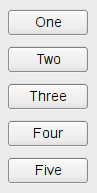
若 QBoxLayout 的取嚮為 Qt::Vertical ,框將再次采用閤適尺寸排成一列。
最輕鬆方式創建 QBoxLayout 是使用某個方便類,如 QHBoxLayout (對於 Qt::Horizontal 框) 或 QVBoxLayout (對於 Qt::Vertical 框)。還可以使用 QBoxLayout 構造函數直接,指定其方嚮為 LeftToRight , RightToLeft , TopToBottom ,或 BottomToTop .
若 QBoxLayout 不是頂層布局 (即:它不管理 Widget 的所有區域和子級),必須將它添加到其父級布局,在采用它做任何事情之前。添加布局的正常方式是通過調用 parentLayout-> addLayout ().
一旦這樣做,就可以將框添加到 QBoxLayout 使用下列 4 函數之一:
使用 insertWidget (), insertSpacing (), insertStretch () 或 insertLayout () 以在布局中指定位置插入框。
QBoxLayout 還包括 2 種邊距寬度:
邊距默認由樣式提供。大多數 Qt 樣式指定的默認邊距對於 Widget 為 9,對於窗口為 11。間距默認與頂層布局邊距寬度相同,或與父布局相同。
要從布局移除 Widget,調用 removeWidget ()。調用 QWidget::hide () 在 Widget 還會從布局高效移除小部件,直到 QWidget::show () 被調用。
幾乎總是會想要使用 QVBoxLayout and QHBoxLayout 而不是 QBoxLayout 因為它們的方便構造函數。
另請參閱 QGridLayout , QStackedLayout ,和 布局管理 .
此類型用於確定框布局的方嚮。
| 常量 | 值 | 描述 |
|---|---|---|
QBoxLayout::LeftToRight
|
0
|
水平從左到右。 |
QBoxLayout::RightToLeft
|
1
|
水平從右到左。 |
QBoxLayout::TopToBottom
|
2
|
垂直從上到下。 |
QBoxLayout::BottomToTop
|
3
|
垂直從下到上。 |
構造新的 QBoxLayout 按方嚮 dir 和父級小部件 parent .
將直接把布局設為頂層布局對於 parent 。Widget 隻可以有一個頂層布局。返迴它通過 QWidget::layout ().
另請參閱 direction () 和 QWidget::setLayout ().
[虛擬]
QBoxLayout::
~QBoxLayout
()
銷毀此框布局。
不銷毀布局 Widget。
[override virtual]
void
QBoxLayout::
addItem
(
QLayoutItem
*
item
)
重實現自 QLayout::addItem ().
添加 layout 到方框末尾,采用連續拉伸因子 stretch .
另請參閱 insertLayout (), addItem (),和 addWidget ().
添加 spacerItem 到此方框布局的末尾。
該函數在 Qt 4.4 引入。
另請參閱 addSpacing () 和 addStretch ().
添加不可拉伸空間 ( QSpacerItem ) 采用尺寸 size 到此方框布局的末尾。 QBoxLayout 提供默認邊距和間距。此函數添加額外空間。
另請參閱 insertSpacing (), addItem (),和 QSpacerItem .
添加可拉伸空間 ( QSpacerItem ) 采用 0 最小尺寸和拉伸因子 stretch 到此方框布局的末尾。
另請參閱 insertStretch (), addItem (),和 QSpacerItem .
限製框的垂直尺度 (如:高度若框是 LeftToRight ) 到最小 size 。其它約束可能遞增限製。
另請參閱 addItem ().
添加 widget 到此框布局的末尾,采用拉伸因子 stretch 和對齊 alignment .
拉伸因子僅適用於 direction 的 QBoxLayout ,且相對於其它框與 Widget 在此 QBoxLayout 。具有更高拉伸因子的 Widget 與框增長更多。
若拉伸因子為 0 且什麼都沒有除非 QBoxLayout 擁有大於 0 的拉伸因子,空間分布將根據 QWidget :sizePolicy() 對於涉及的每個 Widget。
對齊方式的指定是通過 alignment 。默認對齊為 0,意味著 Widget 填充整個單元格。
另請參閱 insertWidget (), addItem (), addLayout (), addStretch (), addSpacing (),和 addStrut ().
[override virtual]
int
QBoxLayout::
count
() const
重實現自 QLayout::count ().
返迴框的方嚮。 addWidget () 和 addSpacing () 工作於此方嚮;拉伸將在此方嚮延伸。
另請參閱 setDirection (), QBoxLayout::Direction , addWidget (),和 addSpacing ().
[override virtual]
Qt::Orientations
QBoxLayout::
expandingDirections
() const
重實現自 QLayout::expandingDirections ().
[override virtual]
bool
QBoxLayout::
hasHeightForWidth
() const
重實現自 QLayoutItem::hasHeightForWidth ().
[override virtual]
int
QBoxLayout::
heightForWidth
(
int
w
) const
重實現自 QLayoutItem::heightForWidth ().
插入 item 到此框布局在位置 index 。若 index 為負,項被添加在末尾。
另請參閱 addItem (), insertWidget (), insertLayout (), insertStretch (),和 insertSpacing ().
插入 layout 在位置 index ,采用拉伸因子 stretch 。若 index 為負,布局被添加在末尾。
layout 變為框布局的子級。
另請參閱 addLayout () 和 insertItem ().
插入 spacerItem 在位置 index ,采用 0 最小尺寸和拉伸因子。若 index 為負,空間被添加在末尾。
該函數在 Qt 4.4 引入。
另請參閱 addSpacerItem (), insertStretch (),和 insertSpacing ().
插入不可拉伸空間 ( QSpacerItem ) 在位置 index ,采用尺寸 size 。若 index 為負,空間被添加在末尾。
框布局具有默認的邊距和間距。此函數添加額外空間。
另請參閱 addSpacing (), insertItem (),和 QSpacerItem .
插入可拉伸空間 ( QSpacerItem ) 在位置 index ,采用 0 最小尺寸和拉伸因子 stretch 。若 index 為負,空間被添加在末尾。
另請參閱 addStretch (), insertItem (),和 QSpacerItem .
插入 widget 在位置 index ,采用拉伸因子 stretch 和對齊 alignment 。若 index 為負,Widget 被添加到末尾。
拉伸因子僅適用於 direction 的 QBoxLayout ,且相對於其它框與 Widget 在此 QBoxLayout 。具有更高拉伸因子的 Widget 與框增長更多。
若拉伸因子為 0 且什麼都沒有除非 QBoxLayout 擁有大於 0 的拉伸因子,空間分布將根據 QWidget :sizePolicy() 對於涉及的每個 Widget。
對齊方式的指定是通過 alignment 。默認對齊為 0,意味著 Widget 填充整個單元格。
另請參閱 addWidget () 和 insertItem ().
[override virtual]
void
QBoxLayout::
invalidate
()
重實現自 QLayout::invalidate ().
重置緩存信息。
[override virtual]
QLayoutItem
*QBoxLayout::
itemAt
(
int
index
) const
重實現自 QLayout::itemAt ().
[override virtual]
QSize
QBoxLayout::
maximumSize
() const
重實現自 QLayout::maximumSize ().
[override virtual]
int
QBoxLayout::
minimumHeightForWidth
(
int
w
) const
重實現自 QLayoutItem::minimumHeightForWidth ().
[override virtual]
QSize
QBoxLayout::
minimumSize
() const
重實現自 QLayout::minimumSize ().
將此布局的方嚮設為 direction .
另請參閱 direction ().
[override virtual]
void
QBoxLayout::
setGeometry
(const
QRect
&
r
)
重實現自 QLayout::setGeometry ().
重實現 QLayout::setSpacing ()。把間距特性設為 spacing .
另請參閱 QLayout::setSpacing () 和 spacing ().
設置拉伸因子在位置 index 。到 stretch .
該函數在 Qt 4.5 引入。
另請參閱 stretch ().
設置拉伸因子為
widget
to
stretch
和返迴 true 若
widget
在此布局中被找到 (不包括子級布局);否則返迴
false
.
另請參閱 setAlignment ().
這是重載函數。
設置拉伸因子為布局
layout
to
stretch
並返迴
true
if
layout
在此布局中被找到 (不包括子級布局);否則返迴
false
.
[override virtual]
QSize
QBoxLayout::
sizeHint
() const
重實現自 QLayoutItem::sizeHint ().
重實現 QLayout::spacing ()。若間距特性有效,返迴該值。否則,計算並返迴間距特性的值。由於 Widget 布局間距從屬樣式,因此,若父級是 Widget,它會查詢樣式為布局 (水平或垂直) 間距。否則,若父級是布局,它會查詢父級布局為 spacing()。
另請參閱 QLayout::spacing () 和 setSpacing ().
返迴拉伸因子在位置 index .
該函數在 Qt 4.5 引入。
另請參閱 setStretch ().
[override virtual]
QLayoutItem
*QBoxLayout::
takeAt
(
int
index
)
重實現自 QLayout::takeAt ().
