QCalendarWidget 類提供允許用戶選擇日期,基於月份的日曆 Widget。 更多...
| 頭: | #include <QCalendarWidget> |
| qmake: | QT += widgets |
| Since: | Qt 4.2 |
| 繼承: | QWidget |
該類在 Qt 4.2 引入。
| enum | HorizontalHeaderFormat { SingleLetterDayNames, ShortDayNames, LongDayNames, NoHorizontalHeader } |
| enum | SelectionMode { NoSelection, SingleSelection } |
| enum | VerticalHeaderFormat { ISOWeekNumbers, NoVerticalHeader } |
|
|
| QCalendarWidget (QWidget * parent = nullptr) | |
| virtual | ~QCalendarWidget () |
| int | dateEditAcceptDelay () const |
| QMap<QDate, QTextCharFormat> | dateTextFormat () const |
| QTextCharFormat | dateTextFormat (const QDate & date ) const |
| Qt::DayOfWeek | firstDayOfWeek () const |
| QTextCharFormat | headerTextFormat () const |
| QCalendarWidget::HorizontalHeaderFormat | horizontalHeaderFormat () const |
| bool | isDateEditEnabled () const |
| bool | isGridVisible () const |
| bool | isNavigationBarVisible () const |
| QDate | maximumDate () const |
| QDate | minimumDate () const |
| int | monthShown () const |
| QDate | selectedDate () const |
| QCalendarWidget::SelectionMode | selectionMode () const |
| void | setDateEditAcceptDelay (int delay ) |
| void | setDateEditEnabled (bool enable ) |
| void | setDateTextFormat (const QDate & date , const QTextCharFormat & format ) |
| void | setFirstDayOfWeek (Qt::DayOfWeek dayOfWeek ) |
| void | setHeaderTextFormat (const QTextCharFormat & format ) |
| void | setHorizontalHeaderFormat (QCalendarWidget::HorizontalHeaderFormat format ) |
| void | setMaximumDate (const QDate & date ) |
| void | setMinimumDate (const QDate & date ) |
| void | setSelectionMode (QCalendarWidget::SelectionMode mode ) |
| void | setVerticalHeaderFormat (QCalendarWidget::VerticalHeaderFormat format ) |
| void | setWeekdayTextFormat (Qt::DayOfWeek dayOfWeek , const QTextCharFormat & format ) |
| QCalendarWidget::VerticalHeaderFormat | verticalHeaderFormat () const |
| QTextCharFormat | weekdayTextFormat (Qt::DayOfWeek dayOfWeek ) const |
| int | yearShown () const |
| virtual QSize | minimumSizeHint () const override |
| virtual QSize | sizeHint () const override |
| void | setCurrentPage (int year , int month ) |
| void | setDateRange (const QDate & min , const QDate & max ) |
| void | setGridVisible (bool show ) |
| void | setNavigationBarVisible (bool visible ) |
| void | setSelectedDate (const QDate & date ) |
| void | showNextMonth () |
| void | showNextYear () |
| void | showPreviousMonth () |
| void | showPreviousYear () |
| void | showSelectedDate () |
| void | showToday () |
| void | activated (const QDate & date ) |
| void | clicked (const QDate & date ) |
| void | currentPageChanged (int year , int month ) |
| void | selectionChanged () |
| virtual void | paintCell (QPainter * painter , const QRect & rect , const QDate & date ) const |
| void | updateCell (const QDate & date ) |
| void | updateCells () |
| virtual bool | event (QEvent * event ) override |
| virtual bool | eventFilter (QObject * watched , QEvent * event ) override |
| virtual void | keyPressEvent (QKeyEvent * event ) override |
| virtual void | mousePressEvent (QMouseEvent * event ) override |
| virtual void | resizeEvent (QResizeEvent * event ) override |

Widget 的初始化是采用當前月和年,但 QCalendarWidget 有提供幾個公共槽以改變顯示的年和月。
默認情況下,選中今天的日期,且用戶可以使用鼠標和鍵盤兩者選擇日期。可以檢索目前選中的日期使用 selectedDate () 函數。它是可能的將用戶選定約束到給定日期範圍通過設置 minimumDate and maximumDate 特性。另外,可以一次性設置 2 特性使用 setDateRange () 方便槽。設置 selectionMode 特性到 NoSelection 以從根本上禁止用戶選擇。注意,還可以以編程方式選擇日期使用 setSelectedDate () 槽。
可以檢索目前顯示的月和年使用 monthShown () 和 yearShown () 函數,分彆。
新近創建的日曆 Widget 使用縮寫的天數名,且周六和周日兩者以紅色標記。日曆柵格不可見。周數顯示,且第 1 列天數是日曆區域設置每周的第 1 天。
可以將天數的錶示法更改為單字母縮寫 (M 對於 Monday) 通過設置 horizontalHeaderFormat 特性到 QCalendarWidget::SingleLetterDayNames 。把同一特性設為 QCalendarWidget::LongDayNames 使 Header (頭部) 顯示完整天數名。可以移除周數通過設置 verticalHeaderFormat 特性到 QCalendarWidget::NoVerticalHeader 。可以打開日曆柵格通過設置 gridVisible 特性為 true 使用 setGridVisible () 函數:

|
QCalendarWidget *calendar; calendar->setGridVisible(true); |
最後,可以更改第 1 列中的天數使用 setFirstDayOfWeek () 函數。
QCalendarWidget 類還提供瞭 3 信號, selectionChanged (), activated () 和 currentPageChanged () 使之可能響應用戶交互。
可以很大程度上定製 Header (頭)、工作日 (或單日) 的渲染通過設置 QTextCharFormat 為某些特殊工作日、特殊日期或 Header (頭) 的渲染。
僅子集特性在 QTextCharFormat 可以用於日曆 Widget。目前,前景、背景及字體特性可以用於確定 Widget 中單個單元格的渲染。
另請參閱 QDate , QDateEdit ,和 QTextCharFormat .
此枚舉類型定義水平 Header (頭) 可以顯示的各種格式。
| 常量 | 值 | 描述 |
|---|---|---|
QCalendarWidget::SingleLetterDayNames
|
1
|
Header (頭) 顯示用於天數名的單字母縮寫 (如 M 對於 Monday). |
QCalendarWidget::ShortDayNames
|
2
|
Header (頭) 顯示天數名的簡短縮寫 (如 Mon 對於 Monday)。 |
QCalendarWidget::LongDayNames
|
3
|
Header (頭) 顯示完整天數名 (如:Monday)。 |
QCalendarWidget::NoHorizontalHeader
|
0
|
頭被隱藏。 |
另請參閱 horizontalHeaderFormat () 和 VerticalHeaderFormat .
此枚舉描述提供給用戶用於在日曆中選擇日期的選定類型。
| 常量 | 值 | 描述 |
|---|---|---|
QCalendarWidget::NoSelection
|
0
|
無法選擇日期。 |
QCalendarWidget::SingleSelection
|
1
|
可以選擇單個日期。 |
另請參閱 selectionMode .
此枚舉類型定義垂直 Header (頭) 可以顯示的各種格式。
| 常量 | 值 | 描述 |
|---|---|---|
QCalendarWidget::ISOWeekNumbers
|
1
|
Header (頭) 顯示 ISO 周數如描述通過 QDate::weekNumber (). |
QCalendarWidget::NoVerticalHeader
|
0
|
頭被隱藏。 |
另請參閱 verticalHeaderFormat () 和 HorizontalHeaderFormat .
此特性保持展示非活動日期編輯的時間,在接受其內容前
若日曆 Widget 的 日期編輯被啓用 , this property specifies the amount of time (in milliseconds) that the date edit remains open after the most recent user input. Once this time has elapsed, the date specified in the date edit is accepted and the popup is closed.
默認情況下,延遲被定義為 1500 毫秒 (1.5 秒)。
該特性在 Qt 4.3 引入。
訪問函數:
| int | dateEditAcceptDelay () const |
| void | setDateEditAcceptDelay (int delay ) |
此特性保持是否啓用日期編輯彈齣
If this property is enabled, pressing a non-modifier key will cause a date edit to popup if the calendar widget has focus, allowing the user to specify a date in the form specified by the current locale.
By default, this property is enabled.
The date edit is simpler in appearance than QDateEdit , but allows the user to navigate between fields using the left and right cursor keys, increment and decrement individual fields using the up and down cursor keys, and enter values directly using the number keys.
該特性在 Qt 4.3 引入。
訪問函數:
| bool | isDateEditEnabled () const |
| void | setDateEditEnabled (bool enable ) |
另請參閱 QCalendarWidget::dateEditAcceptDelay .
此特性保持第 1 列顯示天數的標識值。
默認情況下,第 1 列顯示的天數是日曆區域設置每周的第 1 天。
訪問函數:
| Qt::DayOfWeek | firstDayOfWeek () const |
| void | setFirstDayOfWeek (Qt::DayOfWeek dayOfWeek ) |
此特性保持是否顯示錶格柵格。
|
|
QCalendarWidget *calendar; calendar->setGridVisible(true); |
默認值為 false。
訪問函數:
| bool | isGridVisible () const |
| void | setGridVisible (bool show ) |
此特性保持水平 Header (頭) 的格式。
默認值為 QCalendarWidget::ShortDayNames .
訪問函數:
| QCalendarWidget::HorizontalHeaderFormat | horizontalHeaderFormat () const |
| void | setHorizontalHeaderFormat (QCalendarWidget::HorizontalHeaderFormat format ) |
此特性保持目前指定日期範圍的最大日期。
The user will not be able to select a date which is after the currently set maximum date.
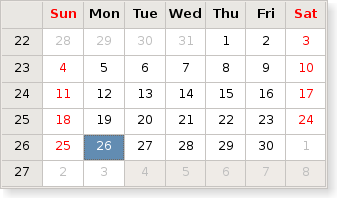
|
QCalendarWidget *calendar; calendar->setGridVisible(true); calendar->setMaximumDate(QDate(2006, 7, 3)); |
The default maximum date is December 31, 9999 CE.
When setting a maximum date, the minimumDate and selectedDate properties are adjusted if the selection range becomes invalid. If the provided date is not a valid QDate object, the setMaximumDate() function does nothing.
訪問函數:
| QDate | maximumDate () const |
| void | setMaximumDate (const QDate & date ) |
另請參閱 setDateRange ().
This property holds the minimum date of the currently specified date range.
The user will not be able to select a date that is before the currently set minimum date.

|
QCalendarWidget *calendar; calendar->setGridVisible(true); calendar->setMinimumDate(QDate(2006, 6, 19)); |
The default minimum date is November 25, 4714 BCE.
When setting a minimum date, the maximumDate and selectedDate properties are adjusted if the selection range becomes invalid. If the provided date is not a valid QDate object, the setMinimumDate() function does nothing.
訪問函數:
| QDate | minimumDate () const |
| void | setMinimumDate (const QDate & date ) |
另請參閱 setDateRange ().
This property holds whether the navigation bar is shown or not
當此特性為
true
(the default), the next month, previous month, month selection, year selection controls are shown on top.
When the property is set to false, these controls are hidden.
該特性在 Qt 4.3 引入。
訪問函數:
| bool | isNavigationBarVisible () const |
| void | setNavigationBarVisible (bool visible ) |
此特性保持目前選中的日期。
The selected date must be within the date range specified by the minimumDate and maximumDate properties. By default, the selected date is the current date.
訪問函數:
| QDate | selectedDate () const |
| void | setSelectedDate (const QDate & date ) |
另請參閱 setDateRange ().
This property holds the type of selection the user can make in the calendar
當此特性被設為 SingleSelection , the user can select a date within the minimum and maximum allowed dates, using either the mouse or the keyboard.
當特性被設為 NoSelection , the user will be unable to select dates, but they can still be selected programmatically. Note that the date that is selected when the property is set to NoSelection will still be the selected date of the calendar.
默認值為 SingleSelection .
訪問函數:
| QCalendarWidget::SelectionMode | selectionMode () const |
| void | setSelectionMode (QCalendarWidget::SelectionMode mode ) |
This property holds the format of the vertical header.
The default value is QCalendarWidget::ISOWeekNumber.
訪問函數:
| QCalendarWidget::VerticalHeaderFormat | verticalHeaderFormat () const |
| void | setVerticalHeaderFormat (QCalendarWidget::VerticalHeaderFormat format ) |
構造日曆 Widget 采用給定 parent .
The widget is initialized with the current month and year, and the currently selected date is today.
另請參閱 setCurrentPage ().
[signal]
void
QCalendarWidget::
activated
(const
QDate
&
date
)
This signal is emitted whenever the user presses the Return or Enter key or double-clicks a date in the calendar widget.
[signal]
void
QCalendarWidget::
clicked
(const
QDate
&
date
)
This signal is emitted when a mouse button is clicked. The date the mouse was clicked on is specified by date . The signal is only emitted when clicked on a valid date, e.g., dates are not outside the minimumDate () 和 maximumDate (). If the selection mode is NoSelection , this signal will not be emitted.
[signal]
void
QCalendarWidget::
currentPageChanged
(
int
year
,
int
month
)
This signal is emitted when the currently shown month is changed. The new year and month are passed as parameters.
另請參閱 setCurrentPage ().
[signal]
void
QCalendarWidget::
selectionChanged
()
此信號被發射,當目前選中日期改變時。
The currently selected date can be changed by the user using the mouse or keyboard, or by the programmer using setSelectedDate ().
另請參閱 selectedDate ().
[slot]
void
QCalendarWidget::
setCurrentPage
(
int
year
,
int
month
)
顯示給定 month 為給定 year without changing the selected date. Use the setSelectedDate () function to alter the selected date.
可以檢索目前顯示的月和年使用 monthShown () 和 yearShown () 函數分彆。
另請參閱 yearShown (), monthShown (), showPreviousMonth (), showNextMonth (), showPreviousYear (),和 showNextYear ().
[slot]
void
QCalendarWidget::
setDateRange
(const
QDate
&
min
, const
QDate
&
max
)
定義日期範圍通過設置 minimumDate and maximumDate 特性。
The date range restricts the user selection, i.e. the user can only select dates within the specified date range. Note that
QCalendarWidget *calendar;
calendar->setDateRange(min, max);
is analogous to
QCalendarWidget *calendar;
calendar->setMinimumDate(min);
calendar->setMaximumDate(max);
若 min or max 參數是無效 QDate 對象,此函數什麼都不做。
另請參閱 setMinimumDate () 和 setMaximumDate ().
[slot]
void
QCalendarWidget::
showNextMonth
()
Shows the next month relative to the currently displayed month. Note that the selected date is not changed.
另請參閱 showPreviousMonth (), setCurrentPage (),和 setSelectedDate ().
[slot]
void
QCalendarWidget::
showNextYear
()
Shows the currently displayed month in the next year relative to the currently displayed year. Note that the selected date is not changed.
另請參閱 showPreviousYear (), setCurrentPage (),和 setSelectedDate ().
[slot]
void
QCalendarWidget::
showPreviousMonth
()
Shows the previous month relative to the currently displayed month. Note that the selected date is not changed.
另請參閱 showNextMonth (), setCurrentPage (),和 setSelectedDate ().
[slot]
void
QCalendarWidget::
showPreviousYear
()
Shows the currently displayed month in the previous year relative to the currently displayed year. Note that the selected date is not changed.
另請參閱 showNextYear (), setCurrentPage (),和 setSelectedDate ().
[slot]
void
QCalendarWidget::
showSelectedDate
()
Shows the month of the selected date.
另請參閱 selectedDate () 和 setCurrentPage ().
[slot]
void
QCalendarWidget::
showToday
()
Shows the month of the today's date.
另請參閱 selectedDate () 和 setCurrentPage ().
[虛擬]
QCalendarWidget::
~QCalendarWidget
()
Destroys the calendar widget.
返迴 QMap from QDate to QTextCharFormat showing all dates that use a special format that alters their rendering.
另請參閱 setDateTextFormat ().
返迴 QTextCharFormat for date . The char format can be be empty if the date is not renderd specially.
[override virtual protected]
bool
QCalendarWidget::
event
(
QEvent
*
event
)
重實現: QWidget::event (QEvent *event).
[override virtual protected]
bool
QCalendarWidget::
eventFilter
(
QObject
*
watched
,
QEvent
*
event
)
重實現: QObject::eventFilter (QObject *watched, QEvent *event).
Returns the text char format for rendering the header.
另請參閱 setHeaderTextFormat ().
[override virtual protected]
void
QCalendarWidget::
keyPressEvent
(
QKeyEvent
*
event
)
重實現: QWidget::keyPressEvent (QKeyEvent *event).
[override virtual]
QSize
QCalendarWidget::
minimumSizeHint
() const
重實現訪問函數為特性: QWidget::minimumSizeHint .
Returns the currently displayed month. Months are numbered from 1 to 12.
另請參閱 yearShown () 和 setCurrentPage ().
[override virtual protected]
void
QCalendarWidget::
mousePressEvent
(
QMouseEvent
*
event
)
重實現: QWidget::mousePressEvent (QMouseEvent *event).
[virtual protected]
void
QCalendarWidget::
paintCell
(
QPainter
*
painter
, const
QRect
&
rect
, const
QDate
&
date
) const
描繪單元格指定通過給定 date ,使用給定 painter and rect .
[override virtual protected]
void
QCalendarWidget::
resizeEvent
(
QResizeEvent
*
event
)
重實現: QWidget::resizeEvent (QResizeEvent *event).
Sets the format used to render the given date to that specified by format .
若 date 為 null,清零所有日期格式。
另請參閱 dateTextFormat ().
Sets the text char format for rendering the header to format . If you also set a weekday text format, this format's foreground and background color will take precedence over the header's format. The other formatting information will still be decided by the header's format.
另請參閱 headerTextFormat ().
Sets the text char format for rendering of day in the week dayOfWeek to format . The format will take precedence over the header format in case of foreground and background color. Other text formatting information is taken from the headers format.
另請參閱 weekdayTextFormat () 和 setHeaderTextFormat ().
[override virtual]
QSize
QCalendarWidget::
sizeHint
() const
重實現訪問函數為特性: QWidget::sizeHint .
[protected]
void
QCalendarWidget::
updateCell
(const
QDate
&
date
)
Updates the cell specified by the given date unless updates are disabled or the cell is hidden.
該函數在 Qt 4.4 引入。
另請參閱 updateCells (), yearShown (),和 monthShown ().
[protected]
void
QCalendarWidget::
updateCells
()
更新所有可見單元格,除非更新被禁用。
該函數在 Qt 4.4 引入。
另請參閱 updateCell ().
返迴的文本字符格式用於渲染天按周 dayOfWeek .
另請參閱 setWeekdayTextFormat () 和 headerTextFormat ().
返迴目前顯示月的年。月的編號是從 1 到 12。
另請參閱 monthShown () 和 setCurrentPage ().
