The QStatusTipEvent class provides an event that is used to show messages in a status bar. 更多...
| 頭: | #include <QStatusTipEvent> |
| qmake: | QT += gui |
| 繼承: | QEvent |
| QStatusTipEvent (const QString & tip ) | |
| QString | tip () const |
The QStatusTipEvent class provides an event that is used to show messages in a status bar.
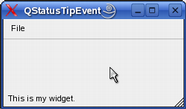
可以為 Widget 設置狀態提示使用 QWidget::setStatusTip () 函數。它們展示在狀態欄中,當鼠標光標進入 Widget 時。例如:
MainWindow::MainWindow(QWidget *parent) : QMainWindow(parent) { QWidget *myWidget = new QWidget; myWidget->setStatusTip(tr("This is my widget.")); setCentralWidget(myWidget); ... } |
|
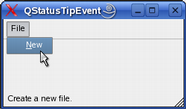
也可以為動作設置狀態提示使用 QAction::setStatusTip () 函數:
MainWindow::MainWindow(QWidget *parent) : QMainWindow(parent) { QMenu *fileMenu = menuBar()->addMenu(tr("File")); QAction *newAct = new QAction(tr("&New"), this); newAct->setStatusTip(tr("Create a new file.")); fileMenu->addAction(newAct); ... } |
|
最後,項視圖類的狀態提示被支持透過 Qt::StatusTipRole 枚舉值。
另請參閱 QStatusBar , QHelpEvent ,和 QWhatsThisClickedEvent .
構造狀態提示事件,采用的文本指定通過 tip .
另請參閱 tip ().
返迴要展示在狀態欄中的消息。
另請參閱 QStatusBar::showMessage ().
