The QMainWindow 類提供主應用程序窗口。 更多...
| 頭: | #include <QMainWindow> |
| qmake: | QT += widgets |
| 繼承: | QWidget |
| enum | DockOption { AnimatedDocks, AllowNestedDocks, AllowTabbedDocks, ForceTabbedDocks, VerticalTabs, GroupedDragging } |
| flags | DockOptions |
|
|
| QMainWindow (QWidget * parent = nullptr, Qt::WindowFlags flags = Qt::WindowFlags()) | |
| virtual | ~QMainWindow () |
| void | addDockWidget (Qt::DockWidgetArea area , QDockWidget * dockwidget ) |
| void | addDockWidget (Qt::DockWidgetArea area , QDockWidget * dockwidget , Qt::Orientation orientation ) |
| void | addToolBar (Qt::ToolBarArea area , QToolBar * toolbar ) |
| void | addToolBar (QToolBar * toolbar ) |
| QToolBar * | addToolBar (const QString & title ) |
| void | addToolBarBreak (Qt::ToolBarArea area = Qt::TopToolBarArea) |
| QWidget * | centralWidget () const |
| Qt::DockWidgetArea | corner (Qt::Corner corner ) const |
| virtual QMenu * | createPopupMenu () |
| QMainWindow::DockOptions | dockOptions () const |
| Qt::DockWidgetArea | dockWidgetArea (QDockWidget * dockwidget ) const |
| bool | documentMode () const |
| QSize | iconSize () const |
| void | insertToolBar (QToolBar * before , QToolBar * toolbar ) |
| void | insertToolBarBreak (QToolBar * before ) |
| bool | isAnimated () const |
| bool | isDockNestingEnabled () const |
| QMenuBar * | menuBar () const |
| QWidget * | menuWidget () const |
| void | removeDockWidget (QDockWidget * dockwidget ) |
| void | removeToolBar (QToolBar * toolbar ) |
| void | removeToolBarBreak (QToolBar * before ) |
| void | resizeDocks (const QList<QDockWidget *> & docks , const QList<int> & sizes , Qt::Orientation orientation ) |
| bool | restoreDockWidget (QDockWidget * dockwidget ) |
| bool | restoreState (const QByteArray & state , int version = 0) |
| QByteArray | saveState (int version = 0) const |
| void | setCentralWidget (QWidget * widget ) |
| void | setCorner (Qt::Corner corner , Qt::DockWidgetArea area ) |
| void | setDockOptions (QMainWindow::DockOptions options ) |
| void | setDocumentMode (bool enabled ) |
| void | setIconSize (const QSize & iconSize ) |
| void | setMenuBar (QMenuBar * menuBar ) |
| void | setMenuWidget (QWidget * menuBar ) |
| void | setStatusBar (QStatusBar * statusbar ) |
| void | setTabPosition (Qt::DockWidgetAreas areas , QTabWidget::TabPosition tabPosition ) |
| void | setTabShape (QTabWidget::TabShape tabShape ) |
| void | setToolButtonStyle (Qt::ToolButtonStyle toolButtonStyle ) |
| void | splitDockWidget (QDockWidget * first , QDockWidget * second , Qt::Orientation orientation ) |
| QStatusBar * | statusBar () const |
| QTabWidget::TabPosition | tabPosition (Qt::DockWidgetArea area ) const |
| QTabWidget::TabShape | tabShape () const |
| QList<QDockWidget *> | tabifiedDockWidgets (QDockWidget * dockwidget ) const |
| void | tabifyDockWidget (QDockWidget * first , QDockWidget * second ) |
| QWidget * | takeCentralWidget () |
| Qt::ToolBarArea | toolBarArea (QToolBar * toolbar ) const |
| bool | toolBarBreak (QToolBar * toolbar ) const |
| Qt::ToolButtonStyle | toolButtonStyle () const |
| bool | unifiedTitleAndToolBarOnMac () const |
| void | setAnimated (bool enabled ) |
| void | setDockNestingEnabled (bool enabled ) |
| void | setUnifiedTitleAndToolBarOnMac (bool set ) |
| void | iconSizeChanged (const QSize & iconSize ) |
| void | tabifiedDockWidgetActivated (QDockWidget * dockWidget ) |
| void | toolButtonStyleChanged (Qt::ToolButtonStyle toolButtonStyle ) |
| const QMetaObject | staticMetaObject |
| virtual void | contextMenuEvent (QContextMenuEvent * event ) override |
| virtual bool | event (QEvent * event ) override |
The QMainWindow 類提供主應用程序窗口。
主窗口提供用於構建應用程序用戶界麵的框架。Qt 有 QMainWindow 及其 相關類 用於主窗口管理。 QMainWindow 有自己的布局,可以添加 QToolBar s, QDockWidget s, a QMenuBar ,和 QStatusBar 。布局具有可以被任何種類 Widget 占據的中心區域。見以下布局圖像。
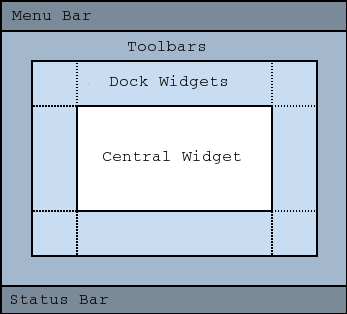
注意: 不支持創建沒有中心 Widget 的主窗口。必須有中心小部件,即使它隻是占位符。
中心小部件通常是標準 Qt Widget,譬如
QTextEdit
或
QGraphicsView
。自定義 Widget 還可以用於高級應用程序。設置中心 Widget 采用
setCentralWidget()
.
主窗口有 SDI (單文檔界麵) 或 MDI (多文檔界麵)。在 Qt 中創建 MDI 應用程序通過使用 QMdiArea 作為中心 Widget。
現在,我們將研究可以被添加到主窗口的每一其它 Widget。舉例說明如何創建和添加它們。
Qt 實現菜單在 QMenu and QMainWindow 保持它們在 QMenuBar . QAction 被添加到菜單,將它們顯示為菜單項。
可以把新菜單添加到主窗口的菜單欄通過調用
menuBar()
,其返迴
QMenuBar
為窗口,然後添加菜單采用
QMenuBar::addMenu
().
QMainWindow
帶有默認菜單欄,但也可以自己設置一個采用
setMenuBar()
。若希望實現自定義菜單欄 (即:不使用
QMenuBar
Widget),可以設置它采用
setMenuWidget()
.
以下是如何創建菜單的範例:
    void MainWindow::createMenus()
    {
        fileMenu = menuBar()->addMenu(tr("&File"));
        fileMenu->addAction(newAct);
        fileMenu->addAction(openAct);
        fileMenu->addAction(saveAct);
The
createPopupMenu()
函數創建彈齣菜單,當主窗口接收到上下文菜單事件時。默認實現生成帶來自停放 Widget 和工具欄的可復選動作的菜單。可以重實現
createPopupMenu()
為自定義菜單。
工具欄的實現在
QToolBar
類。把工具欄添加到主窗口采用
addToolBar()
.
控製工具欄的初始位置通過把它們賦值給特定
Qt::ToolBarArea
。可以通過插入工具欄打斷分割區域 - 把它想像成文本編輯中的換行符 - 采用
addToolBarBreak()
or
insertToolBarBreak()
。還可以限定用戶放置采用
QToolBar::setAllowedAreas
() 和
QToolBar::setMovable
().
可以檢索工具欄圖標的尺寸采用
iconSize()
。尺寸從屬平颱;可以設置固定尺寸采用
setIconSize()
。可以更改工具欄中所有工具按鈕的外觀采用
setToolButtonStyle()
.
以下是創建工具欄的範例:
    void MainWindow::createToolBars()
    {
        fileToolBar = addToolBar(tr("File"));
        fileToolBar->addAction(newAct);
停放 Widget 的實現在
QDockWidget
類。停放 Widget 是可以停放在主窗口中的窗口。可以把停放 Widget 添加到主窗口采用
addDockWidget()
.
有 4 個停放 Widget 區域,給齣通過
Qt::DockWidgetArea
枚舉:左側、右側、頂部及底部。可以指定停放 Widget 區域應該占據哪個區域重疊角落采用
setCorner()
。默認情況下,每個區域隻能包含一行 (垂直或水平) 停放 Widget,但若啓用嵌套采用
setDockNestingEnabled()
,可以將停放 Widget 添加到任一方嚮。
2 停放 Widget 也可以彼此堆疊在一起。 QTabBar 然後用於選擇應顯示哪個 Widget。
我們給齣在主窗口如何創建和添加停放 Widget 的範例:
    QDockWidget *dockWidget = new QDockWidget(tr("Dock Widget"), this);
    dockWidget->setAllowedAreas(Qt::LeftDockWidgetArea |
                                Qt::RightDockWidgetArea);
    dockWidget->setWidget(dockWidgetContents);
    addDockWidget(Qt::LeftDockWidgetArea, dockWidget);
可以設置狀態欄采用
setStatusBar()
,但僅創建一個當首次
statusBar()
(返迴主窗口的狀態欄) 被調用。見
QStatusBar
瞭解如何使用它的有關信息。
QMainWindow
可以存儲其布局的狀態采用
saveState()
;稍後,可以檢索它采用
restoreState()
。它是存儲的工具欄和停放 Widget 的位置和尺寸 (相對於主窗口的尺寸)。
另請參閱 QMenuBar , QToolBar , QStatusBar , QDockWidget , 應用程序範例 , 停放 Widget 範例 , MDI 範例 , SDI 範例 ,和 菜單範例 .
此枚舉包含的標誌指定停放行為對於 QMainWindow .
| 常量 | 值 | 描述 |
|---|---|---|
QMainWindow::AnimatedDocks
|
0x01
|
等同於 animated 特性。 |
QMainWindow::AllowNestedDocks
|
0x02
|
等同於 dockNestingEnabled 特性。 |
QMainWindow::AllowTabbedDocks
|
0x04
|
用戶可以將某一停放 Widget 掉落到另一停放 widget 的 "頂部"。這 2 Widget 堆疊並齣現用於選擇哪個停放 Widget 可見的選項卡欄。 |
QMainWindow::ForceTabbedDocks
|
0x08
|
Each dock area contains a single stack of tabbed dock widgets. In other words, dock widgets cannot be placed next to each other in a dock area. If this option is set, AllowNestedDocks has no effect. |
QMainWindow::VerticalTabs
|
0x10
|
The two vertical dock areas on the sides of the main window show their tabs vertically. If this option is not set, all dock areas show their tabs at the bottom. Implies AllowTabbedDocks. See also setTabPosition (). |
QMainWindow::GroupedDragging
|
0x20
|
When dragging the titlebar of a dock, all the tabs that are tabbed with it are going to be dragged. Implies AllowTabbedDocks. Does not work well if some QDockWidgets have restrictions in which area they are allowed. (This enum value was added in Qt 5.6.) |
These options only control how dock widgets may be dropped in a QMainWindow . They do not re-arrange the dock widgets to conform with the specified options. For this reason they should be set before any dock widgets are added to the main window. Exceptions to this are the AnimatedDocks and VerticalTabs options, which may be set at any time.
該枚舉在 Qt 4.3 引入或被修改。
DockOptions 類型是 typedef 對於 QFlags <DockOption>。它存儲 DockOption 值的 OR (或) 組閤。
此特性保持是否動畫操縱停放 Widget 和工具欄
When a dock widget or tool bar is dragged over the main window, the main window adjusts its contents to indicate where the dock widget or tool bar will be docked if it is dropped. Setting this property causes QMainWindow to move its contents in a smooth animation. Clearing this property causes the contents to snap into their new positions.
By default, this property is set. It may be cleared if the main window contains widgets which are slow at resizing or repainting themselves.
設置此特性等同於設置 AnimatedDocks 選項使用 setDockOptions ().
該特性在 Qt 4.2 引入。
訪問函數:
| bool | isAnimated () const |
| void | setAnimated (bool enabled ) |
此特性保持是否可以嵌套停放
若此特性為
false
, dock areas can only contain a single row (horizontal or vertical) of dock widgets. If this property is
true
, the area occupied by a dock widget can be split in either direction to contain more dock widgets.
Dock nesting is only necessary in applications that contain a lot of dock widgets. It gives the user greater freedom in organizing their main window. However, dock nesting leads to more complex (and less intuitive) behavior when a dock widget is dragged over the main window, since there are more ways in which a dropped dock widget may be placed in the dock area.
設置此特性等同於設置 AllowNestedDocks 選項使用 setDockOptions ().
該特性在 Qt 4.2 引入。
訪問函數:
| bool | isDockNestingEnabled () const |
| void | setDockNestingEnabled (bool enabled ) |
此特性保持停放行為對於 QMainWindow
默認值為 AnimatedDocks | AllowTabbedDocks .
該特性在 Qt 4.3 引入。
訪問函數:
| QMainWindow::DockOptions | dockOptions () const |
| void | setDockOptions (QMainWindow::DockOptions options ) |
此特性保持是否將用於選項卡式停放 Widget 的選項卡欄,設為文檔模式。
默認為 false。
該特性在 Qt 4.5 引入。
訪問函數:
| bool | documentMode () const |
| void | setDocumentMode (bool enabled ) |
另請參閱 QTabBar::documentMode .
此主窗口工具欄圖標的大小。
The default is the default tool bar icon size of the GUI style. Note that the icons used must be at least of this size as the icons are only scaled down.
訪問函數:
| QSize | iconSize () const |
| void | setIconSize (const QSize & iconSize ) |
此特性保持用於選項卡式停放 Widget 的選項卡形狀。
默認為 QTabWidget::Rounded .
該特性在 Qt 4.5 引入。
訪問函數:
| QTabWidget::TabShape | tabShape () const |
| void | setTabShape (QTabWidget::TabShape tabShape ) |
另請參閱 setTabPosition ().
在此主窗口中工具欄按鈕的樣式。
要讓工具按鈕樣式遵循係統設置,將此特性設為 Qt::ToolButtonFollowStyle 。在 Unix,將使用來自桌麵環境的用戶設置。在其它平颱, Qt::ToolButtonFollowStyle 意味著僅圖標。
默認為 Qt::ToolButtonIconOnly .
訪問函數:
| Qt::ToolButtonStyle | toolButtonStyle () const |
| void | setToolButtonStyle (Qt::ToolButtonStyle toolButtonStyle ) |
This property holds whether the window uses the unified title and toolbar look on macOS
Note that the Qt 5 implementation has several limitations compared to Qt 4:
該特性在 Qt 5.2 引入。
訪問函數:
| bool | unifiedTitleAndToolBarOnMac () const |
| void | setUnifiedTitleAndToolBarOnMac (bool set ) |
構造 QMainWindow 采用給定 parent 和指定小部件 flags .
QMainWindow 設置 Qt::Window 標誌自身,且因此將始終創建作為頂層 Widget。
[虛擬]
QMainWindow::
~QMainWindow
()
銷毀主窗口。
添加給定 dockwidget 到指定 area .
添加 dockwidget 進給定 area 按方嚮指定通過 orientation .
添加 toolbar 到指定 area 在此主窗口。 toolbar is placed at the end of the current tool bar block (i.e. line). If the main window already manages toolbar then it will only move the toolbar to area .
另請參閱 insertToolBar (), addToolBarBreak (),和 insertToolBarBreak ().
這是重載函數。
Equivalent of calling addToolBar ( Qt::TopToolBarArea , toolbar )
這是重載函數。
創建 QToolBar 對象,將其窗口標題設為 title ,並把它插入頂部工具欄區域。
另請參閱 setWindowTitle ().
把工具欄中斷添加到給定 area 在呈現所有其它對象後。
返迴主窗口的中心 Widget。此函數返迴零,若中心 Widget 未設置。
另請參閱 setCentralWidget ().
[override virtual protected]
void
QMainWindow::
contextMenuEvent
(
QContextMenuEvent
*
event
)
重實現自 QWidget::contextMenuEvent ().
返迴的停放 Widget 區域占據指定 corner .
另請參閱 setCorner ().
[虛擬]
QMenu
*QMainWindow::
createPopupMenu
()
Returns a popup menu containing checkable entries for the toolbars and dock widgets present in the main window. If there are no toolbars and dock widgets present, this function returns a null pointer.
By default, this function is called by the main window when the user activates a context menu, typically by right-clicking on a toolbar or a dock widget.
If you want to create a custom popup menu, reimplement this function and return a newly-created popup menu. Ownership of the popup menu is transferred to the caller.
另請參閱 addDockWidget (), addToolBar (),和 menuBar ().
返迴
Qt::DockWidgetArea
for
dockwidget
。若
dockwidget
尚未被添加到主窗口,此函數返迴
Qt::NoDockWidgetArea
.
另請參閱 addDockWidget (), splitDockWidget (),和 Qt::DockWidgetArea .
[override virtual protected]
bool
QMainWindow::
event
(
QEvent
*
event
)
重實現自 QWidget::event ().
[signal]
void
QMainWindow::
iconSizeChanged
(const
QSize
&
iconSize
)
This signal is emitted when the size of the icons used in the window is changed. The new icon size is passed in iconSize .
You can connect this signal to other components to help maintain a consistent appearance for your application.
另請參閱 setIconSize ().
插入 toolbar into the area occupied by the before toolbar so that it appears before it. For example, in normal left-to-right layout operation, this means that toolbar will appear to the left of the toolbar specified by before in a horizontal toolbar area.
另請參閱 insertToolBarBreak (), addToolBar (),和 addToolBarBreak ().
插入工具欄中斷,前於工具欄指定通過 before .
返迴用於主窗口的菜單欄。此函數創建並返迴空菜單欄,若菜單欄不存在。
若想要 Mac 應用程序中的所有窗口共享某個菜單欄,就不要使用此函數來創建菜單欄,因為這裏創建的菜單欄將擁有此 QMainWindow 作為其父級。取而代之,必須創建沒有父級的菜單欄,然後就可以在所有 Mac 窗口之間共享。此方式創建無父級的菜單欄:
QMenuBar *menuBar = new QMenuBar(0);
另請參閱 setMenuBar ().
Returns the menu bar for the main window. This function returns null if a menu bar hasn't been constructed yet.
該函數在 Qt 4.2 引入。
另請參閱 setMenuWidget ().
移除 dockwidget from the main window layout and hides it. Note that the dockwidget is not deleted.
移除 toolbar from the main window layout and hides it. Note that the toolbar is not deleted.
Removes a toolbar break previously inserted before the toolbar specified by before .
Resizes the dock widgets in the list docks to the corresponding size in pixels from the list sizes 。若 orientation is Qt::Horizontal , adjusts the width, otherwise adjusts the height of the dock widgets. The sizes will be adjusted such that the maximum and the minimum sizes are respected and the QMainWindow itself will not be resized. Any additional/missing space is distributed amongst the widgets according to the relative weight of the sizes.
範例:
resizeDocks({blueWidget, yellowWidget}, {20 , 40}, Qt::Horizontal);
If the blue and the yellow widget are nested on the same level they will be resized such that the yellowWidget is twice as big as the blueWidget
If some widgets are grouped in tabs, only one widget per group should be specified. Widgets not in the list might be changed to repect the constraints.
該函數在 Qt 5.6 引入。
還原狀態為
dockwidget
若創建它後於調用
restoreState
()。返迴
true
若狀態被還原;否則返迴
false
.
另請參閱 restoreState () 和 saveState ().
還原
state
of this mainwindow's toolbars and dockwidgets. Also restores the corner settings too. The
version
number is compared with that stored in
state
. If they do not match, the mainwindow's state is left unchanged, and this function returns
false
; otherwise, the state is restored, and this function returns
true
.
要還原保存幾何體使用 QSettings ,可以使用的代碼像這樣:
void MainWindow::readSettings()
{
    QSettings settings("MyCompany", "MyApp");
    restoreGeometry(settings.value("myWidget/geometry").toByteArray());
    restoreState(settings.value("myWidget/windowState").toByteArray());
}
另請參閱 saveState (), QWidget::saveGeometry (), QWidget::restoreGeometry (),和 restoreDockWidget ().
Saves the current state of this mainwindow's toolbars and dockwidgets. This includes the corner settings which can be set with setCorner ()。 version number is stored as part of the data.
The objectName property is used to identify each QToolBar and QDockWidget . You should make sure that this property is unique for each QToolBar and QDockWidget you add to the QMainWindow
To restore the saved state, pass the return value and version number to restoreState ().
要在窗口關閉時保存幾何體,可以實現像這樣的關閉事件:
void MyMainWindow::closeEvent(QCloseEvent *event)
{
    QSettings settings("MyCompany", "MyApp");
    settings.setValue("geometry", saveGeometry());
    settings.setValue("windowState", saveState());
    QMainWindow::closeEvent(event);
}
另請參閱 restoreState (), QWidget::saveGeometry (),和 QWidget::restoreGeometry ().
設置給定 widget 成為主窗口的中心小部件。
注意: QMainWindow 擁有所有權對於 widget 指針和在適當時刪除它。
另請參閱 centralWidget ().
設置給定停放小部件 area 以占據指定 corner .
另請參閱 corner ().
把主窗口菜單欄設為 menuBar .
注意: QMainWindow 擁有所有權對於 menuBar 指針和在適當時刪除它。
另請參閱 menuBar ().
把主窗口菜單欄設為 menuBar .
QMainWindow 擁有所有權對於 menuBar 指針和在適當時刪除它。
該函數在 Qt 4.2 引入。
另請參閱 menuWidget ().
把主窗口狀態欄設為 statusbar .
Setting the status bar to 0 will remove it from the main window. Note that QMainWindow 擁有所有權對於 statusbar 指針和在適當時刪除它。
另請參閱 statusBar ().
設置選項卡位置為給定停放小部件 areas 到指定 tabPosition 。默認情況下,所有停放區域都在底部展示其標簽。
注意: The VerticalTabs 停放選項覆蓋由此方法設置的選項卡位置。
該函數在 Qt 4.5 引入。
另請參閱 tabPosition () 和 setTabShape ().
Splits the space covered by the first dock widget into two parts, moves the first dock widget into the first part, and moves the second dock widget into the second part.
The orientation specifies how the space is divided: A Qt::Horizontal split places the second dock widget to the right of the first; a Qt::Vertical split places the second dock widget below the first.
注意 : if first is currently in a tabbed docked area, second will be added as a new tab, not as a neighbor of first . This is because a single tab can contain only one dock widget.
注意 : Qt::LayoutDirection influences the order of the dock widgets in the two parts of the divided area. When right-to-left layout direction is enabled, the placing of the dock widgets will be reversed.
另請參閱 tabifyDockWidget (), addDockWidget (),和 removeDockWidget ().
返迴用於主窗口的狀態欄。此函數創建並返迴空狀態欄,若狀態欄不存在。
另請參閱 setStatusBar ().
返迴選項卡位置為 area .
注意: The VerticalTabs 停放選項覆蓋由此函數返迴的選項卡位置。
該函數在 Qt 4.5 引入。
另請參閱 setTabPosition () 和 tabShape ().
[signal]
void
QMainWindow::
tabifiedDockWidgetActivated
(
QDockWidget
*
dockWidget
)
This signal is emitted when the tabified dock widget is activated by selecting the tab. The activated dock widget is passed in dockWidget .
該函數在 Qt 5.8 引入。
另請參閱 tabifyDockWidget () 和 tabifiedDockWidgets ().
Returns the dock widgets that are tabified together with dockwidget .
該函數在 Qt 4.5 引入。
另請參閱 tabifyDockWidget ().
移動 second dock widget on top of first dock widget, creating a tabbed docked area in the main window.
另請參閱 tabifiedDockWidgets ().
移除此主窗口的中心 Widget。
移除 Widget 的所有權會傳遞給調用者。
該函數在 Qt 5.2 引入。
返迴
Qt::ToolBarArea
for
toolbar
。若
toolbar
尚未被添加到主窗口,此函數返迴
Qt::NoToolBarArea
.
另請參閱 addToolBar (), addToolBarBreak (),和 Qt::ToolBarArea .
返迴是否有工具欄中斷先於 toolbar .
另請參閱 addToolBarBreak () 和 insertToolBarBreak ().
[signal]
void
QMainWindow::
toolButtonStyleChanged
(
Qt::ToolButtonStyle
toolButtonStyle
)
This signal is emitted when the style used for tool buttons in the window is changed. The new style is passed in toolButtonStyle .
You can connect this signal to other components to help maintain a consistent appearance for your application.
另請參閱 setToolButtonStyle ().
