The QPainterPath 類為描繪操作提供容器,使能夠構造和重用圖形形狀。 更多...
| 頭: | #include <QPainterPath> |
| qmake: | QT += gui |
| class | Element |
| enum | ElementType { MoveToElement, LineToElement, CurveToElement, CurveToDataElement } |
| QPainterPath () | |
| QPainterPath (const QPointF & startPoint ) | |
| QPainterPath (const QPainterPath & path ) | |
| ~QPainterPath () | |
| void | addEllipse (const QRectF & boundingRectangle ) |
| void | addEllipse (qreal x , qreal y , qreal width , qreal height ) |
| void | addEllipse (const QPointF & center , qreal rx , qreal ry ) |
| void | addPath (const QPainterPath & path ) |
| void | addPolygon (const QPolygonF & polygon ) |
| void | addRect (const QRectF & rectangle ) |
| void | addRect (qreal x , qreal y , qreal width , qreal height ) |
| void | addRegion (const QRegion & region ) |
| void | addRoundedRect (const QRectF & rect , qreal xRadius , qreal yRadius , Qt::SizeMode mode = Qt::AbsoluteSize) |
| void | addRoundedRect (qreal x , qreal y , qreal w , qreal h , qreal xRadius , qreal yRadius , Qt::SizeMode mode = ...) |
| void | addText (const QPointF & point , const QFont & font , const QString & text ) |
| void | addText (qreal x , qreal y , const QFont & font , const QString & text ) |
| qreal | angleAtPercent (qreal t ) const |
| void | arcMoveTo (const QRectF & rectangle , qreal angle ) |
| void | arcMoveTo (qreal x , qreal y , qreal width , qreal height , qreal angle ) |
| void | arcTo (const QRectF & rectangle , qreal startAngle , qreal sweepLength ) |
| void | arcTo (qreal x , qreal y , qreal width , qreal height , qreal startAngle , qreal sweepLength ) |
| QRectF | boundingRect () const |
| void | closeSubpath () |
| void | connectPath (const QPainterPath & path ) |
| bool | contains (const QPointF & point ) const |
| bool | contains (const QRectF & rectangle ) const |
| bool | contains (const QPainterPath & p ) const |
| QRectF | controlPointRect () const |
| void | cubicTo (const QPointF & c1 , const QPointF & c2 , const QPointF & endPoint ) |
| void | cubicTo (qreal c1X , qreal c1Y , qreal c2X , qreal c2Y , qreal endPointX , qreal endPointY ) |
| QPointF | currentPosition () const |
| QPainterPath::Element | elementAt (int index ) const |
| int | elementCount () const |
| Qt::FillRule | fillRule () const |
| QPainterPath | intersected (const QPainterPath & p ) const |
| bool | intersects (const QRectF & rectangle ) const |
| bool | intersects (const QPainterPath & p ) const |
| bool | isEmpty () const |
| qreal | length () const |
| void | lineTo (const QPointF & endPoint ) |
| void | lineTo (qreal x , qreal y ) |
| void | moveTo (const QPointF & point ) |
| void | moveTo (qreal x , qreal y ) |
| qreal | percentAtLength (qreal len ) const |
| QPointF | pointAtPercent (qreal t ) const |
| void | quadTo (const QPointF & c , const QPointF & endPoint ) |
| void | quadTo (qreal cx , qreal cy , qreal endPointX , qreal endPointY ) |
| void | setElementPositionAt (int index , qreal x , qreal y ) |
| void | setFillRule (Qt::FillRule fillRule ) |
| QPainterPath | simplified () const |
| qreal | slopeAtPercent (qreal t ) const |
| QPainterPath | subtracted (const QPainterPath & p ) const |
| void | swap (QPainterPath & other ) |
| QPolygonF | toFillPolygon (const QTransform & matrix ) const |
| QPolygonF | toFillPolygon (const QMatrix & matrix = QMatrix()) const |
| QList<QPolygonF> | toFillPolygons (const QTransform & matrix ) const |
| QList<QPolygonF> | toFillPolygons (const QMatrix & matrix = QMatrix()) const |
| QPainterPath | toReversed () const |
| QList<QPolygonF> | toSubpathPolygons (const QTransform & matrix ) const |
| QList<QPolygonF> | toSubpathPolygons (const QMatrix & matrix = QMatrix()) const |
| void | translate (qreal dx , qreal dy ) |
| void | translate (const QPointF & offset ) |
| QPainterPath | translated (qreal dx , qreal dy ) const |
| QPainterPath | translated (const QPointF & offset ) const |
| QPainterPath | united (const QPainterPath & p ) const |
| bool | operator!= (const QPainterPath & path ) const |
| QPainterPath | operator& (const QPainterPath & other ) const |
| QPainterPath & | operator&= (const QPainterPath & other ) |
| QPainterPath | operator+ (const QPainterPath & other ) const |
| QPainterPath & | operator+= (const QPainterPath & other ) |
| QPainterPath | operator- (const QPainterPath & other ) const |
| QPainterPath & | operator-= (const QPainterPath & other ) |
| QPainterPath & | operator= (const QPainterPath & path ) |
| QPainterPath & | operator= (QPainterPath && other ) |
| bool | operator== (const QPainterPath & path ) const |
| QPainterPath | operator| (const QPainterPath & other ) const |
| QPainterPath & | operator|= (const QPainterPath & other ) |
| QDataStream & | operator<< (QDataStream & stream , const QPainterPath & path ) |
| QDataStream & | operator>> (QDataStream & stream , QPainterPath & path ) |
The QPainterPath 類為描繪操作提供容器,使能夠構造和重用圖形形狀。
描繪器路徑是由很多圖形構建塊 (譬如:矩形、橢圓、直綫及麯綫) 組成的對象。可以將構建塊 (譬如:矩形或橢圓形) 拼接到封閉子路徑中。封閉路徑擁有的起點和終點重閤。或者,它們可以作為未閉閤的子路徑 (譬如:直綫和麯綫) 獨立存在。
A QPainterPath 對象可以用於填充、輪廓描繪及裁剪。要為給定描繪器路徑生成可填充輪廓,使用 QPainterPathStroker 類。與正常繪製操作相比,描繪器路徑的主要優點是隻需創建復雜形狀一次;那麼可以多次繪製它們,僅使用調用 QPainter::drawPath () 函數。
QPainterPath 提供瞭可以用於獲取路徑及其元素有關信息的一批函數。此外,它是可能的反轉元素次序使用 toReversed () 函數。還有幾個函數能將此描繪器路徑對象,轉換成多邊形錶示。
A QPainterPath 對象可以構造成具有給定起點的空路徑,或構造成副本為另一 QPainterPath 對象。一旦創建,就可以將直綫和麯綫添加到路徑使用 lineTo (), arcTo (), cubicTo () 和 quadTo () 函數。直綫和麯綫的拉伸從 currentPosition () 到作為自變量傳遞的位置。
The currentPosition () 對於 QPainterPath 對象始終是最後添加子路徑的結束位置 (或初始起點)。使用 moveTo () 函數以移動 currentPosition () 無需添加組件。 moveTo () 函數隱式開始新子路徑,關閉先前子路徑。開始新子路徑的另一方式是調用 closeSubpath () 函數以關閉當前路徑通過添加直綫從 currentPosition () 迴到路徑的起始位置。注意:新路徑將擁有 (0, 0) 作為其初始 currentPosition ().
QPainterPath 類還提供瞭幾個方便函數,以將封閉子路徑添加到描繪器路徑: addEllipse (), addPath (), addRect (), addRegion () 和 addText ()。 addPolygon () 函數添加 unclosed 子路徑。事實上,這些函數都是集閤對於 moveTo (), lineTo () 和 cubicTo () 操作。
此外,可以將路徑添加到當前路徑使用 connectPath () 函數。但注意:此函數通過添加直綫,將當前路徑的最後元素連接到給定路徑的第一元素。
以下代碼片段展示如何 QPainterPath 對象可以被使用:

|
QPainterPath path; path.addRect(20, 20, 60, 60); path.moveTo(0, 0); path.cubicTo(99, 0, 50, 50, 99, 99); path.cubicTo(0, 99, 50, 50, 0, 0); QPainter painter(this); painter.fillRect(0, 0, 100, 100, Qt::white); painter.setPen(QPen(QColor(79, 106, 25), 1, Qt::SolidLine, Qt::FlatCap, Qt::MiterJoin)); painter.setBrush(QColor(122, 163, 39)); painter.drawPath(path); |
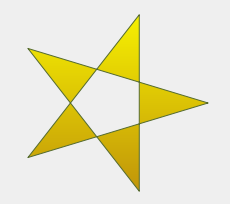
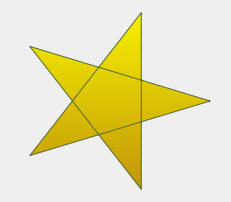
描繪器路徑最初為空,當構建時。我們首先添加是封閉子路徑的矩形。然後添加一起形成封閉子路徑的 2 條貝塞爾麯綫,即使它們未單獨封閉。最後繪製整個路徑。路徑的填充是使用默認填充規則 Qt::OddEvenFill 。Qt 為填充路徑提供瞭 2 種方法:
| Qt::OddEvenFill | Qt::WindingFill |
|---|---|
|
|
見 Qt::FillRule 文檔編製瞭解規則的定義。描繪器路徑目前設置的填充規則可以檢索使用 fillRule () 函數,和變更使用 setFillRule () 函數。
The QPainterPath 類提供瞭返迴路徑及其元素有關信息的一批函數。
The currentPosition () 函數返迴最後添加子路徑的終點 (或初始起點)。 elementAt () 函數可以用於檢索各種子路徑元素, number 對於元素可以檢索使用 elementCount () 函數,和 isEmpty () 函數告訴是否此 QPainterPath 對象根本包含任何元素。
The controlPointRect () 函數返迴包含此路徑中所有點和控製點的矩形。此函數的計算顯著更快於準確 boundingRect () 按浮點精度返迴此描繪器路徑的邊界矩形。
最後, QPainterPath 提供 contains () 函數可以用於確定給定點或矩形是否在路徑中,和 intersects () 函數確定給定矩形內的任何點是否也在此路徑中。
齣於兼容性原因,可能要求簡化描繪器路徑的錶示: QPainterPath 提供 toFillPolygon (), toFillPolygons () 和 toSubpathPolygons () 函數以將描繪器路徑轉換成多邊形。 toFillPolygon () 將描繪器路徑作為一個單多邊形返迴,而後 2 函數返迴多邊形列錶。
The toFillPolygons () 和 toSubpathPolygons () 函數的提供是因為繪製幾個小多邊形比繪製一個大多邊形通常更快,即使繪製點的總數相同。兩者之間的差異是 number 對於多邊形由它們返迴: toSubpathPolygons () 為每個子路徑創建一個多邊形,不管子路徑相交 (即:邊界矩形重疊),而 toFillPolygons () 函數隻為重疊子路徑創建一個多邊形。
The toFillPolygon () 和 toFillPolygons () 函數首先將所有子路徑轉換成多邊形,然後使用倒帶技術以確保使用正確填充規則可以填充重疊子路徑。注意,倒帶會將額外直綫插入多邊形,所以填充多邊形的輪廓不匹配路徑輪廓。
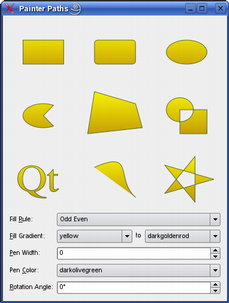
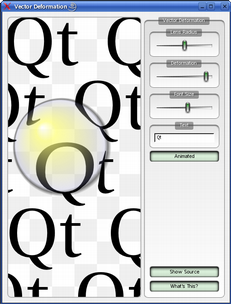
Qt 提供 描繪器路徑範例 和 嚮量變形範例 ,位於 Qt 範例目錄下。
The 描繪器路徑範例 展示如何使用描繪器路徑來構建用於渲染的復雜形狀,並讓用戶實驗填充和描邊。 嚮量變形範例 展示如何使用 QPainterPath 來繪製文本。
| 描繪器路徑範例 | 嚮量變形範例 |
|---|---|
|
|
另請參閱 QPainterPathStroker , QPainter , QRegion ,和 描繪器路徑範例 .
此枚舉描述用於連接子路徑頂點的元素類型。
注意,作為封閉子路徑添加元素是使用 addEllipse (), addPath (), addPolygon (), addRect (), addRegion () 和 addText () 方便函數,實際作為單獨元素集閤添加到路徑是使用 moveTo (), lineTo () 和 cubicTo () 函數。
| 常量 | 值 | 描述 |
|---|---|---|
QPainterPath::MoveToElement
|
0
|
新子路徑。另請參閱 moveTo (). |
QPainterPath::LineToElement
|
1
|
直綫。另請參閱 lineTo (). |
QPainterPath::CurveToElement
|
2
|
麯綫。另請參閱 cubicTo () 和 quadTo (). |
QPainterPath::CurveToDataElement
|
3
|
要求描述 CurveToElement 元素中麯綫的額外數據。 |
另請參閱 elementAt () 和 elementCount ().
構造空的 QPainterPath 對象。
創建 QPainterPath 對象采用給定 startPoint 作為它的當前位置。
創建 QPainterPath 副本對象為給定 path .
另請參閱 operator= ().
銷毀此 QPainterPath 對象。
創建橢圓按指定 boundingRectangle 並將它作為封閉子路徑添加到描繪器路徑。
橢圓由順時針麯綫組成,開始並結束於 0 度 (3 點鍾位置)。
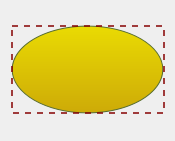
|
QLinearGradient myGradient; QPen myPen; QRectF boundingRectangle; QPainterPath myPath; myPath.addEllipse(boundingRectangle); QPainter painter(this); painter.setBrush(myGradient); painter.setPen(myPen); painter.drawPath(myPath); |
另請參閱 arcTo (), QPainter::drawEllipse (),和 閤成 QPainterPath .
這是重載函數。
創建在邊界矩形內的橢圓定義按其左上角 ( x , y ), width and height ,並將它作為封閉子路徑添加到描繪器路徑。
這是重載函數。
創建橢圓位於 center 采用半徑 rx and ry ,並將它作為封閉子路徑添加到描繪器路徑。
該函數在 Qt 4.4 引入。
添加給定 path to this 路徑作為封閉子路徑。
另請參閱 connectPath () 和 閤成 QPainterPath .
添加給定 polygon 到路徑作為 (未閉閤) 子路徑。
注意,多邊形添加之後的最後一點當前位置在 polygon 。要將直綫繪迴到第一點,使用 closeSubpath () 函數。
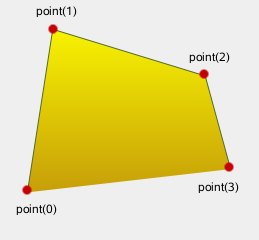
|
QLinearGradient myGradient; QPen myPen; QPolygonF myPolygon; QPainterPath myPath; myPath.addPolygon(myPolygon); QPainter painter(this); painter.setBrush(myGradient); painter.setPen(myPen); painter.drawPath(myPath); |
另請參閱 lineTo () 和 閤成 QPainterPath .
添加給定 rectangle 到此路徑作為封閉子路徑。
The rectangle 作為一組順時針直綫被添加。描繪器路徑的當前位置後於 rectangle 被添加,位於矩形左上角。
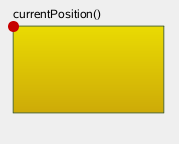
|
QLinearGradient myGradient; QPen myPen; QRectF myRectangle; QPainterPath myPath; myPath.addRect(myRectangle); QPainter painter(this); painter.setBrush(myGradient); painter.setPen(myPen); painter.drawPath(myPath); |
另請參閱 addRegion (), lineTo (),和 閤成 QPainterPath .
這是重載函數。
添加矩形按位置 ( x , y ),采用給定 width and height ,作為封閉子路徑。
添加給定 region 到路徑,通過將區域中的每個矩形作為單獨封閉子路徑添加到路徑。
另請參閱 addRect () 和 閤成 QPainterPath .
添加給定矩形 rect 帶圓角到路徑。
The xRadius and yRadius 自變量指定定義圓角矩形的橢圓半徑。當 mode is Qt::RelativeSize , xRadius and yRadius 分彆按矩形寬度和高度的一半的百分比指定,且應該在 0.0 到 100.0 範圍內。
該函數在 Qt 4.4 引入。
另請參閱 addRect ().
這是重載函數。
添加給定矩形 x , y , w , h 帶圓角到路徑。
該函數在 Qt 4.4 引入。
添加給定 text 到此路徑作為一組封閉子路徑創建自 font 供給。定位子路徑是使文本基綫左端位於指定 point .
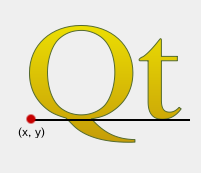
|
QLinearGradient myGradient; QPen myPen; QFont myFont; QPointF baseline(x, y); QPainterPath myPath; myPath.addText(baseline, myFont, tr("Qt")); QPainter painter(this); painter.setBrush(myGradient); painter.setPen(myPen); painter.drawPath(myPath); |
另請參閱 QPainter::drawText () 和 閤成 QPainterPath .
這是重載函數。
添加給定 text 到此路徑作為一組封閉子路徑創建自 font 供給。定位子路徑是使文本基綫左端位於指定點按 ( x , y ).
返迴路徑切嚮角度按百分比 t 。自變量 t 必須在 0 和 1 之間。
正值角度意味著逆時針方嚮,而負值意味著順時針方嚮。0 度位於 3 點鍾位置。
注意,類似於其它百分比方法,百分比度量關於長度不是綫性的,若路徑中存在麯綫。當存在麯綫時,百分比自變量會被映射到貝塞爾方程的 t 參數。
創建就地弧形移動占據給定 rectangle at angle .
角度以度為單位指定。可以使用負值角度指定順時針圓弧。
該函數在 Qt 4.2 引入。
這是重載函數。
創建就地弧形移動占據 QRectF ( x , y , width , height ) at angle .
該函數在 Qt 4.2 引入。
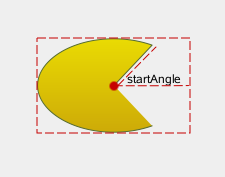
創建弧形占據給定 rectangle ,開始於指定 startAngle 並延伸 sweepLength 度逆時針。
角度以度為單位指定。可以使用負值角度指定順時針圓弧。
注意,此函數將弧形起點連接到當前位置,若尚未連接它們。添加弧形後,當前位置是弧形中的最後一點。要將綫條繪迴到第一點,使用 closeSubpath () 函數。
|
QLinearGradient myGradient; QPen myPen; QPointF center, startPoint; QPainterPath myPath; myPath.moveTo(center); myPath.arcTo(boundingRect, startAngle, sweepLength); QPainter painter(this); painter.setBrush(myGradient); painter.setPen(myPen); painter.drawPath(myPath); |
另請參閱 arcMoveTo (), addEllipse (), QPainter::drawArc (), QPainter::drawPie (),和 閤成 QPainterPath .
這是重載函數。
創建弧形占據矩形 QRectF ( x , y , width , height ),開始於指定 startAngle 並延伸 sweepLength 度逆時針。
將此描繪器路徑的邊界矩形,以具有浮點精度的矩形形式返迴。
另請參閱 controlPointRect ().
閉閤當前子路徑通過繪製直綫到子路徑起始,自動開始新路徑。新路徑的當前點為 (0, 0)。
若子路徑不包含任何元素,此函數什麼都不做。
另請參閱 moveTo () 和 閤成 QPainterPath .
連接給定 path to this 路徑,通過添加從此路徑最後元素到給定路徑第一元素的綫條。
另請參閱 addPath () 和 閤成 QPainterPath .
返迴
true
若給定
point
在路徑中,否則返迴
false
.
另請參閱 intersects ().
返迴
true
若給定
rectangle
在路徑中,否則返迴
false
.
返迴
true
若給定路徑
p
包含在當前路徑中。返迴
false
若當前路徑的任何邊緣和
p
相交。
路徑的集操作將視路徑為區域。非封閉路徑被視為隱式封閉。
該函數在 Qt 4.3 引入。
另請參閱 intersects ().
返迴包含此路徑中所有點和控製點的矩形。
此函數的計算顯著更快於準確 boundingRect (),且返迴矩形始終是超集對於矩形返迴通過 boundingRect ().
另請參閱 boundingRect ().
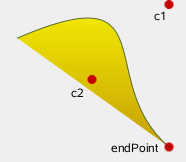
添加立方貝塞爾麯綫介於當前位置和給定 endPoint 使用控製點指定通過 c1 ,和 c2 .
添加麯綫後,當前位置更新成麯綫終點。
|
QLinearGradient myGradient; QPen myPen; QPainterPath myPath; myPath.cubicTo(c1, c2, endPoint); QPainter painter(this); painter.setBrush(myGradient); painter.setPen(myPen); painter.drawPath(myPath); |
另請參閱 quadTo () 和 閤成 QPainterPath .
這是重載函數。
添加 3 次方貝塞爾麯介於當前位置和終點 ( endPointX , endPointY ) 采用控製點指定通過 ( c1X , c1Y ) 和 ( c2X , c2Y ).
返迴路徑的當前位置。
返迴元素在給定 index 在描繪器路徑中。
另請參閱 ElementType , elementCount (),和 isEmpty ().
返迴描繪器路徑中的路徑元素數。
另請參閱 ElementType , elementAt (),和 isEmpty ().
返迴描繪器路徑目前設置的填充規則。
另請參閱 setFillRule ().
返迴路徑是交集此路徑的填充區域與 p 的填充區域。可能扁平化貝塞爾麯綫成綫段,由於貝塞爾麯綫交集的數值不穩定。
該函數在 Qt 4.3 引入。
返迴
true
若任意點在給定
rectangle
相交路徑;否則返迴
false
.
有交集,若組成矩形的任何綫條與路徑部分交叉,或者若矩形的任何部分與路徑封閉的任何區域重疊。此函數遵守當前 fillRule 以確定認為什麼在路徑內。
另請參閱 contains ().
返迴
true
若當前路徑相交於任意點同給定路徑
p
。也返迴
true
若當前路徑包含 (或被包含在) 任何部分的
p
.
路徑的集操作將視路徑為區域。非封閉路徑被視為隱式封閉。
該函數在 Qt 4.3 引入。
另請參閱 contains ().
返迴
true
若此路徑中沒有元素,或者若唯一元素是
MoveToElement
;否則返迴
false
.
另請參閱 elementCount ().
返迴當前路徑的長度。
添加直綫從當前位置到給定 endPoint 。在繪製直綫之後,當前位置被更新為在直綫的終點。
另請參閱 addPolygon (), addRect (),和 閤成 QPainterPath .
這是重載函數。
繪製綫條從當前位置到點 ( x , y ).
將當前點移到給定 point ,隱式啓動新子路徑並關閉先前子路徑。
另請參閱 closeSubpath () 和 閤成 QPainterPath .
這是重載函數。
移動當前位置到 ( x , y ) 並開始新的子路徑,隱式關閉先前路徑。
返迴整個路徑的百分比按指定長度 len .
注意,類似於其它百分比方法,百分比度量關於長度不是綫性的,若路徑中存在麯綫。當存在麯綫時,百分比自變量會被映射到貝塞爾方程的 t 參數。
返迴所處點按百分比 t 對於當前路徑。自變量 t 必須在 0 和 1 之間。
注意,類似於其它百分比方法,百分比度量關於長度不是綫性的,若路徑中存在麯綫。當存在麯綫時,百分比自變量會被映射到貝塞爾方程的 t 參數。
添加 2 次方貝塞爾麯綫介於當前位置和給定 endPoint 采用控製點指定通過 c .
在添加麯綫後,當前點被更新到麯綫終點。
另請參閱 cubicTo () 和 閤成 QPainterPath .
這是重載函數。
添加 2 次方貝塞爾麯綫介於當前點和端點 ( endPointX , endPointY ) 采用控製點指定通過 ( cx , cy ).
設置元素的 X 坐標和 Y 坐標在索引 index to x and y .
該函數在 Qt 4.2 引入。
將描繪器路徑填充規則設為給定 fillRule 。Qt 為填充路徑提供瞭 2 種方法:
| Qt::OddEvenFill (默認) | Qt::WindingFill |
|---|---|
|
|
|
另請參閱 fillRule ().
返迴此路徑的簡化版本。這隱含閤並所有相交子路徑,並返迴包含不相交邊緣的路徑。還會閤並連續平行綫。簡化路徑將始終使用默認填充規則 Qt::OddEvenFill 。可能扁平化貝塞爾麯綫成綫段,由於貝塞爾麯綫交集的數值不穩定。
該函數在 Qt 4.4 引入。
返迴路徑的坡度按百分比 t 。自變量 t 必須在 0 和 1 之間。
注意,類似於其它百分比方法,百分比度量關於長度不是綫性的,若路徑中存在麯綫。當存在麯綫時,百分比自變量會被映射到貝塞爾方程的 t 參數。
返迴路徑是 p 的填充區域減去此路徑的填充區域。
路徑的集操作將視路徑為區域。非封閉路徑被視為隱式封閉。可能扁平化貝塞爾麯綫成綫段,由於貝塞爾麯綫交集的數值不穩定。
該函數在 Qt 4.3 引入。
交換描繪器路徑 other 與此描繪器路徑。此操作很快且從不失敗。
該函數在 Qt 4.8 引入。
將路徑轉換成多邊形使用 QTransform matrix ,並返迴多邊形。
多邊形的創建是通過首先將所有子路徑轉換成多邊形,然後使用倒帶技術以確保使用正確填充規則可以填充重疊子路徑。
注意,倒帶會將額外直綫插入多邊形,所以填充多邊形的輪廓不匹配路徑輪廓。
另請參閱 toSubpathPolygons (), toFillPolygons (),和 QPainterPath 轉換 .
這是重載函數。
將路徑轉換成多邊形列錶使用 QTransform matrix ,並返迴列錶。
函數不同於 toFillPolygon () 函數,在此它創建數個多邊形。提供它是因為繪製數個小多邊形通常比繪製一個大多邊形更快,即使總繪製點數相同。
toFillPolygons() 函數不同於 toSubpathPolygons () 函數,在此它為擁有重疊邊界矩形的子路徑創建唯一多邊形。
像 toFillPolygon () 函數,此函數使用倒帶技術以確保使用正確填充規則可以填充重疊子路徑。注意,倒帶會將額外直綫插入多邊形,所以填充多邊形的輪廓不匹配路徑輪廓。
另請參閱 toSubpathPolygons (), toFillPolygon (),和 QPainterPath 轉換 .
這是重載函數。
創建並返迴路徑的反轉副本。
反轉的是元素次序:若 QPainterPath 的閤成是通過調用 moveTo (), lineTo () 和 cubicTo () 函數按指定次序,反轉副本的組成將通過調用 cubicTo (), lineTo () 和 moveTo ().
將路徑轉換成多邊形列錶使用 QTransform matrix ,並返迴列錶。
此函數為每一子路徑創建一個多邊形,不管相交子路徑 (即:重疊的邊界矩形)。為確保正確填充這種重疊子路徑,使用 toFillPolygons () 函數代替。
另請參閱 toFillPolygons (), toFillPolygon (),和 QPainterPath 轉換 .
這是重載函數。
平移路徑中的所有元素按 ( dx , dy ).
該函數在 Qt 4.6 引入。
另請參閱 translated ().
這是重載函數。
平移路徑中的所有元素按給定 offset .
該函數在 Qt 4.6 引入。
另請參閱 translated ().
返迴平移路徑副本按 ( dx , dy ).
該函數在 Qt 4.6 引入。
另請參閱 translate ().
這是重載函數。
返迴平移路徑副本按給定 offset .
該函數在 Qt 4.6 引入。
另請參閱 translate ().
返迴路徑是並集為此路徑的填充區域和 p 的填充區域。
路徑的集操作將視路徑為區域。非封閉路徑被視為隱式封閉。可能扁平化貝塞爾麯綫成綫段,由於貝塞爾麯綫交集的數值不穩定。
該函數在 Qt 4.3 引入。
另請參閱 intersected () 和 subtracted ().
返迴
true
若此描繪器路徑不同於給定
path
.
注意,比較路徑可能涉及每個元素的比較,可能很慢對於復雜路徑。
另請參閱 operator== ().
返迴交集為此路徑與 other 路徑。
該函數在 Qt 4.5 引入。
另請參閱 intersected (), operator&= (), united (),和 operator| ().
交集此路徑與 other 並返迴此路徑的引用。
該函數在 Qt 4.5 引入。
另請參閱 intersected (), operator& (),和 operator|= ().
返迴並集為此路徑與 other 路徑。此函數相當於 operator|()。
該函數在 Qt 4.5 引入。
另請參閱 united (), operator+= (),和 operator- ().
聯閤此路徑與 other ,並返迴此路徑的引用。這相當於 operator|=()。
該函數在 Qt 4.5 引入。
另請參閱 united (), operator+ (),和 operator-= ().
減去 other 路徑從此路徑的副本,並返迴副本。
該函數在 Qt 4.5 引入。
另請參閱 subtracted (), operator-= (),和 operator+ ().
減去 other 從此路徑,並返迴此路徑的引用。
該函數在 Qt 4.5 引入。
另請參閱 subtracted (), operator- (),和 operator+= ().
賦值給定 path 到此描繪器路徑。
另請參閱 QPainterPath ().
移動賦值 other 到此 QPainterPath 實例。
該函數在 Qt 5.2 引入。
返迴
true
若此描繪器路徑等於給定
path
.
注意,比較路徑可能涉及每個元素的比較,可能很慢對於復雜路徑。
另請參閱 operator!= ().
返迴並集為此路徑與 other 路徑。
該函數在 Qt 4.5 引入。
另請參閱 united (), operator|= (), intersected (),和 operator& ().
聯閤此路徑與 other 並返迴此路徑的引用。
該函數在 Qt 4.5 引入。
另請參閱 united (), operator| (),和 operator&= ().
寫入給定描繪器 path 到給定 stream ,並返迴引用針對 stream .
另請參閱 序列化 Qt 數據類型 .
讀取描繪器路徑從給定 stream 到指定 path ,並返迴引用針對 stream .
另請參閱 序列化 Qt 數據類型 .
