The QRegion 類為描繪器指定裁剪區域。 更多...
| 頭: | #include <QRegion> |
| qmake: | QT += gui |
| enum | RegionType { Rectangle, Ellipse } |
| typedef | const_iterator |
| typedef | const_reverse_iterator |
| QRegion () | |
| QRegion (int x , int y , int w , int h , RegionType t = Rectangle) | |
| QRegion (const QRect & r , RegionType t = Rectangle) | |
| QRegion (const QPolygon & a , Qt::FillRule fillRule = Qt::OddEvenFill) | |
| QRegion (const QRegion & r ) | |
| QRegion (QRegion && other ) | |
| QRegion (const QBitmap & bm ) | |
| const_iterator | begin () const |
| QRect | boundingRect () const |
| const_iterator | cbegin () const |
| const_iterator | cend () const |
| bool | contains (const QPoint & p ) const |
| bool | contains (const QRect & r ) const |
| const_reverse_iterator | crbegin () const |
| const_reverse_iterator | crend () const |
| const_iterator | end () const |
| QRegion | intersected (const QRegion & r ) const |
| QRegion | intersected (const QRect & rect ) const |
| bool | intersects (const QRegion & region ) const |
| bool | intersects (const QRect & rect ) const |
| bool | isEmpty () const |
| bool | isNull () const |
| const_reverse_iterator | rbegin () const |
| int | rectCount () const |
| QVector<QRect> | rects () const |
| const_reverse_iterator | rend () const |
| void | setRects (const QRect * rects , int number ) |
| QRegion | subtracted (const QRegion & r ) const |
| void | swap (QRegion & other ) |
| void | translate (int dx , int dy ) |
| void | translate (const QPoint & point ) |
| QRegion | translated (int dx , int dy ) const |
| QRegion | translated (const QPoint & p ) const |
| QRegion | united (const QRegion & r ) const |
| QRegion | united (const QRect & rect ) const |
| QRegion | xored (const QRegion & r ) const |
| operator QVariant () const | |
| bool | operator!= (const QRegion & other ) const |
| QRegion | operator& (const QRegion & r ) const |
| QRegion | operator& (const QRect & r ) const |
| QRegion & | operator&= (const QRegion & r ) |
| QRegion & | operator&= (const QRect & r ) |
| QRegion | operator+ (const QRegion & r ) const |
| QRegion | operator+ (const QRect & r ) const |
| QRegion & | operator+= (const QRegion & r ) |
| QRegion & | operator+= (const QRect & rect ) |
| QRegion | operator- (const QRegion & r ) const |
| QRegion & | operator-= (const QRegion & r ) |
| QRegion & | operator= (const QRegion & r ) |
| QRegion & | operator= (QRegion && other ) |
| bool | operator== (const QRegion & r ) const |
| QRegion | operator^ (const QRegion & r ) const |
| QRegion & | operator^= (const QRegion & r ) |
| QRegion | operator| (const QRegion & r ) const |
| QRegion & | operator|= (const QRegion & r ) |
| QDataStream & | operator<< (QDataStream & s , const QRegion & r ) |
| QDataStream & | operator>> (QDataStream & s , QRegion & r ) |
The QRegion 類為描繪器指定裁剪區域。
QRegion 用於 QPainter::setClipRegion () 以將描繪區域限製到需要描繪的區域。另外 QWidget::repaint () 函數接受 QRegion 參數。 QRegion 是重新描繪更新屏幕區域最小化數量的最佳工具。
此類不適於構造渲染形狀 (尤其作為輪廓)。使用 QPainterPath 以創建路徑和形狀為用於 QPainter .
可以從矩形、橢圓、多邊形或位圖創建區域。可以創建復雜區域通過組閤簡單區域使用 united (), intersected (), subtracted (),或 xored () (異或)。可以移動區域使用 translate ().
可以測試區域是否 isEmpty () 或者若它 contains () QPoint or QRect 。查找邊界矩形可以采用 boundingRect ().
迭代片區 (采用 begin (), end ()) gives a decomposition of the region into rectangles. The same sequence of rectangles is returned by rects ().
使用復雜區域的範例:
void MyWidget::paintEvent(QPaintEvent *)
{
    QRegion r1(QRect(100, 100, 200, 80),    // r1: elliptic region
               QRegion::Ellipse);
    QRegion r2(QRect(100, 120, 90, 30));    // r2: rectangular region
    QRegion r3 = r1.intersected(r2);        // r3: intersection
    QPainter painter(this);
    painter.setClipRegion(r3);
    ...                                     // paint clipped graphics
}
On Embedded Linux and X11 platforms, parts of this class rely on code obtained under the following licenses:
Copyright (c) 1987 X Consortium
Permission is hereby granted, free of charge, to any person obtaining a copy of this software and associated documentation files (the "Software"), to deal in the Software without restriction, including without limitation the rights to use, copy, modify, merge, publish, distribute, sublicense, and/or sell copies of the Software, and to permit persons to whom the Software is furnished to do so, subject to the following conditions:
The above copyright notice and this permission notice shall be included in all copies or substantial portions of the Software.
THE SOFTWARE IS PROVIDED "AS IS", WITHOUT WARRANTY OF ANY KIND, EXPRESS OR IMPLIED, INCLUDING BUT NOT LIMITED TO THE WARRANTIES OF MERCHANTABILITY, FITNESS FOR A PARTICULAR PURPOSE AND NONINFRINGEMENT. IN NO EVENT SHALL THE X CONSORTIUM BE LIABLE FOR ANY CLAIM, DAMAGES OR OTHER LIABILITY, WHETHER IN AN ACTION OF CONTRACT, TORT OR OTHERWISE, ARISING FROM, OUT OF OR IN CONNECTION WITH THE SOFTWARE OR THE USE OR OTHER DEALINGS IN THE SOFTWARE.
Except as contained in this notice, the name of the X Consortium shall not be used in advertising or otherwise to promote the sale, use or other dealings in this Software without prior written authorization from the X Consortium.
Copyright 1987 by Digital Equipment Corporation, Maynard, Massachusetts.
保留所有權利
Permission to use, copy, modify, and distribute this software and its documentation for any purpose and without fee is hereby granted, provided that the above copyright notice appear in all copies and that both that copyright notice and this permission notice appear in supporting documentation, and that the name of Digital not be used in advertising or publicity pertaining to distribution of the software without specific, written prior permission.
DIGITAL DISCLAIMS ALL WARRANTIES WITH REGARD TO THIS SOFTWARE, INCLUDING ALL IMPLIED WARRANTIES OF MERCHANTABILITY AND FITNESS, IN NO EVENT SHALL DIGITAL BE LIABLE FOR ANY SPECIAL, INDIRECT OR CONSEQUENTIAL DAMAGES OR ANY DAMAGES WHATSOEVER RESULTING FROM LOSS OF USE, DATA OR PROFITS, WHETHER IN AN ACTION OF CONTRACT, NEGLIGENCE OR OTHER TORTIOUS ACTION, ARISING OUT OF OR IN CONNECTION WITH THE USE OR PERFORMANCE OF THIS SOFTWARE.
另請參閱 QPainter::setClipRegion (), QPainter::setClipRect (),和 QPainterPath .
指定要創建的區域形狀。
| 常量 | 值 | 描述 |
|---|---|---|
QRegion::Rectangle
|
0
|
區域覆蓋整個矩形。 |
QRegion::Ellipse
|
1
|
區域是矩形內的橢圓。 |
An iterator over the QRects that make up the region.
QRegion 不提供可變迭代器。
該 typedef 在 Qt 5.8 引入。
A reverse iterator over the QRects that make up the region.
QRegion 不提供可變迭代器。
該 typedef 在 Qt 5.8 引入。
構造空區域。
另請參閱 isEmpty ().
構造矩形 (或橢圓) 區域。
若
t
is
Rectangle
,區域是填充矩形 (
x
,
y
,
w
,
h
)。若
t
is
Ellipse
,區域是填充橢圓具有中心 (
x
+
w
/ 2,
y
+
h
/ 2) 和大小 (
w
,
h
).
這是重載函數。
創建區域基於矩形 r 采用片區類型 t .
若矩形無效,將創建 null 區域。
另請參閱 QRegion::RegionType .
構造多邊形區域從點數組 a 采用填充規則指定通過 fillRule .
若 fillRule is Qt::WindingFill , the polygon region is defined using the winding algorithm; if it is Qt::OddEvenFill , the odd-even fill algorithm is used.
警告: This constructor can be used to create complex regions that will slow down painting when used.
構造的新區域等於區域 r .
Move-constructs a new region from region other . After the call, other 為 null。
該函數在 Qt 5.7 引入。
另請參閱 isNull ().
構造區域從位圖 bm .
The resulting region consists of the pixels in bitmap bm that are Qt::color1 , as if each pixel was a 1 by 1 rectangle.
This constructor may create complex regions that will slow down painting when used. Note that drawing masked pixmaps can be done much faster using QPixmap::setMask ().
返迴 const_iterator pointing to the beginning of the range of rectangles that make up this range, in the order in which rects () returns them.
該函數在 Qt 5.8 引入。
另請參閱 rbegin (), cbegin (),和 end ().
返迴此區域的邊界矩形。空區域給齣的矩形為 QRect::isNull ().
如同 begin ().
該函數在 Qt 5.8 引入。
如同 end ().
該函數在 Qt 5.8 引入。
返迴
true
若區域包含點
p
;否則返迴
false
.
這是重載函數。
返迴
true
若區域重疊矩形
r
;否則返迴
false
.
如同 rbegin ().
該函數在 Qt 5.8 引入。
如同 rend ().
該函數在 Qt 5.8 引入。
返迴 const_iterator pointing to one past the end of the range of rectangles that make up this range, in the order in which rects () returns them.
該函數在 Qt 5.8 引入。
另請參閱 rend (), cend (),和 begin ().
返迴區域交集此區域和 r .
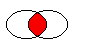
圖形展示 2 橢圓區域的交集。
該函數在 Qt 4.2 引入。
另請參閱 subtracted (), united (),和 xored ().
返迴區域交集此區域和給定 rect .
該函數在 Qt 4.4 引入。
另請參閱 subtracted (), united (),和 xored ().
返迴
true
若此區域相交
region
,否則返迴
false
.
該函數在 Qt 4.2 引入。
返迴
true
若此區域相交
rect
,否則返迴
false
.
該函數在 Qt 4.2 引入。
返迴
true
若區域為空;否則返迴
false
。空區域是不包含任何點的區域。
範例:
QRegion r1(10, 10, 20, 20);
r1.isEmpty();               // false
QRegion r3;
r3.isEmpty();               // true
QRegion r2(40, 40, 20, 20);
r3 = r1.intersected(r2);    // r3: intersection of r1 and r2
r3.isEmpty();               // true
r3 = r1.united(r2);         // r3: union of r1 and r2
r3.isEmpty();               // false
返迴
true
若區域為空;否則返迴
false
。空區域是不包含點的區域。此函數如同
isEmpty
該函數在 Qt 5.0 引入。
另請參閱 isEmpty ().
返迴 const_reverse_iterator pointing to the beginning of the range of rectangles that make up this range, in the reverse order in which rects () returns them.
該函數在 Qt 5.8 引入。
另請參閱 begin (), crbegin (),和 rend ().
返迴矩形數,矩形的返迴在 rects ().
該函數在 Qt 4.6 引入。
返迴組成區域的非重疊矩形數組。
所有矩形的並集等於原始區域。
另請參閱 setRects ().
返迴 const_reverse_iterator pointing to one past the end of the range of rectangles that make up this range, in the reverse order in which rects () returns them.
該函數在 Qt 5.8 引入。
另請參閱 end (), crend (),和 rbegin ().
Sets the region using the array of rectangles specified by rects and number . The rectangles must be optimally Y-X sorted and follow these restrictions:
另請參閱 rects ().
返迴區域為 r 減去此區域。
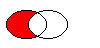
圖形展示左側橢圓減去右側橢圓時的結果 (
left - right
).
該函數在 Qt 4.2 引入。
另請參閱 intersected (), united (),和 xored ().
交換片區 other 與此區域。此操作很快且從不失敗。
該函數在 Qt 4.8 引入。
翻譯 (移動) 區域 dx 沿 X 軸和 dy 沿 Y 軸。
這是重載函數。
平移片區 point .x() 沿 X 軸和 point .y() along the y axis, relative to the current position. Positive values move the region to the right and down.
翻譯為給定 point .
Returns a copy of the region that is translated dx 沿 X 軸和 dy along the y axis, relative to the current position. Positive values move the region to the right and down.
該函數在 Qt 4.1 引入。
另請參閱 translate ().
這是重載函數。
返迴的區域副本有平移 p .x() 沿 X 軸和 p .y() 沿 Y 軸,相對當前位置。正值嚮右下移動矩形。
該函數在 Qt 4.1 引入。
另請參閱 translate ().
返迴區域將並集此區域和 r .

圖形展示 2 橢圓區域的 union (並集)。
該函數在 Qt 4.2 引入。
另請參閱 intersected (), subtracted (),和 xored ().
返迴區域將並集此區域和給定 rect .
該函數在 Qt 4.4 引入。
另請參閱 intersected (), subtracted (),和 xored ().
返迴區域 XOR (異或) 此區域和 r .

圖形展示 2 橢圓區域的 XOR (異或)。
該函數在 Qt 4.2 引入。
另請參閱 intersected (), united (),和 subtracted ().
返迴區域按 QVariant
返迴
true
若此區域不同於
other
區域;否則返迴
false
.
應用
intersected
() 函數到此區域和
r
.
r1&r2
相當於
r1.intersected(r2)
.
另請參閱 intersected ().
這是重載函數。
該函數在 Qt 4.4 引入。
應用
intersected
() 函數到此區域和
r
並將結果賦值給此區域。
r1&=r2
相當於
r1
= r1.intersected(r2).
另請參閱 intersected ().
這是重載函數。
該函數在 Qt 4.4 引入。
應用
united
() 函數到此區域和
r
.
r1+r2
相當於
r1.united(r2)
.
另請參閱 united () 和 operator| ().
這是重載函數。
該函數在 Qt 4.4 引入。
應用
united
() 函數到此區域和
r
並將結果賦值給此區域。
r1+=r2
相當於
r1 = r1.united(r2)
.
另請參閱 intersected ().
Returns a region that is the union of this region with the specified rect .
另請參閱 united ().
應用
subtracted
() 函數到此區域和
r
.
r1-r2
相當於
r1.subtracted(r2)
.
另請參閱 subtracted ().
應用
subtracted
() 函數到此區域和
r
並將結果賦值給此區域。
r1-=r2
相當於
r1 = r1.subtracted(r2)
.
另請參閱 subtracted ().
賦值 r 到此區域並返迴區域引用。
移動賦值 other 到此 QRegion 實例。
該函數在 Qt 5.2 引入。
返迴
true
若區域等於
r
;否則返迴 false。
應用
xored
() 函數到此區域和
r
.
r1^r2
相當於
r1.xored(r2)
.
另請參閱 xored ().
應用
xored
() 函數到此區域和
r
並將結果賦值給此區域。
r1^=r2
相當於
r1 = r1.xored(r2)
.
另請參閱 xored ().
應用
united
() 函數到此區域和
r
.
r1|r2
相當於
r1.united(r2)
.
另請參閱 united () 和 operator+ ().
應用
united
() 函數到此區域和
r
並將結果賦值給此區域。
r1|=r2
相當於
r1 = r1.united(r2)
.
另請參閱 united ().
寫入片區 r 到流 s 並返迴流引用。
另請參閱 QDataStream 運算符格式 .
讀取區域從流 s into r 並返迴流引用。
另請參閱 QDataStream 運算符格式 .
