The QPrintDialog class provides a dialog for specifying the printer's configuration. 更多...
| 頭: | #include <QPrintDialog> |
| qmake: | QT += printsupport |
| 繼承: | QAbstractPrintDialog |
| QPrintDialog (QPrinter * printer , QWidget * parent = Q_NULLPTR) | |
| QPrintDialog (QWidget * parent = Q_NULLPTR) | |
| ~QPrintDialog () | |
| void | open (QObject * receiver , const char * member ) |
| PrintDialogOptions | options () const |
| QPrinter * | printer () |
| void | setOption (PrintDialogOption option , bool on = true) |
| void | setOptions (PrintDialogOptions options ) |
| bool | testOption (PrintDialogOption option ) const |
| virtual void | done (int result ) |
| virtual int | exec () |
| virtual void | setVisible (bool visible ) |
| void | accepted (QPrinter * printer ) |
The QPrintDialog class provides a dialog for specifying the printer's configuration.
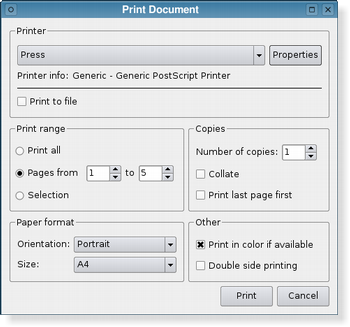
The dialog allows users to change document-related settings, such as the paper size and orientation, type of print (color or grayscale), range of pages, and number of copies to print.
Controls are also provided to enable users to choose from the printers available, including any configured network printers.
Typically, QPrintDialog objects are constructed with a QPrinter object, and executed using the exec () 函數。
QPrintDialog printDialog(printer, parent);
if (printDialog.exec() == QDialog::Accepted) {
    // print ...
}
If the dialog is accepted by the user, the QPrinter object is correctly configured for printing.
|
|
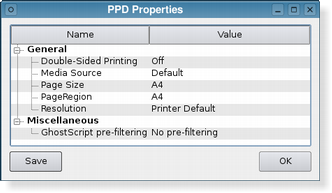
The printer dialog (shown above in Plastique style) enables access to common printing properties. On X11 platforms that use the CUPS printing system, the settings for each available printer can be modified via the dialog's 特性 push button.
On Windows and macOS, the native print dialog is used, which means that some QWidget and QDialog properties set on the dialog won't be respected. The native print dialog on macOS does not support setting printer options, i.e. setOptions () 和 setOption () have no effect.
In Qt 4.4, it was possible to use the static functions to show a sheet on macOS. This is no longer supported in Qt 4.5. If you want this functionality, use QPrintDialog::open ().
另請參閱 QPageSetupDialog and QPrinter .
This property holds the various options that affect the look and feel of the dialog
默認情況下,所有選項是被禁用的。
Options should be set before showing the dialog. Setting them while the dialog is visible is not guaranteed to have an immediate effect on the dialog (depending on the option and on the platform).
該特性在 Qt 4.5 引入。
訪問函數:
| PrintDialogOptions | options () const |
| void | setOptions (PrintDialogOptions options ) |
另請參閱 setOption () 和 testOption ().
Constructs a new modal printer dialog for the given printer 采用給定 parent .
Default constructs an instance of QPrintDialog.
Destroys the print dialog.
[signal]
void
QPrintDialog::
accepted
(
QPrinter
*
printer
)
This signal is emitted when the user accepts the values set in the print dialog. The printer parameter includes the printer that the settings were applied to.
[虛擬]
void
QPrintDialog::
done
(
int
result
)
重實現自 QDialog::done ().
關閉對話框並將其結果代碼設為 result 。若此對話框的展示是采用 exec (),done() 導緻本地事件循環的完成,且 exec () 返迴 result .
注意: This function does not apply to the Native Print Dialog on the Mac macOS and Windows platforms, because the dialog is required to be modal and only the user can close it.
另請參閱 QDialog::done ().
[虛擬]
int
QPrintDialog::
exec
()
重實現自 QDialog::exec ().
這是重載函數。
打開對話框並連接其 accepted () 信號到槽,指定通過 receiver and member .
將從槽斷開信號連接,當關閉對話框時。
該函數在 Qt 4.5 引入。
Returns the printer that this printer dialog operates on. This can be useful when using the QPrintDialog::open () 方法。
設置給定 option 為被啓用若 on 為 true;否則,清零給定 option .
另請參閱 options and testOption ().
[虛擬]
void
QPrintDialog::
setVisible
(
bool
visible
)
重實現自 QWidget::setVisible ().
返迴
true
若給定
option
被啓用;否則,返迴 false。
