The QMdiArea widget provides an area in which MDI windows are displayed. 更多...
| 頭: | #include <QMdiArea> |
| qmake: | QT += widgets |
| Since: | Qt 4.3 |
| 繼承: | QAbstractScrollArea |
| enum | AreaOption { DontMaximizeSubWindowOnActivation } |
| flags | AreaOptions |
| enum | ViewMode { SubWindowView, TabbedView } |
| enum | WindowOrder { CreationOrder, StackingOrder, ActivationHistoryOrder } |
|
|
| QMdiArea (QWidget * parent = Q_NULLPTR) | |
| ~QMdiArea () | |
| WindowOrder | activationOrder () const |
| QMdiSubWindow * | activeSubWindow () const |
| QMdiSubWindow * | addSubWindow (QWidget * widget , Qt::WindowFlags windowFlags = Qt::WindowFlags()) |
| QBrush | background () const |
| QMdiSubWindow * | currentSubWindow () const |
| bool | documentMode () const |
| void | removeSubWindow (QWidget * widget ) |
| void | setActivationOrder (WindowOrder order ) |
| void | setBackground (const QBrush & background ) |
| void | setDocumentMode (bool enabled ) |
| void | setOption (AreaOption option , bool on = true) |
| void | setTabPosition (QTabWidget::TabPosition position ) |
| void | setTabShape (QTabWidget::TabShape shape ) |
| void | setTabsClosable (bool closable ) |
| void | setTabsMovable (bool movable ) |
| void | setViewMode (ViewMode mode ) |
| QList<QMdiSubWindow *> | subWindowList (WindowOrder order = CreationOrder) const |
| QTabWidget::TabPosition | tabPosition () const |
| QTabWidget::TabShape | tabShape () const |
| bool | tabsClosable () const |
| bool | tabsMovable () const |
| bool | testOption (AreaOption option ) const |
| ViewMode | viewMode () const |
| virtual QSize | minimumSizeHint () const |
| virtual QSize | sizeHint () const |
| void | activateNextSubWindow () |
| void | activatePreviousSubWindow () |
| void | cascadeSubWindows () |
| void | closeActiveSubWindow () |
| void | closeAllSubWindows () |
| void | setActiveSubWindow (QMdiSubWindow * window ) |
| void | tileSubWindows () |
| void | subWindowActivated (QMdiSubWindow * window ) |
| virtual void | childEvent (QChildEvent * childEvent ) |
| virtual bool | event (QEvent * event ) |
| virtual bool | eventFilter (QObject * object , QEvent * event ) |
| virtual void | paintEvent (QPaintEvent * paintEvent ) |
| virtual void | resizeEvent (QResizeEvent * resizeEvent ) |
| virtual void | scrollContentsBy (int dx , int dy ) |
| virtual void | showEvent (QShowEvent * showEvent ) |
| virtual void | timerEvent (QTimerEvent * timerEvent ) |
| virtual bool | viewportEvent (QEvent * event ) |
| virtual void | setupViewport (QWidget * viewport ) |
The QMdiArea widget provides an area in which MDI windows are displayed.
QMdiArea functions, essentially, like a window manager for MDI windows. For instance, it draws the windows it manages on itself and arranges them in a cascading or tile pattern. QMdiArea is commonly used as the center widget in a QMainWindow to create MDI applications, but can also be placed in any layout. The following code adds an area to a main window:
    QMainWindow *mainWindow = new QMainWindow;
    mainWindow->setCentralWidget(mdiArea);
Unlike the window managers for top-level windows, all window flags ( Qt::WindowFlags ) are supported by QMdiArea as long as the flags are supported by the current widget style. If a specific flag is not supported by the style (e.g., the WindowShadeButtonHint ), you can still shade the window with showShaded().
Subwindows in QMdiArea are instances of QMdiSubWindow . They are added to an MDI area with addSubWindow (). It is common to pass a QWidget , which is set as the internal widget, to this function, but it is also possible to pass a QMdiSubWindow directly.The class inherits QWidget , and you can use the same API as with a normal top-level window when programming. QMdiSubWindow also has behavior that is specific to MDI windows. See the QMdiSubWindow class description for more details.
A subwindow becomes active when it gets the keyboard focus, or when setFocus () is called. The user activates a window by moving focus in the usual ways. The MDI area emits the subWindowActivated () signal when the active window changes, and the activeSubWindow () function returns the active subwindow.
The convenience function subWindowList () returns a list of all subwindows. This information could be used in a popup menu containing a list of windows, for example.
The subwindows are sorted by the current WindowOrder . This is used for the subWindowList () and for activateNextSubWindow () 和 activatePreviousSubWindow (). Also, it is used when cascading or tiling the windows with cascadeSubWindows () 和 tileSubWindows ().
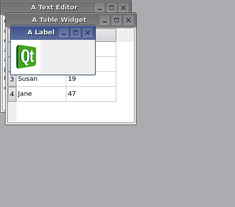
QMdiArea provides two built-in layout strategies for subwindows: cascadeSubWindows () 和 tileSubWindows (). Both are slots and are easily connected to menu entries.
|

|
注意: The default scroll bar property for QMdiArea is Qt::ScrollBarAlwaysOff .
另請參閱 QMdiSubWindow .
此枚舉描述的選項定製行為對於 QMdiArea .
| 常量 | 值 | 描述 |
|---|---|---|
QMdiArea::DontMaximizeSubWindowOnActivation
|
0x1
|
When the active subwindow is maximized, the default behavior is to maximize the next subwindow that is activated. Set this option if you do not want this behavior. |
AreaOptions 類型是 typedef 對於 QFlags <AreaOption>。它存儲 AreaOption 值的 OR (或) 組閤。
This enum describes the view mode of the area; i.e. how sub-windows will be displayed.
| 常量 | 值 | 描述 |
|---|---|---|
QMdiArea::SubWindowView
|
0
|
Display sub-windows with window frames (default). |
QMdiArea::TabbedView
|
1
|
Display sub-windows with tabs in a tab bar. |
該枚舉在 Qt 4.4 引入或被修改。
另請參閱 setViewMode ().
Specifies the criteria to use for ordering the list of child windows returned by subWindowList ()。函數 cascadeSubWindows () 和 tileSubWindows () follow this order when arranging the windows.
| 常量 | 值 | 描述 |
|---|---|---|
QMdiArea::CreationOrder
|
0
|
The windows are returned in the order of their creation. |
QMdiArea::StackingOrder
|
1
|
The windows are returned in the order in which they are stacked, with the top-most window being last in the list. |
QMdiArea::ActivationHistoryOrder
|
2
|
The windows are returned in the order in which they were activated. |
另請參閱 subWindowList ().
This property holds the ordering criteria for subwindow lists
This property specifies the ordering criteria for the list of subwindows returned by subWindowList (). By default, it is the window creation order.
該特性在 Qt 4.4 引入。
訪問函數:
| WindowOrder | activationOrder () const |
| void | setActivationOrder (WindowOrder order ) |
另請參閱 subWindowList ().
This property holds the background brush for the workspace
This property sets the background brush for the workspace area itself. By default, it is a gray color, but can be any brush (e.g., colors, gradients or pixmaps).
訪問函數:
| QBrush | background () const |
| void | setBackground (const QBrush & background ) |
This property holds whether the tab bar is set to document mode in tabbed view mode.
文檔模式默認禁用。
該特性在 Qt 4.5 引入。
訪問函數:
| bool | documentMode () const |
| void | setDocumentMode (bool enabled ) |
另請參閱 QTabBar::documentMode and setViewMode ().
This property holds the position of the tabs in tabbed view mode.
此特性的可能值,描述通過 QTabWidget::TabPosition 枚舉。
該特性在 Qt 4.4 引入。
訪問函數:
| QTabWidget::TabPosition | tabPosition () const |
| void | setTabPosition (QTabWidget::TabPosition position ) |
另請參閱 QTabWidget::TabPosition and setViewMode ().
This property holds the shape of the tabs in tabbed view mode.
此特性的可能值, QTabWidget::Rounded (默認) 或 QTabWidget::Triangular .
該特性在 Qt 4.4 引入。
訪問函數:
| QTabWidget::TabShape | tabShape () const |
| void | setTabShape (QTabWidget::TabShape shape ) |
另請參閱 QTabWidget::TabShape and setViewMode ().
This property holds whether the tab bar should place close buttons on each tab in tabbed view mode.
Tabs are not closable by default.
該特性在 Qt 4.8 引入。
訪問函數:
| bool | tabsClosable () const |
| void | setTabsClosable (bool closable ) |
另請參閱 QTabBar::tabsClosable and setViewMode ().
This property holds whether the user can move the tabs within the tabbar area in tabbed view mode.
Tabs are not movable by default.
該特性在 Qt 4.8 引入。
訪問函數:
| bool | tabsMovable () const |
| void | setTabsMovable (bool movable ) |
另請參閱 QTabBar::movable and setViewMode ().
This property holds the way sub-windows are displayed in the QMdiArea .
默認情況下, SubWindowView is used to display sub-windows.
該特性在 Qt 4.4 引入。
訪問函數:
| ViewMode | viewMode () const |
| void | setViewMode (ViewMode mode ) |
另請參閱 ViewMode , setTabShape (),和 setTabPosition ().
Constructs an empty mdi area. parent 被傳遞給 QWidget 的構造函數。
銷毀 MDI 區域。
[slot]
void
QMdiArea::
activateNextSubWindow
()
Gives the keyboard focus to another window in the list of child windows. The window activated will be the next one determined by the current activation order .
另請參閱 activatePreviousSubWindow () 和 QMdiArea::WindowOrder .
[slot]
void
QMdiArea::
activatePreviousSubWindow
()
Gives the keyboard focus to another window in the list of child windows. The window activated will be the previous one determined by the current activation order .
另請參閱 activateNextSubWindow () 和 QMdiArea::WindowOrder .
Returns a pointer to the current active subwindow. If no window is currently active, 0 is returned.
Subwindows are treated as top-level windows with respect to window state, i.e., if a widget outside the MDI area is the active window, no subwindow will be active. Note that if a widget in the window in which the MDI area lives gains focus, the window will be activated.
另請參閱 setActiveSubWindow () 和 Qt::WindowState .
添加 widget as a new subwindow to the MDI area. If windowFlags are non-zero, they will override the flags set on the widget.
The widget can be either a QMdiSubWindow or another QWidget (in which case the MDI area will create a subwindow and set the widget as the internal widget).
注意: Once the subwindow has been added, its parent will be the viewport widget 的 QMdiArea .
    QMdiArea mdiArea;
    QMdiSubWindow *subWindow1 = new QMdiSubWindow;
    subWindow1->setWidget(internalWidget1);
    subWindow1->setAttribute(Qt::WA_DeleteOnClose);
    mdiArea.addSubWindow(subWindow1);
    QMdiSubWindow *subWindow2 =
        mdiArea.addSubWindow(internalWidget2);
When you create your own subwindow, you must set the Qt::WA_DeleteOnClose widget attribute if you want the window to be deleted when closed in the MDI area. If not, the window will be hidden and the MDI area will not activate the next subwindow.
返迴 QMdiSubWindow that is added to the MDI area.
另請參閱 removeSubWindow ().
[slot]
void
QMdiArea::
cascadeSubWindows
()
Arranges all the child windows in a cascade pattern.
另請參閱 tileSubWindows ().
[virtual protected]
void
QMdiArea::
childEvent
(
QChildEvent
*
childEvent
)
重實現自 QObject::childEvent ().
[slot]
void
QMdiArea::
closeActiveSubWindow
()
Closes the active subwindow.
另請參閱 closeAllSubWindows ().
[slot]
void
QMdiArea::
closeAllSubWindows
()
Closes all subwindows by sending a QCloseEvent to each window. You may receive subWindowActivated () signals from subwindows before they are closed (if the MDI area activates the subwindow when another is closing).
Subwindows that ignore the close event will remain open.
另請參閱 closeActiveSubWindow ().
Returns a pointer to the current subwindow, or 0 if there is no current subwindow.
This function will return the same as activeSubWindow () 若 QApplication 包含 QMdiArea is active.
另請參閱 activeSubWindow () 和 QApplication::activeWindow ().
[virtual protected]
bool
QMdiArea::
event
(
QEvent
*
event
)
重實現自 QObject::event ().
[virtual protected]
bool
QMdiArea::
eventFilter
(
QObject
*
object
,
QEvent
*
event
)
重實現自 QObject::eventFilter ().
[虛擬]
QSize
QMdiArea::
minimumSizeHint
() const
重實現自 QWidget::minimumSizeHint ().
[virtual protected]
void
QMdiArea::
paintEvent
(
QPaintEvent
*
paintEvent
)
重實現自 QWidget::paintEvent ().
移除 widget from the MDI area. The widget must be either a QMdiSubWindow or a widget that is the internal widget of a subwindow. Note widget is never actually deleted by QMdiArea . If a QMdiSubWindow is passed in its parent is set to 0 and it is removed, but if an internal widget is passed in the child widget is set to 0 but the QMdiSubWindow is not removed.
另請參閱 addSubWindow ().
[virtual protected]
void
QMdiArea::
resizeEvent
(
QResizeEvent
*
resizeEvent
)
重實現自 QWidget::resizeEvent ().
[virtual protected]
void
QMdiArea::
scrollContentsBy
(
int
dx
,
int
dy
)
重實現自 QAbstractScrollArea::scrollContentsBy ().
[slot]
void
QMdiArea::
setActiveSubWindow
(
QMdiSubWindow
*
window
)
Activates the subwindow window 。若 window is 0, any current active window is deactivated.
另請參閱 activeSubWindow ().
若 on 為 True, option is enabled on the MDI area; otherwise it is disabled. See AreaOption for the effect of each option.
另請參閱 AreaOption and testOption ().
[virtual protected slot]
void
QMdiArea::
setupViewport
(
QWidget
*
viewport
)
重實現自 QAbstractScrollArea::setupViewport ().
此槽被調用通過 QAbstractScrollArea after setViewport () has been called. Reimplement this function in a subclass of QMdiArea 以初始化新的 viewport 在使用它之前。
另請參閱 setViewport ().
[virtual protected]
void
QMdiArea::
showEvent
(
QShowEvent
*
showEvent
)
重實現自 QWidget::showEvent ().
[虛擬]
QSize
QMdiArea::
sizeHint
() const
重實現自 QWidget::sizeHint ().
[signal]
void
QMdiArea::
subWindowActivated
(
QMdiSubWindow
*
window
)
QMdiArea emits this signal after window has been activated. When window 為 0, QMdiArea has just deactivated its last active window, and there are no active windows on the workspace.
另請參閱 QMdiArea::activeSubWindow ().
Returns a list of all subwindows in the MDI area. If order is CreationOrder (the default), the windows are sorted in the order in which they were inserted into the workspace. If order is StackingOrder , the windows are listed in their stacking order, with the topmost window as the last item in the list. If order is ActivationHistoryOrder , the windows are listed according to their recent activation history.
另請參閱 WindowOrder .
返迴
true
if
option
被啓用;否則返迴
false
.
另請參閱 AreaOption and setOption ().
[slot]
void
QMdiArea::
tileSubWindows
()
Arranges all child windows in a tile pattern.
另請參閱 cascadeSubWindows ().
[virtual protected]
void
QMdiArea::
timerEvent
(
QTimerEvent
*
timerEvent
)
重實現自 QObject::timerEvent ().
[virtual protected]
bool
QMdiArea::
viewportEvent
(
QEvent
*
event
)
重實現自 QAbstractScrollArea::viewportEvent ().
