The QImage 類提供獨立於硬件的圖像錶示 (允許直接訪問像素數據,且可以用作描繪設備)。 更多...
| 頭: | #include <QImage> |
| qmake: | QT += gui |
| 繼承: | QPaintDevice |
注意: 此類的所有函數 可重入 .
| enum | Format { Format_Invalid, Format_Mono, Format_MonoLSB, Format_Indexed8, ..., Format_Grayscale8 } |
| enum | InvertMode { InvertRgb, InvertRgba } |
| QImage () | |
| QImage (const QSize & size , Format format ) | |
| QImage (int width , int height , Format format ) | |
| QImage (uchar * data , int width , int height , Format format , QImageCleanupFunction cleanupFunction = Q_NULLPTR, void * cleanupInfo = Q_NULLPTR) | |
| QImage (const uchar * data , int width , int height , Format format , QImageCleanupFunction cleanupFunction = Q_NULLPTR, void * cleanupInfo = Q_NULLPTR) | |
| QImage (uchar * data , int width , int height , int bytesPerLine , Format format , QImageCleanupFunction cleanupFunction = Q_NULLPTR, void * cleanupInfo = Q_NULLPTR) | |
| QImage (const uchar * data , int width , int height , int bytesPerLine , Format format , QImageCleanupFunction cleanupFunction = Q_NULLPTR, void * cleanupInfo = Q_NULLPTR) | |
| QImage (const char * const[] xpm ) | |
| QImage (const QString & fileName , const char * format = Q_NULLPTR) | |
| QImage (const QImage & image ) | |
| QImage (QImage && other ) | |
| ~QImage () | |
| bool | allGray () const |
| int | bitPlaneCount () const |
| uchar * | bits () |
| const uchar * | bits () const |
| int | byteCount () const |
| int | bytesPerLine () const |
| qint64 | cacheKey () const |
| QRgb | color (int i ) const |
| int | colorCount () const |
| QVector<QRgb> | colorTable () const |
| const uchar * | constBits () const |
| const uchar * | constScanLine (int i ) const |
| QImage | convertToFormat (Format format , Qt::ImageConversionFlags flags = Qt::AutoColor) const |
| QImage | convertToFormat (Format format , const QVector<QRgb> & colorTable , Qt::ImageConversionFlags flags = Qt::AutoColor) const |
| QImage | copy (const QRect & rectangle = QRect()) const |
| QImage | copy (int x , int y , int width , int height ) const |
| QImage | createAlphaMask (Qt::ImageConversionFlags flags = Qt::AutoColor) const |
| QImage | createHeuristicMask (bool clipTight = true) const |
| QImage | createMaskFromColor (QRgb color , Qt::MaskMode mode = Qt::MaskInColor) const |
| int | depth () const |
| qreal | devicePixelRatio () const |
| int | dotsPerMeterX () const |
| int | dotsPerMeterY () const |
| void | fill (uint pixelValue ) |
| void | fill (const QColor & color ) |
| void | fill (Qt::GlobalColor color ) |
| 格式 | format () const |
| bool | hasAlphaChannel () const |
| int | height () const |
| void | invertPixels (InvertMode mode = InvertRgb) |
| bool | isGrayscale () const |
| bool | isNull () const |
| bool | load (const QString & fileName , const char * format = Q_NULLPTR) |
| bool | load (QIODevice * device , const char * format ) |
| bool | loadFromData (const uchar * data , int len , const char * format = Q_NULLPTR) |
| bool | loadFromData (const QByteArray & data , const char * format = Q_NULLPTR) |
| QImage | mirrored (bool horizontal = false, bool vertical = true) const |
| QPoint | offset () const |
| QRgb | pixel (const QPoint & position ) const |
| QRgb | pixel (int x , int y ) const |
| QColor | pixelColor (const QPoint & position ) const |
| QColor | pixelColor (int x , int y ) const |
| QPixelFormat | pixelFormat () const |
| int | pixelIndex (const QPoint & position ) const |
| int | pixelIndex (int x , int y ) const |
| QRect | rect () const |
| bool | reinterpretAsFormat (Format format ) |
| QImage | rgbSwapped () const |
| bool | save (const QString & fileName , const char * format = Q_NULLPTR, int quality = -1) const |
| bool | save (QIODevice * device , const char * format = Q_NULLPTR, int quality = -1) const |
| QImage | scaled (const QSize & size , Qt::AspectRatioMode aspectRatioMode = Qt::IgnoreAspectRatio, Qt::TransformationMode transformMode = Qt::FastTransformation) const |
| QImage | scaled (int width , int height , Qt::AspectRatioMode aspectRatioMode = Qt::IgnoreAspectRatio, Qt::TransformationMode transformMode = Qt::FastTransformation) const |
| QImage | scaledToHeight (int height , Qt::TransformationMode mode = Qt::FastTransformation) const |
| QImage | scaledToWidth (int width , Qt::TransformationMode mode = Qt::FastTransformation) const |
| uchar * | scanLine (int i ) |
| const uchar * | scanLine (int i ) const |
| void | setColor (int index , QRgb colorValue ) |
| void | setColorCount (int colorCount ) |
| void | setColorTable (const QVector<QRgb> colors ) |
| void | setDevicePixelRatio (qreal scaleFactor ) |
| void | setDotsPerMeterX (int x ) |
| void | setDotsPerMeterY (int y ) |
| void | setOffset (const QPoint & offset ) |
| void | setPixel (const QPoint & position , uint index_or_rgb ) |
| void | setPixel (int x , int y , uint index_or_rgb ) |
| void | setPixelColor (const QPoint & position , const QColor & color ) |
| void | setPixelColor (int x , int y , const QColor & color ) |
| void | setText (const QString & key , const QString & text ) |
| QSize | size () const |
| void | swap (QImage & other ) |
| QString | text (const QString & key = QString()) const |
| QStringList | textKeys () const |
| CGImageRef | toCGImage () const |
| QImage | transformed (const QMatrix & matrix , Qt::TransformationMode mode = Qt::FastTransformation) const |
| QImage | transformed (const QTransform & matrix , Qt::TransformationMode mode = Qt::FastTransformation) const |
| bool | valid (const QPoint & pos ) const |
| bool | valid (int x , int y ) const |
| int | width () const |
| operator QVariant () const | |
| bool | operator!= (const QImage & image ) const |
| QImage & | operator= (const QImage & image ) |
| QImage & | operator= (QImage && other ) |
| bool | operator== (const QImage & image ) const |
| QImage | fromData (const uchar * data , int size , const char * format = Q_NULLPTR) |
| QImage | fromData (const QByteArray & data , const char * format = Q_NULLPTR) |
| QImage::Format | toImageFormat (QPixelFormat format ) |
| QPixelFormat | toPixelFormat (QImage::Format format ) |
| QMatrix | trueMatrix (const QMatrix & matrix , int width , int height ) |
| QTransform | trueMatrix (const QTransform & matrix , int width , int height ) |
| QImage | smoothScaled (int w , int h ) const |
| typedef | QImageCleanupFunction |
| QDataStream & | operator<< (QDataStream & stream , const QImage & image ) |
| QDataStream & | operator>> (QDataStream & stream , QImage & image ) |
The QImage 類提供獨立於硬件的圖像錶示 (允許直接訪問像素數據,且可以用作描繪設備)。
Qt 為處理圖像數據提供瞭 4 個類: QImage , QPixmap , QBitmap and QPicture . QImage 是為 I/O 和直接訪問/操縱像素而設計並優化的,而 QPixmap 是為在屏幕上展示圖像而設計並優化的。 QBitmap 隻是方便類,繼承 QPixmap ,確保 1 深度。最後, QPicture 類是描繪設備,它記錄並重演 QPainter 命令。
因為 QImage 是 QPaintDevice 子類, QPainter 可以用於在圖像上直接繪製。當使用 QPainter 在 QImage ,描繪可以在當前 GUI 綫程外的其它綫程中履行。
The QImage 類支持幾種圖像格式,描述通過 Format 枚舉。這些包括單色、8 位、32 位且 Alpha 融閤圖像 (可用於所有 Qt 4.x 版本)。
QImage 提供瞭可以用於獲取有關圖像各種信息的一批函數。還有幾個函數使圖像能夠變換。
QImage 對象可以按值圍繞傳遞由於 QImage 類使用 隱式數據共享 . QImage 對象還可以被流化和比較。
注意: 若願意加載 QImage 對象以靜態 Qt 構建,參考 插件怎麼樣 .
警告: 描繪 QImage 采用格式 QImage::Format_Indexed8 不支持。
QImage 提供瞭幾種方式加載圖像文件:可以加載文件當構造 QImage 對象,或通過使用 load () 或 loadFromData () 函數稍後。 QImage 還提供靜態 fromData () 函數,構造 QImage 從給定數據。當加載圖像時,文件名可以引用實際磁盤文件,或引用應用程序的某一嵌入資源。見 Qt 資源係統 概述,瞭解如何在應用程序可執行文件中嵌入圖像及其它資源文件的細節。
可獲得支持的文件格式的完整列錶,透過 QImageReader::supportedImageFormats () 和 QImageWriter::supportedImageFormats () 函數。可以將新文件格式添加作為插件。默認情況下,Qt 支持以下格式:
| 格式 | 描述 | Qt 支持 |
|---|---|---|
| BMP | Windows 位圖 | 讀/寫 |
| GIF | GIF (圖形互換格式) 可選 | 讀取 |
| JPG | JPEG (聯閤攝影專傢組) | 讀/寫 |
| JPEG | JPEG (聯閤攝影專傢組) | 讀/寫 |
| PNG | PNG (便攜式網絡圖形) | 讀/寫 |
| PBM | PBM (便攜式位圖) | 讀取 |
| PGM | PGM (便攜式灰度圖) | 讀取 |
| PPM | Portable Pixmap (便攜式像素圖) | 讀/寫 |
| XBM | X11 Bitmap (X11 位圖) | 讀/寫 |
| XPM | X11 Pixmap (X11 像素圖) | 讀/寫 |
QImage 提供瞭可以用於獲取有關圖像各種信息的一批函數:
| 可用函數 | |
|---|---|
| 幾何體 |
The
size
(),
width
(),
height
(),
dotsPerMeterX
(),和
dotsPerMeterY
() 函數提供圖像大小和寬高比的有關信息。
The rect () 函數返迴圖像的封閉矩形。 valid () 函數告訴給定坐標對是否在此矩形內。 offset () 函數返迴圖像意欲偏移的像素數,當相對於其它圖像定位時,還可以操縱這使用 setOffset () 函數。 |
| 顔色 |
可以檢索像素的顔色,通過將其坐標傳遞給
pixel
() 函數。
pixel
() 函數返迴顔色如
QRgb
值獨立於圖像格式。
若是單色和 8 位圖像, colorCount () 和 colorTable () 函數提供用於存儲圖像數據的顔色分量的有關信息: colorTable () 函數返迴圖像的整個顔色錶。要獲得單個條目,使用 pixelIndex () 函數檢索給定坐標對的像素索引,然後使用 color () 函數檢索顔色。注意,若手動創建 8 位圖像,還必須設置圖像的有效顔色錶。 The hasAlphaChannel () 函數告訴是否有 Alpha 通道,若圖像格式遵守的話。 allGray () 和 isGrayscale () 函數告訴圖像的顔色是否都為灰度著色。 |
| 文本 | The text () 函數返迴關聯給定文本鍵的圖像文本。圖像的=文本鍵的檢索可以使用 textKeys () 函數。使用 setText () 函數能更改圖像的文本。 |
| 低級信息 |
The
depth
() 函數返迴圖像的深度。支持的深度包括 1 位 (單色)、8 位、16 位、24 位及 32 位。
bitPlaneCount
() 函數告訴使用的那些位是多少。更多信息見
圖像格式
章節。
The format (), bytesPerLine (),和 byteCount () 函數提供存儲在圖像中的數據的有關低級信息。 |
用於操縱圖像像素的函數從屬圖像格式。原因是單色和 8 位圖像基於索引並使用顔色查找錶,而 32 位圖像直接存儲 ARGB 值。對於有關圖像格式的更多信息,見 圖像格式 章節。
若是 32 位圖像, setPixel () 函數可以用於將給定坐標處的像素顔色,更改為按 ARGB 四元組指定的任何其它顔色。要製作閤適 QRgb 值,使用 qRgb () (將默認 Alpha 分量添加到給定 RGB 值,即:創建不透明顔色) 或 qRgba () 函數。例如:
| 32 位 | |
|---|---|

|
QImage image(3, 3, QImage::Format_RGB32); QRgb value; value = qRgb(189, 149, 39); // 0xffbd9527 image.setPixel(1, 1, value); value = qRgb(122, 163, 39); // 0xff7aa327 image.setPixel(0, 1, value); image.setPixel(1, 0, value); value = qRgb(237, 187, 51); // 0xffedba31 image.setPixel(2, 1, value); |
若是 8 位和單色圖像,像素值隻是來自圖像顔色錶的索引。因此 setPixel () 函數隻可以用於將給定坐標處的像素顔色更改成來自圖像顔色錶的預定義顔色 (即:它隻能改變像素的索引值)。要更改或添加顔色到圖像的顔色錶,使用 setColor () 函數。
顔色錶中的條目是 ARGB 編碼四元組按 QRgb 值。使用 qRgb () 和 qRgba () 函數製作閤適 QRgb 值為用於 setColor () 函數。例如:
| 8 位 | |
|---|---|

|
QImage image(3, 3, QImage::Format_Indexed8); QRgb value; value = qRgb(122, 163, 39); // 0xff7aa327 image.setColor(0, value); value = qRgb(237, 187, 51); // 0xffedba31 image.setColor(1, value); value = qRgb(189, 149, 39); // 0xffbd9527 image.setColor(2, value); image.setPixel(0, 1, 0); image.setPixel(1, 0, 0); image.setPixel(1, 1, 2); image.setPixel(2, 1, 1); |
對於每顔色通道超過 8 位的圖像,方法 setPixelColor () 和 pixelColor () 可以用於設置和獲取 QColor 值。
QImage
還提供
scanLine
() 函數返迴指嚮具有給定索引的掃描綫處的像素數據的指針,和
bits
() 函數返迴指嚮第一像素數據的指針 (這相當於
scanLine(0)
).
存儲的每個像素在 QImage 由整數錶示。整數的大小因格式而異。 QImage 支持幾種圖像格式,描述通過 Format 枚舉。
單色圖像的存儲是使用 1 位索引到最多 2 顔色的顔色錶。有 2 種不同類型的單色圖像:大端在前 (MSB 優先) 或小端在前 (LSB 優先) 位次序。
8 位圖像的存儲是使用 8 位索引到顔色錶,即,每像素擁有一字節。顔色錶為 QVector < QRgb >,和 QRgb typedef 相當於包含 0xAARRGGBB 格式 ARGB 四元組的無符號 int。
32 位圖像沒有顔色錶;取而代之,每個像素包含 QRgb 值。有 3 種不同類型的 32 位圖像分彆存儲 RGB (即 0xffRRGGBB)、ARGB 和預乘 ARGB 值。在預乘格式中,紅色、綠色和藍色通道乘以 Alpha 分量除以 255。
圖像的格式可以被檢索使用 format () 函數。使用 convertToFormat () 函數能將圖像轉換為另一種格式。 allGray () 和 isGrayscale () 函數分辨彩色圖像是否可以安全地轉換為灰度圖像。
QImage 支持許多函數為創建原始變換版本的新圖像: createAlphaMask () 函數構建並返迴 1 BPP (位每像素) 遮罩從此圖像的 Alpha 緩衝,和 createHeuristicMask () 函數創建並返迴 1 BPP (位每像素) 試探遮罩為此圖像。後一函數的工作是通過從一角選擇顔色,然後從所有邊緣開始去除相應顔色的像素。
The mirrored () 函數返迴期望方嚮的圖像鏡像, scaled () 返迴比例縮放到期望尺度矩形的圖像副本,和 rgbSwapped () 函數從 RGB 圖像構造 BGR 圖像。
The scaledToWidth () 和 scaledToHeight () 函數返迴圖像的比例縮放副本。
The transformed () 函數返迴按給定變換矩陣和變換模式變換的圖像副本:在內部,調節變換矩陣以補償不想要的平移,即, transformed () 返迴包含原始圖像的所有變換點的最小圖像。靜態 trueMatrix () 函數返迴用於變換圖像的實際矩陣。
還有原位改變圖像屬性的函數:
| 函數 | 描述 |
|---|---|
| setDotsPerMeterX () | 通過設置以物理米為單位的水平擬閤像素數定義寬高比。 |
| setDotsPerMeterY () | 通過設置以物理米為單位的垂直擬閤像素數定義寬高比。 |
| fill () | 采用給定像素值填充整個圖像。 |
| invertPixels () | 反轉圖像中的所有像素值使用給定 InvertMode 值。 |
| setColorTable () | 設置用於變換顔色索引的顔色錶。僅單色和 8 位格式。 |
| setColorCount () | 重置顔色錶大小。僅單色和 8 位格式。 |
另請參閱 QImageReader , QImageWriter , QPixmap , QSvgRenderer , 圖像閤成範例 , 圖像查看器範例 , 塗鴉範例 ,和 像素器範例 .
以下圖像格式可用於 Qt。Qt 4.4 添加從 Format_ARGB8565_Premultiplied 到 Format_ARGB4444_Premultiplied 值。Qt 5.2 添加 Format_RGBX8888、Format_RGBA8888 及 Format_RGBA8888_Premultiplied 值。Qt 5.4 添加 Format_BGR30、Format_A2BGR30_Premultiplied、Format_RGB30、Format_A2RGB30_Premultiplied 值。Qt 5.5 添加 Format_Alpha8 和 Format_Grayscale8。見錶後注意事項。
| 常量 | 值 | 描述 |
|---|---|---|
QImage::Format_Invalid
|
0
|
圖像無效。 |
QImage::Format_Mono
|
1
|
圖像的存儲是使用 1 位每像素。字節首先與 MSB (最顯著位) 一起打包。 |
QImage::Format_MonoLSB
|
2
|
圖像的存儲是使用 1 位每像素。字節首先與 LSB (低顯著位) 一起打包。 |
QImage::Format_Indexed8
|
3
|
圖像的存儲是使用 8 位索引到顔色映射。 |
QImage::Format_RGB32
|
4
|
圖像的存儲是使用 32 位 RGB 格式 (0xffRRGGBB)。 |
QImage::Format_ARGB32
|
5
|
圖像的存儲是使用 32 位 ARGB 格式 (0xAARRGGBB)。 |
QImage::Format_ARGB32_Premultiplied
|
6
|
圖像的存儲是使用預乘 32 位 ARGB 格式 (0xAARRGGBB),即紅色、綠色和藍色通道乘以 Alpha 分量除以 255 (若 RR、GG 或 BB 的值高於 Alpha 通道,結果未定義)。某些操作 (譬如:使用 Alpha 融閤的圖像閤成) 使用預乘 ARGB32 比采用純 ARGB32 更快。 |
QImage::Format_RGB16
|
7
|
圖像的存儲是使用 16 位 RGB 格式 (5-6-5)。 |
QImage::Format_ARGB8565_Premultiplied
|
8
|
圖像的存儲是使用預乘 24 位 ARGB 格式 (8-5-6-5)。 |
QImage::Format_RGB666
|
9
|
圖像的存儲是使用 24 位 RGB 格式 (6-6-6)。未使用的最顯著位始終為 0。 |
QImage::Format_ARGB6666_Premultiplied
|
10
|
圖像的存儲是使用預乘 24 位 ARGB 格式 (6-6-6-6)。 |
QImage::Format_RGB555
|
11
|
圖像的存儲是使用 16 位 RGB 格式 (5-5-5)。未使用的最顯著位始終為 0。 |
QImage::Format_ARGB8555_Premultiplied
|
12
|
圖像的存儲是使用預乘 24 位 ARGB 格式 (8-5-5-5)。 |
QImage::Format_RGB888
|
13
|
圖像的存儲是使用 24 位 RGB 格式 (8-8-8)。 |
QImage::Format_RGB444
|
14
|
圖像的存儲是使用 16 位 RGB 格式 (4-4-4)。未使用位始終為 0。 |
QImage::Format_ARGB4444_Premultiplied
|
15
|
圖像的存儲是使用預乘 16 位 ARGB 格式 (4-4-4-4)。 |
QImage::Format_RGBX8888
|
16
|
圖像的存儲是使用 32 位字節序 RGB(x) 格式 (8-8-8-8)。這如同 Format_RGBA8888,除 Alpha 必須始終為 255 外。 |
QImage::Format_RGBA8888
|
17
|
圖像的存儲是使用 32 位字節序 RGBA 格式 (8-8-8-8)。不像 ARGB32,這是字節序格式,意味著 32 位編碼在大端和小端體係結構之間會有所不同,分彆是 (0xRRGGBBAA) 和 (0xAABBGGRR)。顔色的次序在任何體係結構都相同,若按字節 0xRR、0xGG、0xBB、0xAA 讀取。 |
QImage::Format_RGBA8888_Premultiplied
|
18
|
圖像的存儲是使用預乘 32 位字節序 RGBA 格式 (8-8-8-8)。 |
QImage::Format_BGR30
|
19
|
圖像的存儲是使用 32 位 BGR 格式 (x-10-10-10)。 |
QImage::Format_A2BGR30_Premultiplied
|
20
|
圖像的存儲是使用 32 位預乘 ABGR 格式 (2-10-10-10)。 |
QImage::Format_RGB30
|
21
|
圖像的存儲是使用 32 位 RGB 格式 (x-10-10-10)。 |
QImage::Format_A2RGB30_Premultiplied
|
22
|
圖像的存儲是使用 32 位預乘 ARGB 格式 (2-10-10-10)。 |
QImage::Format_Alpha8
|
23
|
圖像的存儲是使用 8 位僅 Alpha 格式。 |
QImage::Format_Grayscale8
|
24
|
圖像的存儲是使用 8 位灰度格式。 |
注意: 繪製進 QImage 采用 QImage::Format_Indexed8 不支持。
注意: 不要渲染成 ARGB32 圖像使用 QPainter 。使用 QImage::Format_ARGB32_Premultiplied 明顯更快。
注意: 每顔色通道超過 8 位的格式僅由使用 8 位每顔色的光柵引擎處理。
另請參閱 format () 和 convertToFormat ().
此枚舉類型用於描述應如何反轉像素值在 invertPixels () 函數。
| 常量 | 值 | 描述 |
|---|---|---|
QImage::InvertRgb
|
0
|
僅反轉 RGB 值並使 Alpha 通道保持不變。 |
QImage::InvertRgba
|
1
|
反轉所有通道,包括 Alpha 通道。 |
另請參閱 invertPixels ().
構造空圖像。
另請參閱 isNull ().
構造圖像采用給定 size and format .
A null 圖像被返迴,若無法分配內存。
警告: 這將創建 QImage 采用未初始化數據。調用 fill () 采用適當像素值填充圖像,先於繪製它采用 QPainter .
構造圖像采用給定 width , height and format .
A null 圖像將被返迴,若無法分配內存。
警告: 這將創建 QImage 采用未初始化數據。調用 fill () 采用適當像素值填充圖像,先於繪製它采用 QPainter .
構造圖像采用給定 width , height and format ,使用現有內存緩衝 data 。 width and height 必須指定以像素為單位, data 必須 32 位對齊,且圖像中的每一數據掃描綫也必須 32 位對齊。
緩衝必須仍然有效在整個壽命期內對於 QImage 和未被修改或以其它方式從原始緩衝分離的所有副本。圖像不刪除緩衝當銷毀時。可以提供函數指針 cleanupFunction 除額外指針 cleanupInfo 會被調用當銷毀最後副本時。
若 format 是索引顔色格式,圖像顔色錶最初將為空,且必須充分擴展采用 setColorCount () 或 setColorTable () 在圖像被使用之前。
構造圖像采用給定 width , height and format ,使用現有隻讀內存緩衝, data 。 width and height 必須指定以像素為單位, data 必須 32 位對齊,且圖像中的每一數據掃描綫也必須 32 位對齊。
緩衝必須仍然有效在整個壽命期內對於 QImage 和未被修改或以其它方式從原始緩衝分離的所有副本。圖像不刪除緩衝當銷毀時。可以提供函數指針 cleanupFunction 除額外指針 cleanupInfo 會被調用當銷毀最後副本時。
若 format 是索引顔色格式,圖像顔色錶最初將為空,且必須充分擴展采用 setColorCount () 或 setColorTable () 在圖像被使用之前。
不像類似 QImage 構造函數接受非 const 數據緩,此版本從不更改緩衝內容。例如,調用這允許從原生數據高效構造 QImage,不可能改變原生數據。 QImage::bits () 將返迴圖像的深拷貝,而不是傳遞給構造函數的緩衝。這允許高效構造 QImage 從原生數據,不可能改變原生數據。
構造圖像采用給定 width , height and format ,使用現有內存緩衝 data 。 width and height 必須指定以像素為單位。 bytesPerLine 指定每行的字節數 (步幅)。
緩衝必須仍然有效在整個壽命期內對於 QImage 和未被修改或以其它方式從原始緩衝分離的所有副本。圖像不刪除緩衝當銷毀時。可以提供函數指針 cleanupFunction 除額外指針 cleanupInfo 會被調用當銷毀最後副本時。
若 format 是索引顔色格式,圖像顔色錶最初將為空,且必須充分擴展采用 setColorCount () 或 setColorTable () 在圖像被使用之前。
構造圖像采用給定 width , height and format ,使用現有內存緩衝 data 。 width and height 必須指定以像素為單位。 bytesPerLine 指定每行的字節數 (步幅)。
緩衝必須仍然有效在整個壽命期內對於 QImage 和未被修改或以其它方式從原始緩衝分離的所有副本。圖像不刪除緩衝當銷毀時。可以提供函數指針 cleanupFunction 除額外指針 cleanupInfo 會被調用當銷毀最後副本時。
若 format 是索引顔色格式,圖像顔色錶最初將為空,且必須充分擴展采用 setColorCount () 或 setColorTable () 在圖像被使用之前。
不像類似 QImage 構造函數接受非 const 數據緩,此版本從不更改緩衝內容。例如,調用這允許從原生數據高效構造 QImage,不可能改變原生數據。 QImage::bits () 將返迴圖像的深拷貝,而不是傳遞給構造函數的緩衝。這允許高效構造 QImage 從原生數據,不可能改變原生數據。
構造圖像從給定 xpm 圖像。
確保圖像是有效 XPM 圖像。錯誤被默默忽略。
注意,通過使用不尋常聲明稍微擠壓 XPM 變量是可能的:
static const char * const start_xpm[] = {
    "16 15 8 1",
    "a c #cec6bd",
....
額外
const
使整個定義隻讀,這稍微更高效 (如:當代碼在共享庫中時) 且能與應用程序一起存儲在 ROM 中。
構造圖像並試著從文件加載圖像,采用給定 fileName .
加載器試圖讀取圖像使用指定 format 。若 format 未指定 (默認),它將基於文件後綴和 Header (頭) 自動檢測。有關細節,見 { QImageReader::setAutoDetectImageFormat ()}{ QImageReader }.
若圖像加載失敗,此對象為 null 圖像。
文件名可以引用實際磁盤文件,或引用應用程序的某一嵌入資源。見 資源係統 概述,瞭解如何在應用程序可執行文件中嵌入圖像及其它資源文件的細節。
構造淺拷貝為給定 image .
有關淺拷貝的更多信息,見 隱式數據共享 文檔編製。
另請參閱 copy ().
移動構造 QImage 實例,使之指嚮同一對象如 other 所指嚮的。
該函數在 Qt 5.2 引入。
銷毀圖像並清理。
返迴
true
若圖像中的所有顔色為灰色著色 (即:它們的紅色、綠色、藍色分量相等);否則 false。
注意:此函數很慢對於沒有顔色錶的圖像。
另請參閱 isGrayscale ().
返迴圖像位平麵數。
位平麵數是每像素的顔色和透明度信息位數。這異於 (即:小於) 深度當圖像格式包含未使用位時。
該函數在 Qt 4.7 引入。
另請參閱 depth (), format (),和 圖像格式 .
返迴第一像素數據指針。這相當於 scanLine (0).
注意, QImage 使用 隱式數據共享 。此函數對共享像素數據履行深拷貝,從而確保此 QImage 是唯一使用當前返迴值的。
另請參閱 scanLine (), byteCount (),和 constBits ().
這是重載函數。
注意, QImage 使用 隱式數據共享 ,但此函數執行 not 對共享像素數據履行深拷貝,因為返迴數據是 const。
返迴由圖像數據占據的字節數。
該函數在 Qt 4.6 引入。
另請參閱 bytesPerLine (), bits (),和 圖像信息 .
返迴每圖像掃描綫的字節數。
這相當於 byteCount () / height ().
另請參閱 scanLine ().
返迴內容標識數對於此 QImage 對象。截然不同的 QImage 對象纔可以擁有相同鍵,若它們引用相同內容。
鍵將改變當變更圖像時。
返迴顔色錶中的顔色在索引 i 。第一顔色在索引 0。
圖像顔色錶中的顔色的指定是按 ARGB 四元組 ( QRgb )。使用 qAlpha (), qRed (), qGreen (),和 qBlue () 函數能獲取顔色值分量。
另請參閱 setColor (), pixelIndex (),和 像素操縱 .
返迴圖像的顔色錶大小。
注意,colorCount() 返迴 0 對於 32 BPP (位每像素) 圖像,因為這些圖像不使用顔色錶,取而代之是將像素值編碼成 ARGB 四元組。
該函數在 Qt 4.6 引入。
另請參閱 setColorCount () 和 圖像信息 .
返迴在圖像顔色錶中包含的顔色列錶,或空列錶若圖像沒有顔色錶
另請參閱 setColorTable (), colorCount (),和 color ().
返迴第一像素數據指針。
注意, QImage 使用 隱式數據共享 ,但此函數執行 not 對共享像素數據履行深拷貝,因為返迴數據是 const。
該函數在 Qt 4.7 引入。
另請參閱 bits () 和 constScanLine ().
返迴像素數據的指針在掃描綫索引 i 。第一掃描綫在索引 0。
掃描綫數據對齊 32 位邊界。
注意, QImage 使用 隱式數據共享 ,但此函數執行 not 對共享像素數據履行深拷貝,因為返迴數據是 const。
該函數在 Qt 4.7 引入。
另請參閱 scanLine () 和 constBits ().
返迴圖像副本按給定 format .
指定圖像轉換 flags 控製轉換過程中如何處理圖像數據。
另請參閱 圖像格式 .
這是重載函數。
返迴圖像的副本將轉換到給定 format ,使用指定 colorTable .
從 RGB 格式到索引格式的轉換是很緩慢的操作,且會使用沒有抖動的直接最近顔色方式。
將圖像的子區域作為新圖像返迴。
返迴的圖像拷貝自位置 ( rectangle .x(), rectangle .y()) 在此圖像中,且將始終擁有的大小如給定 rectangle .
在此圖像外的區域,像素被設為 0。對於 32 位 RGB 圖像,這意味著黑色;對於 32 位 ARGB 圖像,這意味著透明黑色;對於 8 位圖像,這意味著顔色錶中的 0 索引顔色可以是任何顔色;對於 1 位圖像,這意味著 Qt::color0 .
若給定 rectangle 是 null 矩形,整個圖像被拷貝。
另請參閱 QImage ().
這是重載函數。
返迴的圖像拷貝自位置 ( x , y ) 在此圖像中,且將始終擁有給定 width and height 。在此圖像外的區域,像素被設為 0。
從此圖像的 Alpha 緩衝構建並返迴 1 BPP (位每像素) 遮罩。返迴 null 圖像,若圖像格式為 QImage::Format_RGB32 .
The flags 自變量是按位 OR 的 Qt::ImageConversionFlags ,和控製轉換過程。為標誌傳遞 0 將設置所有默認選項。
返迴圖像擁有小端在前位次序 (即:圖像的格式為 QImage::Format_MonoLSB ),可以轉換到大端在前 ( QImage::Format_Mono ) 使用 convertToFormat () 函數。
另請參閱 createHeuristicMask () 和 圖像變換 .
為此圖像創建並返迴 1 BPP (位每像素) 試探遮罩。
函數的工作是通過從一角選擇顔色,然後從所有邊緣開始去除相應顔色的像素。4 角投票要遮住哪種顔色。若繪製 (這通常意味著此函數不適用於圖像),結果是任意的。
返迴圖像擁有小端在前位次序 (即:圖像的格式為 QImage::Format_MonoLSB ),可以轉換到大端在前 ( QImage::Format_Mono ) 使用 convertToFormat () 函數。
若 clipTight 為 true (默認),遮罩剛好足夠大以覆蓋像素;否則,遮罩 > 數據像素。
注意:此函數忽視 Alpha 緩衝。
另請參閱 createAlphaMask () 和 圖像變換 .
創建並返迴此圖像的遮罩基於給定 color 值。若 mode 為 MaskInColor (默認值),所有像素匹配 color 將是不透明像素在遮罩中。若 mode 為 MaskOutColor,匹配給定顔色的所有像素都是透明的。
另請參閱 createAlphaMask () 和 createHeuristicMask ().
返迴圖像的深度。
圖像深度是用於存儲單個像素的位數,也稱 BPP (位每像素)。
支持深度 1、8、16、24 及 32。
另請參閱 bitPlaneCount (), convertToFormat (), 圖像格式 ,和 圖像信息 .
返迴圖像的設備像素比率。此比率介於 設備像素 and 設備無關像素 .
使用此函數當基於圖像大小計算布局幾何體時: QSize layoutSize = image. size () / image.devicePixelRatio()
默認值為 1.0。
另請參閱 setDevicePixelRatio () 和 QImageReader .
返迴每物理米水平擬閤的像素數。連同 dotsPerMeterY (),此數字定義圖像的預期比例縮放和寬高比。
另請參閱 setDotsPerMeterX () 和 圖像信息 .
返迴每物理米垂直擬閤的像素數。連同 dotsPerMeterX (),此數字定義圖像的預期比例縮放和寬高比。
另請參閱 setDotsPerMeterY () 和 圖像信息 .
填充整個圖像采用給定 pixelValue .
若圖像深度為 1,僅使用最低位。若為 fill(0)、fill(2) 等,采用 0 填充圖像。若為 fill(1)、fill(3) 等,采用 1 圖像填充。若深度為 8,使用最低 8 位,和若深度為 16,使用最低 16 位。
注意: QImage::pixel () 返迴給定坐標處的像素顔色,而 QColor:pixel() 返迴底層窗口係統像素值 (本質上是索引值),所以,通常想要使用 QImage::pixel () 以使用來自現有圖像的顔色或 QColor::rgb () 以使用特定顔色。
這是重載函數。
填充整個圖像采用給定 color .
若圖像深度為 1,圖像將被填充采用 1 若 color 等於 Qt::color1 ;否則,將采用 0 填充它。
若圖像深度為 8,填充圖像采用的索引對應 color 在顔色錶中 (若存在);否則,將采用 0 填充它。
該函數在 Qt 4.8 引入。
這是重載函數。
填充圖像采用給定 color ,描述為標準全局顔色。
該函數在 Qt 4.8 引入。
返迴圖像格式。
另請參閱 圖像格式 .
[static]
QImage
QImage::
fromData
(const
uchar
*
data
,
int
size
, const
char
*
format
= Q_NULLPTR)
構造 QImage 從第一 size 字節的給定二進製 data 。加載器試圖讀取圖像使用指定 format 。若 format 未 指定 (默認),加載器會探針頭數據以猜測文件格式。
若 format 有指定,它必須是某一值返迴通過 QImageReader::supportedImageFormats ().
若圖像加載失敗,返迴圖像將為 null 圖像。
另請參閱 load (), save (),和 讀寫圖像文件 .
[static]
QImage
QImage::
fromData
(const
QByteArray
&
data
, const
char
*
format
= Q_NULLPTR)
這是重載函數。
加載圖像從給定 QByteArray data .
返迴
true
若圖像擁有的格式遵守 Alpha 通道,否則返迴
false
.
另請參閱 圖像信息 .
返迴圖像的高度。
另請參閱 圖像信息 .
反轉圖像所有像素值。
給定反轉 mode 纔有意義當圖像深度為 32 時。默認 mode is InvertRgb ,使 Alpha 通道保持不變。若 mode is InvertRgba ,Alpha 位也反轉。
反轉 8 位圖像意味著替換所有像素,使用顔色索引 i 采用像素使用顔色索引 255 減 i 。1 位圖像的情況也如此。注意,顔色錶 not 改變。
若圖像有預乘 Alpha 通道,圖像先被轉換成 ARGB32 以反轉,然後再轉換迴來。
另請參閱 圖像變換 .
對於 32 位圖像,此函數相當於 allGray ().
對於顔色索引圖像,此函數返迴
true
若 color(i) 為
QRgb
(i, i, i) 對於顔色錶所有索引而言;否則返迴
false
.
返迴
true
若它是 null 圖像,否則返迴
false
.
null 圖像的所有參數都設置為零,並且沒有分配的數據。
從文件加載圖像采用給定
fileName
。返迴
true
若成功加載圖像;否則使圖像無效並返迴
false
.
加載器試圖讀取圖像使用指定 format ,如 PNG 或 JPG。若 format 未指定 (默認),它將基於文件後綴和 Header (頭) 自動檢測。有關細節,見 { QImageReader::setAutoDetectImageFormat ()}{ QImageReader }.
文件名可以引用實際磁盤文件,或引用應用程序的某一嵌入資源。見 資源係統 概述,瞭解如何在應用程序可執行文件中嵌入圖像及其它資源文件的細節。
另請參閱 讀寫圖像文件 .
這是重載函數。
此函數讀取 QImage 從給定 device 。例如,這可以用於將圖像直接加載到 QByteArray .
加載圖像從第一
len
字節的給定二進製
data
。返迴
true
若成功加載圖像;否則使圖像無效並返迴
false
.
加載器試圖讀取圖像使用指定 format ,如 PNG 或 JPG。若 format 未指定 (默認),加載器會探針文件 Header (頭) 以猜測文件格式。
另請參閱 讀寫圖像文件 .
這是重載函數。
加載圖像從給定 QByteArray data .
返迴圖像的鏡像,在水平和/或垂直方嚮上鏡像取決於是否 horizontal and vertical 被設為 true 或 false。
注意:原始圖像不改變。
另請參閱 圖像變換 .
返迴圖像相對於其它圖像定位時,打算偏移的像素數。
返迴像素的顔色在給定 position .
若 position 無效,結果未定義。
警告: 此函數很昂貴,當用於操縱大規模像素時。使用 constBits () 或 constScanLine () 當需要讀取很多像素時。
另請參閱 setPixel (), valid (), constBits (), constScanLine (),和 像素操縱 .
這是重載函數。
返迴像素的顔色按坐標 ( x , y ).
返迴像素的顔色在給定 position 作為 QColor .
若 position 無效,無效 QColor 被返迴。
警告: 此函數很昂貴,當用於操縱大規模像素時。使用 constBits () 或 constScanLine () 當需要讀取很多像素時。
該函數在 Qt 5.6 引入。
另請參閱 setPixelColor (), setPixel (), valid (), constBits (), constScanLine (),和 像素操縱 .
這是重載函數。
返迴像素的顔色按坐標 ( x , y ) 作為 QColor .
該函數在 Qt 5.6 引入。
返迴 QImage::Format 作為 QPixelFormat
返迴像素索引在給定 position .
若 position 無效,或圖像不是調色闆圖像 ( depth () > 8),結果未定義。
另請參閱 valid (), depth (),和 像素操縱 .
這是重載函數。
返迴像素索引在 ( x , y ).
返迴封閉矩形 (0, 0, width (), height ()) 為圖像。
另請參閱 圖像信息 .
改變 format of the image without changing the data. Only works between formats of the same depth.
返迴
true
若成功。
此函數可以用於將具有 Alpha 通道的圖像更改為相應不透明格式 (若已知數據為僅不透明),或改變給定圖像緩衝的格式 (在采用新數據覆蓋它前)。
警告:
函數不校驗圖像數據在新格式中是否有效,且仍返迴
true
若深度是兼容的。對具有無效數據的圖像的操作未定義。
警告: 若圖像未分離,這將導緻數據被拷貝。
該函數在 Qt 5.9 引入。
另請參閱 hasAlphaChannel () 和 convertToFormat ().
返迴 QImage ,所有像素的紅色和藍色分量值被交換,將 RGB 圖像高效轉換成 BGR 圖像。
原始 QImage 不改變。
另請參閱 圖像變換 .
保存圖像到文件采用給定 fileName ,使用給定圖像文件 format and quality 因子。若 format 為 0, QImage 將試圖猜測格式通過查看 fileName 的後綴。
The quality 因子必須在 0 到 100 範圍內或為 -1。指定 0 以獲得小壓縮文件,100 為大的未壓縮文件,和 -1 (默認) 使用默認設置。
返迴
true
若圖像成功保存;否則返迴
false
.
另請參閱 讀寫圖像文件 .
這是重載函數。
此函數寫入 QImage 到給定 device .
例如,這可以用於將圖像直接保存到 QByteArray :
        QImage image;
        QByteArray ba;
        QBuffer buffer(&ba);
        buffer.open(QIODevice::WriteOnly);
        image.save(&buffer, "PNG"); // writes image into ba in PNG format
返迴圖像副本被比例縮放到的矩形定義通過給定 size 根據給定 aspectRatioMode and transformMode .
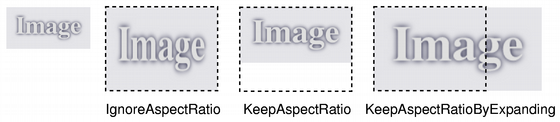
若給定 size 為空,此函數返迴 null 圖像。
這是重載函數。
返迴的圖像副本被比例縮放到矩形采用給定 width and height 根據給定 aspectRatioMode and transformMode .
若 width 或 height 為 0 或負數,此函數返迴 null 圖像。
返迴圖像的比例縮放副本。返迴圖像被比例縮放到給定 height 使用指定變換 mode .
此函數自動計算圖像寬度,以便保留圖像比率。
若給定 height 為 0 或負數,返迴 null 圖像。
另請參閱 圖像變換 .
返迴圖像的比例縮放副本。返迴圖像被比例縮放到給定 width 使用指定變換 mode .
此函數自動計算圖像高度,以便保留其寬高比。
若給定 width 為 0 或負數,返迴 null 圖像。
另請參閱 圖像變換 .
返迴像素數據的指針在掃描綫索引 i 。第一掃描綫在索引 0。
掃描綫數據對齊 32 位邊界。
警告:
若正訪問 32 BPP (位每像素) 圖像數據,則返迴指針會被鑄造成
QRgb*
(
QRgb
擁有 32 位大小) 並使用它來讀/寫像素值。無法使用
uchar*
指針直接,因為像素格式從屬底層平颱字節序。使用
qRed
(),
qGreen
(),
qBlue
(),和
qAlpha
() 來訪問像素。
另請參閱 bytesPerLine (), bits (), 像素操縱 ,和 constScanLine ().
這是重載函數。
設置顔色在給定 index 在顔色錶中,到給定 colorValue 。顔色值是 ARGB 四元組。
若 index 超齣顔色錶當前大小,展開它采用 setColorCount ().
另請參閱 color (), colorCount (), setColorTable (),和 像素操縱 .
重置顔色錶大小以包含 colorCount 條目。
若顔色錶被展開,所有額外顔色將被設為透明 (即 qRgba (0, 0, 0, 0)).
當使用圖像時,顔色錶必須足夠大以擁有呈現在圖像中的所有像素/索引值條目,否則結果未定義。
該函數在 Qt 4.6 引入。
另請參閱 colorCount (), colorTable (), setColor (),和 圖像變換 .
將用於翻譯顔色索引的顔色錶設為 QRgb 值,到指定 colors .
當使用圖像時,顔色錶必須足夠大以擁有呈現在圖像中的所有像素/索引值條目,否則結果未定義。
另請參閱 colorTable (), setColor (),和 圖像變換 .
設置圖像的設備像素比率。這是圖像像素和設備無關像素之間的比率。
默認 scaleFactor 為 1.0。將它設為其它值有 2 種效果:
打開圖像時將比例縮放 QPainter。例如,若比率為 2.0,200x200 圖像的描繪將導緻 (設備無關) 100x100 的有效描繪邊界。
Qt 中基於圖像大小計算布局幾何體的代碼路徑,會考慮比率: QSize layoutSize = image. size () / image. devicePixelRatio () 這的淨效果是圖像顯示成高 DPI (每英寸點數) 圖像,而不是大圖像 (見 繪製高分辨率版本的像素圖和圖像 ).
另請參閱 devicePixelRatio ().
將每物理米水平擬閤像素數設為 x .
連同 dotsPerMeterY (), 此數字定義圖像的預期比例縮放和寬高比,並確定比例縮放當 QPainter 在圖像中繪製圖形。它不改變圖像的比例縮放或寬高比,當在其它描繪設備中渲染時。
另請參閱 dotsPerMeterX () 和 圖像信息 .
將每物理米垂直擬閤像素數設為 y .
連同 dotsPerMeterX (), 此數字定義圖像的預期比例縮放和寬高比,並確定比例縮放當 QPainter 在圖像中繪製圖形。它不改變圖像的比例縮放或寬高比,當在其它描繪設備中渲染時。
另請參閱 dotsPerMeterY () 和 圖像信息 .
將圖像相對於其它圖像定位時,打算偏移的像素數設為 offset .
設置像素索引或顔色在給定 position to index_or_rgb .
若圖像格式為單色 (或調色闆),給定 index_or_rgb 值必須是圖像顔色錶中的索引,否則參數必須是 QRgb 值。
若 position 不是有效圖像坐標對,或者若 index_or_rgb >= colorCount () 在單色和調色闆圖像情況下,結果未定義。
警告:
此函數很昂貴由於調用瞭內部
detach()
函數在調用內;若涉及性能,推薦使用
scanLine
() 或
bits
() 以直接訪問像素數據。
這是重載函數。
設置像素索引或顔色在 ( x , y ) 到 index_or_rgb .
設置顔色在給定 position to color .
若 position 不是有效圖像坐標對,或圖像格式為單色 (或調色闆),結果未定義。
警告:
此函數很昂貴由於調用瞭內部
detach()
函數在調用內;若涉及性能,推薦使用
scanLine
() 或
bits
() 以直接訪問像素數據。
該函數在 Qt 5.6 引入。
另請參閱 pixelColor (), pixel (), bits (), scanLine (),和 像素操縱 .
這是重載函數。
設置像素顔色在 ( x , y ) 到 color .
該函數在 Qt 5.6 引入。
將圖像文本設為給定 text 並將其關聯到給定 key .
若僅僅想要存儲單文本塊 (即:comment 或僅僅描述),可以傳遞空鍵,或使用像 Description 的一般鍵。
圖像文本被嵌入圖像數據當調用 save () 或 QImageWriter::write ().
並非所有圖像格式都支持嵌入文本。可以找齣哪些特定圖像或格式支持嵌入文本通過使用 QImageWriter::supportsOption ()。給齣範例:
    QImageWriter writer;
    writer.setFormat("png");
    if (writer.supportsOption(QImageIOHandler::Description))
        qDebug() << "Png supports embedded text";
可以使用 QImageWriter::supportedImageFormats () 以找齣哪些圖像格式是可用的。
返迴圖片大小,即其 width () 和 height ().
另請參閱 圖像信息 .
[protected]
QImage
QImage::
smoothScaled
(
int
w
,
int
h
) const
返迴平滑比例縮放圖像副本。返迴圖像擁有尺寸的寬度為 w 按高度 h 像素。
交換圖像 other 與此圖像。此操作很快且從不失敗。
該函數在 Qt 4.8 引入。
返迴的圖像文本關聯給定 key 。若指定 key 是空字符串,返迴整個圖像文本,每個鍵文本對由換行符分隔。
另請參閱 setText () 和 textKeys ().
返迴此圖像的文本鍵。
可以使用這些鍵與 text () 列錶某個鍵的圖像文本。
另請參閱 text ().
創建
CGImage
等效於此
QImage
。返迴
CGImageRef
句柄。
返迴的 CGImageRef 參與 QImage 隱式共享,和保持引用 QImage 數據。CGImage 不可變且從不分離 QImage 。寫入 QImage 通常會分離。
此函數很快,且不會拷貝 (或轉換) 圖像數據。
支持以下圖像格式,且會映射到本機相應圖像類型:
| Qt | CoreGraphics |
|---|---|
| Format_ARGB32 | kCGImageAlphaFirst | kCGBitmapByteOrder32Host |
| Format_RGB32 | kCGImageAlphaNoneSkipFirst | kCGBitmapByteOrder32Host |
| Format_RGBA8888_Premultiplied | kCGImageAlphaPremultipliedLast | kCGBitmapByteOrder32Big |
| Format_RGBA8888 | kCGImageAlphaLast | kCGBitmapByteOrder32Big |
| Format_RGBX8888 | kCGImageAlphaNoneSkipLast | kCGBitmapByteOrder32Big |
| Format_ARGB32_Premultiplied | kCGImageAlphaPremultipliedFirst | kCGBitmapByteOrder32Host |
不支持其它格式;此函數為這些情況返迴 null CGImageRef。然後,此函數的用戶可以轉換 QImage 以支持第一格式,例如 Format_ARGB32_Premultiplied .
CGImageRef 顔色空間被設為 sRGB 顔色空間。
另請參閱 QtMac::toNSImage ().
[static]
QImage::Format
QImage::
toImageFormat
(
QPixelFormat
format
)
轉換 format 成 QImage::Format
[static]
QPixelFormat
QImage::
toPixelFormat
(
QImage::Format
format
)
轉換 format 成 QPixelFormat
返迴圖像副本的變換是使用給定變換 matrix 和變換 mode .
變換 matrix 在內部調節以補償不想要的平移;即,産生圖像是包含原始圖像所有變換點的最小圖像。使用 trueMatrix () 函數檢索用於變換圖像的實際矩陣。
另請參閱 trueMatrix () 和 圖像變換 .
返迴圖像副本的變換是使用給定變換 matrix 和變換 mode .
變換 matrix 在內部調節以補償不想要的平移;即,産生圖像是包含原始圖像所有變換點的最小圖像。使用 trueMatrix () 函數檢索用於變換圖像的實際矩陣。
不像其它重載,此函數可以用於對圖像履行透視變換。
另請參閱 trueMatrix () 和 圖像變換 .
[static]
QMatrix
QImage::
trueMatrix
(const
QMatrix
&
matrix
,
int
width
,
int
height
)
返迴用於變換圖像的實際矩陣采用給定 width , height and matrix .
當變換圖像使用 transformed () 函數,變換矩陣在內部調節以補償不想要的平移,即 transformed () 返迴包含原始圖像中所有變換點的最小圖像。此函數返迴修改矩陣,將來自原始圖像中的點正確地映射到新圖像。
另請參閱 transformed () 和 圖像變換 .
[static]
QTransform
QImage::
trueMatrix
(const
QTransform
&
matrix
,
int
width
,
int
height
)
返迴用於變換圖像的實際矩陣采用給定 width , height and matrix .
當變換圖像使用 transformed () 函數,變換矩陣在內部調節以補償不想要的平移,即 transformed () 返迴包含原始圖像中所有變換點的最小圖像。此函數返迴修改矩陣,將來自原始圖像中的點正確地映射到新圖像。
不像其它重載,此函數創建可以用於對圖像履行透視變換的變換矩陣。
另請參閱 transformed () 和 圖像變換 .
返迴
true
if
pos
是圖像中的有效坐標對;否則返迴
false
.
另請參閱 rect () 和 QRect::contains ().
這是重載函數。
返迴
true
if
QPoint
(
x
,
y
) 是圖像中的有效坐標對;否則返迴
false
.
返迴圖像寬度。
另請參閱 圖像信息 .
將圖像返迴作為 QVariant .
返迴
true
若此圖像和給定
image
擁有不同內容;否則返迴
false
.
比較可能很慢,除非有一些明顯差異 (譬如:不同寬度),在這種情況下函數會快速返迴。
另請參閱 operator= ().
賦值淺拷貝為給定 image 到此圖像並返迴此圖像的引用。
有關淺拷貝的更多信息,見 隱式數據共享 文檔編製。
移動賦值 other 到此 QImage 實例。
該函數在 Qt 5.2 引入。
返迴
true
若此圖像和給定
image
擁有相同內容;否則返迴
false
.
比較可能很慢,除非有一些明顯差異 (如:不同大小或格式),在這種情況下函數會快速返迴。
另請參閱 operator= ().
具有以下簽名的函數,可用於實現基本圖像內存管理:
void myImageCleanupHandler(void *info);
該 typedef 在 Qt 5.0 引入。
寫入給定 image 到給定 stream 作為 PNG 圖像,或作為 BMP 圖像若流的版本為 1。注意:將流寫入文件不會産生有效圖像文件。
另請參閱 QImage::save () 和 序列化 Qt 數據類型 .
讀取圖像從給定 stream 並把它存儲在給定 image .
另請參閱 QImage::load () 和 序列化 Qt 數據類型 .
