The QGraphicsAnchorLayout class provides a layout where one can anchor widgets together in Graphics View. 更多...
| 頭: | #include <QGraphicsAnchorLayout> |
| qmake: | QT += widgets |
| Since: | Qt 4.6 |
| 繼承: | QGraphicsLayout |
| QGraphicsAnchorLayout (QGraphicsLayoutItem * parent = Q_NULLPTR) | |
| virtual | ~QGraphicsAnchorLayout () |
| QGraphicsAnchor * | addAnchor (QGraphicsLayoutItem * firstItem , Qt::AnchorPoint firstEdge , QGraphicsLayoutItem * secondItem , Qt::AnchorPoint secondEdge ) |
| void | addAnchors (QGraphicsLayoutItem * firstItem , QGraphicsLayoutItem * secondItem , Qt::Orientations orientations = Qt::Horizontal | Qt::Vertical) |
| void | addCornerAnchors (QGraphicsLayoutItem * firstItem , Qt::Corner firstCorner , QGraphicsLayoutItem * secondItem , Qt::Corner secondCorner ) |
| QGraphicsAnchor * | anchor (QGraphicsLayoutItem * firstItem , Qt::AnchorPoint firstEdge , QGraphicsLayoutItem * secondItem , Qt::AnchorPoint secondEdge ) |
| qreal | horizontalSpacing () const |
| void | setHorizontalSpacing (qreal spacing ) |
| void | setSpacing (qreal spacing ) |
| void | setVerticalSpacing (qreal spacing ) |
| qreal | verticalSpacing () const |
| virtual int | count () const |
| virtual void | invalidate () |
| virtual QGraphicsLayoutItem * | itemAt (int index ) const |
| virtual void | removeAt (int index ) |
| virtual void | setGeometry (const QRectF & geom ) |
| virtual QSizeF | sizeHint (Qt::SizeHint which , const QSizeF & constraint = QSizeF()) const |
The QGraphicsAnchorLayout class provides a layout where one can anchor widgets together in Graphics View.
錨點布局允許開發者指定應如何彼此相對及布局自身,放置 Widget。製定規範是將錨點添加到布局,通過調用 addAnchor (), addAnchors () 或 addCornerAnchors ().
可以訪問布局中的現有錨點,采用 anchor () 函數。錨定項會被自動添加到布局,且若項被刪除,則其錨點也會被自動移除。
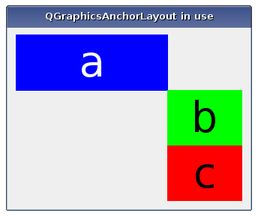
Anchors are always set up between edges of an item, where the "center" is also considered to be an edge. Consider the following example:
layout->addAnchor(b, Qt::AnchorLeft, a, Qt::AnchorRight);
layout->addAnchor(b, Qt::AnchorTop, a, Qt::AnchorBottom);
Here, the right edge of item
a
is anchored to the left edge of item
b
and the bottom edge of item
a
is anchored to the top edge of item
b
, with the result that item
b
will be placed diagonally to the right and below item
b
.
The addCornerAnchors () function provides a simpler way of anchoring the corners of two widgets than the two individual calls to addAnchor () shown in the code above. Here, we see how a widget can be anchored to the top-left corner of the enclosing layout:
layout->addCornerAnchors(a, Qt::TopLeftCorner, layout, Qt::TopLeftCorner);
In cases where anchors are used to match the widths or heights of widgets, it is convenient to use the addAnchors () function. As with the other functions for specifying anchors, it can also be used to anchor a widget to a layout.
QGraphicsAnchorLayout respects each item's size hints and size policies. Note that there are some properties of QSizePolicy that are not respected .
The layout may distribute some space between the items. If the spacing has not been explicitly specified, the actual amount of space will usually be 0.
However, if the first edge is the opposite of the second edge (e.g., the right edge of the first widget is anchored to the left edge of the second widget), the size of the anchor will be queried from the style through a pixel metric: PM_LayoutHorizontalSpacing for horizontal anchors and PM_LayoutVerticalSpacing for vertical anchors.
If the spacing is negative, the items will overlap to some extent.
There are some features that QGraphicsAnchorLayout currently does not support. This might change in the future, so avoid using these features if you want to avoid any future regressions in behaviour:
另請參閱 QGraphicsLinearLayout , QGraphicsGridLayout ,和 QGraphicsLayout .
構造 QGraphicsAnchorLayout 實例。 parent 被傳遞給 QGraphicsLayout 的構造函數。
[虛擬]
QGraphicsAnchorLayout::
~QGraphicsAnchorLayout
()
銷毀 QGraphicsAnchorLayout 對象。
Creates an anchor between the edge firstEdge of item firstItem and the edge secondEdge of item secondItem . The spacing of the anchor is picked up from the style. Anchors between a layout edge and an item edge will have a size of 0. If there is already an anchor between the edges, the new anchor will replace the old one.
firstItem and secondItem are automatically added to the layout if they are not part of the layout. This means that count () can increase by up to 2.
The spacing an anchor will get depends on the type of anchor. For instance, anchors from the Right edge of one item to the Left edge of another (or vice versa) will use the default horizontal spacing. The same behaviour applies to Bottom to Top anchors, (but they will use the default vertical spacing). For all other anchor combinations, the spacing will be 0. All anchoring functions will follow this rule.
The spacing can also be set manually by using QGraphicsAnchor::setSpacing () 方法。
Calling this function where firstItem or secondItem are ancestors of the layout have undefined behaviour.
另請參閱 addAnchors () 和 addCornerAnchors ().
Anchors two or four edges of firstItem with the corresponding edges of secondItem , so that firstItem has the same size as secondItem in the dimensions specified by orientations .
For example, the following example anchors the left and right edges of two items to match their widths:
layout->addAnchor(b, Qt::AnchorLeft, c, Qt::AnchorLeft);
layout->addAnchor(b, Qt::AnchorRight, c, Qt::AnchorRight);
This can also be achieved using the following line of code:
layout->addAnchors(b, c, Qt::Horizontal);
另請參閱 addAnchor () 和 addCornerAnchors ().
創建 2 個點介於 firstItem and secondItem 指定通過角落, firstCorner and secondCorner , where one is for the horizontal edge and another one for the vertical edge.
This is a convenience function, since anchoring corners can be expressed as anchoring two edges. For instance:
layout->addAnchor(a, Qt::AnchorTop, layout, Qt::AnchorTop);
layout->addAnchor(a, Qt::AnchorLeft, layout, Qt::AnchorLeft);
This can also be achieved with the following line of code:
layout->addCornerAnchors(a, Qt::TopLeftCorner, layout, Qt::TopLeftCorner);
If there is already an anchor between the edge pairs, it will be replaced by the anchors that this function specifies.
firstItem and secondItem are automatically added to the layout if they are not part of the layout. This means that count () can increase by up to 2.
另請參閱 addAnchor () 和 addAnchors ().
Returns the anchor between the anchor points defined by firstItem and firstEdge and secondItem and secondEdge . If there is no such anchor, the function will return 0.
[虛擬]
int
QGraphicsAnchorLayout::
count
() const
重實現自 QGraphicsLayout::count ().
Returns the default horizontal spacing for the anchor layout.
另請參閱 verticalSpacing () 和 setHorizontalSpacing ().
[虛擬]
void
QGraphicsAnchorLayout::
invalidate
()
重實現自 QGraphicsLayout::invalidate ().
[虛擬]
QGraphicsLayoutItem
*QGraphicsAnchorLayout::
itemAt
(
int
index
) const
重實現自 QGraphicsLayout::itemAt ().
[虛擬]
void
QGraphicsAnchorLayout::
removeAt
(
int
index
)
重實現自 QGraphicsLayout::removeAt ().
移除布局項在 index without destroying it. Ownership of the item is transferred to the caller.
Removing an item will also remove any of the anchors associated with it.
[虛擬]
void
QGraphicsAnchorLayout::
setGeometry
(const
QRectF
&
geom
)
重實現自 QGraphicsLayoutItem::setGeometry ().
Sets the default horizontal spacing for the anchor layout to spacing .
另請參閱 horizontalSpacing (), setVerticalSpacing (),和 setSpacing ().
Sets the default horizontal and the default vertical spacing for the anchor layout to spacing .
If an item is anchored with no spacing associated with the anchor, it will use the default spacing.
QGraphicsAnchorLayout does not support negative spacings. Setting a negative value will unset the previous spacing and make the layout use the spacing provided by the current widget style.
另請參閱 setHorizontalSpacing () 和 setVerticalSpacing ().
Sets the default vertical spacing for the anchor layout to spacing .
另請參閱 verticalSpacing (), setHorizontalSpacing (),和 setSpacing ().
[virtual protected]
QSizeF
QGraphicsAnchorLayout::
sizeHint
(
Qt::SizeHint
which
, const
QSizeF
&
constraint
= QSizeF()) const
重實現自 QGraphicsLayoutItem::sizeHint ().
Returns the default vertical spacing for the anchor layout.
另請參閱 horizontalSpacing () 和 setVerticalSpacing ().
