The QFontDialog class provides a dialog widget for selecting a font. 更多...
| 頭: | #include <QFontDialog> |
| qmake: | QT += widgets |
| 繼承: | QDialog |
| enum | FontDialogOption { NoButtons, DontUseNativeDialog, ScalableFonts, NonScalableFonts, MonospacedFonts, ProportionalFonts } |
| flags | FontDialogOptions |
| QFontDialog (QWidget * parent = Q_NULLPTR) | |
| QFontDialog (const QFont & initial , QWidget * parent = Q_NULLPTR) | |
| QFont | currentFont () const |
| void | open (QObject * receiver , const char * member ) |
| FontDialogOptions | options () const |
| QFont | selectedFont () const |
| void | setCurrentFont (const QFont & font ) |
| void | setOption (FontDialogOption option , bool on = true) |
| void | setOptions (FontDialogOptions options ) |
| bool | testOption (FontDialogOption option ) const |
| virtual void | setVisible (bool visible ) |
| void | currentFontChanged (const QFont & font ) |
| void | fontSelected (const QFont & font ) |
| QFont | getFont (bool * ok , const QFont & initial , QWidget * parent = Q_NULLPTR, const QString & title = QString(), FontDialogOptions options = FontDialogOptions()) |
| QFont | getFont (bool * ok , QWidget * parent = Q_NULLPTR) |
| virtual void | changeEvent (QEvent * e ) |
| virtual void | done (int result ) |
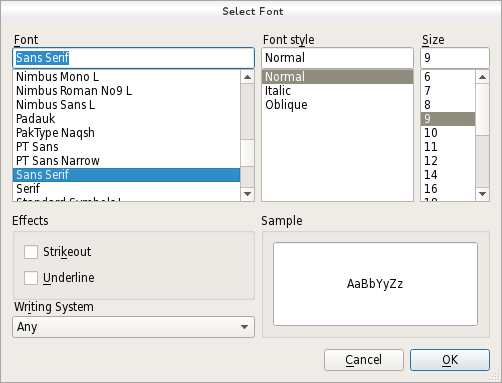
The QFontDialog class provides a dialog widget for selecting a font.
字體對話框的創建是透過某一靜態 getFont () 函數。
範例:
bool ok;
QFont font = QFontDialog::getFont(
                &ok, QFont("Helvetica [Cronyx]", 10), this);
if (ok) {
    // the user clicked OK and font is set to the font the user selected
} else {
    // the user canceled the dialog; font is set to the initial
    // value, in this case Helvetica [Cronyx], 10
}
The dialog can also be used to set a widget's font directly:
myWidget.setFont(QFontDialog::getFont(0, myWidget.font()));
If the user clicks OK the font they chose will be used for myWidget, and if they click Cancel the original font is used.
另請參閱 QFont , QFontInfo , QFontMetrics , QColorDialog , QFileDialog ,和 標準對話框範例 .
This enum specifies various options that affect the look and feel of a font dialog.
For instance, it allows to specify which type of font should be displayed. If none are specified all fonts available will be listed.
Note that the font filtering options might not be supported on some platforms (e.g. Mac). They are always supported by the non native dialog (used on Windows or Linux).
| 常量 | 值 | 描述 |
|---|---|---|
QFontDialog::NoButtons
|
0x00000001
|
不顯示 OK and Cancel buttons. (Useful for "live dialogs".) |
QFontDialog::DontUseNativeDialog
|
0x00000002
|
Use Qt's standard font dialog on the Mac instead of Apple's native font panel. |
QFontDialog::ScalableFonts
|
0x00000004
|
展示可伸縮字體 |
QFontDialog::NonScalableFonts
|
0x00000008
|
展示不可伸縮字體 |
QFontDialog::MonospacedFonts
|
0x00000010
|
展示等寬字體 |
QFontDialog::ProportionalFonts
|
0x00000020
|
展示成正比字體 |
該枚舉在 Qt 4.5 引入或被修改。
FontDialogOptions 類型是 typedef 對於 QFlags <FontDialogOption>. It stores an OR combination of FontDialogOption values.
另請參閱 options , setOption (),和 testOption ().
此特性保持對話框的當前字體。
該特性在 Qt 4.5 引入。
訪問函數:
| QFont | currentFont () const |
| void | setCurrentFont (const QFont & font ) |
通知程序信號:
| void | currentFontChanged (const QFont & font ) |
This property holds the various options that affect the look and feel of the dialog
默認情況下,所有選項是被禁用的。
Options should be set before showing the dialog. Setting them while the dialog is visible is not guaranteed to have an immediate effect on the dialog (depending on the option and on the platform).
該特性在 Qt 4.5 引入。
訪問函數:
| FontDialogOptions | options () const |
| void | setOptions (FontDialogOptions options ) |
另請參閱 setOption () 和 testOption ().
Constructs a standard font dialog.
使用 setCurrentFont () to set the initial font attributes.
The parent parameter is passed to the QDialog 構造函數。
該函數在 Qt 4.5 引入。
另請參閱 getFont ().
Constructs a standard font dialog with the given parent 和指定 initial 顔色。
該函數在 Qt 4.5 引入。
[virtual protected]
void
QFontDialog::
changeEvent
(
QEvent
*
e
)
重實現自 QWidget::changeEvent ().
Returns the current font.
該函數在 Qt 4.5 引入。
注意: getter 函數對於特性 currentFont .
另請參閱 setCurrentFont () 和 selectedFont ().
[signal]
void
QFontDialog::
currentFontChanged
(const
QFont
&
font
)
This signal is emitted when the current font is changed. The new font is specified in font .
The signal is emitted while a user is selecting a font. Ultimately, the chosen font may differ from the font currently selected.
該函數在 Qt 4.5 引入。
注意: 通知程序信號對於特性 currentFont .
另請參閱 currentFont , fontSelected (),和 selectedFont ().
[virtual protected]
void
QFontDialog::
done
(
int
result
)
重實現自 QDialog::done ().
關閉對話框並將其結果代碼設為 result 。若此對話框的展示是采用 exec (),done() 導緻本地事件循環的完成,且 exec () 返迴 result .
另請參閱 QDialog::done ().
[signal]
void
QFontDialog::
fontSelected
(const
QFont
&
font
)
This signal is emitted when a font has been selected. The selected font is specified in font .
The signal is only emitted when a user has chosen the final font to be used. It is not emitted while the user is changing the current font in the font dialog.
該函數在 Qt 4.5 引入。
另請參閱 selectedFont (), currentFontChanged (),和 currentFont .
[static]
QFont
QFontDialog::
getFont
(
bool
*
ok
, const
QFont
&
initial
,
QWidget
*
parent
= Q_NULLPTR, const
QString
&
title
= QString(),
FontDialogOptions
options
= FontDialogOptions())
執行模態字體對話框並返迴字體。
If the user clicks OK , the selected font is returned. If the user clicks Cancel , initial font is returned.
The dialog is constructed with the given parent and the options specified in options . title is shown as the window title of the dialog and initial is the initially selected font. If the ok parameter is not-null, the value it refers to is set to true if the user clicks OK , and set to false if the user clicks Cancel .
範例:
bool ok;
QFont font = QFontDialog::getFont(&ok, QFont("Times", 12), this);
if (ok) {
    // font is set to the font the user selected
} else {
    // the user canceled the dialog; font is set to the initial
    // value, in this case Times, 12.
}
The dialog can also be used to set a widget's font directly:
myWidget.setFont(QFontDialog::getFont(0, myWidget.font()));
In this example, if the user clicks OK the font they chose will be used, and if they click Cancel the original font is used.
警告: 不要刪除 parent during the execution of the dialog. If you want to do this, you should create the dialog yourself using one of the QFontDialog 構造函數。
[static]
QFont
QFontDialog::
getFont
(
bool
*
ok
,
QWidget
*
parent
= Q_NULLPTR)
這是重載函數。
執行模態字體對話框並返迴字體。
If the user clicks OK , the selected font is returned. If the user clicks Cancel , the Qt default font is returned.
The dialog is constructed with the given parent 。若 ok parameter is not-null, the value it refers to is set to true if the user clicks OK , and false if the user clicks Cancel .
範例:
bool ok;
QFont font = QFontDialog::getFont(&ok, this);
if (ok) {
    // font is set to the font the user selected
} else {
    // the user canceled the dialog; font is set to the default
    // application font, QApplication::font()
}
警告: 不要刪除 parent during the execution of the dialog. If you want to do this, you should create the dialog yourself using one of the QFontDialog 構造函數。
這是重載函數。
打開對話框並連接其 fontSelected () 信號到槽,指定通過 receiver and member .
將從槽斷開信號連接,當關閉對話框時。
該函數在 Qt 4.5 引入。
Returns the font that the user selected by clicking the OK or equivalent button.
注意: This font is not always the same as the font held by the currentFont property since the user can choose different fonts before finally selecting the one to use.
Sets the font highlighted in the QFontDialog 到給定 font .
該函數在 Qt 4.5 引入。
注意: setter 函數對於特性 currentFont .
另請參閱 currentFont () 和 selectedFont ().
設置給定 option 為被啓用若 on 為 true;否則,清零給定 option .
另請參閱 options and testOption ().
[虛擬]
void
QFontDialog::
setVisible
(
bool
visible
)
重實現自 QWidget::setVisible ().
返迴
true
若給定
option
被啓用;否則,返迴 false。
