QPainter provides highly optimized functions to do most of the drawing GUI programs require. It can draw everything from simple graphical primitives (represented by the QPoint , QLine , QRect , QRegion and QPolygon classes) to complex shapes like vector paths. In Qt vector paths are represented by the QPainterPath 類。 QPainterPath provides a container for painting operations, enabling graphical shapes to be constructed and reused.

|
QPainterPath
A painter path is an object composed of lines and curves. For example, a rectangle is composed by lines and an ellipse is composed by curves. The main advantage of painter paths over normal drawing operations is that complex shapes only need to be created once; then they can be drawn many times using only calls to the QPainter::drawPath () 函數。 A QPainterPath 對象可以用於填充、輪廓描繪及裁剪。要為給定描繪器路徑生成可填充輪廓,使用 QPainterPathStroker 類。 |
Lines and outlines are drawn using the QPen class. A pen is defined by its style (i.e. its line-type), width, brush, how the endpoints are drawn (cap-style) and how joins between two connected lines are drawn (join-style). The pen's brush is a QBrush object used to fill strokes generated with the pen, i.e. the QBrush class defines the fill pattern.
QPainter can also draw aligned text and pixmaps.
When drawing text, the font is specified using the QFont class. Qt will use the font with the specified attributes, or if no matching font exists, Qt will use the closest matching installed font. The attributes of the font that is actually used can be retrieved using the QFontInfo class. In addition, the QFontMetrics class provides the font measurements, and the QFontDatabase class provides information about the fonts available in the underlying window system.
Normally, QPainter draws in a "natural" coordinate system, but it is able to perform view and world transformations using the QTransform 類。更多信息,見 坐標係 , which also describes the rendering process, i.e. the relation between the logical representation and the rendered pixels, and the benefits of anti-aliased painting.
|
Anti-Aliased Painting
當繪製時,像素渲染的控製是通過 QPainter::Antialiasing render hint. The QPainter::RenderHint 枚舉用於將標誌指定給 QPainter 可能 (或可能不) 被任何給定引擎所遵守。 The QPainter::Antialiasing 值指示引擎應對圖元邊緣抗鋸齒若可能的話 (即:通過使用不同顔色光亮度平滑邊緣)。 |
|
Shapes are filled using the QBrush class. A brush is defined by its color and its style (i.e. its fill pattern).
Any color in Qt is represented by the QColor class which supports the RGB, HSV and CMYK color models. QColor also support alpha-blended outlining and filling (specifying the transparency effect), and the class is platform and device independent (the colors are mapped to hardware using the QColormap class). For more information, see the QColor 類文檔編製。
The available fill patterns are described by the Qt::BrushStyle enum. These include basic patterns spanning from uniform color to very sparse pattern, various line combinations, gradient fills and textures. Qt provides the QGradient class to define custom gradient fills, while texture patterns are specified using the QPixmap 類。
|
QGradient
The QGradient class is used in combination with QBrush 以指定漸變填充。 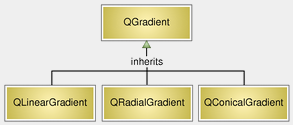
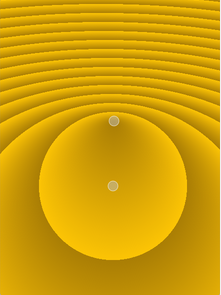
Qt currently supports three types of gradient fills: Linear gradients interpolate colors between start and end points, radial gradients interpolate colors between a focal point and end points on a circle surrounding it, and conical gradients interpolate colors around a center point. |
