A QML application that demonstrates visualizing multiple 3D scenes using Scene3D and Scene3DView .
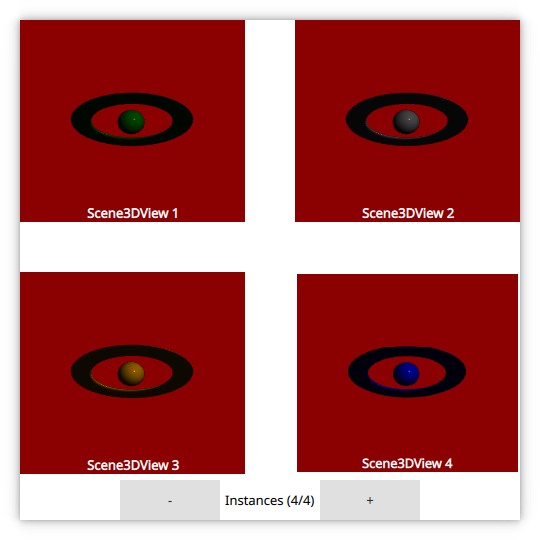
This example demonstrates visualizing multiple 3D scenes from a Qt Quick application usinc Scene3D and Scene3DView . Each 3D scene contains a single active camera and a single active light source. Visualized data is assumed to be at a fixed location.
要運行範例從 Qt Creator ,打開 歡迎 模式,然後選擇範例從 範例 。更多信息,拜訪 構建和運行範例 .
首先設置 Scene3D instance that will be required for our Scene3DView instanced.
Scene3D {
    id: scene3dInstance
    anchors.fill: parent
    focus: true
    aspects: ["input", "logic"]
    cameraAspectRatioMode: Scene3D.AutomaticAspectRatio
    multisample: true
}
Then we instanciate our Scene3DView instances and make them reference the Scene3D . We also provide a root Entity for each Scene3DView 采用 scene3dview/AnimatedEntity.qml .
Rectangle {
    width: grid.cellWidth
    height: grid.cellHeight
    color: "darkRed"
    scale: ma.pressed || ma.containsMouse ? 0.8 : 1
    Behavior on scale { NumberAnimation { duration: 750 } }
    Scene3DView {
        onXChanged: console.log(("X (%1): %2").arg(model.index).arg(x))
        scene3D: scene3dInstance
        anchors.fill: parent
        AnimatedEntity {
            sceneColor: grid.colors[model.index]
            // Only clear the color for the first Scene3DView
            clearColor: model.index === 0
        }
    }
    Text {
        anchors {
            horizontalCenter: parent.horizontalCenter
            bottom: parent.bottom
        }
        color: "white"
        font.bold: true
        text: "Scene3DView " + (model.index + 1)
    }
    MouseArea {
        id: ma
        anchors.fill: parent
        hoverEnabled: true
    }
}
Care has to be taken that only the first Scene3DView clears the color buffer. We don't want each Scene3DView to clear the screen as that would erase content for all but the last Scene3DView .
// Only clear the color for the first Scene3DView
clearColor: model.index === 0
