QGridLayout 類按柵格布置 Widget。 更多...
| 頭: | #include <QGridLayout> |
| qmake: | QT += widgets |
| 繼承: | QLayout |
| QGridLayout () | |
| QGridLayout (QWidget * parent ) | |
| virtual | ~QGridLayout () |
| void | addItem (QLayoutItem * item , int row , int column , int rowSpan = 1, int columnSpan = 1, Qt::Alignment alignment = Qt::Alignment()) |
| void | addLayout (QLayout * layout , int row , int column , Qt::Alignment alignment = Qt::Alignment()) |
| void | addLayout (QLayout * layout , int row , int column , int rowSpan , int columnSpan , Qt::Alignment alignment = Qt::Alignment()) |
| void | addWidget (QWidget * widget , int row , int column , Qt::Alignment alignment = Qt::Alignment()) |
| void | addWidget (QWidget * widget , int fromRow , int fromColumn , int rowSpan , int columnSpan , Qt::Alignment alignment = Qt::Alignment()) |
| QRect | cellRect (int row , int column ) const |
| int | columnCount () const |
| int | columnMinimumWidth (int column ) const |
| int | columnStretch (int column ) const |
| void | getItemPosition (int index , int * row , int * column , int * rowSpan , int * columnSpan ) const |
| int | horizontalSpacing () const |
| QLayoutItem * | itemAtPosition (int row , int column ) const |
| Qt::Corner | originCorner () const |
| int | rowCount () const |
| int | rowMinimumHeight (int row ) const |
| int | rowStretch (int row ) const |
| void | setColumnMinimumWidth (int column , int minSize ) |
| void | setColumnStretch (int column , int stretch ) |
| void | setHorizontalSpacing (int spacing ) |
| void | setOriginCorner (Qt::Corner corner ) |
| void | setRowMinimumHeight (int row , int minSize ) |
| void | setRowStretch (int row , int stretch ) |
| void | setSpacing (int spacing ) |
| void | setVerticalSpacing (int spacing ) |
| int | spacing () const |
| int | verticalSpacing () const |
| virtual int | count () const override |
| virtual Qt::Orientations | expandingDirections () const override |
| virtual bool | hasHeightForWidth () const override |
| virtual int | heightForWidth (int w ) const override |
| virtual void | invalidate () override |
| virtual QLayoutItem * | itemAt (int index ) const override |
| virtual QSize | maximumSize () const override |
| virtual int | minimumHeightForWidth (int w ) const override |
| virtual QSize | minimumSize () const override |
| virtual void | setGeometry (const QRect & rect ) override |
| virtual QSize | sizeHint () const override |
| virtual QLayoutItem * | takeAt (int index ) override |
| virtual void | addItem (QLayoutItem * item ) override |
QGridLayout 占用可用於它的空間 (通過其父級布局或通過 parentWidget ()),將它劃分成行和列,並將它管理的每個 Widget 放入正確單元格中。
列和行的行為等同;我們將討論列,但行也有等效函數。
每列都有最小寬度和拉伸因子。最小寬度是最大設置寬度使用 setColumnMinimumWidth () 和該列中每個 Widget 的最小寬度。拉伸因子的設置是使用 setColumnStretch () 並確定列可用空間將超齣其必要最小空間多少。
通常,會將被管理的每個 Widget 或布局放入其自己的單元格中使用 addWidget ()。Widget 占據多個單元格也是可能的,使用跨越行和列重載 addItem () 和 addWidget ()。若這樣做,QGridLayout 將猜測如何覆蓋列/行分配大小 (基於拉伸因子)。
要從布局移除 Widget,調用 removeWidget ()。調用 QWidget::hide () 在 Widget 還會從布局高效移除小部件,直到 QWidget::show () 被調用。
此插圖展示具有 5 列 3 行的柵格的對話框片段 (以洋紅色覆蓋展示柵格):
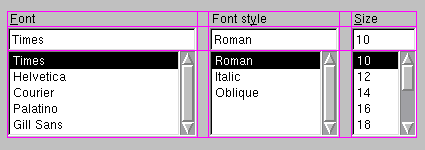
組成此對話框片段中的第 0 列、第2 列和第 4 列的是 QLabel , QLineEdit ,及 QListBox。第 1 列和第 3 列被做成占位符采用 setColumnMinimumWidth ()。第 0 行包含 3 個 QLabel 對象,第 1 行 3 個 QLineEdit 對象和第 2 行 3 個 QListBox 對象。使用占位符列 (1 和 3) 以獲得在列之間的適量空間。
注意,列和行的寬和高並不相等。若想要 2 列擁有相同寬度,必須自己將它們的最小寬度和拉伸因子設為一樣。這樣做是使用 setColumnMinimumWidth () 和 setColumnStretch ().
若 QGridLayout 不是頂層布局 (即:不管理 Widget 的所有區域和子級),必須將它添加到其父級布局 (當創建它時),在采用它做任何事情之前。添加布局的平常方式是通過調用 addLayout () 在父級布局。
一旦有添加布局,就可以開始將 Widget 及其它布局放入柵格布局的單元格中使用 addWidget (), addItem (),和 addLayout ().
QGridLayout 還包括 2 種邊距寬度: 內容邊距 和 spacing ()。內容邊距是沿 QGridLayout 4 側邊緣的預留空間寬度。 spacing () 是相鄰框之間自動分配的間距寬度。
默認內容邊距值的提供是通過 style 。Qt 樣式指定的默認值對於 Widget 為 9,而對於窗口為 11。默認間距如同頂層布局 (或父級布局) 的邊距寬度。
另請參閱 QBoxLayout , QStackedLayout , 布局管理 ,和 基本布局範例 .
This property holds the spacing between widgets that are laid out side by side
If no value is explicitly set, the layout's horizontal spacing is inherited from the parent layout, or from the style settings for the parent widget.
該特性在 Qt 4.3 引入。
訪問函數:
| int | horizontalSpacing () const |
| void | setHorizontalSpacing (int spacing ) |
另請參閱 verticalSpacing , QStyle::pixelMetric (),和 PM_LayoutHorizontalSpacing .
This property holds the spacing between widgets that are laid out on top of each other
If no value is explicitly set, the layout's vertical spacing is inherited from the parent layout, or from the style settings for the parent widget.
該特性在 Qt 4.3 引入。
訪問函數:
| int | verticalSpacing () const |
| void | setVerticalSpacing (int spacing ) |
另請參閱 horizontalSpacing , QStyle::pixelMetric (),和 PM_LayoutHorizontalSpacing .
構造新柵格布局。
You must insert this grid into another layout. You can insert widgets and layouts into this layout at any time, but laying out will not be performed before this is inserted into another layout.
構造新的 QGridLayout 采用父級小部件 parent 。布局最初有一行和一列,且將展開當插入新的項時。
將直接把布局設為頂層布局對於 parent 。Widget 隻可以有一個頂層布局。返迴它通過 QWidget::layout ().
另請參閱 QWidget::setLayout ().
[虛擬]
QGridLayout::
~QGridLayout
()
銷毀柵格布局。將終止幾何體管理,若這是頂層柵格。
不銷毀布局 Widget。
添加 item 在位置 row , column , spanning rowSpan rows and columnSpan columns, and aligns it according to alignment 。若 rowSpan and/or columnSpan is -1, then the item will extend to the bottom and/or right edge, respectively. The layout takes ownership of the item .
警告: 不要使用此函數添加子級布局 (或子級 Widget 項)。使用 addLayout () 或 addWidget () 代替。
[override virtual protected]
void
QGridLayout::
addItem
(
QLayoutItem
*
item
)
重實現: QLayout::addItem (QLayoutItem *item).
放置 layout 在位置 ( row , column ) 在柵格中。左上位置為 (0, 0)。
對齊方式的指定是通過 alignment 。默認對齊為 0,意味著 Widget 填充整個單元格。
A non-zero alignment indicates that the layout should not grow to fill the available space but should be sized according to sizeHint ().
layout 變為柵格布局的子級。
這是重載函數。
此版本添加布局 layout to the cell grid, spanning multiple rows/columns. The cell will start at row , column spanning rowSpan rows and columnSpan columns.
若 rowSpan and/or columnSpan 為 -1,那麼布局將分彆延伸到底部和/或右邊緣。
添加給定 widget 到單元格柵格按 row , column 。左上位置默認為 (0, 0)。
對齊方式的指定是通過 alignment 。默認對齊為 0,意味著 Widget 填充整個單元格。
這是重載函數。
此版本添加給定 widget to the cell grid, spanning multiple rows/columns. The cell will start at fromRow , fromColumn spanning rowSpan rows and columnSpan columns. The widget will have the given alignment .
若 rowSpan and/or columnSpan 為 -1,那麼 Widget 將分彆延伸到底部和/或右邊緣。
Returns the geometry of the cell with row row and column column in the grid. Returns an invalid rectangle if row or column is outside the grid.
警告: in the current version of Qt this function does not return valid results until setGeometry () has been called, i.e. after the parentWidget () is visible.
返迴此柵格的列數。
返迴列間距為列 column .
另請參閱 setColumnMinimumWidth ().
返迴拉伸因子為列 column .
另請參閱 setColumnStretch ().
[override virtual]
int
QGridLayout::
count
() const
重實現: QLayout::count () const.
[override virtual]
Qt::Orientations
QGridLayout::
expandingDirections
() const
重實現: QLayout::expandingDirections () const.
返迴項的位置信息采用給定 index .
The variables passed as row and column are updated with the position of the item in the layout, and the rowSpan and columnSpan variables are updated with the vertical and horizontal spans of the item.
另請參閱 itemAtPosition () 和 itemAt ().
[override virtual]
bool
QGridLayout::
hasHeightForWidth
() const
重實現: QLayoutItem::hasHeightForWidth () const.
[override virtual]
int
QGridLayout::
heightForWidth
(
int
w
) const
重實現: QLayoutItem::heightForWidth (int ) const.
[override virtual]
void
QGridLayout::
invalidate
()
重實現: QLayout::invalidate ().
[override virtual]
QLayoutItem
*QGridLayout::
itemAt
(
int
index
) const
重實現: QLayout::itemAt (int index) const.
返迴的布局項占據單元格 (
row
,
column
),或
nullptr
若單元格為空。
該函數在 Qt 4.4 引入。
另請參閱 getItemPosition () 和 indexOf ().
[override virtual]
QSize
QGridLayout::
maximumSize
() const
重實現: QLayout::maximumSize () const.
[override virtual]
int
QGridLayout::
minimumHeightForWidth
(
int
w
) const
重實現: QLayoutItem::minimumHeightForWidth (int w) const.
[override virtual]
QSize
QGridLayout::
minimumSize
() const
重實現: QLayout::minimumSize () const.
Returns the corner that's used for the grid's origin, i.e. for position (0, 0).
另請參閱 setOriginCorner ().
返迴此網格中的行數。
返迴設置的最小寬度為行 row .
另請參閱 setRowMinimumHeight ().
返迴拉伸因子為行 row .
另請參閱 setRowStretch ().
設置最小寬度為列 column to minSize 像素。
另請參閱 columnMinimumWidth () 和 setRowMinimumHeight ().
設置拉伸因子為列 column to stretch 。第一列編號 0。
The stretch factor is relative to the other columns in this grid. Columns with a higher stretch factor take more of the available space.
The default stretch factor is 0. If the stretch factor is 0 and no other column in this table can grow at all, the column may still grow.
An alternative approach is to add spacing using addItem () 采用 QSpacerItem .
另請參閱 columnStretch () 和 setRowStretch ().
[override virtual]
void
QGridLayout::
setGeometry
(const
QRect
&
rect
)
重實現: QLayout::setGeometry (const QRect &r).
把柵格的原點角 (即:位置 (0, 0)) 設為 corner .
另請參閱 originCorner ().
設置最小高度為行 row to minSize 像素。
另請參閱 rowMinimumHeight () 和 setColumnMinimumWidth ().
設置拉伸因子對於行 row to stretch 。首行編號 0。
The stretch factor is relative to the other rows in this grid. Rows with a higher stretch factor take more of the available space.
The default stretch factor is 0. If the stretch factor is 0 and no other row in this table can grow at all, the row may still grow.
另請參閱 rowStretch (), setRowMinimumHeight (),和 setColumnStretch ().
This function sets both the vertical and horizontal spacing to spacing .
另請參閱 spacing (), setVerticalSpacing (),和 setHorizontalSpacing ().
[override virtual]
QSize
QGridLayout::
sizeHint
() const
重實現: QLayoutItem::sizeHint () const.
若垂直間距 == 水平間距,此函數返迴該值;否則返迴 -1。
另請參閱 setSpacing (), verticalSpacing (),和 horizontalSpacing ().
[override virtual]
QLayoutItem
*QGridLayout::
takeAt
(
int
index
)
重實現: QLayout::takeAt (int index).
