QCategoryAxis 類把命名範圍放置在軸上。 更多...
| 頭: | #include <QCategoryAxis> |
| 實例化: | CategoryAxis |
| 繼承: | QValueAxis |
| enum | AxisLabelsPosition { AxisLabelsPositionCenter, AxisLabelsPositionOnValue } |
| QCategoryAxis (QObject * parent = nullptr) | |
| virtual | ~QCategoryAxis () |
| void | append (const QString & categoryLabel , qreal categoryEndValue ) |
| QStringList | categoriesLabels () |
| int | count () const |
| qreal | endValue (const QString & categoryLabel ) const |
| QCategoryAxis::AxisLabelsPosition | labelsPosition () const |
| void | remove (const QString & categoryLabel ) |
| void | replaceLabel (const QString & oldLabel , const QString & newLabel ) |
| void | setLabelsPosition (QCategoryAxis::AxisLabelsPosition position ) |
| void | setStartValue (qreal min ) |
| qreal | startValue (const QString & categoryLabel = QString()) const |
| virtual QAbstractAxis::AxisType | type () const override |
| void | categoriesChanged () |
| void | labelsPositionChanged (QCategoryAxis::AxisLabelsPosition position ) |
This class can be used to explain the underlying data by adding labeled categories. Unlike QBarCategoryAxis , QCategoryAxis allows the widths of the category ranges to be specified freely.
Example code on how to use QCategoryAxis:
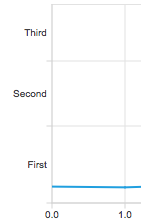
QChartView *chartView = new QChartView;
QLineSeries *series = new QLineSeries;
// ...
chartView->chart()->addSeries(series);
QCategoryAxis *axisY = new QCategoryAxis;
axisY->setMin(0);
axisY->setMax(52);
axisY->setStartValue(15);
axisY->append("First", 20);
axisY->append("Second", 37);
axisY->append("Third", 52);
chartView->chart()->setAxisY(axisY, series);
此枚舉描述類彆標簽的位置。
| 常量 | 值 | 描述 |
|---|---|---|
QCategoryAxis::AxisLabelsPositionCenter
|
0x0
|
Labels are centered to category. |
QCategoryAxis::AxisLabelsPositionOnValue
|
0x1
|
Labels are positioned to the high end limit of the category. |
此特性以字符串列錶保持類彆標簽。
訪問函數:
| QStringList | categoriesLabels () |
此特性保持類彆數。
訪問函數:
| int | count () const |
This property holds the position of the category labels. The labels in the beginning and in the end of the axes may overlap other axes' labels when positioned on value.
訪問函數:
| QCategoryAxis::AxisLabelsPosition | labelsPosition () const |
| void | setLabelsPosition (QCategoryAxis::AxisLabelsPosition position ) |
通知程序信號:
| void | labelsPositionChanged (QCategoryAxis::AxisLabelsPosition position ) |
This property holds the low end of the first category on the axis.
訪問函數:
| qreal | startValue (const QString & categoryLabel = QString()) const |
| void | setStartValue (qreal min ) |
Constructs an axis object that is a child of parent .
[signal]
void
QCategoryAxis::
categoriesChanged
()
This signal is emitted when the categories of the axis change.
[虛擬]
QCategoryAxis::
~QCategoryAxis
()
銷毀對象。
Appends a new category to the axis with the label categoryLabel . A category label has to be unique. categoryEndValue specifies the high end limit of the category. It has to be greater than the high end limit of the previous category. Otherwise the method returns without adding a new category.
Returns the list of the categories' labels.
注意: Getter function for property categoriesLabels.
Returns the number of categories.
注意: getter 函數對於特性 count。
Returns the high end limit of the category specified by categoryLabel .
Removes a category specified by the label categoryLabel from the axis.
Replaces an existing category label specified by oldLabel with newLabel . If the old label does not exist, the method returns without making any changes.
設置 min to be the low end limit of the first category on the axis. If categories have already been added to the axis, the passed value must be less than the high end value of the already defined first category range. Otherwise nothing is done.
注意: setter 函數對於特性 startValue .
另請參閱 startValue ().
Returns the low end limit of the category specified by categoryLabel .
注意: Getter function for property startValue.
另請參閱 setStartValue ().
[override virtual]
QAbstractAxis::AxisType
QCategoryAxis::
type
() const
重實現: QValueAxis::type () const.
返迴軸的類型。
