範例展示如何區分可用於拖放操作中的各種 MIME (多用途 Internet 郵件擴展) 格式。
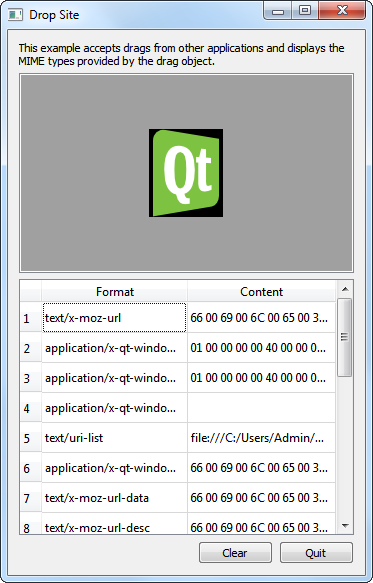
The Drop Site example accepts drops from other applications, and displays the MIME formats provided by the drag object.
There are two classes,
DropArea
and
DropSiteWindow
,和
main()
function in this example. A
DropArea
object is instantiated in
DropSiteWindow
; a
DropSiteWindow
object is then invoked in the
main()
函數。
The
DropArea
類是子類化的
QLabel
具有公共槽
clear()
,和
changed()
信號。
class DropArea : public QLabel
{
    Q_OBJECT
public:
    explicit DropArea(QWidget *parent = nullptr);
public slots:
    void clear();
signals:
    void changed(const QMimeData *mimeData = nullptr);
此外,
DropArea
also contains a private instance of
QLabel
and reimplementations of four
QWidget
事件處理程序:
These event handlers are further explained in the implementation of the
DropArea
類。
protected:
    void dragEnterEvent(QDragEnterEvent *event) override;
    void dragMoveEvent(QDragMoveEvent *event) override;
    void dragLeaveEvent(QDragLeaveEvent *event) override;
    void dropEvent(QDropEvent *event) override;
private:
    QLabel *label;
};
在
DropArea
構造函數,設置
最小大小
為 200x200 像素,
框架樣式
to both
QFrame::Sunken
and
QFrame::StyledPanel
, and we align its contents to the center.
DropArea::DropArea(QWidget *parent)
    : QLabel(parent)
{
    setMinimumSize(200, 200);
    setFrameStyle(QFrame::Sunken | QFrame::StyledPanel);
    setAlignment(Qt::AlignCenter);
    setAcceptDrops(true);
    setAutoFillBackground(true);
    clear();
}
Also, we enable drop events in
DropArea
by setting the
acceptDrops
特性到
true
. Then, we enable the
autoFillBackground
property and invoke the
clear()
函數。
The
dragEnterEvent()
event handler is called when a drag is in progress and the mouse enters the
DropArea
對象。對於
DropSite
example, when the mouse enters
DropArea
, we set its text to "<drop content>" and highlight its background.
void DropArea::dragEnterEvent(QDragEnterEvent *event)
{
    setText(tr("<drop content>"));
    setBackgroundRole(QPalette::Highlight);
    event->acceptProposedAction();
    emit changed(event->mimeData());
}
Then, we invoke
acceptProposedAction()
on
event
, setting the drop action to the one proposed. Lastly, we emit the
changed()
signal, with the data that was dropped and its MIME type information as a parameter.
For dragMoveEvent() , we just accept the proposed QDragMoveEvent 對象, event ,采用 acceptProposedAction() .
void DropArea::dragMoveEvent(QDragMoveEvent *event)
{
    event->acceptProposedAction();
}
The
DropArea
class's implementation of
dropEvent()
提取
event
's mime data and displays it accordingly.
void DropArea::dropEvent(QDropEvent *event)
{
    const QMimeData *mimeData = event->mimeData();
The
mimeData
object can contain one of the following objects: an image, HTML text, plain text, or a list of URLs.
    if (mimeData->hasImage()) {
        setPixmap(qvariant_cast<QPixmap>(mimeData->imageData()));
    } else if (mimeData->hasHtml()) {
        setText(mimeData->html());
        setTextFormat(Qt::RichText);
    } else if (mimeData->hasText()) {
        setText(mimeData->text());
        setTextFormat(Qt::PlainText);
    } else if (mimeData->hasUrls()) {
        QList<QUrl> urlList = mimeData->urls();
        QString text;
        for (int i = 0; i < urlList.size() && i < 32; ++i)
            text += urlList.at(i).path() + QLatin1Char('\n');
        setText(text);
    } else {
        setText(tr("Cannot display data"));
    }
mimeData
包含圖像,顯示它在
DropArea
with
setPixmap()
.
mimeData
包含 HTML,顯示它采用
setText()
並設置
DropArea
的文本格式為
Qt::RichText
.
mimeData
包含純文本,顯示它采用
setText()
並設置
DropArea
的文本格式為
Qt::PlainText
. In the event that
mimeData
contains URLs, we iterate through the list of URLs to display them on individual lines.
mimeData
contains other types of objects, we set
DropArea
's text, with
setText()
to "Cannot display data" to inform the user.
We then set
DropArea
's
backgroundRole
to
QPalette::Dark
and we accept
event
's proposed action.
    setBackgroundRole(QPalette::Dark);
    event->acceptProposedAction();
}
The dragLeaveEvent() event handler is called when a drag is in progress and the mouse leaves the widget.
void DropArea::dragLeaveEvent(QDragLeaveEvent *event)
{
    clear();
    event->accept();
}
For
DropArea
's implementation, we clear invoke
clear()
and then accept the proposed event.
The
clear()
function sets the text in
DropArea
to "<drop content>" and sets the
backgroundRole
to
QPalette::Dark
. Lastly, it emits the
changed()
信號。
void DropArea::clear()
{
    setText(tr("<drop content>"));
    setBackgroundRole(QPalette::Dark);
    emit changed();
}
The
DropSiteWindow
類包含構造函數和公共槽
updateFormatsTable()
.
class DropSiteWindow : public QWidget
{
    Q_OBJECT
public:
    DropSiteWindow();
public slots:
    void updateFormatsTable(const QMimeData *mimeData);
private:
    DropArea *dropArea;
    QLabel *abstractLabel;
    QTableWidget *formatsTable;
    QPushButton *clearButton;
    QPushButton *quitButton;
    QDialogButtonBox *buttonBox;
};
The class also contains a private instance of
DropArea
,
dropArea
,
QLabel
,
abstractLabel
,
QTableWidget
,
formatsTable
,
QDialogButtonBox
,
buttonBox
, and two
QPushButton
對象,
clearButton
and
quitButton
.
In the constructor of
DropSiteWindow
, we instantiate
abstractLabel
and set its
wordWrap
特性到
true
. We also call the
adjustSize()
function to adjust
abstractLabel
's size according to its contents.
DropSiteWindow::DropSiteWindow()
{
    abstractLabel = new QLabel(tr("This example accepts drags from other "
                                  "applications and displays the MIME types "
                                  "provided by the drag object."));
    abstractLabel->setWordWrap(true);
    abstractLabel->adjustSize();
Then we instantiate
dropArea
和連接它的
changed()
signal to
DropSiteWindow
's
updateFormatsTable()
槽。
    dropArea = new DropArea;
    connect(dropArea, &DropArea::changed,
            this, &DropSiteWindow::updateFormatsTable);
現在設置
QTableWidget
對象,
formatsTable
. Its horizontal header is set using a
QStringList
對象,
labels
. The number of columms are set to two and the table is not editable. Also, the
formatTable
's horizontal header is formatted to ensure that its second column stretches to occupy additional space available.
    QStringList labels;
    labels << tr("Format") << tr("Content");
    formatsTable = new QTableWidget;
    formatsTable->setColumnCount(2);
    formatsTable->setEditTriggers(QAbstractItemView::NoEditTriggers);
    formatsTable->setHorizontalHeaderLabels(labels);
    formatsTable->horizontalHeader()->setStretchLastSection(true);
Two
QPushButton
對象,
clearButton
and
quitButton
, are instantiated and added to
buttonBox
- a
QDialogButtonBox
object. We use
QDialogButtonBox
here to ensure that the push buttons are presented in a layout that conforms to the platform's style.
    clearButton = new QPushButton(tr("Clear"));
    quitButton = new QPushButton(tr("Quit"));
    buttonBox = new QDialogButtonBox;
    buttonBox->addButton(clearButton, QDialogButtonBox::ActionRole);
    buttonBox->addButton(quitButton, QDialogButtonBox::RejectRole);
    connect(quitButton, &QAbstractButton::clicked, this, &QWidget::close);
    connect(clearButton, &QAbstractButton::clicked, dropArea, &DropArea::clear);
The
clicked()
信號對於
quitButton
and
clearButton
被連接到
close()
and
clear()
,分彆。
For the layout, we use a
QVBoxLayout
,
mainLayout
, to arrange our widgets vertically. We also set the window title to "Drop Site" and the minimum size to 350x500 pixels.
    QVBoxLayout *mainLayout = new QVBoxLayout(this);
    mainLayout->addWidget(abstractLabel);
    mainLayout->addWidget(dropArea);
    mainLayout->addWidget(formatsTable);
    mainLayout->addWidget(buttonBox);
    setWindowTitle(tr("Drop Site"));
    setMinimumSize(350, 500);
}
We move on to the
updateFormatsTable()
function. This function updates the
formatsTable
, displaying the MIME formats of the object dropped onto the
DropArea
object. First, we set
QTableWidget
's
rowCount
property to 0. Then, we validate to ensure that the
QMimeData
object passed in is a valid object.
void DropSiteWindow::updateFormatsTable(const QMimeData *mimeData)
{
    formatsTable->setRowCount(0);
    if (!mimeData)
        return;
Once we are sure that
mimeData
is valid, we iterate through its supported formats using the
foreach keyword
. This keyword has the following format:
foreach(variable, container)
In our example,
format
是
variable
和
container
是
QStringList
, obtained from
mimeData->formats()
.
注意:
The
formats()
function returns a
QStringList
object, containing all the formats supported by the
mimeData
.
    for (const QString &format : mimeData->formats()) {


QTableWidgetItem


*

formatItem

=


new


QTableWidgetItem


(format);
formatItem

-


>

setFlags(


Qt


::

ItemIsEnabled);
formatItem

-


>

setTextAlignment(


Qt


::

AlignTop

|


Qt


::

AlignLeft);
Within each iteration, we create a
QTableWidgetItem
,
formatItem
and we set its
flags
to
Qt::ItemIsEnabled
, and its
文本對齊
to
Qt::AlignTop
and
Qt::AlignLeft
.
A
QString
對象,
text
, is customized to display data according to the contents of
format
. We invoke
QString
's
simplified()
function on
text
, to obtain a string that has no additional space before, after or in between words.
        QString text;
        if (format == QLatin1String("text/plain")) {
            text = mimeData->text().simplified();
        } else if (format == QLatin1String("text/html")) {
            text = mimeData->html().simplified();
        } else if (format == QLatin1String("text/uri-list")) {
            QList<QUrl> urlList = mimeData->urls();
            for (int i = 0; i < urlList.size() && i < 32; ++i)
                text.append(urlList.at(i).toString() + QLatin1Char(' '));
        } else {
            QByteArray data = mimeData->data(format);
            for (int i = 0; i < data.size() && i < 32; ++i)
                text.append(QStringLiteral("%1 ").arg(uchar(data[i]), 2, 16, QLatin1Char('0')).toUpper());
        }
若
format
contains a list of URLs, we iterate through them, using spaces to separate them. On the other hand, if
format
contains an image, we display the data by converting the text to hexadecimal.
        int row = formatsTable->rowCount();
        formatsTable->insertRow(row);
        formatsTable->setItem(row, 0, new QTableWidgetItem(format));
        formatsTable->setItem(row, 1, new QTableWidgetItem(text));
    }
    formatsTable->resizeColumnToContents(0);
}
一旦
text
has been customized to contain the appropriate data, we insert both
format
and
text
into
formatsTable
with
setItem()
. Lastly, we invoke
resizeColumnToContents()
on
formatsTable
's first column.
在
main()
函數,實例化
DropSiteWindow
並援引其
show()
函數。
int main(int argc, char *argv[])
{
    QApplication app(argc, argv);
    DropSiteWindow window;
    window.show();
    return app.exec();
}
文件:
