The Qt Remote Objects (QtRO) module provides an easy way to share Qt APIs between processes and devices. A data channel between processes and devices is required for this to work. Therefore, the first thing you need in QtRO is a QRemoteObjectNode . In QtRO, a node is an endpoint for communication. Each participant in a remote objects network, be it a process or a device, needs its own node. QtRO is a peer-to-peer network, with connected nodes being the links in the network.
Nodes, by themselves, don’t provide much use. The value comes from adding QObject classes to a node for sharing. Any peer node can then request a copy/instance of the shared object from the node that shares it (called the 主機節點 ). Unlike when using normal class instances (with independent properties and signal emissions), the idea in QtRO is to synchronize the changes of the shared object to all of the copies. With a few exceptions, the copies have the exact same Qt API as the original object, and are intended to be used exactly as if the original object were available. In QtRO, the original object is called the Source . It is a fully implemented C++ class, with whatever business logic is needed to provide the desired functionality. Copies of this object are called 復本 s. You don’t need to write any C++ code for a replica; instead, you simply request an instance from a node. You still need some code to use it, such as connecting signals to your own slots, but you don’t need to implement the internal behavior – that was already done in the source object.
Because the source can be in a different process or even on a different device, there are concerns in QtRO that you won’t run into when developing without Inter-Process Communication (IPC). Specifically, what happens if the process or device isn’t there? This is where the additions to the 復本 API come in. There is an initialized() signal that is emitted once the replica has received the source state from the QtRO network. There is also an isReplicaValid property and a stateChanged() signal to alert you if the connection is lost.
Objects shared over QtRO use the links (conduits) between nodes for all communication. If you intend to share a QObject ,必須創建 主機節點 with a URL other nodes can connect to. You can also use the QtRO 注冊 to facilitate connections, but your nodes sharing sources still need to be Host nodes. Each shared object is given a name (a QString ), used for identifying it on the QtRO network.
見 概述 for a more detailed description, or use the following examples to get started with QtRO.
To illustrate the use of remote objects, on the source side we need to:
And on the replica side:
The examples below will show both repc -compiled static objects and dynamic source objects. The examples will also show direct connections as well as connections using a 注冊 在節點之間。
In this example, the source object is a simple binary switch that will toggle its state based on a timer. When the state changes, a signal is emitted by the source which QtRO propagates to all replicas. As the replica will have the same properties, signals and slots as were exposed from the source object, any slots connected to the replica's signal will be called when the replica receives the signal. The client process then echoes back the received switch state to the source by emitting its own signal which is connected to a slot on the replica.
要創建此
Source
object, we first create the definition file,
simpleswitch.rep
. This file describes the properties and methods for the object and is input to the
repc
utility which is part of Qt Remote Objects. Only the interfaces that need to be exposed to
復本
objects are defined in this file.
simpleswitch.rep
class SimpleSwitch
{
    PROP(bool currState=false);
    SLOT(server_slot(bool clientState));
};
Above,
currState
holds the current state of the switch, and
server_slot()
allows us to interact with the
Source
- it will be connected to the
echoSwitchState(bool newstate)
信號。
For
repc
to process this file, add the following line to the
.pro
文件:
REPC_SOURCE = simpleswitch.rep
The
REPC_SOURCE
變量隻與 Qt Remote Objects 模塊相關,所以也需要把它添加到工程:
QT += remoteobjects
repc
creates the header
rep_SimpleSwitch_source.h
in your specified build directory. Refer to the
Source
section for more details about this file.
Repc creates three helper classes for use with QtRO. For this example, we will use the most basic:
SimpleSwitchSimpleSource
. It is an abstract class, defined in
rep_SimpleSwitch_source.h
。從它派生以定義 SimpleSwitch 實現類,如下所示:
simpleswitch.h
#ifndef SIMPLESWITCH_H
#define SIMPLESWITCH_H
#include "rep_SimpleSwitch_source.h"
class SimpleSwitch : public SimpleSwitchSimpleSource
{
    Q_OBJECT
public:
    SimpleSwitch(QObject *parent = nullptr);
    ~SimpleSwitch();
    virtual void server_slot(bool clientState);
public Q_SLOTS:
    void timeout_slot();
private:
    QTimer *stateChangeTimer;
};
#endif
Above,
stateChangeTimer
是
QTimer
that is used to toggle the state of our SimpleSwitch,
timeout_slot()
is connected to the timeout() signal of
stateChangeTimer
,
server_slot()
-- which is called on the source (automatically via QtRO) whenever any replica calls their version of the slot -- outputs the received value, and
currStateChanged(bool)
, defined in
repc
生成
rep_SimpleSwitch_source.h
, is emitted whenever currState toggles. In this example, we ignore the signal on the source side, and handle it later on the replica side.
定義的
SwitchState
類展示如下:
simpleswitch.cpp
#include "simpleswitch.h"
// constructor
SimpleSwitch::SimpleSwitch(QObject *parent) : SimpleSwitchSimpleSource(parent)
{
    stateChangeTimer = new QTimer(this); // Initialize timer
    QObject::connect(stateChangeTimer, &SimpleSwitch::timeout, this, &SimpleSwitch::timeout_slot); // connect timeout() signal from stateChangeTimer to timeout_slot() of simpleSwitch
    stateChangeTimer->start(2000); // Start timer and set timout to 2 seconds
    qDebug() << "Source Node Started";
}
//destructor
SimpleSwitch::~SimpleSwitch()
{
    stateChangeTimer->stop();
}
void SimpleSwitch::server_slot(bool clientState)
{
    qDebug() << "Replica state is " << clientState; // print switch state echoed back by client
}
void SimpleSwitch::timeout_slot()
{
    // slot called on timer timeout
    if (currState()) // check if current state is true, currState() is defined in repc generated rep_SimpleSwitch_source.h
        setCurrState(false); // set state to false
    else
        setCurrState(true); // set state to true
    qDebug() << "Source State is "<<currState();
}
Because this example involves using a direct connection between nodes, step 2 for 注冊 creation is omitted.
主機節點的創建如下所示:
QRemoteObjectHost srcNode(QUrl(QStringLiteral("local:switch")));
下列語句實例化 Source object and pass it to the host to enable "remoting", that is, making the object visible to the QtRO network:
SimpleSwitch srcSwitch; // create simple switch
srcNode.enableRemoting(&srcSwitch); // enable remoting
內容對於
main.cpp
file that implements the above steps are shown below:
main.cpp
#include <QCoreApplication>
#include "simpleswitch.h"
int main(int argc, char *argv[])
{
    QCoreApplication a(argc, argv);
    SimpleSwitch srcSwitch; // create simple switch
    QRemoteObjectHost srcNode(QUrl(QStringLiteral("local:switch"))); // create host node without Registry
    srcNode.enableRemoting(&srcSwitch); // enable remoting/sharing
    return a.exec();
}
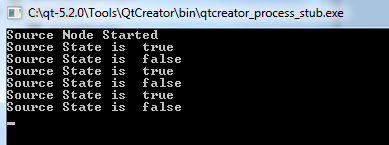
Compile and run this (source side) project. The output (without any replicas created) should look as shown below with the switch state toggling between
true
and
false
每隔 2 秒。
Next are the steps for creating the replica side of the network, which in this example gets the state of switch from the Source 並迴顯它。
The same API definition file as was used on the source side,
SimpleSwitch.rep
, is used for creating a
復本
頭文件使用
repc
utility. Include the following line in your client side
.pro
文件,指定
.rep
文件輸入:
REPC_REPLICA = simpleswitch.rep
The
repc
工具生成
rep_SimpleSwitch_replica.h
file in the build directory. Refer to
復本
section for more details about this file.
以下代碼實例化網絡中的第 2 節點,並把它連接到 Source (源) 主機節點:
QRemoteObjectNode repNode; // create remote object node
repNode.connectToNode(QUrl(QStringLiteral("local:switch"))); // connect with remote host node
首先,實例化復本:
QSharedPointer<SimpleSwitchReplica> ptr;
ptr.reset(repNode.acquire<SimpleSwitchReplica>()); // acquire replica of source from host node
注意, acquire() returns a pointer to the replica. However, it does not manage the pointer lifetime. This example uses the recommended process of wrapping the returned pointer in a QSharedPointer or QScopedPointer to ensure the pointer is properly deleted.
main.cpp
implements above steps and instantiates our object:
main.cpp
#include <QCoreApplication>
#include "client.h"
int main(int argc, char *argv[])
{
    QCoreApplication a(argc, argv);
    QSharedPointer<SimpleSwitchReplica> ptr; // shared pointer to hold source replica
    QRemoteObjectNode repNode; // create remote object node
    repNode.connectToNode(QUrl(QStringLiteral("local:switch"))); // connect with remote host node
    ptr.reset(repNode.acquire<SimpleSwitchReplica>()); // acquire replica of source from host node
    Client rswitch(ptr); // create client switch object and pass reference of replica to it
    return a.exec();
}
Complete declaration and definition of the
Client
類:
client.h
#ifndef _CLIENT_H
#define _CLIENT_H
#include <QObject>
#include <QSharedPointer>
#include "rep_SimpleSwitch_replica.h"
class Client : public QObject
{
    Q_OBJECT
public:
    Client(QSharedPointer<SimpleSwitchReplica> ptr);
    ~Client();
    void initConnections();// Function to connect signals and slots of source and client
Q_SIGNALS:
    void echoSwitchState(bool switchState);// this signal is connected with server_slot(..) on the source object and echoes back switch state received from source
public Q_SLOTS:
    void recSwitchState_slot(); // slot to receive source state
private:
    bool clientSwitchState; // holds received server switch state
    QSharedPointer<SimpleSwitchReplica> reptr;// holds reference to replica
 };
#endif
client.cpp
#include "client.h"
// constructor
Client::Client(QSharedPointer<SimpleSwitchReplica> ptr) :
    QObject(nullptr),reptr(ptr)
{
    initConnections();
    //We can connect to SimpleSwitchReplica Signals/Slots
    //directly because our Replica was generated by repc.
}
//destructor
Client::~Client()
{
}
void Client::initConnections()
{
    // initialize connections between signals and slots
    // connect source replica signal currStateChanged() with client's recSwitchState() slot to receive source's current state
    QObject::connect(reptr.data(), &SimpleSwitchReplica::currStateChanged, this, &Client::recSwitchState_slot);
    // connect client's echoSwitchState(..) signal with replica's server_slot(..) to echo back received state
    QObject::connect(this, &Client::echoSwitchState, reptr.data(), &SimpleSwitchReplica::server_slot);
}
void Client::recSwitchState_slot()
{
    qDebug() << "Received source state "<<reptr.data()->currState();
    clientSwitchState = reptr.data()->currState();
    Q_EMIT echoSwitchState(clientSwitchState); // Emit signal to echo received state back to server
}
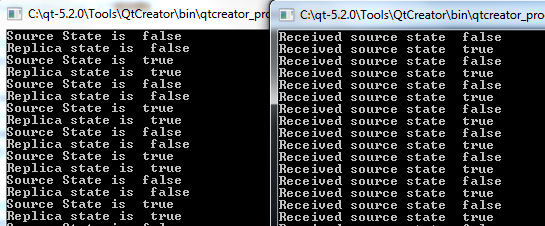
Compiling and executing this example together with the source-side example generates the following output:
A dynamic replica is initially created as a "bare" QObject - that is, it has no properties, signals or slots. QtRO returns the API for the object during initialization (after the connection to the source is made), thus the API is added to the object at runtime.
There are no changes to the source side as a dynamic 復本 only impacts how the requestor node acquires the replica. The source-side code shown in 範例 1 會被使用。
Add replica generation to project.
因為 Replica (復本) 是動態獲得的,非
.rep
文件的要求不像在
範例 1
.
Create the remote node and connect it with the source host node.
The code for this step is unchanged from 範例 1 .
QRemoteObjectNode repNode; // create remote object node
repNode.connectToNode(QUrl(QStringLiteral("local:switch"))); // connect with remote host node
Acquire a replica of the remote source object.
在
main.cpp
,使用
QSharedPointer
to hold a replica of the remote object, and then instantiate a replica requestor object:
#include <QCoreApplication>
#include "dynamicclient.h"
int main(int argc, char *argv[])
{
    QCoreApplication a(argc, argv);
    QSharedPointer<QRemoteObjectDynamicReplica> ptr; // shared pointer to hold replica
    QRemoteObjectNode repNode;
    repNode.connectToNode(QUrl(QStringLiteral("local:switch")));
    ptr.reset(repNode.acquireDynamic("SimpleSwitch")); // acquire replica of source from host node
    DynamicClient rswitch(ptr); // create client switch object and pass replica reference to it
}
Below is the complete declaration and definition of the requestor class (
DynamicClient
in this example):
dynamicclient.h
#ifndef _DYNAMICCLIENT_H
#define _DYNAMICCLIENT_H
#include <QObject>
#include <QSharedPointer>
#include <QRemoteObjectNode>
#include <qremoteobjectdynamicreplica.h>
class DynamicClient : public QObject
{
    Q_OBJECT
public:
    DynamicClient(QSharedPointer<QRemoteObjectDynamicReplica> ptr);
    ~DynamicClient();
Q_SIGNALS:
    void echoSwitchState(bool switchState);// this signal is connected with server_slot(..) slot of source object and echoes back switch state received from source
public Q_SLOTS:
    void recSwitchState_slot(); // Slot to receive source state
    void initConnection_slot(); //Slot to connect signals/slot on replica initialization
private:
    bool clientSwitchState; // holds received server switch state
    QSharedPointer<QRemoteObjectDynamicReplica> reptr;// holds reference to replica
 };
#endif
dynamicclient.cpp
#include "dynamicclient.h"
// constructor
DynamicClient::DynamicClient(QSharedPointer<QRemoteObjectDynamicReplica> ptr) :
    QObject(nullptr), reptr(ptr)
{
    //connect signal for replica valid changed with signal slot initialization
    QObject::connect(reptr.data(), &QRemoteObjectDynamicReplica::initialized, this,
                     &DynamicClient::initConnection_slot);
}
//destructor
DynamicClient::~DynamicClient()
{
}
// Function to initialize connections between slots and signals
void DynamicClient::initConnection_slot()
{
    // connect source replica signal currStateChanged() with client's recSwitchState() slot to receive source's current state
   QObject::connect(reptr.data(), SIGNAL(currStateChanged()), this, SLOT(recSwitchState_slot()));
   // connect client's echoSwitchState(..) signal with replica's server_slot(..) to echo back received state
   QObject::connect(this, SIGNAL(echoSwitchState(bool)),reptr.data(), SLOT(server_slot(bool)));
}
void DynamicClient::recSwitchState_slot()
{
   clientSwitchState = reptr->property("currState").toBool(); // use replica property to get currState from source
   qDebug() << "Received source state " << clientSwitchState;
   Q_EMIT echoSwitchState(clientSwitchState); // Emit signal to echo received state back to server
}
When executed together with the source-side example, the output is identical to 範例 1 .
This example will illustrate the use of a 注冊 for building the node topology. For only two nodes, the benefits of using a registry are minimal. With a registry, instead of using a QUrl to create a direct connection between two nodes, you use a different QUrl to point both the host and replica nodes to the registry. As the network grows, using a registry means that all nodes only need to connect to the registry via a single QUrl . With direct connections, nodes would have to maintain a list of QUrl s for each node they link to.
The
simpleswitch.h
and
simpleswitch.cpp
源來自
範例
can be used without modification. The difference is in the way a host node is created and connected to the
注冊
:
main.cpp
#include <QCoreApplication>
#include "simpleswitch.h"
int main(int argc, char *argv[])
{
    QCoreApplication a(argc, argv);
    SimpleSwitch srcSwitch; // create SimpleSwitch
    QRemoteObjectRegistryHost regNode(QUrl(QStringLiteral("local:registry"))); // create node that hosts registry
    QRemoteObjectHost srcNode(QUrl(QStringLiteral("local:switch")), QUrl(QStringLiteral("local:registry"))); // create node that will host source and connect to registry
    //Note, you can add srcSwitch directly to regNode if desired.
    //We use two Nodes here, as the regNode could easily be in a third process.
    srcNode.enableRemoting(&srcSwitch); // enable remoting of source object
    return a.exec();
}
The requestor object used for this example is the dynamic replica client discussed in 範例 2 .
The only modification is in
main.cpp
:
注冊
node is created to acquire a
復本
:
QRemoteObjectNode repNode(QUrl(QStringLiteral("local:registry")));
When executed together with the source-side example, the output is identical to 範例 1 .
