The QTextBlock class provides a container for text fragments in a QTextDocument . 更多...
| 頭: | #include <QTextBlock> |
| qmake: | QT += gui |
注意: 此類的所有函數 可重入 .
| class | iterator |
| typedef | Iterator |
| QTextBlock (const QTextBlock & other ) | |
| QTextBlock::iterator | begin () const |
| QTextBlockFormat | blockFormat () const |
| int | blockFormatIndex () const |
| int | blockNumber () const |
| QTextCharFormat | charFormat () const |
| int | charFormatIndex () const |
| void | clearLayout () |
| bool | contains (int position ) const |
| const QTextDocument * | document () const |
| QTextBlock::iterator | end () const |
| int | firstLineNumber () const |
| bool | isValid () const |
| bool | isVisible () const |
| QTextLayout * | layout () const |
| int | length () const |
| int | lineCount () const |
| QTextBlock | next () const |
| int | position () const |
| QTextBlock | previous () const |
| int | revision () const |
| void | setLineCount (int count ) |
| void | setRevision (int rev ) |
| void | setUserData (QTextBlockUserData * data ) |
| void | setUserState (int state ) |
| void | setVisible (bool visible ) |
| QString | text () const |
| Qt::LayoutDirection | textDirection () const |
| QVector<QTextLayout::FormatRange> | textFormats () const |
| QTextList * | textList () const |
| QTextBlockUserData * | userData () const |
| int | userState () const |
| bool | operator!= (const QTextBlock & other ) const |
| bool | operator< (const QTextBlock & other ) const |
| QTextBlock & | operator= (const QTextBlock & other ) |
| bool | operator== (const QTextBlock & other ) const |
The QTextBlock class provides a container for text fragments in a QTextDocument .
文本塊將文本塊 (或文本段落) 封裝在 QTextDocument . QTextBlock provides read-only access to the block/paragraph structure of QTextDocuments. It is mainly of use if you want to implement your own layouts for the visual representation of a QTextDocument ,或想要遍曆文檔並以自己的自定義格式寫齣內容。
文本塊是由它們的父級文檔,創建的。若需要創建新文本塊,或修改文檔內容 (當審查文檔內容時),使用基於光標的接口提供通過 QTextCursor 代替。
各文本塊位於特定 position () 在 document ()。塊內容的獲得,可以通過使用 text () 函數。 length () 函數確定文檔內塊的大小 (包括格式化字符)。塊視覺特性的確定是通過其文本 layout (),其 charFormat (),及其 blockFormat ().
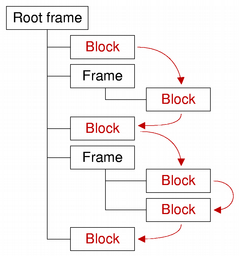
The next () 和 previous () 函數使能夠迭代文檔中的連續有效塊,在迭代期間不通過其它手段修改文檔的條件下。注意,雖然塊是按序列返迴的,但相鄰塊可能來自文檔結構中的不同地方。塊有效性的確定可以通過調用 isValid ().
QTextBlock provides comparison operators to make it easier to work with blocks: operator== () 比較 2 塊是否相等, operator!= () 為不等比較 2 個塊,和 operator< () 確定同一文檔中的塊是否在另一個塊之前。
另請參閱 QTextBlockFormat , QTextCharFormat ,和 QTextFragment .
Qt 樣式同義詞 QTextBlock::iterator .
拷貝 other 文本塊的屬性到此文本塊。
返迴指嚮文本塊開頭的文本塊迭代器。
另請參閱 end ().
返迴 QTextBlockFormat 描述特定塊特性。
另請參閱 charFormat ().
返迴文本塊格式在文檔內部塊格式列錶中的索引。
另請參閱 QTextDocument::allFormats ().
返迴此塊的編號,或 -1 若塊無效。
該函數在 Qt 4.4 引入。
另請參閱 QTextCursor::blockNumber ().
返迴 QTextCharFormat that describes the block's character format. The block's character format is used when inserting text into an empty block.
另請參閱 blockFormat ().
Returns an index into the document's internal list of character formats for the text block's character format.
另請參閱 QTextDocument::allFormats ().
清零 QTextLayout 用於布置並顯示塊內容。
該函數在 Qt 4.4 引入。
另請參閱 layout ().
返迴
true
若給定
position
位於文本塊內;否則返迴
false
.
Returns the text document this text block belongs to, or 0 if the text block does not belong to any document.
返迴指嚮文本塊末尾的文本塊迭代器。
另請參閱 begin (), next (),和 previous ().
返迴此塊的第一行號,或 -1 若塊無效。除非布局支持,否則行號等同於塊號。
該函數在 Qt 4.5 引入。
另請參閱 QTextBlock::blockNumber ().
返迴
true
若此文本塊有效;否則返迴
false
.
返迴
true
若塊可見;否則返迴
false
.
該函數在 Qt 4.4 引入。
另請參閱 setVisible ().
返迴 QTextLayout 用於布置並顯示塊內容。
注意:返迴的 QTextLayout 對象的修改隻可以從 documentChanged 實現的 QAbstractTextDocumentLayout 子類。從外部應用的任何改變,都會導緻未定義行為。
另請參閱 clearLayout ().
返迴塊的長度 (以字符為單位)。
注意: 返迴長度包括所有格式化字符,例如:換行符。
另請參閱 text (), charFormat (),和 blockFormat ().
返迴行數。所有文檔布局並非都支持此特徵。
該函數在 Qt 4.5 引入。
另請參閱 setLineCount ().
返迴此塊之後的文檔文本塊;或空文本塊若這是最後一個。
注意:下一個塊可能與此塊位於不同的框架 (或錶格) 中。
另請參閱 previous (), begin (),和 end ().
返迴文檔塊首字符的索引。
Returns the text block in the document before this block, or an empty text block if this is the first one.
請注意,上一個塊可能位於此塊不同的框架 (或錶格) 中。
另請參閱 next (), begin (),和 end ().
返迴塊修訂。
該函數在 Qt 4.4 引入。
另請參閱 setRevision () 和 QTextDocument::revision ().
把行數設為 count .
該函數在 Qt 4.5 引入。
另請參閱 lineCount ().
把塊修訂設為 rev .
該函數在 Qt 4.4 引入。
另請參閱 revision () 和 QTextDocument::revision ().
附加給定 data 對象到文本塊。
QTextBlockUserData can be used to store custom settings. The ownership is passed to the underlying text document, i.e. the provided QTextBlockUserData object will be deleted if the corresponding text block gets deleted. The user data object is not stored in the undo history, so it will not be available after undoing the deletion of a text block.
For example, if you write a programming editor in an IDE, you may want to let your user set breakpoints visually in your code for an integrated debugger. In a programming editor a line of text usually corresponds to one QTextBlock 。 QTextBlockUserData interface allows the developer to store data for each QTextBlock , like for example in which lines of the source code the user has a breakpoint set. Of course this could also be stored externally, but by storing it inside the QTextDocument , it will for example be automatically deleted when the user deletes the associated line. It's really just a way to store custom information in the QTextDocument without using custom properties in QTextFormat which would affect the undo/redo stack.
該函數在 Qt 4.1 引入。
另請參閱 userData ().
存儲指定 state integer value in the text block. This may be useful for example in a syntax highlighter to store a text parsing state.
該函數在 Qt 4.1 引入。
另請參閱 userState ().
把塊的可見性設為 visible .
該函數在 Qt 4.4 引入。
另請參閱 isVisible ().
以純文本形式返迴塊內容。
另請參閱 length (), charFormat (),和 blockFormat ().
返迴解析文本方嚮。
If the block has no explicit direction set, it will resolve the direction from the blocks content. Returns either Qt::LeftToRight or Qt::RightToLeft .
該函數在 Qt 4.7 引入。
另請參閱 QTextFormat::layoutDirection (), QString::isRightToLeft (),和 Qt::LayoutDirection .
Returns the block's text format options as a list of continuous ranges of QTextCharFormat . The range's character format is used when inserting text within the range boundaries.
該函數在 Qt 5.3 引入。
另請參閱 charFormat () 和 blockFormat ().
若塊錶示列錶項,返迴該項所屬的列錶;否則返迴
nullptr
.
返迴指針指嚮 QTextBlockUserData object if previously set with setUserData () or a null pointer.
該函數在 Qt 4.1 引入。
另請參閱 setUserData ().
返迴先前設置的整數值采用 setUserState () 或 -1。
該函數在 Qt 4.1 引入。
另請參閱 setUserState ().
返迴
true
若此文本塊不同於
other
文本塊。
返迴
true
若此文本塊的齣現先於
other
文本塊在文檔中。
賦值 other 文本塊到此文本塊。
返迴
true
若此文本塊相同如
other
文本塊。
