創建新的頂層窗口。 更多...
| import 語句: | import QtQuick.Window 2.12 |
| 實例化: | QQuickWindow |
The Window object creates a new top-level window for a Qt Quick scene. It automatically sets up the window for use with
QtQuick 2.x
graphical types.
To use this type, you will need to import the module with the following line:
import QtQuick.Window 2.2
Omitting this import will allow you to have a QML environment without access to window system features.
A Window can be declared inside an Item or inside another Window; in that case the inner Window will automatically become "transient for" the outer Window: that is, most platforms will show it centered upon the outer window by default, and there may be other platform-dependent behaviors, depending also on the flags . If the nested window is intended to be a dialog in your application, you should also set flags to Qt.Dialog, because some window managers will not provide the centering behavior without that flag. You can also declare multiple windows inside a top-level QtObject , in which case the windows will have no transient relationship.
Alternatively you can set or bind x and y to position the Window explicitly on the screen.
When the user attempts to close a window, the
closing
signal will be emitted. You can force the window to stay open (for example to prompt the user to save changes) by writing an
onClosing
handler and setting
close.accepted = false
.
|
active : bool |
The active status of the window.
該特性在 Qt 5.1 引入。
另請參閱 requestActivate() .
|
activeFocusItem : Item |
The item which currently has active focus or
null
若沒有項具有活動聚焦。
該特性在 Qt 5.1 引入。
|
color : color |
The background color for the window.
Setting this property is more efficient than using a separate Rectangle.
|
[read-only] contentItem : Item |
The invisible root item of the scene.
這是窗口管理器的提示,若它需要顯示相關窗口的額外內容 (像:彈齣窗口、對話框、狀態欄或類似的)。
推薦取嚮為 Screen.orientation , but an application doesn't have to support all possible orientations, and thus can opt to ignore the current screen orientation.
窗口和內容取嚮之間的差異,確定內容的鏇轉量。
默認值為 Qt::PrimaryOrientation .
該特性在 Qt 5.1 引入。
另請參閱 Screen .
|
[default] data : list < 對象 > |
The data property allows you to freely mix visual children, resources and other Windows in a Window.
If you assign another Window to the data list, the nested window will become "transient for" the outer Window.
If you assign an Item to the data list, it becomes a child of the Window's contentItem , so that it appears inside the window. The item's parent will be the window's contentItem , which is the root of the Item ownership tree within that Window.
If you assign any other object type, it is added as a resource.
It should not generally be necessary to refer to the
data
property, as it is the default property for Window and thus all child items are automatically assigned to this property.
另請參閱 QWindow::transientParent() .
The window flags of the window.
The window flags control the window's appearance in the windowing system, whether it's a dialog, popup, or a regular window, and whether it should have a title bar, etc.
The flags which you read from this property might differ from the ones that you set if the requested flags could not be fulfilled.
另請參閱 Qt::WindowFlags .
|
height : int |
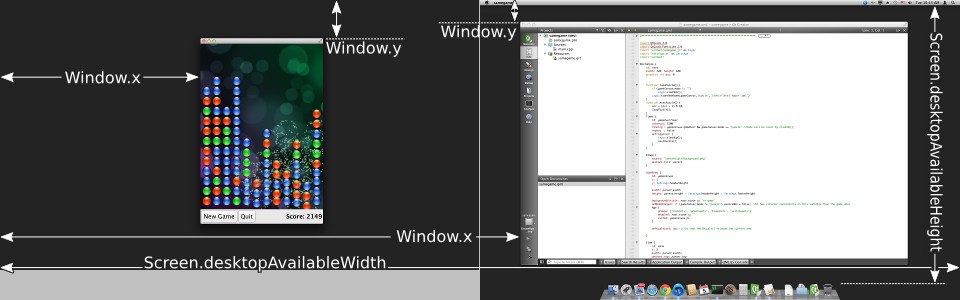
Defines the window's position and size.
(x, y) 位置相對於 Screen if there is only one, or to the virtual desktop (arrangement of multiple screens).
Window { x: 100; y: 100; width: 100; height: 100 }
|
maximumHeight : int |
Defines the window's maximum size.
This is a hint to the window manager to prevent resizing above the specified width and height.
該特性在 Qt 5.1 引入。
|
maximumWidth : int |
Defines the window's maximum size.
This is a hint to the window manager to prevent resizing above the specified width and height.
該特性在 Qt 5.1 引入。
|
minimumHeight : int |
Defines the window's minimum size.
This is a hint to the window manager to prevent resizing below the specified width and height.
該特性在 Qt 5.1 引入。
|
minimumWidth : int |
Defines the window's minimum size.
This is a hint to the window manager to prevent resizing below the specified width and height.
該特性在 Qt 5.1 引入。
The modality of the window.
A modal window prevents other windows from receiving input events. Possible values are Qt.NonModal (the default), Qt.WindowModal, and Qt.ApplicationModal.
|
opacity : real |
The opacity of the window.
If the windowing system supports window opacity, this can be used to fade the window in and out, or to make it semitransparent.
A value of 1.0 or above is treated as fully opaque, whereas a value of 0.0 or below is treated as fully transparent. Values inbetween represent varying levels of translucency between the two extremes.
默認值為 1.0。
該特性在 Qt 5.1 引入。
|
screen : variant |
The screen with which the window is associated.
If specified before showing a window, will result in the window being shown on that screen, unless an explicit window position has been set. The value must be an element from the Qt.application.screens array.
注意: To ensure that the window is associated with the desired screen when the underlying native window is created, make sure this property is set as early as possible and that the setting of its value is not deferred. This can be particularly important on embedded platforms without a windowing system, where only one window per screen is allowed at a time. Setting the screen after a window has been created does not move the window if the new screen is part of the same virtual desktop as the old screen.
該特性在 Qt 5.9 引入。
另請參閱 QWindow::setScreen() , QWindow::screen() , QScreen ,和 Qt.application .
|
title : string |
The window's title in the windowing system.
The window title might appear in the title area of the window decorations, depending on the windowing system and the window flags. It might also be used by the windowing system to identify the window in other contexts, such as in the task switcher.
The screen-occupation state of the window.
Visibility is whether the window should appear in the windowing system as normal, minimized, maximized, fullscreen or hidden.
To set the visibility to
AutomaticVisibility
means to give the window a default visible state, which might be
FullScreen
or
Windowed
depending on the platform. However when reading the visibility property you will always get the actual state, never
AutomaticVisibility
.
When a window is not visible its visibility is Hidden, and setting visibility to
Hidden
is the same as setting
visible
to
false
.
該特性在 Qt 5.1 引入。
另請參閱 visible .
|
visible : bool |
Whether the window is visible on the screen.
Setting visible to false is the same as setting visibility to Hidden .
另請參閱 visibility .
|
width : int |
Defines the window's position and size.
(x, y) 位置相對於 Screen if there is only one, or to the virtual desktop (arrangement of multiple screens).
Window { x: 100; y: 100; width: 100; height: 100 }
|
x : int |
Defines the window's position and size.
(x, y) 位置相對於 Screen if there is only one, or to the virtual desktop (arrangement of multiple screens).
Window { x: 100; y: 100; width: 100; height: 100 }
|
y : int |
Defines the window's position and size.
(x, y) 位置相對於 Screen if there is only one, or to the virtual desktop (arrangement of multiple screens).
Window { x: 100; y: 100; width: 100; height: 100 }
|
Window.active : bool |
This attached property tells whether the window is active. The Window attached property can be attached to any Item.
Here is an example which changes a label to show the active state of the window in which it is shown:
import QtQuick 2.4
import QtQuick.Window 2.2
Text {
    text: Window.active ? "active" : "inactive"
}
該特性在 Qt 5.4 引入。
|
Window.activeFocusItem : Item |
This attached property holds the item which currently has active focus or
null
if there is no item with active focus. The Window attached property can be attached to any Item.
該特性在 Qt 5.4 引入。
|
Window.contentItem : Item |
This attached property holds the invisible root item of the scene or
null
if the item is not in a window. The Window attached property can be attached to any Item.
該特性在 Qt 5.4 引入。
|
Window.height : int |
These attached properties hold the size of the item's window. The Window attached property can be attached to any Item.
該特性在 Qt 5.5 引入。
This attached property holds whether the window is currently shown in the windowing system as normal, minimized, maximized, fullscreen or hidden. The
Window
attached property can be attached to any Item. If the item is not shown in any window, the value will be
Hidden
.
該特性在 Qt 5.4 引入。
另請參閱 visible and visibility.
|
Window.width : int |
These attached properties hold the size of the item's window. The Window attached property can be attached to any Item.
該特性在 Qt 5.5 引入。
|
Window.window : Window |
This attached property holds the item's window. The Window attached property can be attached to any Item.
該特性在 Qt 5.7 引入。
|
closing ( CloseEvent close ) |
This signal is emitted when the user tries to close the window.
This signal includes a
close
parameter. The
close.accepted
property is true by default so that the window is allowed to close; but you can implement an
onClosing
handler and set
close.accepted = false
if you need to do something else before the window can be closed.
相應處理程序是
onClosing
.
This signal was introduced in Qt 5.1.
|
alert ( int msec ) |
導緻展示警報
msec
毫秒。若
msec
is
0
(the default), then the alert is shown indefinitely until the window becomes active again.
在警報狀態下,窗口指示 "要求關注",例如:通過刷新 (或彈跳) 任務欄條目。
該方法在 Qt 5.1 引入。
Closes the window.
When this method is called, or when the user tries to close the window by its title bar button, the
closing
signal will be emitted. If there is no handler, or the handler does not revoke permission to close, the window will subsequently close. If the
QGuiApplication::quitOnLastWindowClosed
特性為
true
, and there are no other windows open, the application will quit.
隱藏窗口。
相當於設置
visible
to
false
or
visibility
to
Hidden
.
另請參閱 show() .
Lowers the window in the windowing system.
請求降低窗口將齣現在其它窗口下方。
Raises the window in the windowing system.
請求提升窗口將齣現在其它窗口上方。
請求激活窗口 (即:接收鍵盤聚焦)。
該方法在 Qt 5.1 引入。
展示窗口。
這相當於調用 showFullScreen() , showMaximized() ,或 showNormal() , depending on the platform's default behavior for the window type and flags.
另請參閱 showFullScreen() , showMaximized() , showNormal() , hide() ,和 QQuickItem::flags() .
以全屏方式展示窗口。
相當於設置 visibility to FullScreen .
按最大化方式展示窗口。
相當於設置 visibility to Maximized .
按最小化方式展示窗口。
相當於設置 visibility to Minimized .
按正常方式 (即:最大化、最小化、或全屏) 展示窗口。
相當於設置 visibility to Windowed .
