Action provides an abstract user interface action that can be bound to items. 更多...
| import 語句: | import QtQuick.Controls 1.4 |
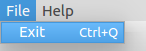
在應用程序中,很多常見命令可以憑藉菜單、工具欄按鈕及鍵盤快捷方式援引。由於用戶期望每個命令都能以相同方式履行,不管所用的用戶界麵,它是有用的將每個命令錶示成 action .
An action can be bound to a menu item and a toolbar button, and it will automatically keep them in sync. For example, in a word processor, if the user presses a Bold toolbar button, the Bold menu item will automatically be checked.
QtQuick Controls supports actions in Button , ToolButton ,和 MenuItem .
    ...
    Action {
        id: copyAction
        text: "&Copy"
        shortcut: StandardKey.Copy
        iconName: "edit-copy"
        enabled: (!!activeFocusItem && !!activeFocusItem["copy"])
        onTriggered: activeFocusItem.copy()
    }
    Action {
        id: cutAction
        text: "Cu&t"
        shortcut: StandardKey.Cut
        iconName: "edit-cut"
        enabled: (!!activeFocusItem && !!activeFocusItem["cut"])
        onTriggered: activeFocusItem.cut()
    }
    Action {
        id: pasteAction
        text: "&Paste"
        shortcut: StandardKey.Paste
        iconName: "edit-paste"
        enabled: (!!activeFocusItem && !!activeFocusItem["paste"])
        onTriggered: activeFocusItem.paste()
    }
    toolBar: ToolBar {
        RowLayout {
            anchors.fill: parent
            anchors.margins: spacing
            Label {
                text: UI.label
            }
            Item { Layout.fillWidth: true }
            CheckBox {
                id: enabler
                text: "Enabled"
                checked: true
            }
        }
    }
    menuBar: MenuBar {
        Menu {
            title: "&File"
            MenuItem {
                text: "E&xit"
                shortcut: StandardKey.Quit
                onTriggered: Qt.quit()
            }
        }
        Menu {
            title: "&Edit"
            visible: tabView.currentIndex == 2
            MenuItem { action: cutAction }
            MenuItem { action: copyAction }
            MenuItem { action: pasteAction }
        }
        Menu {
            title: "&Help"
            MenuItem {
                text: "About..."
                onTriggered: aboutDialog.open()
            }
        }
    }
    ...
|
checkable : bool |
Whether the menu item can be checked, or toggled. Defaults to
false
.
另請參閱 checked and exclusiveGroup .
|
checked : bool |
If the action is
checkable
, this property reflects its checked state. Defaults to
false
. Its value is also false while
checkable
為 false。
另請參閱 toggled and exclusiveGroup .
|
enabled : bool |
Whether the action is enabled, and can be triggered. Defaults to
true
.
另請參閱 trigger() and triggered .
|
exclusiveGroup : ExclusiveGroup |
If an action is checkable, an ExclusiveGroup can be attached to it. All the actions sharing the same exclusive group become mutually exclusive selectable, meaning that only the last checked action will actually be checked.
默認為
null
, meaning no exclusive behavior is to be expected.
|
iconName : string |
Sets the icon name for the action. This will pick the icon with the given name from the current theme.
Defaults to an empty string.
注意: This property requires QApplication .
|
iconSource : url |
Sets the icon file or resource url for the action. Defaults to an empty URL.
Shortcut bound to the action. The keysequence can be a string or a 標準鍵 .
Defaults to an empty string.
Action {
    id: copyAction
    text: qsTr("&Copy")
    shortcut: StandardKey.Copy
}
|
text : string |
Text for the action. This text will show as the button text, or as title in a menu item.
Mnemonics are supported by prefixing the shortcut letter with &. For instance,
"\&Open"
will bind the
Alt-O
shortcut to the
"Open"
menu item. Note that not all platforms support mnemonics.
Defaults to an empty string.
|
tooltip : string |
Tooltip to be shown when hovering the control bound to this action. Not all controls support tooltips on all platforms, especially MenuItem .
Defaults to an empty string.
Emitted whenever a action's checked property changes. This usually happens at the same time as triggered .
相應處理程序是
onToggled
.
Emitted when either the menu item or its bound action have been activated. Includes the object that triggered the event if relevant (e.g. a Button or MenuItem ). You shouldn't need to emit this signal, use trigger() 代替。
相應處理程序是
onTriggered
.
Will emit the triggered signal if the action is enabled. You may provide a source object if the Action would benefit from knowing the origin of the triggering (e.g. for analytics). Will also emit the toggled signal if it is checkable.
