An abstract parent type for all bar series types. 更多...
| import 語句: | import QtCharts 2.3 |
| 實例化: | QAbstractBarSeries |
| 繼承: | AbstractSeries |
| 繼承者: | BarSeries , HorizontalBarSeries , HorizontalPercentBarSeries , HorizontalStackedBarSeries , PercentBarSeries ,和 StackedBarSeries |
In bar charts, bars are defined as bar sets that contain one data value for each category. The position of a bar is specified by the category and its height by the data value. Bar series that contain multiple bar sets group together bars that belong to the same category. The way the bars are displayed is determined by the type chosen to create the bar chart: BarSeries , StackedBarSeries , PercentBarSeries , HorizontalBarSeries , HorizontalStackedBarSeries ,或 HorizontalPercentBarSeries .
若 ValueAxis type is used instead of a BarCategoryAxis type for the main bar axis, the bars are grouped around the index value of the category.
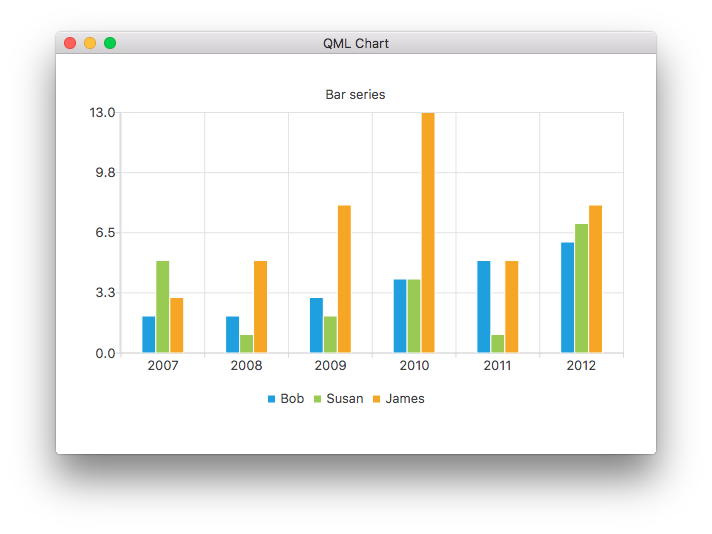
The following QML code snippet shows how to use the BarSeries and BarCategoryAxis type to create a simple bar chart:
ChartView {
    title: "Bar series"
    anchors.fill: parent
    legend.alignment: Qt.AlignBottom
    antialiasing: true
    BarSeries {
        id: mySeries
        axisX: BarCategoryAxis { categories: ["2007", "2008", "2009", "2010", "2011", "2012" ] }
        BarSet { label: "Bob"; values: [2, 2, 3, 4, 5, 6] }
        BarSet { label: "Susan"; values: [5, 1, 2, 4, 1, 7] }
        BarSet { label: "James"; values: [3, 5, 8, 13, 5, 8] }
    }
}
|
axisX : AbstractAxis |
The x-axis used for the series. If you leave both axisX and axisXTop undefined, a BarCategoryAxis is created for the series.
另請參閱 axisXTop .
|
axisXTop : AbstractAxis |
The x-axis used for the series, drawn on top of the chart view.
注意: You can only provide either axisX or axisXTop, but not both.
另請參閱 axisX .
|
axisY : AbstractAxis |
The y-axis used for the series. If you leave both axisY and axisYRight undefined, a ValueAxis is created for the series.
另請參閱 axisYRight .
|
axisYRight : AbstractAxis |
The y-axis used for the series, drawn to the right of the chart view.
注意: You can only provide either axisY or axisYRight, but not both.
另請參閱 axisY .
|
barWidth : real |
寬度單位是 X 軸的單位。條形的最小寬度為 0,且負值被視為 0。將寬度設為 0 意味著屏幕中的條形寬度為 1 像素,不管 X 軸的刻度。寬於 0 的條形按 X 軸的刻度比例縮放。
注意: When used with the BarSeries type, this value specifies the width of a group of bars instead of that of a single bar.
|
count : int |
The number of bar sets in a bar series.
|
labelsAngle : real |
The angle of the value labels in degrees.
|
labelsFormat : string |
The format used for showing labels in a bar series.
另請參閱 QAbstractBarSeries::labelsFormat , labelsVisible ,和 labelsPosition .
|
labelsPosition : enumeration |
The position of the data value labels:
| 常量 | 描述 |
|---|---|
AbstractBarSeries.LabelsCenter
|
Label is located in the center of the bar. |
AbstractBarSeries.LabelsInsideEnd
|
Label is located inside the bar at the top. |
AbstractBarSeries.LabelsInsideBase
|
Label is located inside the bar at the bottom. |
AbstractBarSeries.LabelsOutsideEnd
|
Label is located outside the bar at the top. |
另請參閱 labelsVisible and labelsFormat .
|
labelsPrecision : real |
The maximum amount of significant digits shown in value labels.
默認值為 6。
|
labelsVisible : bool |
The visibility of the labels in a bar series.
This signal is emitted when bar sets are added to the series.
The corresponding signal handler is
onBarsetsAdded
.
This signal is emitted when bar sets are removed from the series.
The corresponding signal handler is
onBarsetsRemoved
.
This signal is emitted when the user clicks the bar specified by index in the bar set specified by barset .
The corresponding signal handler is
onClicked
.
This signal is emitted when the user double-clicks the bar specified by index in the bar set specified by barset .
The corresponding signal handler is
onDoubleClicked
.
This signal is emitted when a mouse is hovered over the bar specified by
index
in the bar set specified by
barset
. When the mouse moves over the bar,
status
turns
true
, and when the mouse moves away again, it turns
false
.
The corresponding signal handler is
onHovered
.
This signal is emitted when the user clicks the bar specified by index in the bar set specified by barset and holds down the mouse button.
The corresponding signal handler is
onPressed
.
This signal is emitted when the user releases the mouse press on the bar specified by index in the bar set specified by barset .
The corresponding signal handler is
onReleased
.
Adds a new bar set with label and values to the index. values is a list of real values.
例如:
myBarSeries.append("set 1", [0, 0.2, 0.2, 0.5, 0.4, 1.5, 0.9]);
Returns the bar set at index . Returns null if the index is not valid.
Removes all bar sets from the series.
|
BarSet insert ( int index , string label , VariantList values ) |
Adds a new bar set with label and values to index . values can be a list of real values or a list of XYPoint 類型。
If the index value is equal to or less than zero, the new bar set is prepended to the bar series. If the index value is equal to or greater than the number of bar sets in the bar series, the new bar set is appended to the bar series.
另請參閱 append() .
Removes the bar set specified by
barset
from the series. Returns
true
若成功,
false
否則。
