The QFileDialog 類提供允許用戶選擇文件 (或目錄) 的對話框。 更多...
| 頭: | #include <QFileDialog> |
| qmake: | QT += widgets |
| 繼承: | QDialog |
| enum | AcceptMode { AcceptOpen, AcceptSave } |
| enum | DialogLabel { LookIn, FileName, FileType, Accept, Reject } |
| enum | FileMode { AnyFile, ExistingFile, Directory, ExistingFiles, DirectoryOnly } |
| enum | Option { ShowDirsOnly, DontResolveSymlinks, DontConfirmOverwrite, DontUseNativeDialog, ..., DontUseCustomDirectoryIcons } |
| flags | Options |
| enum | ViewMode { Detail, List } |
|
|
| QFileDialog (QWidget * parent , Qt::WindowFlags flags ) | |
| QFileDialog (QWidget * parent = nullptr, const QString & caption = QString(), const QString & directory = QString(), const QString & filter = QString()) | |
| virtual | ~QFileDialog () |
| QFileDialog::AcceptMode | acceptMode () const |
| QString | defaultSuffix () const |
| QDir | directory () const |
| QUrl | directoryUrl () const |
| QFileDialog::FileMode | fileMode () const |
| QDir::Filters | filter () const |
| QStringList | history () const |
| QFileIconProvider * | iconProvider () const |
| QAbstractItemDelegate * | itemDelegate () const |
| QString | labelText (QFileDialog::DialogLabel label ) const |
| QStringList | mimeTypeFilters () const |
| QStringList | nameFilters () const |
| void | open (QObject * receiver , const char * member ) |
| QFileDialog::Options | options () const |
| QAbstractProxyModel * | proxyModel () const |
| bool | restoreState (const QByteArray & state ) |
| QByteArray | saveState () const |
| void | selectFile (const QString & filename ) |
| void | selectMimeTypeFilter (const QString & filter ) |
| void | selectNameFilter (const QString & filter ) |
| void | selectUrl (const QUrl & url ) |
| QStringList | selectedFiles () const |
| QString | selectedMimeTypeFilter () const |
| QString | selectedNameFilter () const |
| QList<QUrl> | selectedUrls () const |
| void | setAcceptMode (QFileDialog::AcceptMode mode ) |
| void | setDefaultSuffix (const QString & suffix ) |
| void | setDirectory (const QString & directory ) |
| void | setDirectory (const QDir & directory ) |
| void | setDirectoryUrl (const QUrl & directory ) |
| void | setFileMode (QFileDialog::FileMode mode ) |
| void | setFilter (QDir::Filters filters ) |
| void | setHistory (const QStringList & paths ) |
| void | setIconProvider (QFileIconProvider * provider ) |
| void | setItemDelegate (QAbstractItemDelegate * delegate ) |
| void | setLabelText (QFileDialog::DialogLabel label , const QString & text ) |
| void | setMimeTypeFilters (const QStringList & filters ) |
| void | setNameFilter (const QString & filter ) |
| void | setNameFilters (const QStringList & filters ) |
| void | setOption (QFileDialog::Option option , bool on = true) |
| void | setOptions (QFileDialog::Options options ) |
| void | setProxyModel (QAbstractProxyModel * proxyModel ) |
| void | setSidebarUrls (const QList<QUrl> & urls ) |
| void | setSupportedSchemes (const QStringList & schemes ) |
| void | setViewMode (QFileDialog::ViewMode mode ) |
| QList<QUrl> | sidebarUrls () const |
| QStringList | supportedSchemes () const |
| bool | testOption (QFileDialog::Option option ) const |
| QFileDialog::ViewMode | viewMode () const |
| virtual void | setVisible (bool visible ) override |
| void | currentChanged (const QString & path ) |
| void | currentUrlChanged (const QUrl & url ) |
| void | directoryEntered (const QString & directory ) |
| void | directoryUrlEntered (const QUrl & directory ) |
| void | fileSelected (const QString & file ) |
| void | filesSelected (const QStringList & selected ) |
| void | filterSelected (const QString & filter ) |
| void | urlSelected (const QUrl & url ) |
| void | urlsSelected (const QList<QUrl> & urls ) |
| QString | getExistingDirectory (QWidget * parent = nullptr, const QString & caption = QString(), const QString & dir = QString(), QFileDialog::Options options = ShowDirsOnly) |
| QUrl | getExistingDirectoryUrl (QWidget * parent = nullptr, const QString & caption = QString(), const QUrl & dir = QUrl(), QFileDialog::Options options = ShowDirsOnly, const QStringList & supportedSchemes = QStringList()) |
| QString | getOpenFileName (QWidget * parent = nullptr, const QString & caption = QString(), const QString & dir = QString(), const QString & filter = QString(), QString * selectedFilter = nullptr, QFileDialog::Options options = Options()) |
| QStringList | getOpenFileNames (QWidget * parent = nullptr, const QString & caption = QString(), const QString & dir = QString(), const QString & filter = QString(), QString * selectedFilter = nullptr, QFileDialog::Options options = Options()) |
| QUrl | getOpenFileUrl (QWidget * parent = nullptr, const QString & caption = QString(), const QUrl & dir = QUrl(), const QString & filter = QString(), QString * selectedFilter = nullptr, QFileDialog::Options options = Options(), const QStringList & supportedSchemes = QStringList()) |
| QList<QUrl> | getOpenFileUrls (QWidget * parent = nullptr, const QString & caption = QString(), const QUrl & dir = QUrl(), const QString & filter = QString(), QString * selectedFilter = nullptr, QFileDialog::Options options = Options(), const QStringList & supportedSchemes = QStringList()) |
| QString | getSaveFileName (QWidget * parent = nullptr, const QString & caption = QString(), const QString & dir = QString(), const QString & filter = QString(), QString * selectedFilter = nullptr, QFileDialog::Options options = Options()) |
| QUrl | getSaveFileUrl (QWidget * parent = nullptr, const QString & caption = QString(), const QUrl & dir = QUrl(), const QString & filter = QString(), QString * selectedFilter = nullptr, QFileDialog::Options options = Options(), const QStringList & supportedSchemes = QStringList()) |
| const QMetaObject | staticMetaObject |
| virtual void | accept () override |
| virtual void | changeEvent (QEvent * e ) override |
| virtual void | done (int result ) override |
The QFileDialog 類提供允許用戶選擇文件 (或目錄) 的對話框。
The QFileDialog 類使用戶能夠遍曆文件係統,以選擇一個或多個文件或目錄。
最輕鬆方式創建 QFileDialog 是使用靜態函數。
fileName = QFileDialog::getOpenFileName(this,
    tr("Open Image"), "/home/jana", tr("Image Files (*.png *.jpg *.bmp)"));
在以上範例中,模態 QFileDialog 的創建是使用靜態函數。對話框初始顯示 /home/jana 目錄的內容,並顯示與字符串 Image files (*.png *.jpg *.bmp) 中給定模式匹配的文件。文件對話框父級被設為 this ,且窗口標題被設為 Open Image。
若想要使用多個過濾器,分隔每過濾器采用 two 分號。例如:
"Images (*.png *.xpm *.jpg);;Text files (*.txt);;XML files (*.xml)"
可以創建自己的 QFileDialog 無需使用靜態函數。通過調用 setFileMode (),可以指定用戶必須在對話框中選擇什麼:
QFileDialog dialog(this);
dialog.setFileMode(QFileDialog::AnyFile);
在以上範例中,文件對話框的模式被設為 AnyFile ,意味著用戶可以選擇任何文件,甚至指定不存在的文件。此模式對於創建 Save As (另存為) 文件對話框很有用。使用 ExistingFile 若用戶必須選擇現有文件,或 Directory 若隻有目錄可以被選擇。見 QFileDialog::FileMode 枚舉瞭解模式的完整列錶。
The fileMode 特性包含對話框的操作模式;這指示用戶期望選擇什麼類型的對象。使用 setNameFilter () 以設置對話框的文件過濾器。例如:
dialog.setNameFilter(tr("Images (*.png *.xpm *.jpg)"));
在以上範例中,把過濾器設為
"Images (*.png *.xpm *.jpg)"
,這意味著僅文件具有擴展名
png
,
xpm
,或
jpg
將展示在
QFileDialog
。可以應用多個過濾器通過使用
setNameFilters
()。使用
selectNameFilter
() 以選擇給齣的某一過濾器作為文件對話框默認過濾器。
文件對話框有 2 種查看模式: List and Detail . List 將當前目錄內容呈現為文件和目錄名稱列錶。 Detail 顯示文件和目錄名稱列錶,但每個名稱旁邊還提供額外信息 (譬如:文件大小和修改日期)。設置模式采用 setViewMode ():
dialog.setViewMode(QFileDialog::Detail);
當創建自己的文件對話框時需要使用的最後一個重要函數是 selectedFiles ().
QStringList fileNames;
if (dialog.exec())
    fileNames = dialog.selectedFiles();
在以上範例中,創建並展示模態文件對話框。若用戶點擊 OK,選中文件被放入
fileName
.
可以設置對話框的工作目錄采用 setDirectory ()。可以選擇當前目錄中的每個文件使用 selectFile () 函數。
The 標準對話框 範例展示如何使用 QFileDialog 及其它內置 Qt 對話框。
默認情況下,將使用本機平颱文件對話框,若有的話。在此情況下,否則就不會實例化用於構造對話框的 Widget,所以相關訪問器,譬如 layout () 和 itemDelegate () 將返迴 null。可以設置 DontUseNativeDialog 選項以確保將使用基於 Widget 的實現,而不是本機對話框。
另請參閱 QDir , QFileInfo , QFile , QColorDialog , QFontDialog , 標準對話框範例 ,和 應用程序範例 .
| 常量 | 值 |
|---|---|
QFileDialog::AcceptOpen
|
0
|
QFileDialog::AcceptSave
|
1
|
| 常量 | 值 |
|---|---|
QFileDialog::LookIn
|
0
|
QFileDialog::FileName
|
1
|
QFileDialog::FileType
|
2
|
QFileDialog::Accept
|
3
|
QFileDialog::Reject
|
4
|
此枚舉被用於指示用戶可以在文件對話框中選擇什麼。即:對話框將返迴什麼,若用戶點擊 OK。
| 常量 | 值 | 描述 |
|---|---|---|
QFileDialog::AnyFile
|
0
|
文件的名稱,無論它是否存在。 |
QFileDialog::ExistingFile
|
1
|
單個現有文件的名稱。 |
QFileDialog::Directory
|
2
|
目錄的名稱。顯示文件和目錄兩者。然而,本機 Windows 文件對話框不支持在目錄選取器中顯示文件。 |
QFileDialog::ExistingFiles
|
3
|
零個或多個現有文件的名稱。 |
從 Qt 4.5 起此值已過時:
| 常量 | 值 | 描述 |
|---|---|---|
QFileDialog::DirectoryOnly
|
4
|
使用
Directory
and
setOption
(
ShowDirsOnly
, true) 代替。
|
另請參閱 setFileMode ().
| 常量 | 值 | 描述 |
|---|---|---|
QFileDialog::ShowDirsOnly
|
0x00000001
|
Only show directories in the file dialog. By default both files and directories are shown. (Valid only in the Directory file mode.) |
QFileDialog::DontResolveSymlinks
|
0x00000002
|
不解析文件對話框中的符號鏈接。默認情況下,解析符號鏈接。 |
QFileDialog::DontConfirmOverwrite
|
0x00000004
|
不要求確認,若選中現有文件。默認情況下,請求確認。 |
QFileDialog::DontUseNativeDialog
|
0x00000010
|
Don't use the native file dialog. By default, the native file dialog is used unless you use a subclass of QFileDialog 包含 Q_OBJECT macro, or the platform does not have a native dialog of the type that you require. |
注意: This option must be set before changing dialog properties or showing the dialog.
| 常量 | 值 | 描述 |
|---|---|---|
QFileDialog::ReadOnly
|
0x00000020
|
指示模型為隻讀。 |
QFileDialog::HideNameFilterDetails
|
0x00000040
|
指示是否隱藏文件名過濾器細節。 |
QFileDialog::DontUseSheet
|
0x00000008
|
In previous versions of Qt, the static functions would create a sheet by default if the static function was given a parent. This is no longer supported and does nothing in Qt 4.5, The static functions will always be an application modal dialog. If you want to use sheets, use QFileDialog::open () 代替。 |
QFileDialog::DontUseCustomDirectoryIcons
|
0x00000080
|
Always use the default directory icon. Some platforms allow the user to set a different icon. Custom icon lookup cause a big performance impact over network or removable drives. Setting this will enable the QFileIconProvider::DontUseCustomDirectoryIcons option in the icon provider. This enum value was added in Qt 5.2. |
Options 類型是 typedef 對於 QFlags <Option>。它存儲 Option 值的 OR (或) 組閤。
This enum describes the view mode of the file dialog; i.e. what information about each file will be displayed.
| 常量 | 值 | 描述 |
|---|---|---|
QFileDialog::Detail
|
0
|
Displays an icon, a name, and details for each item in the directory. |
QFileDialog::List
|
1
|
Displays only an icon and a name for each item in the directory. |
另請參閱 setViewMode ().
此特性保持對話框的接受模式
動作模式定義對話框是用於打開文件還是保存文件。
默認情況下,此特性被設為 AcceptOpen .
訪問函數:
| QFileDialog::AcceptMode | acceptMode () const |
| void | setAcceptMode (QFileDialog::AcceptMode mode ) |
另請參閱 AcceptMode .
suffix added to the filename if no other suffix was specified
This property specifies a string that will be added to the filename if it has no suffix already. The suffix is typically used to indicate the file type (e.g. "txt" indicates a text file).
If the first character is a dot ('.'), it is removed.
訪問函數:
| QString | defaultSuffix () const |
| void | setDefaultSuffix (const QString & suffix ) |
此特性保持對話框的文件模式
The file mode defines the number and type of items that the user is expected to select in the dialog.
默認情況下,此特性被設為 AnyFile .
This function will set the labels for the FileName and Accept DialogLabel s. It is possible to set custom text after the call to setFileMode().
訪問函數:
| QFileDialog::FileMode | fileMode () const |
| void | setFileMode (QFileDialog::FileMode mode ) |
另請參閱 FileMode .
This property holds the various options that affect the look and feel of the dialog
默認情況下,所有選項是被禁用的。
Options (particularly the DontUseNativeDialogs option) should be set before changing dialog properties or showing the dialog.
設置選項當對話框可見時,不保證會立即影響對話框 (從屬選項和平颱)。
設置選項在改變其它特性後,可能導緻這些值不起作用。
該特性在 Qt 4.5 引入。
訪問函數:
| QFileDialog::Options | options () const |
| void | setOptions (QFileDialog::Options options ) |
另請參閱 setOption () 和 testOption ().
This property holds the URL schemes that the file dialog should allow navigating to.
Setting this property allows to restrict the type of URLs the user will be able to select. It is a way for the application to declare the protocols it will support to fetch the file content. An empty list means that no restriction is applied (the default). Supported for local files ("file" scheme) is implicit and always enabled; it is not necessary to include it in the restriction.
該特性在 Qt 5.6 引入。
訪問函數:
| QStringList | supportedSchemes () const |
| void | setSupportedSchemes (const QStringList & schemes ) |
This property holds the way files and directories are displayed in the dialog
默認情況下,
Detail
mode is used to display information about files and directories.
訪問函數:
| QFileDialog::ViewMode | viewMode () const |
| void | setViewMode (QFileDialog::ViewMode mode ) |
另請參閱 ViewMode .
構造文件對話框采用給定 parent 和小部件 flags .
構造文件對話框采用給定 parent and caption that initially displays the contents of the specified directory . The contents of the directory are filtered before being shown in the dialog, using a semicolon-separated list of filters specified by filter .
[虛擬]
QFileDialog::
~QFileDialog
()
銷毀文件對話框。
[override virtual protected]
void
QFileDialog::
accept
()
重實現自 QDialog::accept ().
[override virtual protected]
void
QFileDialog::
changeEvent
(
QEvent
*
e
)
重實現自 QWidget::changeEvent ().
[signal]
void
QFileDialog::
currentChanged
(const
QString
&
path
)
When the current file changes for local operations, this signal is emitted with the new file name as the path 參數。
另請參閱 filesSelected ().
[signal]
void
QFileDialog::
currentUrlChanged
(const
QUrl
&
url
)
When the current file changes, this signal is emitted with the new file URL as the url 參數。
該函數在 Qt 5.2 引入。
另請參閱 urlsSelected ().
返迴目前顯示在對話框中的目錄。
另請參閱 setDirectory ().
[signal]
void
QFileDialog::
directoryEntered
(const
QString
&
directory
)
This signal is emitted for local operations when the user enters a directory .
該函數在 Qt 4.3 引入。
Returns the url of the directory currently being displayed in the dialog.
該函數在 Qt 5.2 引入。
另請參閱 setDirectoryUrl ().
[signal]
void
QFileDialog::
directoryUrlEntered
(const
QUrl
&
directory
)
此信號被發射當用戶鍵入 directory .
該函數在 Qt 5.2 引入。
[override virtual protected]
void
QFileDialog::
done
(
int
result
)
重實現自 QDialog::done ().
[signal]
void
QFileDialog::
fileSelected
(const
QString
&
file
)
When the selection changes for local operations and the dialog is accepted, this signal is emitted with the (possibly empty) selected file .
另請參閱 currentChanged () 和 QDialog::Accepted .
[signal]
void
QFileDialog::
filesSelected
(const
QStringList
&
selected
)
When the selection changes for local operations and the dialog is accepted, this signal is emitted with the (possibly empty) list of selected 文件。
另請參閱 currentChanged () 和 QDialog::Accepted .
返迴所用過濾器,當顯示文件時。
該函數在 Qt 4.4 引入。
另請參閱 setFilter ().
[signal]
void
QFileDialog::
filterSelected
(const
QString
&
filter
)
此信號被發射,當用戶選擇 filter .
該函數在 Qt 4.3 引入。
[static]
QString
QFileDialog::
getExistingDirectory
(
QWidget
*
parent
= nullptr, const
QString
&
caption
= QString(), const
QString
&
dir
= QString(),
QFileDialog::Options
options
= ShowDirsOnly)
這是將返迴由用戶選擇的現有目錄的方便靜態函數。
QString dir = QFileDialog::getExistingDirectory(this, tr("Open Directory"),
                                                "/home",
                                                QFileDialog::ShowDirsOnly
                                                | QFileDialog::DontResolveSymlinks);
此函數創建模態文件對話框采用給定 parent 小部件。若 parent 非 0,對話框將展示在父級 Widget 中心。
The dialog's working directory is set to dir , and the caption is set to caption . Either of these may be an empty string in which case the current directory and a default caption will be used respectively.
The options 自變量保持有關如何運行對話框的各種選項,見 QFileDialog::Option enum for more information on the flags you can pass. To ensure a native file dialog, ShowDirsOnly must be set.
On Windows and macOS , this static function will use the native file dialog and not a QFileDialog . However, the native Windows file dialog does not support displaying files in the directory chooser. You need to pass DontUseNativeDialog to display files using a QFileDialog .
On Unix/X11, the normal behavior of the file dialog is to resolve and follow symlinks. For example, if
/usr/tmp
is a symlink to
/var/tmp
, the file dialog will change to
/var/tmp
after entering
/usr/tmp
。若
options
包括
DontResolveSymlinks
, the file dialog will treat symlinks as regular directories.
On Windows, the dialog will spin a blocking modal event loop that will not dispatch any QTimers, and if parent is not 0 then it will position the dialog just below the parent's title bar.
警告: 不要刪除 parent during the execution of the dialog. If you want to do this, you should create the dialog yourself using one of the QFileDialog 構造函數。
另請參閱 getOpenFileName (), getOpenFileNames (),和 getSaveFileName ().
[static]
QUrl
QFileDialog::
getExistingDirectoryUrl
(
QWidget
*
parent
= nullptr, const
QString
&
caption
= QString(), const
QUrl
&
dir
= QUrl(),
QFileDialog::Options
options
= ShowDirsOnly, const
QStringList
&
supportedSchemes
= QStringList())
This is a convenience static function that will return an existing directory selected by the user. If the user presses Cancel, it returns an empty url.
函數的用法類似於 QFileDialog::getExistingDirectory ()。尤其 parent , caption , dir and options 以準確相同方式被使用。
The main difference with QFileDialog::getExistingDirectory () comes from the ability offered to the user to select a remote directory. That's why the return type and the type of dir is QUrl .
The supportedSchemes argument allows to restrict the type of URLs the user will be able to select. It is a way for the application to declare the protocols it will support to fetch the file content. An empty list means that no restriction is applied (the default). Supported for local files ("file" scheme) is implicit and always enabled; it is not necessary to include it in the restriction.
When possible, this static function will use the native file dialog and not a QFileDialog . On platforms which don't support selecting remote files, Qt will allow to select only local files.
該函數在 Qt 5.2 引入。
另請參閱 getExistingDirectory (), getOpenFileUrl (), getOpenFileUrls (),和 getSaveFileUrl ().
[static]
QString
QFileDialog::
getOpenFileName
(
QWidget
*
parent
= nullptr, const
QString
&
caption
= QString(), const
QString
&
dir
= QString(), const
QString
&
filter
= QString(),
QString
*
selectedFilter
= nullptr,
QFileDialog::Options
options
= Options())
This is a convenience static function that returns an existing file selected by the user. If the user presses Cancel, it returns a null string.
QString fileName = QFileDialog::getOpenFileName(this, tr("Open File"),
                                                "/home",
                                                tr("Images (*.png *.xpm *.jpg)"));
The function creates a modal file dialog with the given parent 小部件。若 parent 非 0,對話框將展示在父級 Widget 中心。
文件對話框的工作目錄將被設為 dir 。若 dir includes a file name, the file will be selected. Only files that match the given filter 纔被展示。選中過濾器被設為 selectedFilter 。參數 dir , selectedFilter ,和 filter may be empty strings. If you want multiple filters, separate them with ';;', for example:
"Images (*.png *.xpm *.jpg);;Text files (*.txt);;XML files (*.xml)"
The options 自變量保持有關如何運行對話框的各種選項,見 QFileDialog::Option 枚舉瞭解可以傳遞標誌的更多有關信息。
把對話框標題設為 caption 。若 caption is not specified then a default caption will be used.
On Windows, and macOS , this static function will use the native file dialog and not a QFileDialog .
On Windows the dialog will spin a blocking modal event loop that will not dispatch any QTimers, and if parent is not 0 then it will position the dialog just below the parent's title bar.
On Unix/X11, the normal behavior of the file dialog is to resolve and follow symlinks. For example, if
/usr/tmp
is a symlink to
/var/tmp
, the file dialog will change to
/var/tmp
after entering
/usr/tmp
。若
options
包括
DontResolveSymlinks
, the file dialog will treat symlinks as regular directories.
警告: 不要刪除 parent during the execution of the dialog. If you want to do this, you should create the dialog yourself using one of the QFileDialog 構造函數。
另請參閱 getOpenFileNames (), getSaveFileName (),和 getExistingDirectory ().
[static]
QStringList
QFileDialog::
getOpenFileNames
(
QWidget
*
parent
= nullptr, const
QString
&
caption
= QString(), const
QString
&
dir
= QString(), const
QString
&
filter
= QString(),
QString
*
selectedFilter
= nullptr,
QFileDialog::Options
options
= Options())
This is a convenience static function that will return one or more existing files selected by the user.
QStringList files = QFileDialog::getOpenFileNames(
                        this,
                        "Select one or more files to open",
                        "/home",
                        "Images (*.png *.xpm *.jpg)");
此函數創建模態文件對話框采用給定 parent 小部件。若 parent 非 0,對話框將展示在父級 Widget 中心。
文件對話框的工作目錄將被設為 dir 。若 dir includes a file name, the file will be selected. The filter is set to filter so that only those files which match the filter are shown. The filter selected is set to selectedFilter 。參數 dir , selectedFilter and filter may be empty strings. If you need multiple filters, separate them with ';;', for instance:
"Images (*.png *.xpm *.jpg);;Text files (*.txt);;XML files (*.xml)"
把對話框標題設為 caption 。若 caption is not specified then a default caption will be used.
On Windows, and macOS , this static function will use the native file dialog and not a QFileDialog .
On Windows the dialog will spin a blocking modal event loop that will not dispatch any QTimers, and if parent is not 0 then it will position the dialog just below the parent's title bar.
On Unix/X11, the normal behavior of the file dialog is to resolve and follow symlinks. For example, if
/usr/tmp
is a symlink to
/var/tmp
, the file dialog will change to
/var/tmp
after entering
/usr/tmp
。
options
自變量保持有關如何運行對話框的各種選項,見
QFileDialog::Option
枚舉瞭解可以傳遞標誌的更多有關信息。
警告: 不要刪除 parent during the execution of the dialog. If you want to do this, you should create the dialog yourself using one of the QFileDialog 構造函數。
另請參閱 getOpenFileName (), getSaveFileName (),和 getExistingDirectory ().
[static]
QUrl
QFileDialog::
getOpenFileUrl
(
QWidget
*
parent
= nullptr, const
QString
&
caption
= QString(), const
QUrl
&
dir
= QUrl(), const
QString
&
filter
= QString(),
QString
*
selectedFilter
= nullptr,
QFileDialog::Options
options
= Options(), const
QStringList
&
supportedSchemes
= QStringList())
This is a convenience static function that returns an existing file selected by the user. If the user presses Cancel, it returns an empty url.
函數的用法類似於 QFileDialog::getOpenFileName ()。尤其 parent , caption , dir , filter , selectedFilter and options 以準確相同方式被使用。
The main difference with QFileDialog::getOpenFileName () comes from the ability offered to the user to select a remote file. That's why the return type and the type of dir is QUrl .
The supportedSchemes argument allows to restrict the type of URLs the user will be able to select. It is a way for the application to declare the protocols it will support to fetch the file content. An empty list means that no restriction is applied (the default). Supported for local files ("file" scheme) is implicit and always enabled; it is not necessary to include it in the restriction.
When possible, this static function will use the native file dialog and not a QFileDialog . On platforms which don't support selecting remote files, Qt will allow to select only local files.
該函數在 Qt 5.2 引入。
另請參閱 getOpenFileName (), getOpenFileUrls (), getSaveFileUrl (),和 getExistingDirectoryUrl ().
[static]
QList
<
QUrl
> QFileDialog::
getOpenFileUrls
(
QWidget
*
parent
= nullptr, const
QString
&
caption
= QString(), const
QUrl
&
dir
= QUrl(), const
QString
&
filter
= QString(),
QString
*
selectedFilter
= nullptr,
QFileDialog::Options
options
= Options(), const
QStringList
&
supportedSchemes
= QStringList())
This is a convenience static function that will return one or more existing files selected by the user. If the user presses Cancel, it returns an empty list.
函數的用法類似於 QFileDialog::getOpenFileNames ()。尤其 parent , caption , dir , filter , selectedFilter and options 以準確相同方式被使用。
The main difference with QFileDialog::getOpenFileNames () comes from the ability offered to the user to select remote files. That's why the return type and the type of dir are respectively QList < QUrl > 和 QUrl .
The supportedSchemes argument allows to restrict the type of URLs the user will be able to select. It is a way for the application to declare the protocols it will support to fetch the file content. An empty list means that no restriction is applied (the default). Supported for local files ("file" scheme) is implicit and always enabled; it is not necessary to include it in the restriction.
When possible, this static function will use the native file dialog and not a QFileDialog . On platforms which don't support selecting remote files, Qt will allow to select only local files.
該函數在 Qt 5.2 引入。
另請參閱 getOpenFileNames (), getOpenFileUrl (), getSaveFileUrl (),和 getExistingDirectoryUrl ().
[static]
QString
QFileDialog::
getSaveFileName
(
QWidget
*
parent
= nullptr, const
QString
&
caption
= QString(), const
QString
&
dir
= QString(), const
QString
&
filter
= QString(),
QString
*
selectedFilter
= nullptr,
QFileDialog::Options
options
= Options())
這是將返迴用戶選擇文件名的方便靜態函數。文件不必存在。
它創建模態文件對話框采用給定 parent 小部件。若 parent 非 0,對話框將展示在父級 Widget 中心。
QString fileName = QFileDialog::getSaveFileName(this, tr("Save File"),
                           "/home/jana/untitled.png",
                           tr("Images (*.png *.xpm *.jpg)"));
文件對話框的工作目錄將被設為 dir 。若 dir 包括文件名,文件將被選中。文件匹配 filter 纔被展示。選中過濾器被設為 selectedFilter 。參數 dir , selectedFilter ,和 filter 可以是空字符串。多個過濾器采用 ;; 分隔。例如:
"Images (*.png *.xpm *.jpg);;Text files (*.txt);;XML files (*.xml)"
The options 自變量保持有關如何運行對話框的各種選項,見 QFileDialog::Option 枚舉瞭解可以傳遞標誌的更多有關信息。
可以選取默認過濾器通過設置 selectedFilter 到期望值。
把對話框標題設為 caption 。若 caption 未指定,將使用默認標題。
On Windows, and macOS , this static function will use the native file dialog and not a QFileDialog .
On Windows the dialog will spin a blocking modal event loop that will not dispatch any QTimers, and if parent is not 0 then it will position the dialog just below the parent's title bar. On macOS , with its native file dialog, the filter argument is ignored.
On Unix/X11, the normal behavior of the file dialog is to resolve and follow symlinks. For example, if
/usr/tmp
is a symlink to
/var/tmp
, the file dialog will change to
/var/tmp
after entering
/usr/tmp
。若
options
包括
DontResolveSymlinks
the file dialog will treat symlinks as regular directories.
警告: 不要刪除 parent during the execution of the dialog. If you want to do this, you should create the dialog yourself using one of the QFileDialog 構造函數。
另請參閱 getOpenFileName (), getOpenFileNames (),和 getExistingDirectory ().
[static]
QUrl
QFileDialog::
getSaveFileUrl
(
QWidget
*
parent
= nullptr, const
QString
&
caption
= QString(), const
QUrl
&
dir
= QUrl(), const
QString
&
filter
= QString(),
QString
*
selectedFilter
= nullptr,
QFileDialog::Options
options
= Options(), const
QStringList
&
supportedSchemes
= QStringList())
這是返迴用戶選擇文件的方便靜態函數。文件不必存在。若用戶按下 Cancel,返迴空 URL。
函數的用法類似於 QFileDialog::getSaveFileName ()。尤其 parent , caption , dir , filter , selectedFilter and options 以準確相同方式被使用。
The main difference with QFileDialog::getSaveFileName () comes from the ability offered to the user to select a remote file. That's why the return type and the type of dir is QUrl .
The supportedSchemes argument allows to restrict the type of URLs the user will be able to select. It is a way for the application to declare the protocols it will support to save the file content. An empty list means that no restriction is applied (the default). Supported for local files ("file" scheme) is implicit and always enabled; it is not necessary to include it in the restriction.
When possible, this static function will use the native file dialog and not a QFileDialog . On platforms which don't support selecting remote files, Qt will allow to select only local files.
該函數在 Qt 5.2 引入。
另請參閱 getSaveFileName (), getOpenFileUrl (), getOpenFileUrls (),和 getExistingDirectoryUrl ().
以路徑列錶形式返迴文件對話框的瀏覽曆史。
另請參閱 setHistory ().
返迴文件對話框使用的圖標提供程序。
另請參閱 setIconProvider ().
返迴用於在文件對話框視圖中呈現項的項委托。
另請參閱 setItemDelegate ().
返迴文件對話框展示的文本在指定 label .
另請參閱 setLabelText ().
返迴在此文件對話框中運轉的 MIME 類型過濾器。
該函數在 Qt 5.2 引入。
另請參閱 setMimeTypeFilters ().
返迴在此文件對話框中運轉的文件類型過濾器。
該函數在 Qt 4.4 引入。
另請參閱 setNameFilters ().
This function connects one of its signals to the slot specified by receiver and member . The specific signal depends is filesSelected () 若 fileMode is ExistingFiles and fileSelected () 若 fileMode is anything else.
將從槽斷開信號連接,當關閉對話框時。
該函數在 Qt 4.5 引入。
Returns the proxy model used by the file dialog. By default no proxy is set.
另請參閱 setProxyModel ().
Restores the dialogs's layout, history and current directory to the state 指定。
通常,這用於結閤 QSettings to restore the size from a past session.
返迴
false
若有錯誤
該函數在 Qt 4.3 引入。
Saves the state of the dialog's layout, history and current directory.
通常,這用於結閤 QSettings to remember the size for a future session. A version number is stored as part of the data.
該函數在 Qt 4.3 引入。
選擇給定 filename 在文件對話框。
另請參閱 selectedFiles ().
設置當前 MIME 類型 filter .
該函數在 Qt 5.2 引入。
設置當前文件類型 filter . Multiple filters can be passed in filter by separating them with semicolons or spaces.
該函數在 Qt 4.4 引入。
另請參閱 setNameFilter (), setNameFilters (),和 selectedNameFilter ().
選擇給定 url 在文件對話框。
注意: 非本機 QFileDialog 僅支持本地文件。
該函數在 Qt 5.2 引入。
另請參閱 selectedUrls ().
Returns a list of strings containing the absolute paths of the selected files in the dialog. If no files are selected, or the mode is not ExistingFiles or ExistingFile , selectedFiles() contains the current path in the viewport.
另請參閱 selectedNameFilter () 和 selectFile ().
Returns The mimetype of the file that the user selected in the file dialog.
該函數在 Qt 5.9 引入。
Returns the filter that the user selected in the file dialog.
該函數在 Qt 4.4 引入。
另請參閱 selectedFiles ().
Returns a list of urls containing the selected files in the dialog. If no files are selected, or the mode is not ExistingFiles or ExistingFile , selectedUrls() contains the current path in the viewport.
該函數在 Qt 5.2 引入。
另請參閱 selectedNameFilter () 和 selectUrl ().
設置文件對話框的當前 directory .
注意:
在 iOS,若設置
directory
to
QStandardPaths::standardLocations(QStandardPaths::PicturesLocation).last()
, a native image picker dialog will be used for accessing the user's photo album. The filename returned can be loaded using
QFile
and related APIs. For this to be enabled, the Info.plist assigned to
QMAKE_INFO_PLIST
in the project file must contain the key
NSPhotoLibraryUsageDescription
. See Info.plist documentation from Apple for more information regarding this key. This feature was added in Qt 5.5.
另請參閱 directory ().
這是重載函數。
設置文件對話框的當前 directory url.
注意: 非本機 QFileDialog 僅支持本地文件。
注意:
On Windows, it is possible to pass URLs representing one of the
virtual folders
, such as "Computer" or "Network". This is done by passing a
QUrl
使用方案
clsid
followed by the CLSID value with the curly braces removed. For example the URL
clsid:374DE290-123F-4565-9164-39C4925E467B
denotes the download location. For a complete list of possible values, see the MSDN documentation on
KNOWNFOLDERID
。該特徵在 Qt 5.5 添加。
該函數在 Qt 5.2 引入。
另請參閱 directoryUrl () 和 QUuid .
將用於模型的過濾器設為 filters 。過濾器用於指定應展示的文件種類。
該函數在 Qt 4.4 引入。
另請參閱 filter ().
設置文件對話框瀏覽曆史以包含給定 paths .
另請參閱 history ().
將用於文件對話框的圖標提供程序設為指定 provider .
另請參閱 iconProvider ().
Sets the item delegate used to render items in the views in the file dialog to the given delegate .
警告: 不應該在視圖之間,共享實例化的相同委托。這樣做會導緻不正確 (或不直觀) 編輯行為,由於連接到給定委托的各視圖都可以接收 closeEditor() 信號,且試圖訪問、修改或關閉已關閉的編輯器。
Note that the model used is QFileSystemModel . It has custom item data roles, which is described by the Roles 枚舉。可以使用 QFileIconProvider 若隻想要自定義圖標。
另請參閱 itemDelegate (), setIconProvider (),和 QFileSystemModel .
設置 text 展示在文件對話框在指定 label .
另請參閱 labelText ().
設置 filters 以用於文件對話框,從 MIME 類型列錶。
Convenience method for setNameFilters ()。使用 QMimeType to create a name filter from the glob patterns and description defined in each MIME type.
Use application/octet-stream for the "All files (*)" filter, since that is the base MIME type for all files.
Calling setMimeTypeFilters overrides any previously set name filters, and changes the return value of nameFilters ().
QStringList mimeTypeFilters;
mimeTypeFilters << "image/jpeg" // will show "JPEG image (*.jpeg *.jpg *.jpe)
            << "image/png"  // will show "PNG image (*.png)"
            << "application/octet-stream"; // will show "All files (*)"
QFileDialog dialog(this);
dialog.setMimeTypeFilters(mimeTypeFilters);
dialog.exec();
該函數在 Qt 5.2 引入。
另請參閱 mimeTypeFilters ().
將用於文件對話框的過濾器設為給定 filter .
若 filter contains a pair of parentheses containing one or more filename-wildcard patterns, separated by spaces, then only the text contained in the parentheses is used as the filter. This means that these calls are all equivalent:
dialog.setNameFilter("All C++ files (*.cpp *.cc *.C *.cxx *.c++)");
dialog.setNameFilter("*.cpp *.cc *.C *.cxx *.c++");
該函數在 Qt 4.4 引入。
另請參閱 setMimeTypeFilters () 和 setNameFilters ().
設置 filters 用於文件對話框。
Note that the filter
*.*
is not portable, because the historical assumption that the file extension determines the file type is not consistent on every operating system. It is possible to have a file with no dot in its name (for example,
Makefile
). In a native Windows file dialog,
*.*
will match such files, while in other types of file dialogs it may not. So it is better to use
*
if you mean to select any file.
QStringList filters;
filters << "Image files (*.png *.xpm *.jpg)"
        << "Text files (*.txt)"
        << "Any files (*)";
QFileDialog dialog(this);
dialog.setNameFilters(filters);
dialog.exec();
setMimeTypeFilters
() has the advantage of providing all possible name filters for each file type. For example, JPEG images have three possible extensions; if your application can open such files, selecting the
image/jpeg
mime type as a filter will allow you to open all of them.
該函數在 Qt 4.4 引入。
另請參閱 nameFilters ().
設置給定 option 為被啓用若 on 為 true;否則,清零給定 option .
Options (particularly the DontUseNativeDialogs option) should be set before changing dialog properties or showing the dialog.
設置選項當對話框可見時,不保證會立即影響對話框 (從屬選項和平颱)。
設置選項在改變其它特性後,可能導緻這些值不起作用。
該函數在 Qt 4.5 引入。
另請參閱 options and testOption ().
把視圖模型設為給定 proxyModel 。這很有用,若想要修改底層模型;例如:添加列、過濾數據、或添加驅動器。
Any existing proxy model will be removed, but not deleted. The file dialog will take ownership of the proxyModel .
該函數在 Qt 4.3 引入。
另請參閱 proxyModel ().
設置 urls 位於側邊欄中。
例如:
    QList<QUrl> urls;
    urls << QUrl::fromLocalFile("/Users/foo/Code/qt5")
         << QUrl::fromLocalFile(QStandardPaths::standardLocations(QStandardPaths::MusicLocation).first());
    QFileDialog dialog;
    dialog.setSidebarUrls(urls);
    dialog.setFileMode(QFileDialog::AnyFile);
    if(dialog.exec()) {
        // ...
    }
文件對話框看起來就像這樣:
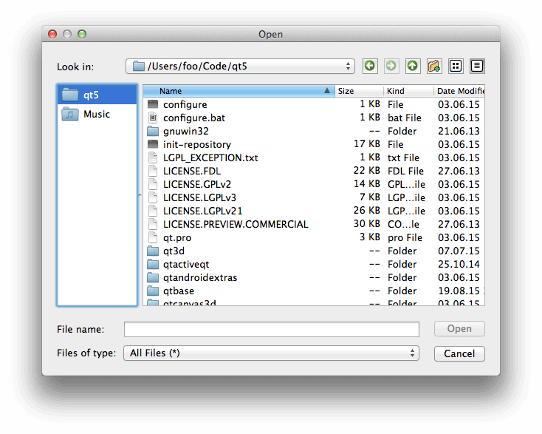
該函數在 Qt 4.3 引入。
另請參閱 sidebarUrls ().
[override virtual]
void
QFileDialog::
setVisible
(
bool
visible
)
重實現自 QDialog::setVisible ().
返迴目前在側邊欄中的 URL 列錶
該函數在 Qt 4.3 引入。
另請參閱 setSidebarUrls ().
返迴
true
若給定
option
被啓用;否則,返迴 false。
該函數在 Qt 4.5 引入。
另請參閱 options and setOption ().
[signal]
void
QFileDialog::
urlSelected
(const
QUrl
&
url
)
當選定改變且對話框接受時,此信號發射帶有 (可能空) 選中 url .
該函數在 Qt 5.2 引入。
另請參閱 currentUrlChanged () 和 QDialog::Accepted .
[signal]
void
QFileDialog::
urlsSelected
(const
QList
<
QUrl
> &
urls
)
當選定改變且對話框接受時,此信號發射帶有 (可能空) 列錶選中 urls .
該函數在 Qt 5.2 引入。
另請參閱 currentUrlChanged () 和 QDialog::Accepted .
