The QProgressDialog class provides feedback on the progress of a slow operation. 更多...
| 头: | #include <QProgressDialog> |
| qmake: | QT += widgets |
| 继承: | QDialog |
|
| QProgressDialog (QWidget * parent = nullptr, Qt::WindowFlags f = Qt::WindowFlags()) | |
| QProgressDialog (const QString & labelText , const QString & cancelButtonText , int minimum , int maximum , QWidget * parent = nullptr, Qt::WindowFlags f = Qt::WindowFlags()) | |
| virtual | ~QProgressDialog () |
| bool | autoClose () const |
| bool | autoReset () const |
| QString | labelText () const |
| int | maximum () const |
| int | minimum () const |
| int | minimumDuration () const |
| void | open (QObject * receiver , const char * member ) |
| void | setAutoClose (bool close ) |
| void | setAutoReset (bool reset ) |
| void | setBar (QProgressBar * bar ) |
| void | setCancelButton (QPushButton * cancelButton ) |
| void | setLabel (QLabel * label ) |
| int | value () const |
| bool | wasCanceled () const |
| virtual QSize | sizeHint () const override |
| void | cancel () |
| void | reset () |
| void | setCancelButtonText (const QString & cancelButtonText ) |
| void | setLabelText (const QString & text ) |
| void | setMaximum (int maximum ) |
| void | setMinimum (int minimum ) |
| void | setMinimumDuration (int ms ) |
| void | setRange (int minimum , int maximum ) |
| void | setValue (int progress ) |
| void | canceled () |
| const QMetaObject | staticMetaObject |
| virtual void | changeEvent (QEvent * ev ) override |
| virtual void | closeEvent (QCloseEvent * e ) override |
| virtual void | resizeEvent (QResizeEvent * event ) override |
| virtual void | showEvent (QShowEvent * e ) override |
| void | forceShow () |
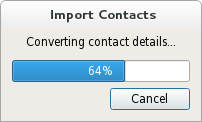
The QProgressDialog class provides feedback on the progress of a slow operation.
进度对话框用于给予用户操作将花费多长时间的指示,并演示应用程序末被冻结。它还可以让用户,有机会中止操作。
A common problem with progress dialogs is that it is difficult to know when to use them; operations take different amounts of time on different hardware. QProgressDialog offers a solution to this problem: it estimates the time the operation will take (based on time for steps), and only shows itself if that estimate is beyond minimumDuration () (默认 4 秒)。
使用 setMinimum () 和 setMaximum () 或构造函数,可以设置操作步数和调用 setValue () 作为操作进度。步数可以任选。它可以是拷贝文件数、收到字节数、透过主循环算法的迭代次数,或其它合适单位。进度起始值的设置通过 setMinimum (),且进度对话框展示操作已完成,当调用 setValue () 采用值设置通过 setMaximum () 作为其自变量。
对话框在操作结束时自动重置并隐藏本身。使用 setAutoReset () 和 setAutoClose () 能改变这种行为。注意:若设置新的最大 (使用 setMaximum () 或 setRange ()) that equals your current value (),对话框将不会被关闭 (不管怎样)。
There are two ways of using QProgressDialog : modal and modeless.
Compared to a modeless QProgressDialog , a modal QProgressDialog is simpler to use for the programmer. Do the operation in a loop, call setValue () 不时,并校验是否取消采用 wasCanceled ()。例如:
    QProgressDialog progress("Copying files...", "Abort Copy", 0, numFiles, this);
    progress.setWindowModality(Qt::WindowModal);
    for (int i = 0; i < numFiles; i++) {
        progress.setValue(i);
        if (progress.wasCanceled())
            break;
        //... copy one file
    }
    progress.setValue(numFiles);
A modeless progress dialog is suitable for operations that take place in the background, where the user is able to interact with the application. Such operations are typically based on QTimer (或 QObject::timerEvent ()) 或 QSocketNotifier ;或在单独线程中履行。 QProgressBar 在主窗口状态栏中,经常是非模态进度对话框的替代。
需要以事件循环来运行,连接 canceled () 信号到操作停止槽,和调用 setValue () 不时。例如:
// Operation constructor
Operation::Operation(QObject *parent)
    : QObject(parent), steps(0)
{
    pd = new QProgressDialog("Operation in progress.", "Cancel", 0, 100);
    connect(pd, SIGNAL(canceled()), this, SLOT(cancel()));
    t = new QTimer(this);
    connect(t, SIGNAL(timeout()), this, SLOT(perform()));
    t->start(0);
}
void Operation::perform()
{
    pd->setValue(steps);
    //... perform one percent of the operation
    steps++;
    if (steps > pd->maximum())
        t->stop();
}
void Operation::cancel()
{
    t->stop();
    //... cleanup
}
这 2 种模式,都可以通过采用自定义小部件替换子级 Widget 以定制进度对话框,通过使用 setLabel (), setBar (),和 setCancelButton ()。函数 setLabelText () 和 setCancelButtonText () 设置展示文本。
另请参阅 QDialog , QProgressBar , GUI 设计手册:进度指示器 , 查找文件范例 ,和 像素器范例 .
此特性保持对话框是否获得隐藏,通过 reset ()
默认为 true。
访问函数:
| bool | autoClose () const |
| void | setAutoClose (bool close ) |
另请参阅 setAutoReset ().
此特性保持进度对话框是否调用 reset () 尽快 value () 等于 maximum ()
默认为 true。
访问函数:
| bool | autoReset () const |
| void | setAutoReset (bool reset ) |
另请参阅 setAutoClose ().
此特性保持标签的文本
默认文本为空字符串。
访问函数:
| QString | labelText () const |
| void | setLabelText (const QString & text ) |
此特性保持由进度条表示的最高值
默认为 100。
访问函数:
| int | maximum () const |
| void | setMaximum (int maximum ) |
此特性保持由进度条表示的最低值
默认为 0。
访问函数:
| int | minimum () const |
| void | setMinimum (int minimum ) |
此特性保持对话框出现前,必须经过的时间
If the expected duration of the task is less than the minimumDuration, the dialog will not appear at all. This prevents the dialog popping up for tasks that are quickly over. For tasks that are expected to exceed the minimumDuration, the dialog will pop up after the minimumDuration time or as soon as any progress is set.
若设为 0,始终一设置任何进度,就会尽快展示对话框。默认为 4000 毫秒。
访问函数:
| int | minimumDuration () const |
| void | setMinimumDuration (int ms ) |
此特性保持当前已取得的进度数量。
为使进度对话框如期望般工作,应把此特性初始设为 QProgressDialog::minimum () 并把它最终设为 QProgressDialog::maximum ();可以调用 setValue() 任意多次在两者之间。
警告: 若进度对话框是模态的 (见 QProgressDialog::QProgressDialog ()),setValue() 调用 QApplication::processEvents (), so take care that this does not cause undesirable re-entrancy in your code. For example, don't use a QProgressDialog 在 paintEvent ()!
访问函数:
| int | value () const |
| void | setValue (int progress ) |
此特性保持对话框是否被取消
访问函数:
| bool | wasCanceled () const |
构造进度对话框。
默认设置:
The parent argument is dialog's parent widget. The widget flags, f , are passed to the QDialog::QDialog () 构造函数。
另请参阅 setLabelText (), setCancelButtonText (), setCancelButton (), setMinimum (),和 setMaximum ().
构造进度对话框。
The labelText 是用于提醒用户进展如何的文本。
The cancelButtonText 是要在取消按钮上显示的文本。若传递的是 QString(),则不展示取消按钮。
The minimum and maximum is the number of steps in the operation for which this progress dialog shows progress. For example, if the operation is to examine 50 files, this value minimum value would be 0, and the maximum would be 50. Before examining the first file, call setValue (0). As each file is processed call setValue (1), setValue (2), etc., finally calling setValue (50) after examining the last file.
The parent argument is the dialog's parent widget. The parent, parent , and widget flags, f , are passed to the QDialog::QDialog () 构造函数。
另请参阅 setLabelText (), setLabel (), setCancelButtonText (), setCancelButton (), setMinimum (),和 setMaximum ().
[虚拟]
QProgressDialog::
~QProgressDialog
()
销毁进度对话框。
[slot]
void
QProgressDialog::
cancel
()
重置进度对话框。 wasCanceled () 变为 true,直到进度对话框被重置。进度对话框变为隐藏。
[signal]
void
QProgressDialog::
canceled
()
此信号发射,当点击取消按钮时。它被连接到 cancel () 槽,默认情况下。
另请参阅 wasCanceled ().
[override virtual protected]
void
QProgressDialog::
changeEvent
(
QEvent
*
ev
)
重实现自 QWidget::changeEvent ().
[override virtual protected]
void
QProgressDialog::
closeEvent
(
QCloseEvent
*
e
)
重实现自 QDialog::closeEvent ().
[protected slot]
void
QProgressDialog::
forceShow
()
展示,若算法启动后对话框仍隐藏且 minimumDuration 毫秒已过去。
另请参阅 setMinimumDuration ().
打开对话框并连接其 canceled () 信号到槽,指定通过 receiver and member .
将从槽断开信号连接,当关闭对话框时。
该函数在 Qt 4.5 引入。
[slot]
void
QProgressDialog::
reset
()
重置进度对话框。进度对话框变为隐藏,若 autoClose () 为 true。
另请参阅 setAutoClose () 和 setAutoReset ().
[override virtual protected]
void
QProgressDialog::
resizeEvent
(
QResizeEvent
*
event
)
重实现自 QDialog::resizeEvent ().
将进度栏小部件设为 bar 。进度对话框会重置大小以拟合。进度对话框拥有其所有权对于进度 bar 会被删除当有必要时,因此不要使用分配在堆栈中的进度条。
将取消按钮设为 Push Button (按钮)
cancelButton
。进度对话框拥有此按钮 (会被删除当有必要时) 的所有权,因此,勿传递堆栈中的对象地址,即:使用 new() 去创建按钮。若
nullptr
被传递,则取消按钮不会被展示。
另请参阅 setCancelButtonText ().
[slot]
void
QProgressDialog::
setCancelButtonText
(const
QString
&
cancelButtonText
)
将取消按钮的文本设为 cancelButtonText 。若文本被设为 QString(),它将导致取消按钮被隐藏并被删除。
另请参阅 setCancelButton ().
把标签设为 label 。进度对话框会重置大小以拟合。标签变为由进度对话框所有,且会被删除当有必要时,因此,不要把对象地址传递给堆栈。
另请参阅 setLabelText ().
[slot]
void
QProgressDialog::
setRange
(
int
minimum
,
int
maximum
)
Sets the progress dialog's minimum and maximum values to minimum and maximum ,分别。
若 maximum < minimum , minimum 变为唯一合法值。
If the current value falls outside the new range, the progress dialog is reset with reset ().
[override virtual protected]
void
QProgressDialog::
showEvent
(
QShowEvent
*
e
)
重实现自 QDialog::showEvent ().
[override virtual]
QSize
QProgressDialog::
sizeHint
() const
重实现自 QDialog::sizeHint ().
Returns a size that fits the contents of the progress dialog. The progress dialog resizes itself as required, so you should not need to call this yourself.
