Qt 資源係統是獨立於平颱的機製,用於在應用程序的可執行文件中存儲二進製文件。若應用程序始終需要某些特定文件 (如圖標、翻譯文件、等),且不想冒丟失文件的風險,這就很有用。
資源係統基於緊密閤作,在 qmake , rcc (Qt 的資源編譯器) 及 QFile .
.qrc
)
The resources associated with an application are specified in a
.qrc
file, an XML-based file format that lists files on the disk and optionally assigns them a resource name that the application must use to access the resource.
這裏是範例
.qrc
文件:
<!DOCTYPE RCC><RCC version="1.0">
<qresource>
    <file>images/copy.png</file>
    <file>images/cut.png</file>
    <file>images/new.png</file>
    <file>images/open.png</file>
    <file>images/paste.png</file>
    <file>images/save.png</file>
</qresource>
</RCC>
The resource files listed in the
.qrc
file are files that are part of the application's source tree. The specified paths are relative to the directory containing the
.qrc
file. Note that the listed resource files must be located in the same directory as the
.qrc
file, or one of its subdirectories.
Resource data can either be compiled into the binary and thus accessed immediately in application code, or a binary resource can be created and at a later point in application code registered with the resource system.
By default, resources are accessible in the application under the same file name as they have in the source tree, with a
:/
前綴,或通過
URL
采用
qrc
方案。
例如,文件路徑
:/images/cut.png
或 URL
qrc:///images/cut.png
would give access to the
cut.png
file, whose location in the application's source tree is
images/cut.png
. This can be changed using the
file
tag's
alias
屬性:
<file alias="cut-img.png">images/cut.png</file>
The file is then accessible as
:/cut-img.png
from the application. It is also possible to specify a path prefix for all files in the
.qrc
文件使用
qresource
tag's
prefix
屬性:
<qresource prefix="/myresources">
    <file alias="cut-img.png">images/cut.png</file>
</qresource>
In this case, the file is accessible as
:/myresources/cut-img.png
.
Some resources need to change based on the user's locale, such as translation files or icons. This is done by adding a
lang
屬性到
qresource
tag, specifying a suitable locale string. For example:
<qresource>
    <file>cut.jpg</file>
</qresource>
<qresource lang="fr">
    <file alias="cut.jpg">cut_fr.jpg</file>
</qresource>
若用戶的區域設置為法語 (即
QLocale::system
().name() returns "fr_FR"),
:/cut.jpg
變為引用針對
cut_fr.jpg
圖像。對於其它區域設置,
cut.jpg
被使用。
見 QLocale 文檔編製瞭解區域設置字符串所用格式的描述。
見 QFileSelector for an additional mechanism to select locale-specific resources, in addition to the ability to select OS-specific and other features.
For an external binary resource to be created you must create the resource data (commonly given the
.rcc
extension) by passing the -binary switch to
rcc
. Once the binary resource is created you can register the resource with the
QResource
API.
For example, a set of resource data specified in a
.qrc
file can be compiled in the following way:
rcc -binary myresource.qrc -o myresource.rcc
In the application, this resource would be registered with code like this:
QResource::registerResource("/path/to/myresource.rcc");
對於要把資源編譯進二進製的
.qrc
文件,必須提及在應用程序的
.pro
文件以便
qmake
知道關於它。例如:
RESOURCES = application.qrc
qmake
will produce make rules to generate a file called
qrc_application.cpp
that is linked into the application. This file contains all the data for the images and other resources as static C++ arrays of compressed binary data. The
qrc_application.cpp
file is automatically regenerated whenever the
.qrc
file changes or one of the files that it refers to changes. If you don't use
.pro
files, you can either invoke
rcc
manually or add build rules to your build system.
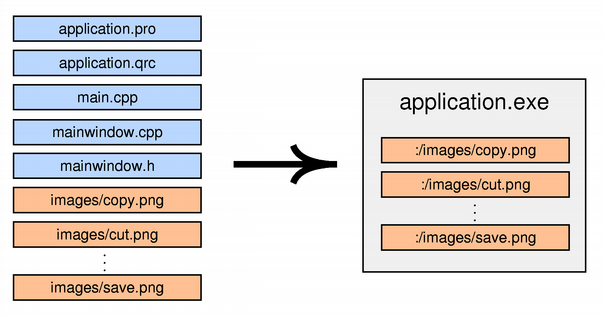
Currently, Qt always stores the data directly in the executable, even on Windows, macOS, and iOS, where the operating system provides native support for resources. This might change in a future Qt release.
把資源集閤文件轉換成 Python 模塊,是通過使用資源編譯器 rcc :
rcc -g python application.qrc > application_rc.py
應用程序需要導入模塊:
import application_rc.py
rcc
attempts to compress the content to optimize disk space usage in the final binaries. By default, it will perform a heuristic check to determine whether compressing is worth it and will store the content uncompressed if it fails to sufficiently compress. To control the threshold, you can use the
-threshold
option, which tells
rcc
the percentage of the original file size that must be gained for it to store the file in compressed form.
rcc -threshold 25 myresources.qrc
The default value is "70", indicating that the compressed file must be 70% smaller than the original (no more than 30% of the original file size).
It is possible to turn off compression, if desired. This can be useful if your resources already contain a compressed format, such as
.png
files, and you do not want to incur the CPU cost at build time to confirm that it can't be compressed. Another reason is if disk usage is not a problem and the application would prefer to keep the content as clean memory pages at runtime. You do this by giving the
-no-compress
command line argument.
rcc -no-compress myresources.qrc
rcc
also gives you some control over the compression level and compression algorithm, for example:
rcc -compress 2 -compress-algo zlib myresources.qrc
也是可能的,使用
threshold
,
compress
,和
compress-algo
作為屬性在 .qrc
file
標簽。
<qresource>
    <file compress="1" compress-algo="zstd">data.txt</file>
</qresource>
The above will select the
zstd
algorithm with compression level 1.
rcc
supports the following compression algorithms and compression levels:
best
: use the best algorithm among the ones below, at its highest compression level, to achieve the most compression at the expense of using a lot of CPU time during compilation. This value is useful in the XML file to indicate a file should be most compressed, regardless of which algorithms
rcc
支持。
zstd
: use the
Zstandard
library to compress contents. Valid compression levels range from 1 to 19, 1 is least compression (least CPU time) and 19 is the most compression (most CPU time). The default level is 14. A special value of 0 tells the
zstd
library to choose an implementation-defined default.
zlib
: use the
zlib
library to compress contents. Valid compression levels range from 1 to 9, with 1 applying the least compression (least CPU time) and 9 the most compression (most CPU time). The special value 0 means "no compression" and should not be used. The default is implementation-defined, but usually is level 6.
none
: no compression. This is the same as the
-no-compress
選項。
Support for both Zstandard and zlib are optional. If a given library was not detected at compile time, attempting to pass
-compress-algo
for that library will result in an error. The default compression algorithm is
zstd
if it is enabled,
zlib
若不。
In the application, resource paths can be used in most places instead of ordinary file system paths. In particular, you can pass a resource path instead of a file name to the QIcon , QImage ,或 QPixmap 構造函數:
cutAct = new QAction(QIcon(":/images/cut.png"), tr("Cu&t"), this);
見 Application example for an actual application that uses Qt's resource system to store its icons.
In memory, resources are represented by a tree of resource objects. The tree is automatically built at startup and used by QFile for resolving paths to resources. You can use a QDir initialized with ":/" to navigate through the resource tree from the root.
Qt's resources support the concept of a search path list. If you then refer to a resource with
:
而不是
:/
as the prefix, the resource will be looked up using the search path list. The search path list is empty at startup; call
QDir::addSearchPath
() to add paths to it.
If you have resources in a library, you need to force initialization of your resources by calling
Q_INIT_RESOURCE
() with the base name of the
.qrc
文件。例如:
MyClass::MyClass() : BaseClass()
{
    Q_INIT_RESOURCE(resources);
    QFile file(":/myfile.dat");
    ...
}
This ensures that the resources are linked into the final application binary in the case of static linking. You should put the initialization code close to where the resources are used in your library, so that clients of your library will only link in the resources if they use the feature of the library that depends on them.
Note: As the resource initializers generated by rcc are declared in the global namespace, your calls to Q_INIT_RESOURCE () also need to be done outside of any namespace.
If the library includes resources that are not used internally, but instead exposed to clients of the library, the initialization needs to happen in the application code. For example:
int main(int argc, char *argv[])
{
    QApplication app(argc, argv);
    Q_INIT_RESOURCE(graphlib);
    QFile file(":/graph.png");
    ...
    return app.exec();
}
As before, this ensures that the resources are linked into the final application binary in the case of static linking, but also triggers loading of the library in the case of dynamic linking, such as plugins.
Similarly, if you must unload a set of resources explicitly (because a plugin is being unloaded or the resources are not valid any longer), you can force removal of your resources by calling Q_CLEANUP_RESOURCE () with the same base name as above.
注意:使用 Q_INIT_RESOURCE () 和 Q_CLEANUP_RESOURCE () is not necessary when the resource is built as part of the application.
