要創建此
Source
對象,首先創建定義文件
simpleswitch.rep
。此文件描述對象的特性和方法,並輸入到 Qt Remote Objects 編譯器
repc
。此文件隻定義必要暴露接口給
復本
.
simpleswitch.rep
class SimpleSwitch
{
    PROP(bool currState=false);
    SLOT(server_slot(bool clientState));
};
在
simpleswitch.rep
,
currState
保持開關的當前狀態。
server_slot()
允許我們與 Source (源) 交互 - 將把它連接到
echoSwitchState(bool newstate)
信號。
為使 RepC (復本編譯器) 處理此文件,把以下行添加到
.pro
文件:
REPC_SOURCE = simpleswitch.rep
The
REPC_SOURCE
變量隻與 Qt Remote Objects 模塊相關,所以也需要把它添加到工程:
QT += remoteobjects
RepC (復本編譯器) 創建
rep_SimpleSwitch_source.h
頭在指定的構建目錄下。更多信息,見
Source
.
RepC (復本編譯器) 創建瞭 3 個幫手類為用於 QtRO。對於此範例,我們使用基本:
SimpleSwitchSimpleSource
。它是抽象類,定義在
rep_SimpleSwitch_source.h
。從它派生以定義 SimpleSwitch 實現類,如下所示:
simpleswitch.h
#ifndef SIMPLESWITCH_H
#define SIMPLESWITCH_H
#include "rep_SimpleSwitch_source.h"
class SimpleSwitch : public SimpleSwitchSimpleSource
{
    Q_OBJECT
public:
    SimpleSwitch(QObject *parent = nullptr);
    ~SimpleSwitch();
    virtual void server_slot(bool clientState);
public Q_SLOTS:
    void timeout_slot();
private:
    QTimer *stateChangeTimer;
};
#endif
在
simpleswitch.h
,
stateChangeTimer
是
QTimer
用於觸發 SimpleSwitch 狀態。
timeout_slot()
被連接到
stateChangeTimer
的 timeout() 信號。
server_slot()
-- 在 Source (源) 中被自動調用,每當任何復本調用其槽版本時 -- 輸齣接收值。
currStateChanged(bool)
,定義在
repc
生成
rep_SimpleSwitch_source.h
,被發射每當
currState
觸發。在此範例中,我們忽略 Source (源) 側信號,並稍後在 Replica (復本) 側處理它。
定義的
SwitchState
類展示如下:
simpleswitch.cpp
#include "simpleswitch.h"
// constructor
SimpleSwitch::SimpleSwitch(QObject *parent) : SimpleSwitchSimpleSource(parent)
{
    stateChangeTimer = new QTimer(this); // Initialize timer
    QObject::connect(stateChangeTimer, &SimpleSwitch::timeout, this, &SimpleSwitch::timeout_slot); // connect timeout() signal from stateChangeTimer to timeout_slot() of simpleSwitch
    stateChangeTimer->start(2000); // Start timer and set timout to 2 seconds
    qDebug() << "Source Node Started";
}
//destructor
SimpleSwitch::~SimpleSwitch()
{
    stateChangeTimer->stop();
}
void SimpleSwitch::server_slot(bool clientState)
{
    qDebug() << "Replica state is " << clientState; // print switch state echoed back by client
}
void SimpleSwitch::timeout_slot()
{
    // slot called on timer timeout
    if (currState()) // check if current state is true, currState() is defined in repc generated rep_SimpleSwitch_source.h
        setCurrState(false); // set state to false
    else
        setCurrState(true); // set state to true
    qDebug() << "Source State is "<<currState();
}
由於這個範例在節點之間使用瞭直接連接,所以可以省略此步驟。
主機節點的創建如下所示:
QRemoteObjectHost srcNode(QUrl(QStringLiteral("local:switch")));
下列語句實例化 Source 對象並把它傳遞給主機以啓用 remoting,這是使對象對 QtRO 網絡可見的過程:
SimpleSwitch srcSwitch; // create simple switch
srcNode.enableRemoting(&srcSwitch); // enable remoting
內容對於
main.cpp
文件,實現上述步驟如下:
main.cpp
#include <QCoreApplication>
#include "simpleswitch.h"
int main(int argc, char *argv[])
{
    QCoreApplication a(argc, argv);
    SimpleSwitch srcSwitch; // create simple switch
    QRemoteObjectHost srcNode(QUrl(QStringLiteral("local:switch"))); // create host node without Registry
    srcNode.enableRemoting(&srcSwitch); // enable remoting/sharing
    return a.exec();
}
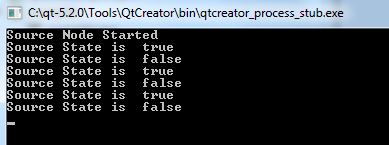
編譯並運行此 Source (源) 側工程。在不創建任何 Replica (復本) 的情況下,輸齣看起來應該如下所示,采用開關狀態觸發介於
true
and
false
每隔 2 秒。
後續步驟是創建網絡的 Replica (復本) 側。在此範例中,獲取開關狀態來自 Source 並迴顯它。
使用如 Source (源) 側所做的相同 API 定義文件
SimpleSwitch.rep
,要創建
復本
頭文件使用
repc
。包括以下行在客戶端側
.pro
文件,指定
.rep
文件輸入:
REPC_REPLICA = simpleswitch.rep
The
repc
工具生成
rep_SimpleSwitch_replica.h
文件在構建目錄下。更多信息,見
復本
.
以下代碼實例化網絡中的第 2 節點,並把它連接到 Source (源) 主機節點:
QRemoteObjectNode repNode; // create remote object node
repNode.connectToNode(QUrl(QStringLiteral("local:switch"))); // connect with remote host node
首先,實例化復本:
QSharedPointer<SimpleSwitchReplica> ptr;
ptr.reset(repNode.acquire<SimpleSwitchReplica>()); // acquire replica of source from host node
注意: acquire() 返迴 Replica (復本) 指針,但不管理其壽命。此範例展示包裹返迴指針的推薦進程在 QSharedPointer or QScopedPointer 以確保始終正確刪除指針。
main.cpp
實現上述步驟並實例化對象:
main.cpp
#include <QCoreApplication>
#include "client.h"
int main(int argc, char *argv[])
{
    QCoreApplication a(argc, argv);
    QSharedPointer<SimpleSwitchReplica> ptr; // shared pointer to hold source replica
    QRemoteObjectNode repNode; // create remote object node
    repNode.connectToNode(QUrl(QStringLiteral("local:switch"))); // connect with remote host node
    ptr.reset(repNode.acquire<SimpleSwitchReplica>()); // acquire replica of source from host node
    Client rswitch(ptr); // create client switch object and pass reference of replica to it
    return a.exec();
}
完整聲明和定義對於
Client
類如下:
client.h
#ifndef _CLIENT_H
#define _CLIENT_H
#include <QObject>
#include <QSharedPointer>
#include "rep_SimpleSwitch_replica.h"
class Client : public QObject
{
    Q_OBJECT
public:
    Client(QSharedPointer<SimpleSwitchReplica> ptr);
    ~Client();
    void initConnections();// Function to connect signals and slots of source and client
Q_SIGNALS:
    void echoSwitchState(bool switchState);// this signal is connected with server_slot(..) on the source object and echoes back switch state received from source
public Q_SLOTS:
    void recSwitchState_slot(); // slot to receive source state
private:
    bool clientSwitchState; // holds received server switch state
    QSharedPointer<SimpleSwitchReplica> reptr;// holds reference to replica
 };
#endif
client.cpp
#include "client.h"
// constructor
Client::Client(QSharedPointer<SimpleSwitchReplica> ptr) :
    QObject(nullptr),reptr(ptr)
{
    initConnections();
    //We can connect to SimpleSwitchReplica Signals/Slots
    //directly because our Replica was generated by repc.
}
//destructor
Client::~Client()
{
}
void Client::initConnections()
{
    // initialize connections between signals and slots
    // connect source replica signal currStateChanged() with client's recSwitchState() slot to receive source's current state
    QObject::connect(reptr.data(), &SimpleSwitchReplica::currStateChanged, this, &Client::recSwitchState_slot);
    // connect client's echoSwitchState(..) signal with replica's server_slot(..) to echo back received state
    QObject::connect(this, &Client::echoSwitchState, reptr.data(), &SimpleSwitchReplica::server_slot);
}
void Client::recSwitchState_slot()
{
    qDebug() << "Received source state "<<reptr.data()->currState();
    clientSwitchState = reptr.data()->currState();
    Q_EMIT echoSwitchState(clientSwitchState); // Emit signal to echo received state back to server
}
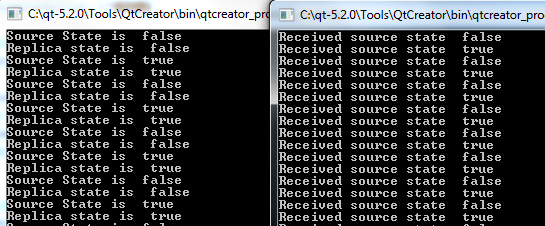
編譯並運行此示例,與 Source (源) 側範例一起生成以下輸齣: