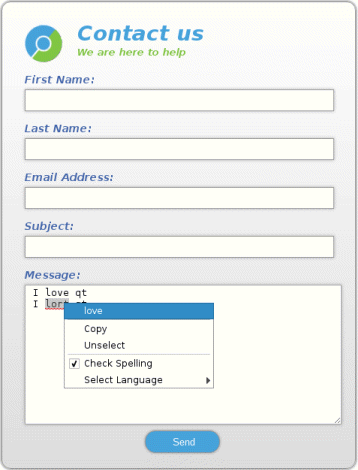
拼寫檢查器 演示如何將拼寫檢查支持集成到 HTML 錶單中,使用戶能夠提交拼寫檢查消息。
要運行範例從 Qt Creator ,打開 歡迎 模式,然後選擇範例從 範例 。更多信息,拜訪 構建和運行範例 .
To be able to check the spelling, we need to provide the spellchecker with dictionaries. The Qt WebEngine spellchecker supports dictionaries provided by the Hunspell project on all platforms and native dictionaries provided by macOS. In this example, we want to support the English and German languages.
For Hunspell dictionaries to be supported they have to be compiled into a special binary format. A Hunspell dictionary consists of two files:
.dic
file that is a dictionary containing words for the language
.aff
file that defines the meaning of special flags in the dictionary
These two files can be converted into the
bdic
format by using the
qwebengine_convert_dict
tool that is shipped together with Qt.
In this example, we are going to compile en_US and de_DE dictionaries. However, the real full dictionaries would take too much space for the purposes of this example. Therefore, we have created two dummy dictionaries that contain the following words and can be used to demonstrate the conversion process:
Each word in a dictionary can be prefixed with
q
. For more information about how to create
dic
and
aff
files, see the Hunspell dictionary file format specification in the
Hunspell Project
.
見 拼寫檢查器特徵文檔編製 如何搜索字典文件。
We specify the QMAKE_EXTRA_COMPILERS parameter in the project file to add a conversion step to the build process:
qtPrepareTool(CONVERT_TOOL, qwebengine_convert_dict)
debug_and_release {
    CONFIG(debug, debug|release): DICTIONARIES_DIR = debug/qtwebengine_dictionaries
    else: DICTIONARIES_DIR = release/qtwebengine_dictionaries
} else {
    DICTIONARIES_DIR = qtwebengine_dictionaries
}
dict_base_paths = en/en-US de/de-DE
for (base_path, dict_base_paths) {
    dict.files += $$PWD/dict/$${base_path}.dic
}
dictoolbuild.input = dict.files
dictoolbuild.output = $${DICTIONARIES_DIR}/${QMAKE_FILE_BASE}.bdic
dictoolbuild.depends = ${QMAKE_FILE_PATH}/${QMAKE_FILE_BASE}.aff
dictoolbuild.commands = $${CONVERT_TOOL} ${QMAKE_FILE_IN} ${QMAKE_FILE_OUT}
dictoolbuild.name = Build ${QMAKE_FILE_IN_BASE}
dictoolbuild.CONFIG = no_link target_predeps
QMAKE_EXTRA_COMPILERS += dictoolbuild
To set up a dictionary, we run
qwebengine_convert_dict
passing the file path of the dictionary
dic
and
bdic
files. The
aff
file and optional
delta
file are also picked up by the
convert
process. The output
bdic
file is placed into the
qtwebengine_dictionaries
local directory (or Resources directory), which the application binary will run from.
The constructor of our class is trivial.
WebView::WebView(QWidget *parent)
    : QWebEngineView(parent)
{
    m_spellCheckLanguages["English"] = "en-US";
    m_spellCheckLanguages["German"] = "de-DE";
    QWebEngineProfile *profile = page()->profile();
    profile->setSpellCheckEnabled(true);
    profile->setSpellCheckLanguages({"en-US"});
We define simple mapping between our dictionary filenames and the actual language display name. We will use that mapping to display names of dictionaries in the context menu. Spellchecking is disabled by default. Therefore we also enable spellchecker and set the
English
dictionary. When Qt WebEngine's spellcheck service initializes, it will try to load the
bdict
dictionaries and to check them for consistency. Any errors are logged by using the
qWarning
() 函數。
The current language used for spellchecking is defined per profile, and can get set using the QWebEngineProfile::setSpellCheckLanguage method. When the user clicks on an underlined misspelled word, the default context menu displays up to four suggestions. Selecting one will replace the misspelled word. We could reimplement a number of suggestions, by overriding QWebEngineView::contextMenuEvent and using QWebEngineContextMenuData::spellCheckerSuggestions , but we will demonstrate how to add langague options in the context menu instead:
void WebView::contextMenuEvent(QContextMenuEvent *event)
{
    const QWebEngineContextMenuData &data = page()->contextMenuData();
    Q_ASSERT(data.isValid());
    if (!data.isContentEditable()) {
        QWebEngineView::contextMenuEvent(event);
        return;
    }
    QWebEngineProfile *profile = page()->profile();
    const QStringList &languages = profile->spellCheckLanguages();
    QMenu *menu = page()->createStandardContextMenu();
    menu->addSeparator();
    QAction *spellcheckAction = new QAction(tr("Check Spelling"), nullptr);
    spellcheckAction->setCheckable(true);
    spellcheckAction->setChecked(profile->isSpellCheckEnabled());
    connect(spellcheckAction, &QAction::toggled, this, [profile](bool toogled) {
        profile->setSpellCheckEnabled(toogled);
    });
    menu->addAction(spellcheckAction);
    if (profile->isSpellCheckEnabled()) {
        QMenu *subMenu = menu->addMenu(tr("Select Language"));
        const QStringList keys = m_spellCheckLanguages.keys();
        for (const QString &str : keys) {
            QAction *action = subMenu->addAction(str);
            action->setCheckable(true);
            QString lang = m_spellCheckLanguages[str];
            action->setChecked(languages.contains(lang));
            connect(action, &QAction::triggered, this, [profile, lang](){
               profile->setSpellCheckLanguages(QStringList()<<lang);
            });
        }
    }
    connect(menu, &QMenu::aboutToHide, menu, &QObject::deleteLater);
    menu->popup(event->globalPos());
}
Above, we get the QWebEngineContextMenuData instance using the QWebEnginePage::contextMenuData method. We use it to be notified when the user clicks on an editable field and show the Check Spelling item in the context menu. Moreover, if spellchecking is enabled, we also add the 選擇語言 submenu with the supported languages. When an action is triggered, we set the language with the QWebEngineProfile::setSpellCheckLanguage call.
