數字時鍾範例展示如何使用 QLCDNumber 顯示具有類似 LCD 數字的數。
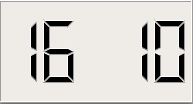
數字時鍾範例的屏幕截圖
此範例還演示如何 QTimer 可以用於按定期間隔更新 Widget。
The
DigitalClock
class provides a clock widget showing the time with hours and minutes separated by a blinking colon. We subclass
QLCDNumber
and implement a private slot called
showTime()
to update the clock display:
class DigitalClock : public QLCDNumber
{
    Q_OBJECT
public:
    DigitalClock(QWidget *parent = 0);
private slots:
    void showTime();
};
DigitalClock::DigitalClock(QWidget *parent)
    : QLCDNumber(parent)
{
    setSegmentStyle(Filled);
    QTimer *timer = new QTimer(this);
    connect(timer, &QTimer::timeout, this, &DigitalClock::showTime);
    timer->start(1000);
    showTime();
    setWindowTitle(tr("Digital Clock"));
    resize(150, 60);
}
In the constructor, we first change the look of the LCD numbers. The
QLCDNumber::Filled
style produces raised segments filled with the foreground color (typically black). We also set up a one-second timer to keep track of the current time, and we connect its
timeout()
signal to the private
showTime()
slot so that the display is updated every second. Then, we call the
showTime()
slot; without this call, there would be a one-second delay at startup before the time is shown.
void DigitalClock::showTime()
{
    QTime time = QTime::currentTime();
    QString text = time.toString("hh:mm");
    if ((time.second() % 2) == 0)
        text[2] = ' ';
    display(text);
}
The
showTime()
slot is called whenever the clock display needs to be updated.
The current time is converted into a string with the format "hh:mm". When QTime::second () is a even number, the colon in the string is replaced with a space. This makes the colon appear and vanish every other second.
最後,調用 QLCDNumber::display () 以更新 Widget。
文件:
