就業培訓     下載中心     Wiki     聯絡
登錄   注冊

Log
  1. 首頁
  2. Qt 5.12.12
  3. Qt Widgets
  4. 模糊拾取器效果示例

模糊拾取器效果示例

Demonstrates how to apply graphical effects on items in the view.
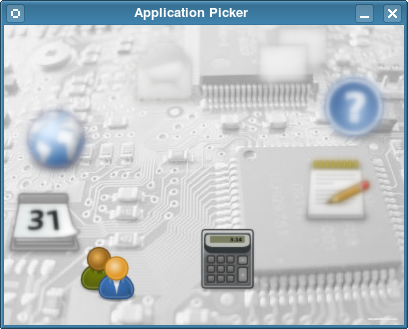
The Blur Picker example displays a circle of application icons. All icons are blurred, except the one on the bottom left side of the screen, which is the one in focus. Clicking anywhere on the left side of the screen moves the icon circle clockwise to the next icon Clicking on the right side advances the circle counterclockwise.

文件:

  • effects/blurpicker/blureffect.cpp
  • effects/blurpicker/blureffect.h
  • effects/blurpicker/blurpicker.cpp
  • effects/blurpicker/blurpicker.h
  • effects/blurpicker/blurpicker.pro
  • effects/blurpicker/blurpicker.qrc
  • effects/blurpicker/main.cpp

圖像:

  • effects/blurpicker/images/accessories-calculator.png
  • effects/blurpicker/images/accessories-text-editor.png
  • effects/blurpicker/images/background.jpg
  • effects/blurpicker/images/help-browser.png
  • effects/blurpicker/images/internet-group-chat.png
  • effects/blurpicker/images/internet-mail.png
  • effects/blurpicker/images/internet-web-browser.png
  • effects/blurpicker/images/office-calendar.png
  • effects/blurpicker/images/system-users.png

另請參閱 QGraphicsBlurEffect .

版權所有  © 2014-2026 樂數軟件    

工業和信息化部: 粵ICP備14079481號-1
