The following members of QML type PieMenu 已過時。 提供它們是為使舊源代碼能繼續工作。強烈建議不要在新代碼中使用它們。
|
boundingItem : Item |
The item which the menu must stay within.
A typical use case for PieMenu involves:
Although they sound similar, they have different purposes. Consider the example below:
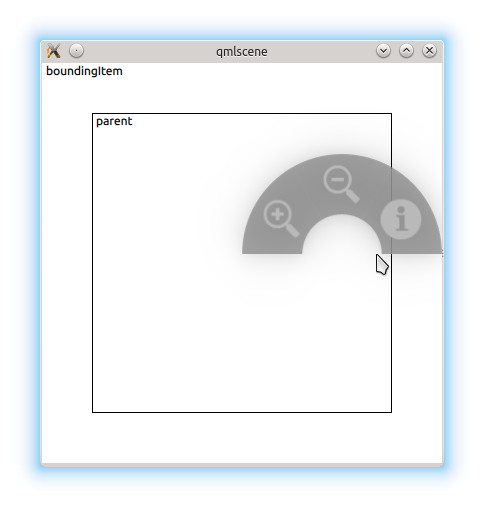
The user can only open the menu within the inner rectangle. In this case, they've opened the menu on the edge of the MouseArea , but there would not be enough room to display the entire menu centered at the cursor position, so it was moved to the left.
If for some reason we didn't want this restriction, we can set boundingItem to
null
:
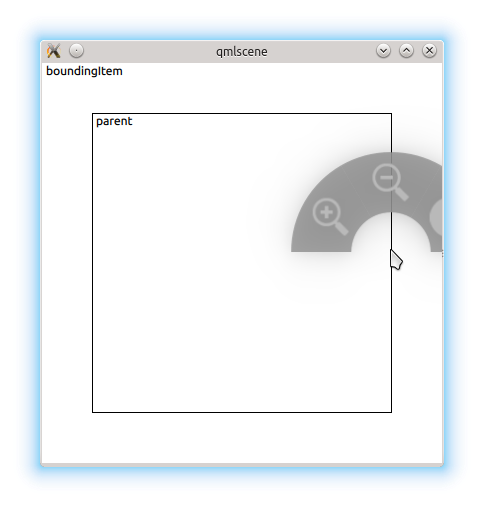
By default, the menu's parent is the boundingItem.
|
[read-only] currentIndex : int |
The index of the the menu item that is currently under the mouse, or
-1
if there is no such item.
|
[read-only] currentItem : int |
The menu item that is currently under the mouse, or
null
if there is no such item.
The list of menu items displayed by this menu.
You can assign menu items by declaring them as children of PieMenu :
PieMenu {
    MenuItem {
        text: "Action 1"
        onTriggered: function() { print("Action 1"); }
    }
    MenuItem {
        text: "Action 2"
        onTriggered: function() { print("Action 2"); }
    }
    MenuItem {
        text: "Action 3"
        onTriggered: function() { print("Action 3"); }
    }
}
|
[read-only] selectionAngle : real |
This property reflects the angle (in radians) created by the imaginary line from the center of the menu to the position of the cursor.
Its value is undefined when the menu is not visible.
|
title : string |
This property defines the text that is shown above the menu when there is no current menu item (
currentIndex
is
-1
).
默認值為
""
(an empty string).
|
triggerMode : int |
This property determines the method for selecting items in the menu.
警告: Changing the triggerMode while the menu is visible will result in undefined behavior.
