一旦安裝 Qt,在開發主機上就可以按像任何其它應用程序的相同辦法啓動 Qt Assistant。
The Qt Assistant 主窗口包含帶導航窗口的側邊欄 (1):
在所選文檔中的所選話題,會被顯示在 文檔編製 window (2).

點擊 上一 and 下一 工具欄按鈕 (3) 在拜訪過的話題間導航。

To bookmark topics of particular interest, select Bookmarks > 添加書簽 (or press Ctrl+B ). A bookmark for the page that is currently showing in the 文檔編製 window is added.
You can view and manage bookmarks in the Bookmarks window. Double-click a bookmark to open the topic in the 文檔編製 window. You can also right-click the bookmark and select Show Bookmark 在上下文菜單。
要重命名或刪除突顯書簽,選擇 重命名書簽 or 刪除書簽 在上下文菜單。

To perform an index search, click the 索引 tab on the sidebar (or press Alt+I ). In the Look For field, enter the search term. As you type, words are found and highlighted in a list beneath the field. If the highlighted text matches what you are looking for, double-click it or press Enter 。 文檔編製 window displays the relevant topic. You rarely have to type in the whole word before Qt Assistant finds a match. Note that for some words there may be more than one possible topic that is relevant.
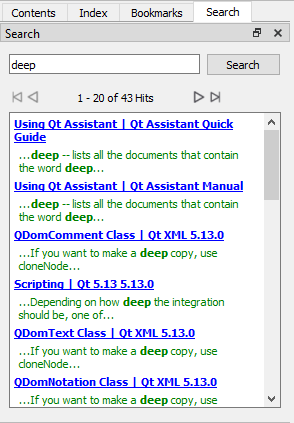
Qt Assistant also provides full text searching for finding specific words in the documentation. To activate the full text search, either press (Alt+S) or click the Search tab on the sidebar. Then enter the term you are looking for and click Search . All documents containing the specified term are listed.
